



Maxime Labonne and I were planning our upcoming book when we kept hitting the same realization. Just as LLMs got commoditized, the harness around them is commoditizing too, hardening into a handful of standardized, batteries-included frameworks. Once it’s a commodity, the hard question flips. It stops being “how do I get an agent running” and becomes “for each piece, do I build, configure, or just use it?” And that line is blurry.
Overbuild, and you burn weeks reimplementing a tool loop, a permission system, and a sandbox that is already available for free. Under-build, and you lean on the defaults forever, never building the one layer that’s actually yours, your context layer, your moat, so you stay a renter of someone else’s system.
The harnesses fall along a spectrum, from tool-like ones you customize as a user (Claude Code, Codex, OpenCode) through framework-type ones you build with, like Pydantic AI in Python or pi in TypeScript.
This article hands you that system design: the ~80% blueprint that’s conceptually the same across Claude Code, OpenCode, Codex, and pi, walked component by component, with one conclusion per piece.
We start with the big-picture architecture, the shape almost every harness shares, then walk it component by component: the tools the model calls, the catalog of agents, how subagents spawn and stay contained, how skills load cheaply, where memory really lives, how sandboxes both protect and scale you, and the permission layer with almost no AI in it. Each one closes on a verdict that fills in the map.
Build the Layer That’s Actually Yours (Product)
This article shows the system design of a harness, the commoditized part. The real value is the business layer you build on top of it. That’s what my Agent AI Engineering course teaches, built with Towards AI: only what you need to deliver value, not how to rebuild the harness.
35 lessons. 3 end-to-end portfolio projects. A certificate. And a Discord community with direct access to industry experts and me.
Built for software, data engineers or scientists transitioning into AI engineering.
Rated 5/5 by 300+ students. The first 7 lessons are free:
The 80% Every Harness Shares
Roughly 80% of a harness’s blueprint is identical regardless of the tool or framework, because every harness solves the same problems with different techniques. That shared 80% is exactly the part you mostly use as-is. The decisions about what to configure or build live in the remaining slice. At the highest level: a user message goes in, an answer comes out, and everything between is the harness.
In between, here are the 5 core layers:
The Agent is the innermost piece: the agentic loop (the ReAct loop, where the model reasons then acts) wrapping an LLM plus its tools. The LLM can be closed (Gemini, Anthropic, OpenAI) or open-source served over the OpenAI protocol on Modal, RunPod, GCP, or TogetherAI, or run locally with Ollama or llama.cpp. This loop is the core: strip away compaction, task budgets, and thinking and it’s roughly 150 lines.
The Harness is everything wrapped around the agent: a message queue with a priority gate, the sandbox, hooks, services (LLM gateway, memory, LSP servers, MCP client), skills, the permission system, an agents catalog, and subagents, with context engineering sprinkled everywhere.
The Runtime is the durable execution layer the whole harness runs inside: Prefect, Temporal, Kitaru. It gives you non-blocking human-in-the-loop, scheduling, durability and caching, and a credentials proxy.
The Presentation layer is how you talk to the harness, whether TUI, web, mobile, WhatsApp, or Telegram. The interesting question is how the same agent serves many front-ends, and there are 2 real patterns. One is a pub/sub bus, OpenCode style, where a headless server streams events to TUI, web, and desktop clients over HTTP+SSE so many clients observe 1 live session. The other is custom services bridging into 1 in-process loop, the Claude Code style.
The Observability layer is tracing, logging, metrics and evals sitting across everything, with tools like Opik, Langfuse, or Braintrust.
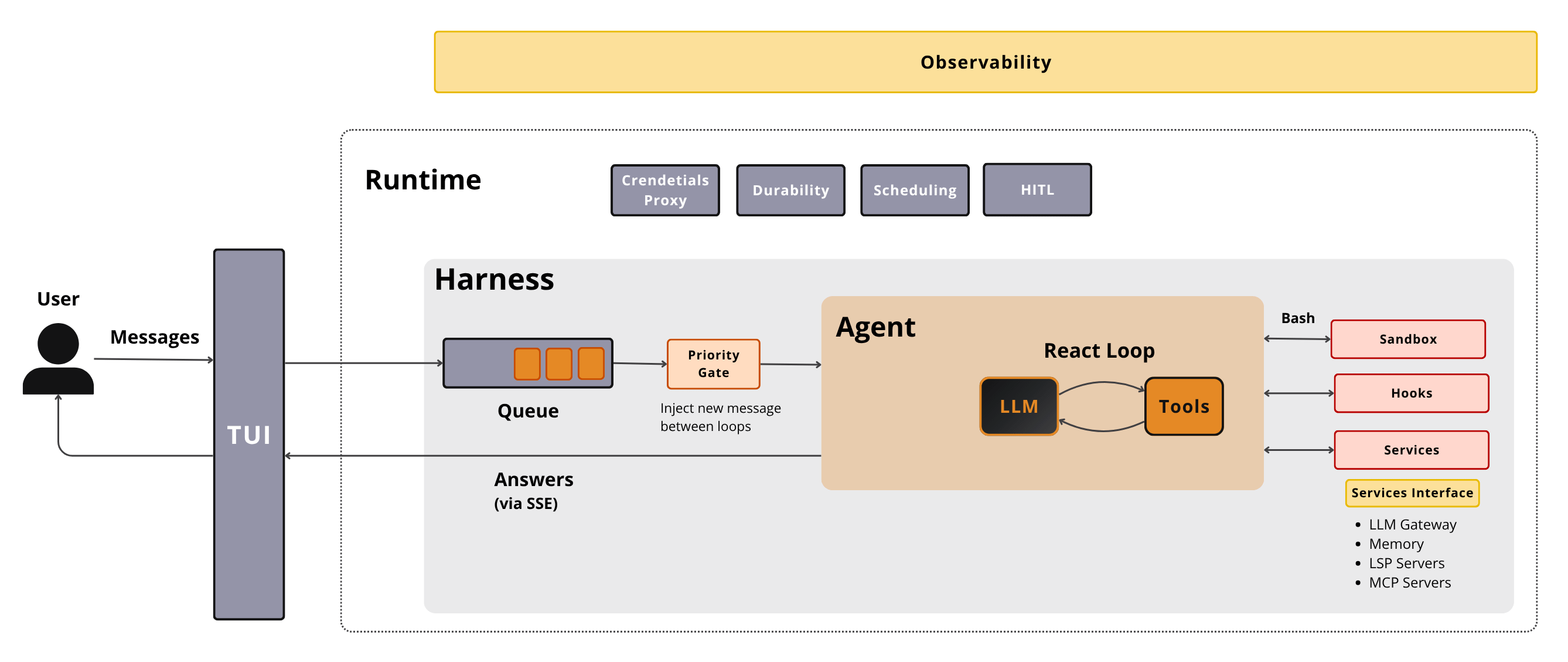
To see how the components connect, let’s follow a single message down the happy path: user → TUI → message queue → wait for the agent to be free → agent → LLM → tool → LLM → tool → … → LLM → answer → TUI → user.
Meanwhile, The TUI sends and receives over SSE. The priority gate decides when to inject a new message between loops rather than interrupting mid-loop. When the context window nears its limit (tokens ≥ contextWindow − reserve), compaction runs, keeping the window as [system prompt] + [summary] + [recent tail]. And a single tool call can fan out into hooks, sandboxes, services, and permission gates.
![A user message buffered by the priority gate, run through the agentic loop's stream→check→tool→append→recurse cycle, then streamed back to the TUI as the answer — with compaction ([system prompt]+[summary]+[recent tail]) kicking in as the context window fills.](https://substackcdn.com/image/fetch/$s_!Q7I0!,f_auto,q_auto:good,fl_progressive:steep/https%3A%2F%2Fsubstack-post-media.s3.amazonaws.com%2Fpublic%2Fimages%2Fc2553bc0-4c0e-4564-bf21-43e7f4773b22_1400x656.png "A user message buffered by the priority gate, run through the agentic loop's stream→check→tool→append→recurse cycle, then streamed back to the TUI as the answer — with compaction ([system prompt]+[summary]+[recent tail]) kicking in as the context window fills.")
This skeleton, the loop, the queue, the runtime wiring, the message journey, is the commoditized 80%. As there is a ton going on on top of the basic agentic loop, let’s explore all the core components of the harness to get an intuition on what can be customized or built on top of it.
The Tools
The set of tools the LLM can call inside the agentic loop is the most visible part of a harness. Everything the model can invoke conforms to a single shape, a name, an input schema, and an execute method behind a flat registry.
Ground that in what a real harness ships. Claude Code organizes ~40 built-ins into 10 families, and these are what you get for free:
File I/O:
FileRead,FileWrite,FileEdit,Glob,Grep. The model’s hands on your files. Read one, write a new one, edit in place, find files by name pattern withGlob, and search their contents withGrep.Execution:
Bash. A single tool to run shell commands. The most powerful tool available that allows an agent to run shell, Python, TypeScript or in general interact with your machine.Orchestration:
EnterPlanMode/ExitPlanMode,Sleep,Agent(spawn a subagent),EnterWorktree/ExitWorktree. These shape the work itself. Plan mode gates edits behind a read-only planning pass,Sleeppauses the loop,Agentspawns a subagent, and the worktree pair carves out an isolated branch to edit without touching the main tree.Tasks:
TaskCreate/Update/Get/List/Output/Stop. A task state machine that lets the agent track a to-do list and run long jobs that outlive a single turn.Web:
WebSearch,WebFetch. The window outward. Search the web, then pull a specific URL’s contents into context.MCP: an MCP tool factory +
ToolSearch,ListMcpResources,ReadMcpResource,MCPAuth. This is how external tool servers plug in. The factory mints 1 tool per each tool from the MCP server to flatten out the tool discovery logic into a single tool set (e.g.,/mcp__brown__edit_content_prompt).ToolSearchsurfaces the right one when hundreds are attached, and the rest list resources, read them, and handle auth.Scheduling and misc:
ScheduleCron,RemoteTrigger,Skill(a dispatcher, 1 tool with N skills by argument),LSP,AskUser. The odds and ends. Schedule a run on a cron, trigger one remotely, dispatch a skill by argument, query a language server withLSP, and hand a question back to the human withAskUser.
The built-in tool families are the commoditized surface. The customizer’s job is to configure which tools each agent may call. The architect’s is to build new domain tools as MCP servers plugged into the same registry. That’s where your product’s actual capabilities live.
Tools are what the model can do. The agents’ catalog is who does it.
The Agent Catalog Is Just a Config File
Each harness ships a set of predefined agents, and the version worth copying defines them as config, not code, because that makes them discoverable and pluggable without touching the loop. The format varies: a markdown file with YAML frontmatter, where the body is the prompt, in pi and Claude Code, or plain YAML or JSON in OpenCode. I reach for YAML, but the point is the same. The core fields are small: name, mode, model, tools, disallowedTools, and permission.
When you open Claude Code, you chat directly with the primary agent, the primary process. The trickiest part to understand is that both the primary and subagents can wear multiple hats. The agent catalog distcribes these hats, these modes the agent can take on.
A catalog worth copying looks like this, synthesized across the references (the mode: primary | subagent | all axis is OpenCode’s, while Plan, Explore, and General Purpose ship in Claude Code):
Build (mode: primary), the default agent.
Plan (mode: primary), read-only.
General Purpose (mode: subagent), the fallback when no specific agent fits.
Explore (mode: subagent), read-only search and locate, running on a cheap model.
Code Reviewer (mode: subagent), read-only and git/diff-aware.
The code-reviewer subagent (in Claude Code) tools allowlist grants FileRead, Grep, Glob, and Bash(git *), while its disallowedTools denylist blocks FileEdit, FileWrite, and Bash(rm *). So it can read the tree and run git, but it can never edit a file or shell out to delete one. That dual allowlist/denylist, with rule syntax like Bash(git *). The safety trick is that the scope is narrowing only. OpenCode enforces it by deriving a child’s permissions from its parent’s, so a delegated agent can never out-permission the one that spawned it.
Use the bundled agents as-is for everyday work, then author your own as YAML or markdown files. You rarely need to build a custom agent. That usually happens when you build your custom application. For example, I did it only for my deep research and writing skills, which required a ton of customization. Ultimately, ending up as completely apps covered as a skill.
To get the full picture, let’s understand how subagents work.
A Subagent Is a New Loop
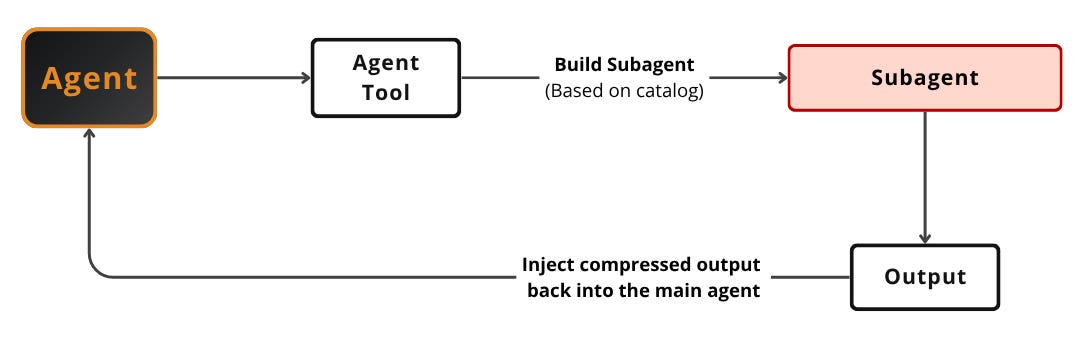
Most harnesses support subagents, though some, like pi, do it via plugins instead of natively. The hard part is keeping orchestrator and child communicating without the child’s full context polluting the parent loop and ensuring the orchestrator, “orchestrates” the subagents as expected. Remember that the orchestrator is an agent, not a workflow encoded in code, which means it can easily go off track and forget a step.
In Claude Code a subagent is not new code. It’s the same loop re-entered with a cloned context and a restricted tool list, and only a condensed summary flows back. A periodic ~30-second summarizer fork produces a live progress label plus a bounded final summary. The lesson to steal: a subagent is your existing loop, narrowed, with a summary on the return path. Only recently they started introducing subagents as new processes.
Harnesses almost never support swarm architectures where every agent talks to every other. They support a master–slave orchestrator topology where one main agent tracks the children.
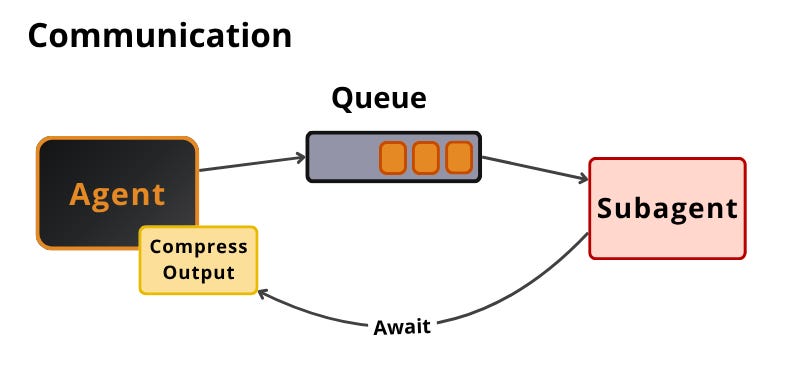
Spawning is half the problem. The parent and child still have to talk, and there are three channels, ordered by how far apart the two run.
Cheapest is in-process: the child is a nested call, so its output is just a return value handed back to the caller. A queue sits one step out. The parent drops work on a message queue, the child consumes it, and the parent awaits a result event. Because the queue is a shared bus, other clients can watch the same exchange live, the way OpenCode streams a subagent’s events to many observers. Most decoupled are shared JSON files: a lock-serialized mailbox, one file per recipient, that agents in separate processes or worktrees write and poll. pi’s one-way subprocess, streaming JSON lines back to the parent, is the same idea narrowed to a pipe.
For most builders this is use-as-is, lightly configured. The spawn mechanism and orchestrator topology come standard, and all you configure is each subagent’s tool and permission scope and which agent it spawns. You only build when you need exotic isolation, like pi’s out-of-process model for untrusted children. That’s a rare need.
Now let’s see how skills fit into the picture.
Skills
A skill is one of the simplest implementations to understand yet one of the highest-impact things in the whole harness. It’s essentially a markdown recipe, instructions plus an allowed-tool set, that the model pulls in on demand.
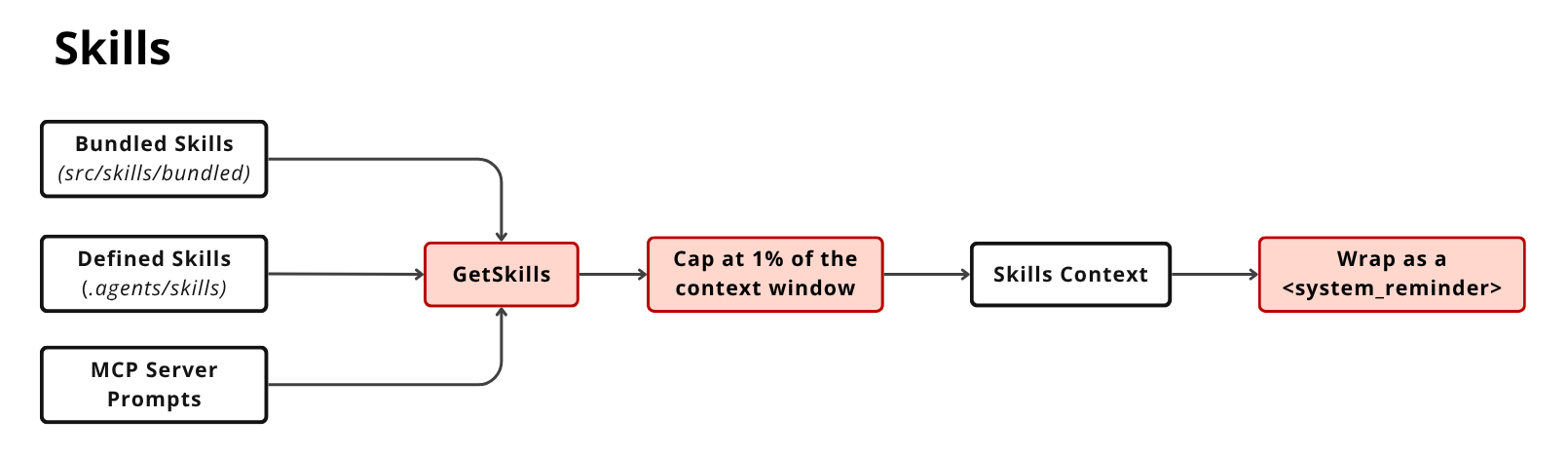
Concretely, skills come from 3 sources merged together: bundled skills shipped with the harness (e.g. src/skills/bundled), defined skills dropped into .agents/skills, and MCP server prompts. The pipeline is short. A GetSkills step collects all 3 sources, caps the total at ~1% of the context window, assembles a single skills context, and wraps it as a <system_reminder>.
That 1% cap is the whole trick, and it works because of progressive disclosure. Skills are surfaced by name and description only, so the agent sees a cheap menu of capabilities and reads a skill’s body on demand, which is why the always-loaded skills context can be hard-capped at ~1% and still scale to dozens of skills. pi takes the same spirit further, surfacing its skills via prompt injection rather than as tools.
This is pure configure, or really authoring, and it’s the single best return on effort for the user and customizer tiers. Writing a markdown skill is the cheapest way to teach the harness a new workflow, and the 1% cap means you can pile on dozens.
Skills, tools, and subagents all hang off the loop, and they’re mostly things you configure. Memory is different. It’s the one component where you actually build your own layer.
Memory Is the Layer You Actually Build
In most harnesses, out-of-the-box memory is loaded directly into context, not via a tool. The model never calls a tool to “remember.” Relevant memories are read off disk and prepended to the system prompt before the turn runs, and new memories are extracted after the turn by a separate process.
A file-backed design, Claude Code-style, is worth grounding concretely. The store splits into 2 kinds of files. User-defined .md files come first: AGENTS.md is always loaded, and **/AGENTS.md is loaded dynamically per directory, on demand. LLM-extracted .md files come second: MEMORY.md is an always-loaded index, hard-capped at ~200 lines / 25 KB, while logs/YYYY-MM-DD.md is an append-only daily log where only the relevant logs are loaded. A small-model side-query ranks topic files from the log by their frontmatter description, not embeddings, and picks the top few to inject, which is debuggable and needs no vector store.
By default a forked extractor updates MEMORY.md live after each turn. A daily-log variant runs a nightly /dream distillation instead: a small LLM extracts the conversation into logs/YYYY-MM-DD.md, then a second distills those logs into MEMORY.md. In other words the pipeline looks like this: raw conversation → daily logs → durable memory.
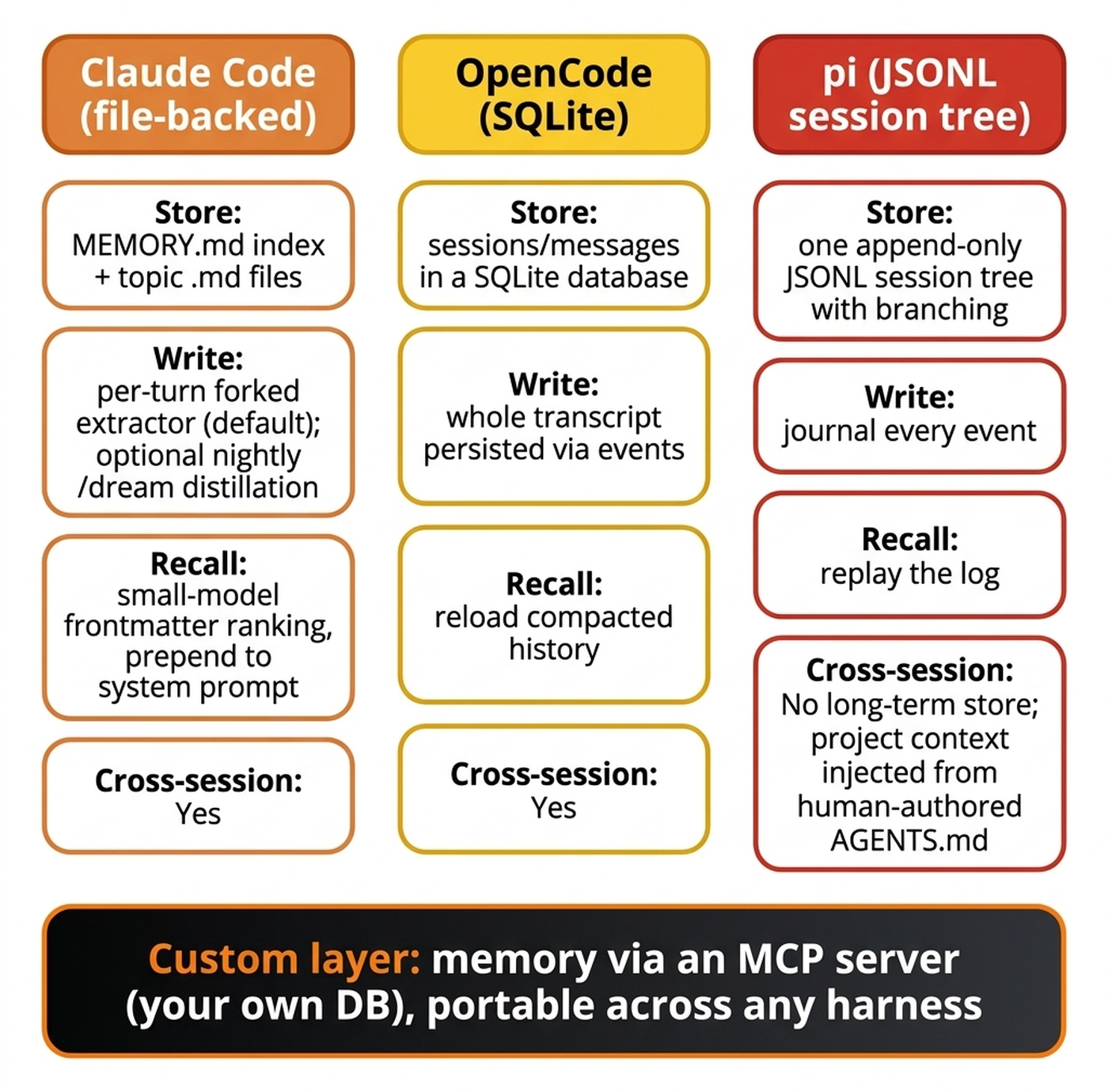
Most harnesses use a file-based system for memory. Which is good enough for uses cases such as coding. Other tools, like Cursor or OpenClaw, build a vector index over your memory instead. That’s why many people report better memory from OpenClaw. As instead of parsing your whole memory as append only logs or forgetting context when building the MEMORY.md index, OpenClaw builds a vector index over your memory.
Here’s the heart of the build/configure/use thread, though. The defaults get you started and AGENTS.md is worth configuring, but the highest-leverage move is a custom memory layer behind an MCP server, a database exposed through an MCP server with your own read/write logic. Because it’s harness-independent, you jump from Claude Code to Cursor to anything and the agent instantly picks up who you are.
Real independence means owning your own context layer.
This is the one place to build, and it pays off for every tier that’s serious. The context layer behind an MCP server is the moat. It’s harness-portable, fully yours, and the thing that makes the assistant your assistant.
Owning your context is about what the agent knows. The next layer is about where its code runs, sandboxing, which protects you and, surprisingly, lets 1 harness scale to many jobs.
The Sandbox: One Jail, Many Remote Workers
The obvious reason for a sandbox comes first: it keeps the agent in a controlled environment with no direct access to your machine. Establish the key separation early.
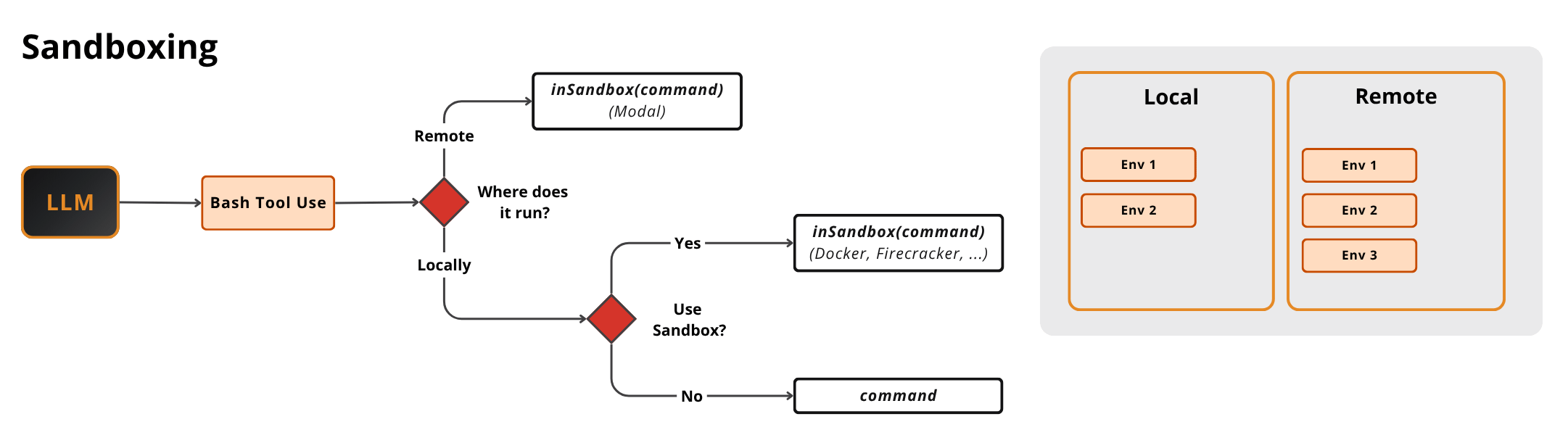
Sandboxing lives at the Bash and PowerShell tool layer, not the UI. When the model issues a Bash tool call, a decision runs about where it executes. If remote, the command runs in a sandbox such as Modal. If local, the harness asks whether to use a sandbox at all: yes means it runs inside a local sandbox (Docker, Firecracker, …). No means it runs directly on your machine.
The enforcement detail worth stealing, the way Claude Code does it, is that the jail is derived from the same permission rules the agent already uses, and it always denies writes to its own settings file.
On top of security sandboxes can change how we define software architecture. Reframe sandboxes as workers from classic distributed systems: each sandbox is a worker that runs jobs in parallel, and 1 harness can manage and scale many of them. So the same harness that protects you locally can fan out dozens of remote jobs. Depending on your sandbox type, you can run data ingestion jobs or even training jobs if the VM has a GPU. Everything from your harness. Codex is a harness that is all in on remote sandboxing.
Now, let’s wrap up the article with the most important component: the permission layer.
The Permission Layer Has Almost No AI in It
The permission system is the hardest part to reason about, and the strange thing is it has essentially no AI in it, yet it’s what makes the whole system safe to run. Its job is narrow: for every tool call, decide to (a) run it, (b) ask the user, or (c) deny it.
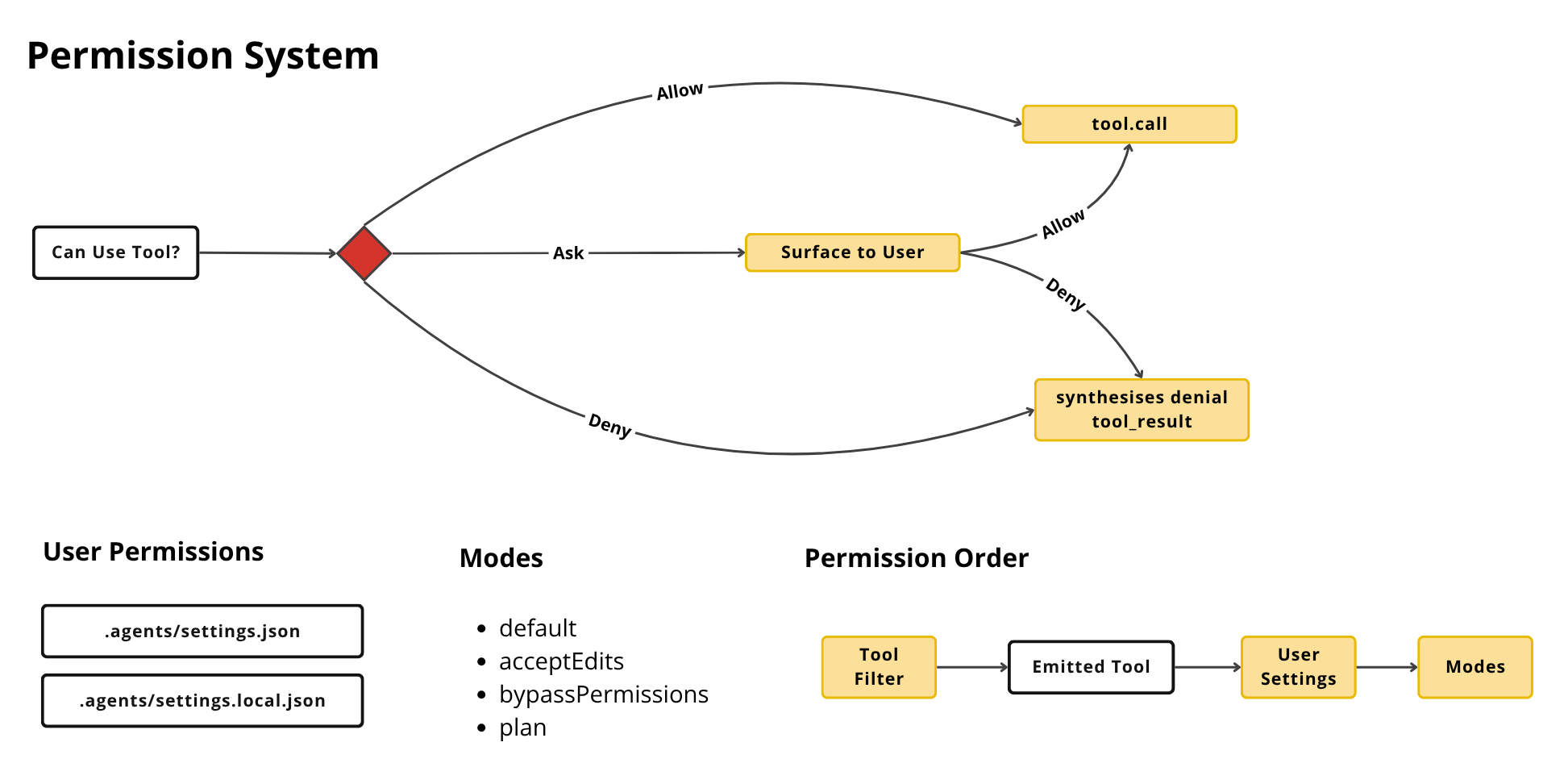
The structure has 2 flavors. Agent modes change default behavior: default, acceptEdits, bypassPermissions, and plan. User-defined rules live in config, in .agents/settings.json and .agents/settings.local.json, where you declare what the agent can and cannot run, including wildcard rules like Bash(git *). The harness combines mode metadata and user rules at runtime to resolve each call.
The “Can use tool?” question has 3 outcomes.
Allow calls the tool. Ask surfaces it to the user, and on allow it calls the tool, while on deny it synthesizes a denial tool-result and continues. Deny synthesizes the denial directly.
When deciding what to do, the harness runs tool filter → user settings → mode.
Here’s the counterintuitive payoff. “Bypass everything” is not total. Plan mode is enforced prompt-side, via a system reminder telling the model to only edit the plan file.
Which shows how fragile these mechanisms still are, as we just hope for the best that the model will pick up the instruction.
You almost never build this. But it’s incredebly important to properly configure it. It’s probably the most important part to configure right to ensure it has just enough access to your data and machine.
What’s Next
These are just the core components that almost any agentic harness needs and has.
But there is more to it.
Worktrees for parallel isolated edits, multiprocessing subagents for true parallelism, and a plugin system for extending the harness without forking it. Which I will address in future articles.
But here is what I’m wondering:
Which component did you decide to build rather than configure? Was owning it worth it, or did you reinvent something the harness already had?
Click the button below and tell me. I read every response.
Enjoyed the article? The most sincere compliment is to restack this for your readers.
Whenever you’re ready, here is how I can help you
Go from agent user to agent builder. Master the foundations of AI agents and turn fragile demo code into reliable, production-ready systems with my course, Agent Engineering: Building Multi-Agent Systems (made with Towards AI).
35 lessons. Pure foundations from scratch. 4 mini-projects. 2 production systems. A certificate and direct access to me & industry experts in our Discord.
Built for software and data professionals transitioning into AI engineering. Rated 5/5 with 300+ students. The first 7 lessons are free:
Not ready to commit? Start with our free Agent AI Engineering Guide, a 6-day email course on the mistakes that silently break AI agents in production.
Images
If not otherwise stated, all images are created by the author.
Great article!
The permission layer is the most important section, and the tension you flag at the end is the whole point. There are two enforcement regimes here and only one is real. Deterministic and trustworthy: the allow/deny rules, the sandbox jail derived from them, and the monotonic scope-narrowing where a child can never out-permission its parent, which holds no matter what the model does.
Then plan mode, enforced prompt-side by a system reminder. That's not an exact control, it's a suggestion, and from a security view anything enforced by "we hope the model reads it" should be treated as already bypassed, since a confused model and an adversarial input land in the same place. The takeaway across your build/configure/use frame: any safety property you actually care about has to live in the deterministic layer, not the just the prompt. That or make sure to include human in the loop.
The harness is where most teams underinvest. They agonize over the model choice and ship a default loop, default tools, no memory. Then they blame the model when it fails. Build the moat parts, use the rest as-is, but know which is which.