



When I was researching about harness engineering I asked Claude Code to compare 7 large repos: Claude Code’s leaked source, OpenCode, Pi and a bunch more. Directly pointing Claude Code to these repos was a mess, generating superficial answers.
The standard fix is to ask the agent to compile notes for each repo and then compare them, which works, but it’s cumbersome to manage. Especially if you want to repeat the process. On top of that, what if you want to mix your research with other company docs, articles, papers and YouTube videos?
That’s where an LLM wiki kicks in. It’s the best way I’ve found to merge all my research into one token-efficient memory layer that I can easily pass to my agent to anchor its reasoning in it.
The method is popularized by Andrej Karpathy as a pattern to give agents memory built only from Markdown files. He calls the wiki “a persistent, compounding artifact.” I use mine the opposite way: one wiki per project, deleted when the project ends.
You can use it as memory for coding, research, journaling, education, and brainstorming. The only issue is that it eats a lot of tokens unless you know how it works inside to customize it to your needs.
In my previous piece, I showed how I run it on top of my Second Brain.
In this article, I'll show you how to build an LLM wiki from first principles in 3 exercises, each upgrading the same skill. Available in this GitHub repo:
Exercise 1, vanilla: ingest, index, and query local files.
Exercise 2, ingest: add custom sources.
Exercise 3, interactive: learn continually from your questions.
First, a quick word from our sponsor ↓
Build for the long run (Sponsored)

Long-running agents need endurance.
They must survive waiting for users and withstand tool failures. They must adapt to every leap in model intelligence.
⚡️ Inngest makes long-running agents durable, observable, and improvable over time.
Check out their generous free tier and a sleek local dev server for testing your workflows.
Now, let’s go!
What are LLM wikis?
In exercise 1, we have 5 notes on MCP and skills ingested into the LLM wiki. If, using our agent, we ask “What do my notes say about when to use an MCP server vs. a CLI?”, the agent finds the 3 most relevant wiki pages (agent-connectivity, cli, mcp) and answers with links to them. Each link leads down to the sources and raw notes behind the claim.
The LLM wiki is a directory of Markdown files that an LLM writes and an agent reads. Zero databases have seen the query. It’s surprising how much complexity you can squeeze out of Markdown files.
Sources go in, derived pages (the nodes) come out. As each page links to other relevant pages, plus the sources it was created from, the wiki indirectly forms a knowledge graph. To sum up:
An LLM wiki is a knowledge graph represented with Markdown files.
Image 1 shows the LLM wiki from exercise 2, rendered as an Obsidian graph, with 14 sources and 17 nodes.
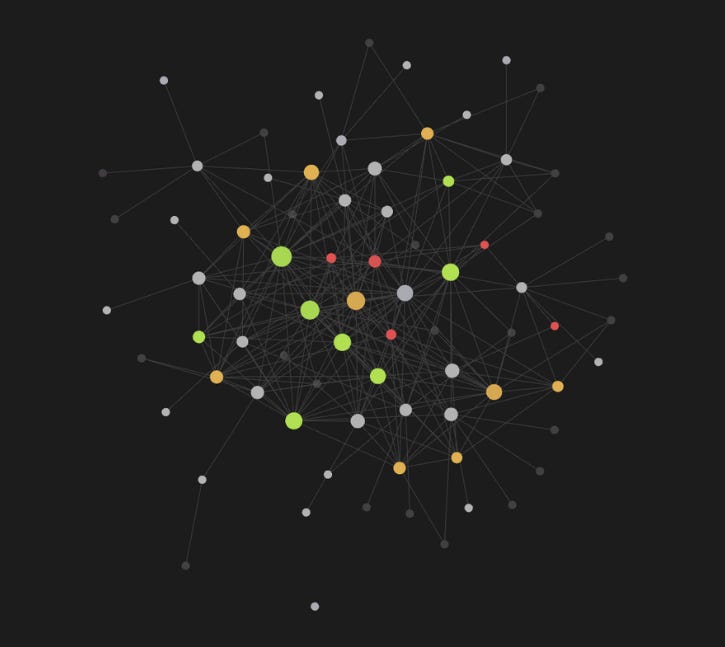
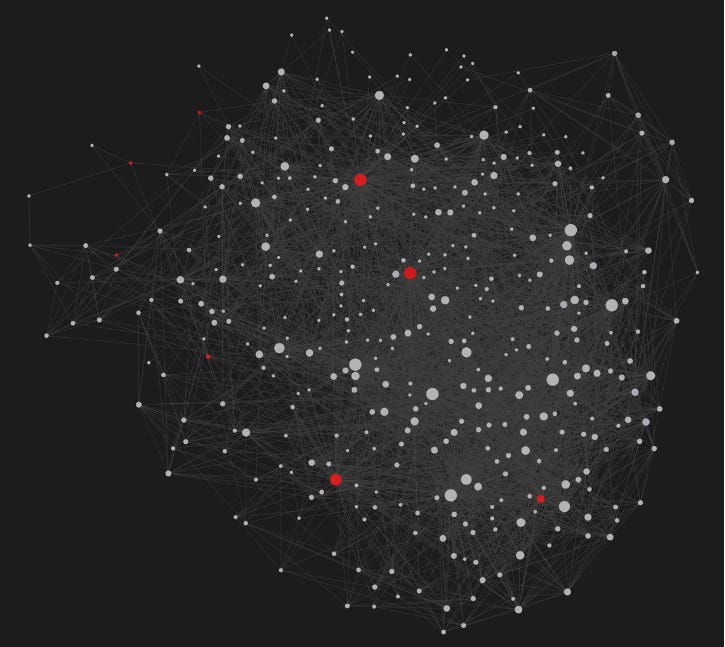
Image 2 shows an earlier snapshot of the wiki behind my current book, with 135 sources and 120 nodes.
But Obsidian is only a viewer. Every tutorial recommends it because it renders linked Markdown beautifully. The files are still plain Markdown and work in any editor. The agent doesn’t need Obsidian to operate the wiki. Just point it to the wiki dir, and it’s good to go. Zero setup, zero dependencies.
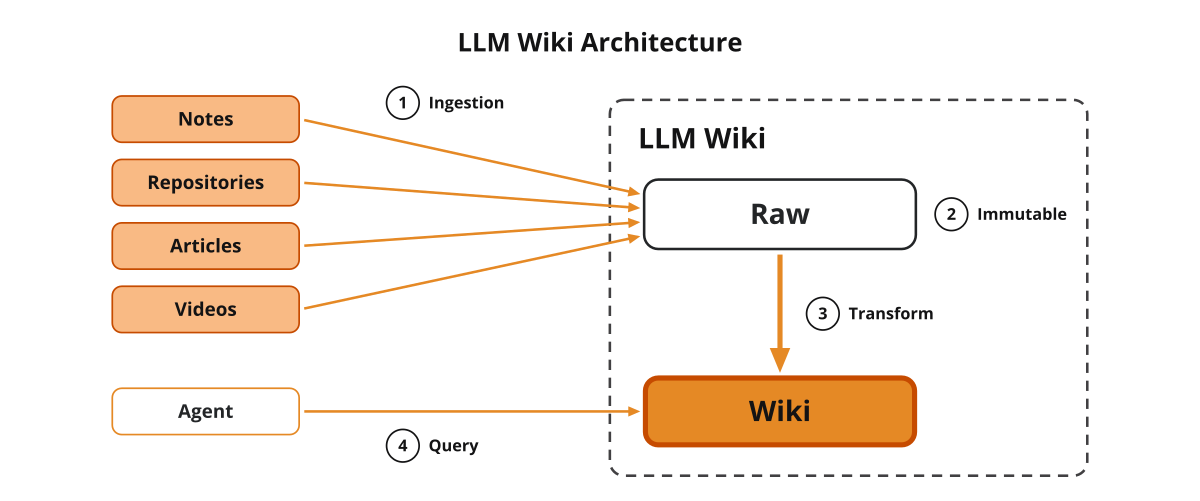
The architecture comes down to 4 steps, illustrated in Image 3:
Ingestion copies notes, repos, articles, and videos into
raw/.raw/is immutable: the source of truth, never edited.An LLM transforms it into
wiki/, derived pages for what we know.The agent queries only
wiki/.
The point is to turn raw data into something easy to query, instead of throwing all of it at the LLM and hoping for the best. In other words, we want to do RAG.
On disk, one wiki looks like this:
wiki-<slug>/
├── log.md            # append-only history
├── raw/              # immutable copies of what was ingested
│   ├── <slug>.md
│   └── assets/
└── wiki/
    ├── index.md      # generated root
    ├── overview.md   # LLM-written summary of the whole wiki
    ├── sources/      # one page per raw file
    ├── entities/
    └── concepts/
Each raw file gets exactly one source page, an executive summary of what matters in it: a summary, key claims, notable quotes, and connections. From it, the LLM extracts entities and concepts. Entities are tools or frameworks, clear things that you can point at, while concepts are more like theoretical ideas.
In exercise 1, the 5 ingested notes yield 5 source pages, 4 entities, and 5 concepts. The note “The Future of MCP vs. Skills” alone yields 3 entities (MCP, Claude Code, FastMCP) and 4 concepts (skills, CLI, agent connectivity, orchestration).
Entities and concepts are just an ontology. Swap them for whatever your domain needs: people, companies, organizations, locations, tools. Go too narrow, and extraction misses things. Go too wide, and it extracts everything. “Entities + Concepts” is a very generic ontology that works on anything, which can be a blessing and a curse. To go deeper, see how to ship a knowledge graph ontology in 5 minutes.
Next, follow a single item from the moment you ingest it to see where those pages come from.
How ingestion builds the wiki
As shown in Image 4, every item starts with the same 2 steps. First, the item is copied into raw/. We use the slug as its ID, so an item ingested twice is skipped. Second, the LLM writes its source page, listing in the frontmatter the entities and concepts it extracted.
An entity or concept gets its own page only when at least 2 distinct sources extract it. One note mentioning something is a fact about the note. Two notes mentioning it is a fact about your knowledge.
In exercise 1, Obsidian appeared in 1 source and stayed unpromoted. Agent memory appeared in 2, so wiki/concepts/agent-memory.md was synthesized across both. The threshold is tunable, and it’s what keeps the knowledge graph clean: it cuts noise and keeps what recurs across your data.
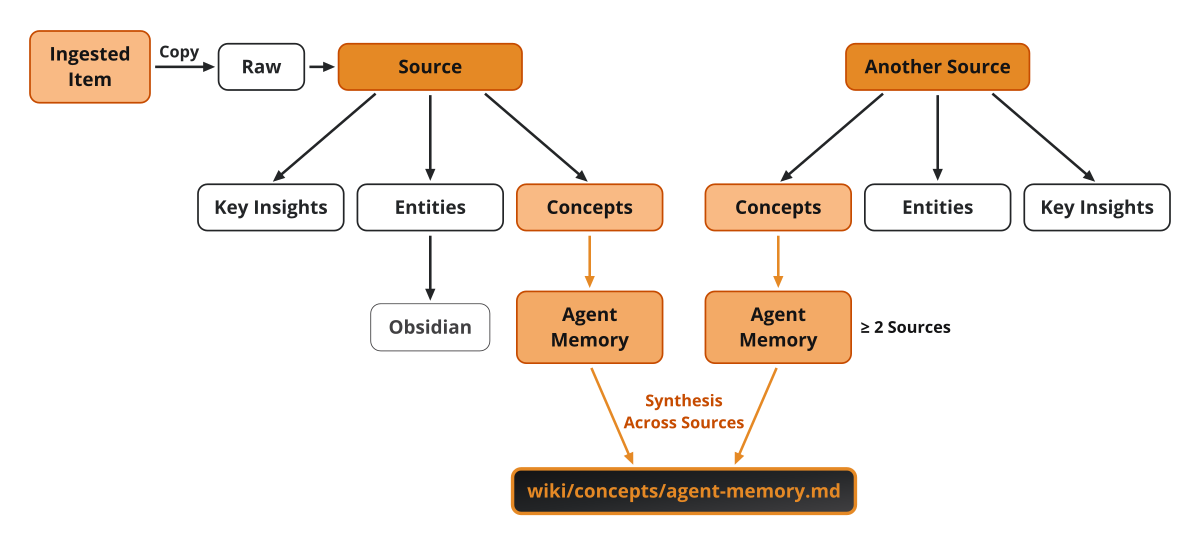
This is graph ingestion, scaled down: extract per document, merge across documents, threshold to cut noise. This strategy has a huge overlap with how you can actually do GraphRAG because, at its core, it is a very light GraphRAG technique. See the full architecture.
Updates recompute only what changed. A new source triggers a recount, and only the entity and concept pages it touches are rewritten. The skill never overwrites raw/, so for a changed note we swap the raw copy, rewrite its source page, and recompute just the pages linked to it. There’s no full re-ingest.
Here is what the agent memory concept from exercise 1 looks like:
---
type: concept
title: Agent Memory
description: Unified, agent-accessible memory built from ingested documents, knowledge-graph extraction, and embeddings, exposed to agents through MCP search/write tools.
aliases:
  - unified memory
  - knowledge graph memory
  - GraphRAG
sources:
  - "[[wiki/sources/the-right-way-of-building-agents-with-mcp-servers]]"
  - "[[wiki/sources/why-mcp-is-not-dead]]"
related:
  - "[[wiki/concepts/orchestration]]"
  - "[[wiki/entities/prefect]]"
  - "[[wiki/entities/mcp]]"
created: 2026-08-29T15:32:43Z
timestamp: 2026-08-29T15:32:43Z
source_count: 2
---

# Agent Memory
...

## Definition
...

## Key claims
...

## Relationships
...
The index is created by a Python script, not an LLM. After the pages, a script rebuilds one index per folder (wiki/sources/, wiki/concepts/, wiki/entities/), each a list of title — description bullets. For entities, it looks like this:
# Entities

- [[wiki/entities/claude-code|Claude Code]] — Anthropic's terminal-based coding agent and MCP client, which also natively runs skills placed in `.claude/skills/`.
- [[wiki/entities/fastmcp|FastMCP]] — The de facto default Python SDK for building MCP servers and clients, maintained by Prefect.
As seen in Images 5, 6, and 7, the root wiki/index.md points to the 3 sub-indexes, with page counts. It’s the agent’s first entry point into the wiki. Finally, the skill rewrites the overview and appends the event to log.md as an append-only log.
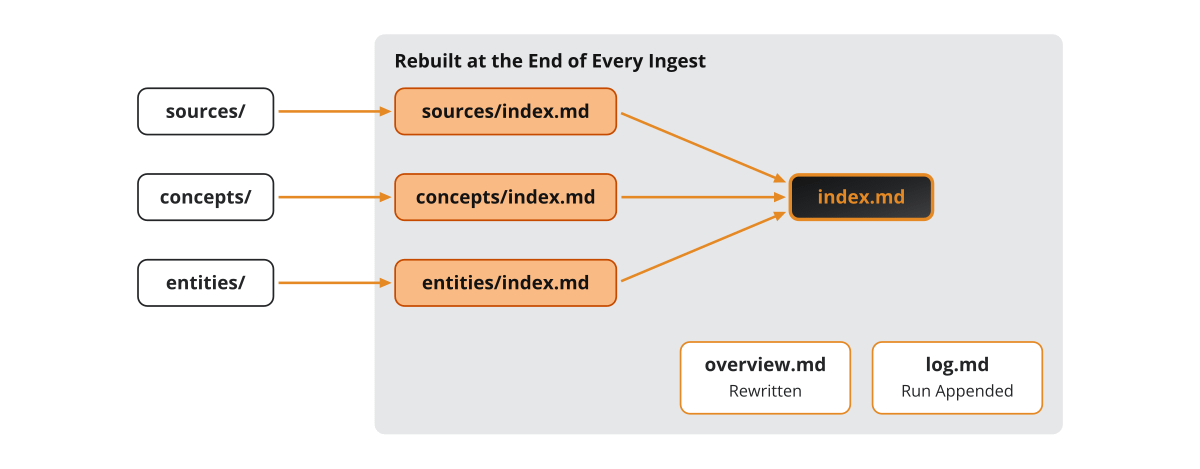
In Obsidian, you can see the hierarchy. The root index.md sits 1 hop from every section index:
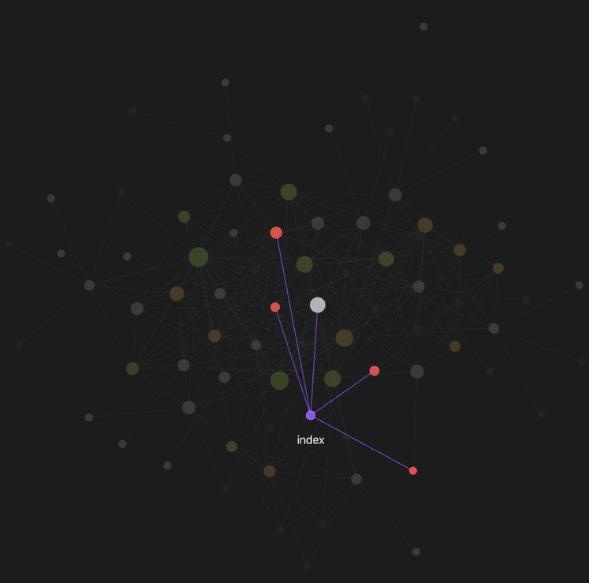
And concepts/index.md sits 1 hop from every concept page:
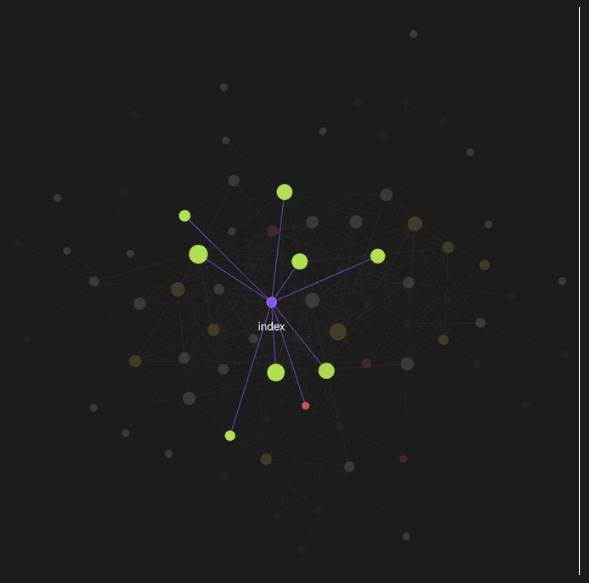
The agent walks these indexes every time it answers a question.
Querying the wiki via progressive disclosure
The raw/ directory is the last folder the agent accesses. It walks a 3-step ladder and stops as soon as the question is answered, since each index line is enough to choose a page:
The root
index.md, then the 1 or 2 relevant sub-indexes.Then 1–3 pages, preferring entity and concept pages, already synthesized across sources, over single-source pages.
Only if those fall short does it access the linked source pages, then the raw files.
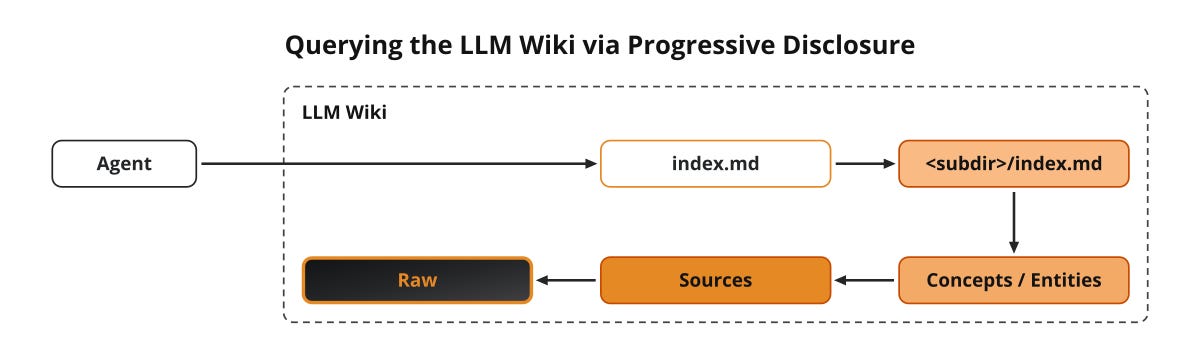
It’s RAG built from files. Reading 1–3 pages is the top-k: stop at the first hits. Following links from page to page is multi-hop graph traversal, used only when the top hits fall short. Beautiful!
This beats dumping files into context because every raw file is read in full once, at ingest. A query pays for a few index lines plus 1–3 curated pages (that already cross-pollinate ideas between docs), not your whole corpus. The MCP-vs-CLI question took 3 pages.
The price is latency and scalability. A graph database returns neighbors in 1 call. Here the agent opens one file, then another. And scaling ingestion and search past 1,000 sources can be challenging. That’s the trade-off of a knowledge graph built from Markdown files instead of Neo4j or Postgres.
Every claim cites the page it came from. To avoid hallucinations, if the wiki doesn’t know, the agent says so.
So how do I know it works? To be honest, with just vibes at this point. I don’t want to lie to you. Precision holds up when I check answers against topics I know. As for recall, I can’t tell whether it found everything relevant. Proper RAG-style evals are the next step.
Let’s take a look at the skill used for both ingestion and queries.
Implementing the skill
The llm-wiki-vanilla skill from exercise 1 is 3 Markdown files and 2 scripts:
01-llm-wiki-vanilla/
├── SKILL.md              # the workflow: locate, detect mode, ingest or query
├── CONVENTIONS.md        # the data contract: layout, threshold, links, log
├── PAGES.md              # one template per page type
└── scripts/
    ├── count_mentions.py # which slugs crossed the ≥2 threshold
    └── build_index_md.py # regenerates every index.md
The frontmatter is the trigger. Until the skill is invoked, only its name and description sit in the agent’s context, and the description is what makes the agent pick the skill for the right request:
---
name: 01-llm-wiki-vanilla
description: "Build and query a minimal LLM-maintained wiki from local markdown notes (modes: ingest, query)."
---
SKILL.md holds the core steps. Step 0 locates the wiki: a wiki-*/ folder holding both raw/ and wiki/. Step 1 detects the mode. It routes to ingest only on an explicit verb (ingest, add, build) or dropped paths, and to query otherwise.
The ingest path then runs collect and dedup, copy to raw/, source pages, count mentions, entity and concept pages, overview, rebuild index, and log.
SKILL.md stays lean. It tells the agent to read CONVENTIONS.md and PAGES.md only when it needs to write something, so queries keep the context small via progressive disclosure.
The pages’ Markdown YAML frontmatter follows Google’s Open Knowledge Format, which requires a mandatory type field, plus a name and description. Other fields depend on the type. For example, ontology objects (entities and concepts) include graph attributes such as aliases, sources, and related concepts or entities. All of this is encoded in the PAGES.md templates.
count_mentions.py walks every source page’s frontmatter and returns which entity or concept passed the 2-source threshold. build_index_md.py regenerates every index from the frontmatter metadata.
Basic math and deterministic transformations belong in scripts. Otherwise, you uselessly consume tokens, and you kind of assume that the LLM will count right. It mostly does, but not always.
A major advantage over passing all documents into context is that a smaller model handles ingestion, while a larger model queries only a fraction of the data.
I ran ingestion with Sonnet 5.5 and queries with Opus 5.5 for better reasoning across pages and better goal execution.
So far, we’ve implemented a vanilla skill that reads only local Markdown. In exercise 2, we show how to extend it with multiple sources.
How to support multiple sources (exercise 2)
An LLM wiki gets powerful when local notes, web articles, code repos, YouTube videos, and Reddit threads are interconnected in one graph. Mine pulls from my Readwise saves, Obsidian vault, and GitHub stars: separate silos that the wiki compiles into one interface I can chat with.
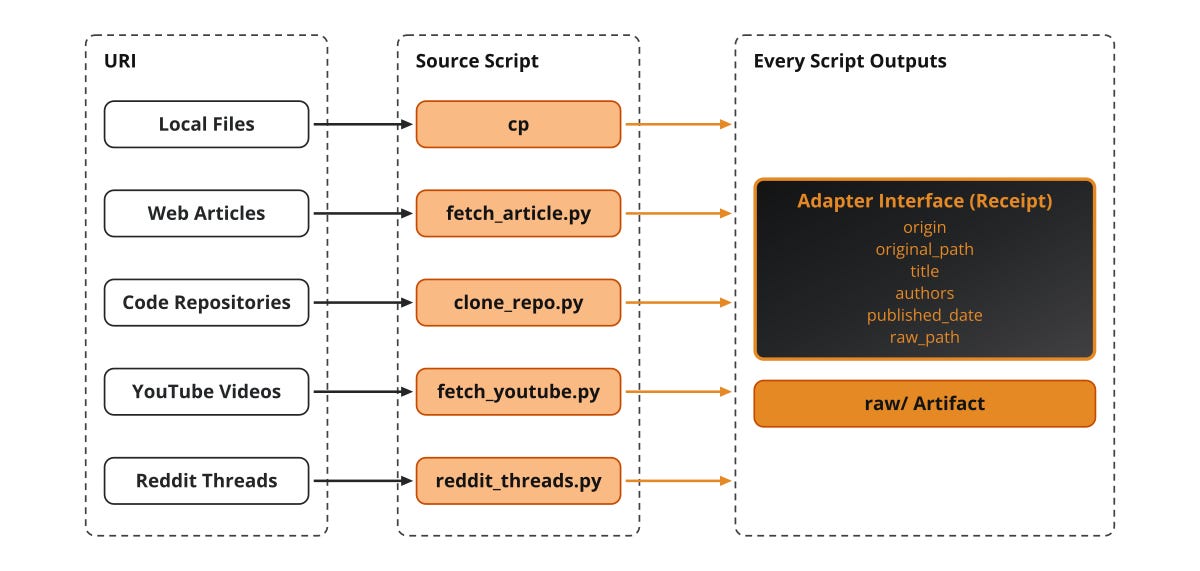
The upgraded skill from exercise 2 handles 5 sources, each with its own adapter script that turns one URI into exactly one raw artifact that has the same interface across sources (origin, original path, title, authors, published date, raw path):
Local files use
cp.fetch_article.pyis acurlplus HTML cleanup.clone_repo.pyis a shallow clone.fetch_youtube.pyandreddit_threads.pyare API calls.
Everything downstream of raw/ is origin-agnostic, so adding a source is one small fetch-and-normalize script, a per-origin ETL pipeline.
Repos get their own page type, since a repo is a tree, not a file. Its writer produces one short ARCHITECTURE.md summary in wiki/repos/<repo>/ and, to avoid assuming the consumer needs more, it goes deeper only on demand.
The exercise 2 skill grows the agents/ and scripts/ directories with one per source:
02-llm-wiki-ingest/
├── SKILL.md
├── CONVENTIONS.md
├── PAGES.md
├── SOURCES.md            # adapter contract + routing table
├── agents/
│   ├── source_writer.md
│   ├── repo_writer.md
│   ├── page_writer.md
│   └── overview_writer.md
└── scripts/
    ├── fetch_article.py
    ├── clone_repo.py
    ├── fetch_youtube.py
    ├── count_mentions.py
    └── build_index_md.py
Fetching runs in parallel, then one source writer per raw file reads it exactly once. A barrier waits for every source page because page writers combine sources, then one page writer per qualifying slug runs, then the overview writer.
As shown in Image 10, fetching and writing source pages happen in parallel. Entity and concept compilation requires all sources to determine what to combine. Ontology pages can also be written in parallel once all source pages are ready.
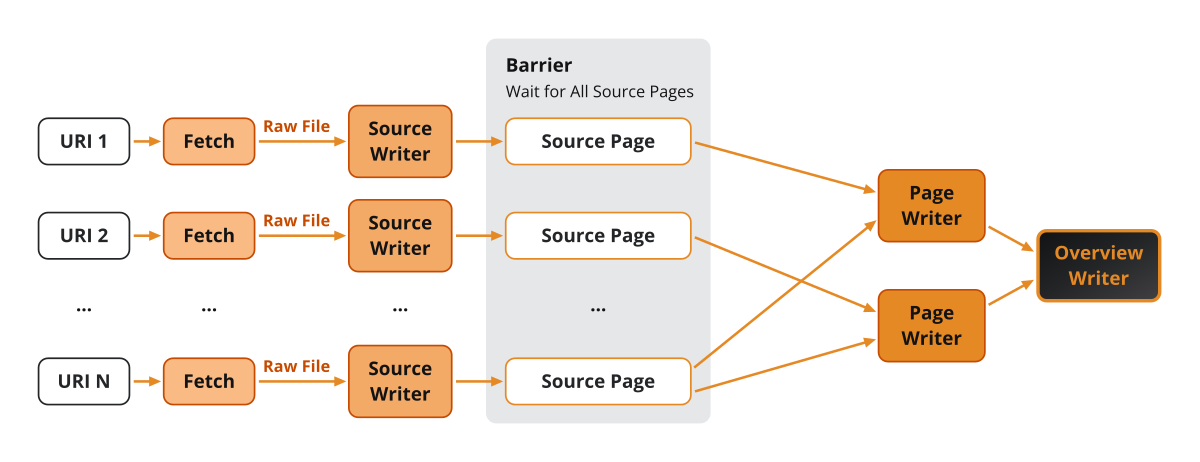
The agents are plain .md files inside the skill. The main SKILL.md instructs the harness to “create subagents” based on these files, defaulting to Sonnet. This is a powerful and easy strategy to make your skills harness-agnostic.
So far, the wiki grows only when you ingest. In exercise 3, we will see how to capture the interactions with the wiki as a signal.
Interactive LLM wikis (exercise 3)
Your questions are data. They show what isn’t clear to you yet. For me, as a content creator, that’s often exactly what my audience won’t understand either. The questions leave breadcrumbs of my own learning curve.
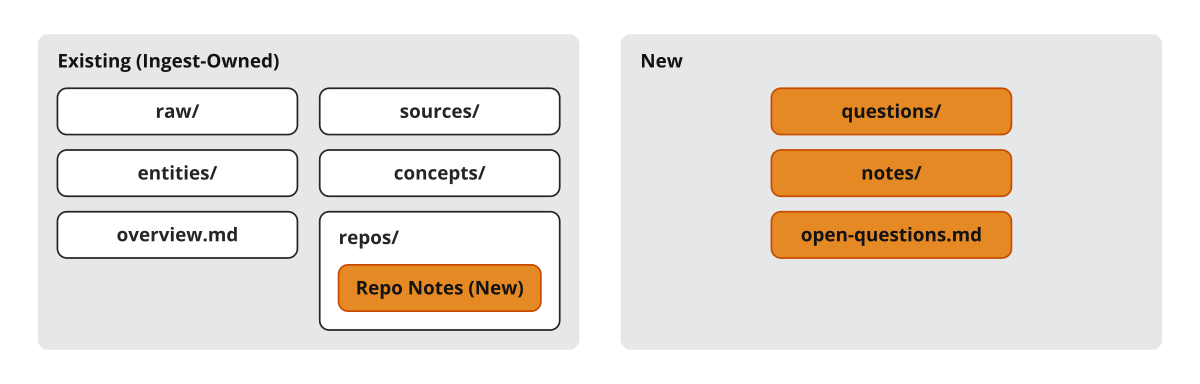
So, with this upgrade, we add 3 new components:
questions/logs each question as a slim pointer page.notes/is a second layer of pages on top of sources, entities, and concepts.open-questions.mdlists what the wiki can’t answer yet.
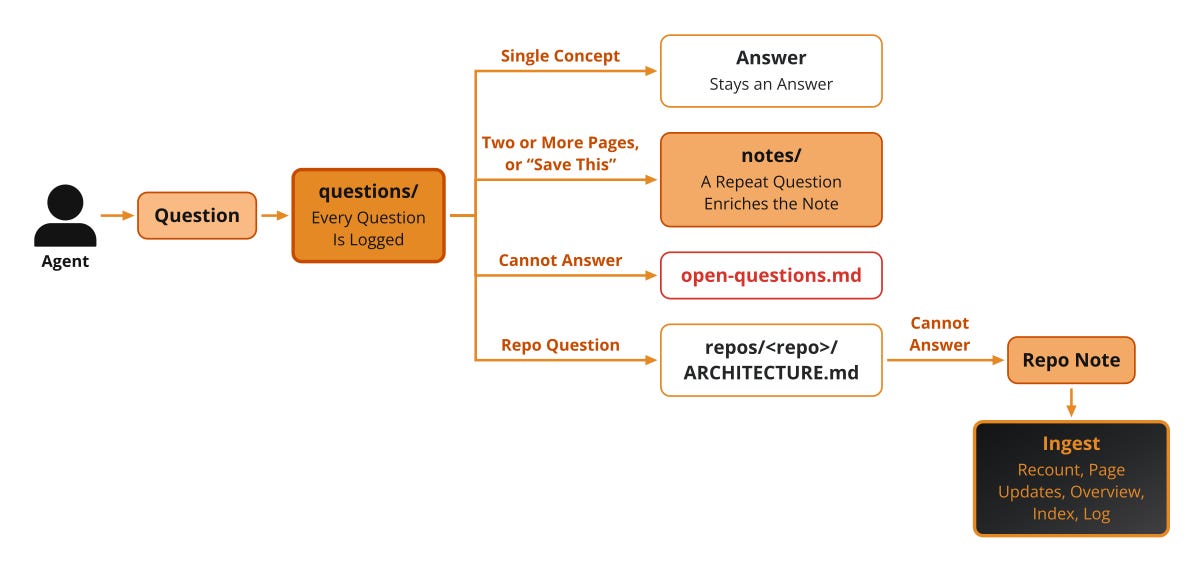
Every logged question has 4 possible outcomes:
A single-concept answer stays an answer.
An answer synthesizing 2 or more pages, or one you ask to save, becomes a note. If the wiki created notes out of every answer, it would quickly become useless.
An unanswerable question gets saved in
open-questions.md.A repo question that
ARCHITECTURE.mdcan’t answer makes the agent read the clone and write a repo note, which re-enters ingest and can push a concept over the threshold.
One thing I am still trying to calibrate is when to create a note from multiple concepts or entities, since doing this every time can quickly add a lot of noise.
So where are LLM wikis actually useful?
LLM wikis burn tokens at ingest, so for a one-off question over a pile of files, you waste tokens and time. They’re also hard to maintain and scale next to a full knowledge graph, which makes them the wrong long-term memory for a product serving millions of users. There, use a real database, as I show in implementing a unified memory from scratch.
Also, transforming your codebase into a wiki is an anti-pattern. You’d re-sync the wiki on every commit, and the code is already a graph that coding agents are trained to walk. The repo is already the wiki. You have to pick your battles. It doesn’t work for everything.
Where they shine is personal long-term memory scoped to one project or use case. Unlike Karpathy’s wikis, mine don’t outlive the project. Even though I can maintain them, I use them as one-off memory layers for researching a project, writing an article, or implementing a feature. Whenever the project is done, I can just kill them.
The hardcore case is my book. One wiki holds 196 raw sources, 7 repos, and 399 nodes, and I’m only at chapter 5 of 12. A second, separate wiki models the context between chapters. It answers questions like “Are chunking strategies already covered in depth in previous chapters?” across a ~350-page draft with hundreds of layered concepts.
Alternatives exist, like graphify, a Claude Code skill that turns any folder into a queryable knowledge graph, but I keep everything light with my own custom skill.
So I encourage you to go to our repository, look at the 3 exercises (vanilla, ingest, and interactive), understand the principles behind them, and build your own version.
But here is what I’m wondering:
What is the No. 1 use case you’ve used, or plan to use, LLM wikis for?
Click the button below and tell me. I read every response.
Enjoyed the article? The most sincere compliment is to restack this for your readers.
Whenever you’re ready, here is how I can help you
Go from agent user to agent builder. Master the foundations of AI agents and turn fragile demo code into reliable, production-ready systems with my course, Agent Engineering: Building Multi-Agent Systems (made with Towards AI).
35 lessons. Pure foundations from scratch. 4 mini-projects. 2 production systems. A certificate and direct access to me & industry experts in our Discord.
Built for software and data professionals transitioning into AI engineering. Rated 5/5 with 300+ students. The first 7 lessons are free:
Not ready to commit? Start with our free Agent AI Engineering Guide, a 6-day email course on the mistakes that silently break AI agents in production.
Images & videos
If not otherwise stated, all images and videos are created by the author.
This is one of the best things I have ever stumbled upon. I make my second brain when working on different research topics especially when working on my literature review and it works all the time.