



I’ve been building what Andrej Karpathy calls an LLM Knowledge Base on top of my private data for the past few months — without realizing that was the name for it. Now, seeing it’s such a hot topic, I want to share my own twist on it. Similar to Andrej’s design, but still very different in how I approach the problem.
I keep my notes in Obsidian, my reading in Readwise, and my topical research in NotebookLM. Each tool is excellent in isolation, but no AI can reach across all three.
Whenever I reach for a general-purpose deep-research tool like Perplexity or Gemini Deep Research, it just searches the public web. Every user gets the exact same sources, and the resulting article reads like everyone else’s. What I actually want to research is my own curated thinking.
I want to leverage the books I highlighted, the notes I wrote, and the transcripts I dumped into NotebookLM. That is the edge. That is the signal nobody else has.
To solve this, I built a deep research agent as three Claude Code skills. The /research_create, /research_search, and /research_distill skills run on top of my private data via the obsidian, readwise, and nlm command-line interfaces (CLIs).
The system uses multi-round query expansion with gap analysis between rounds. It outputs a memory/ folder with an index.yaml file that acts as a progressive-disclosure wiki over the source files. We also apply post-processing, including deduplication and re-ranking, to keep the result focused.
There is no vector database and no Retrieval-Augmented Generation (RAG) pipeline. We use the filesystem as state and Markdown, YAML, and JSON as the wire format. If you already keep notes in Obsidian, articles in Readwise, or research in NotebookLM, this is for you.
By the end of this article, you will know exactly how it works, see it run on this very article, and have a blueprint to build your own.
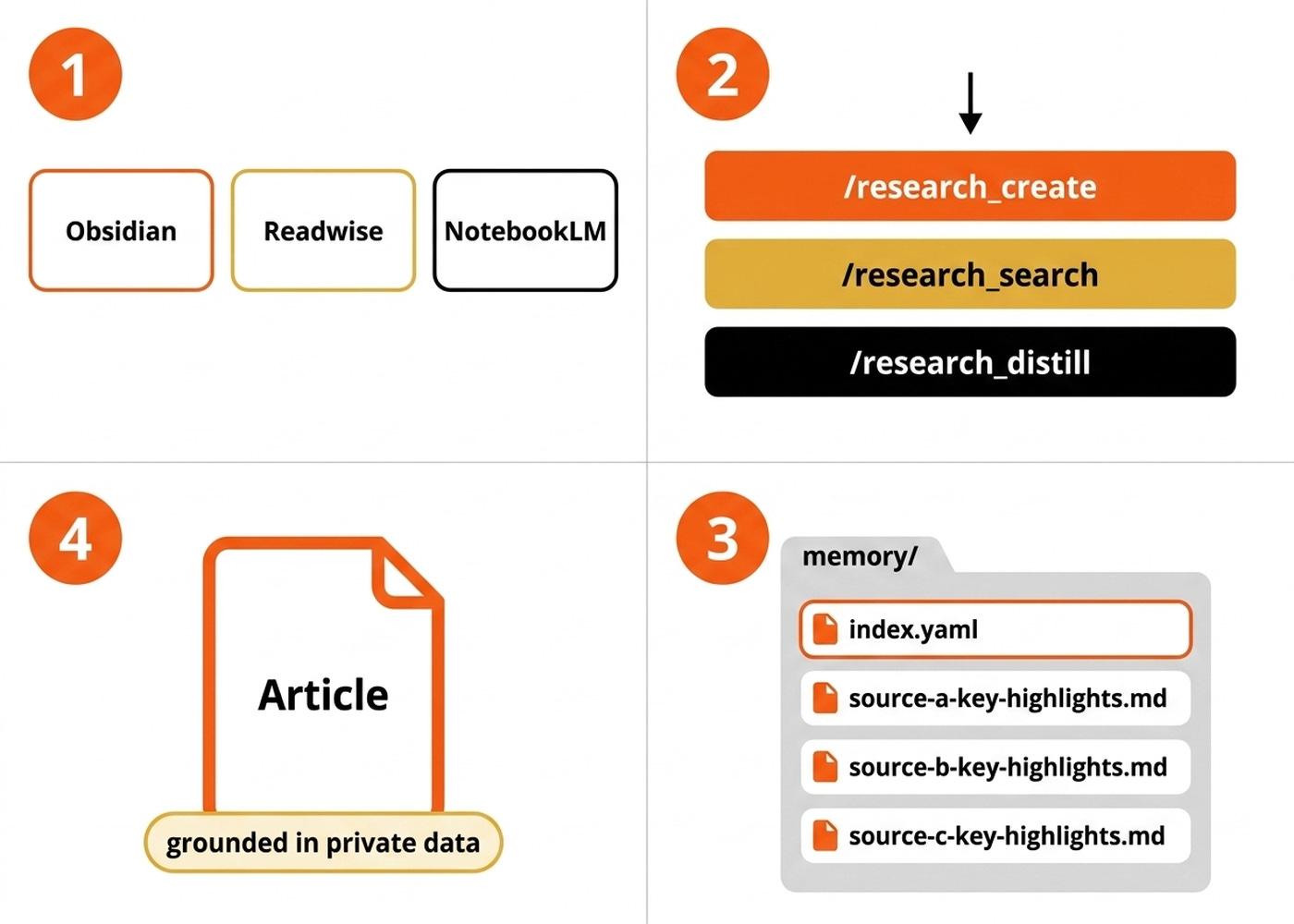
Here is the system at a glance. We will look at the three skills, three CLI adapters, and one memory folder, before we open the heaviest skill in the next section.
Your Path to Agentic AI Engineering for Production (Product)
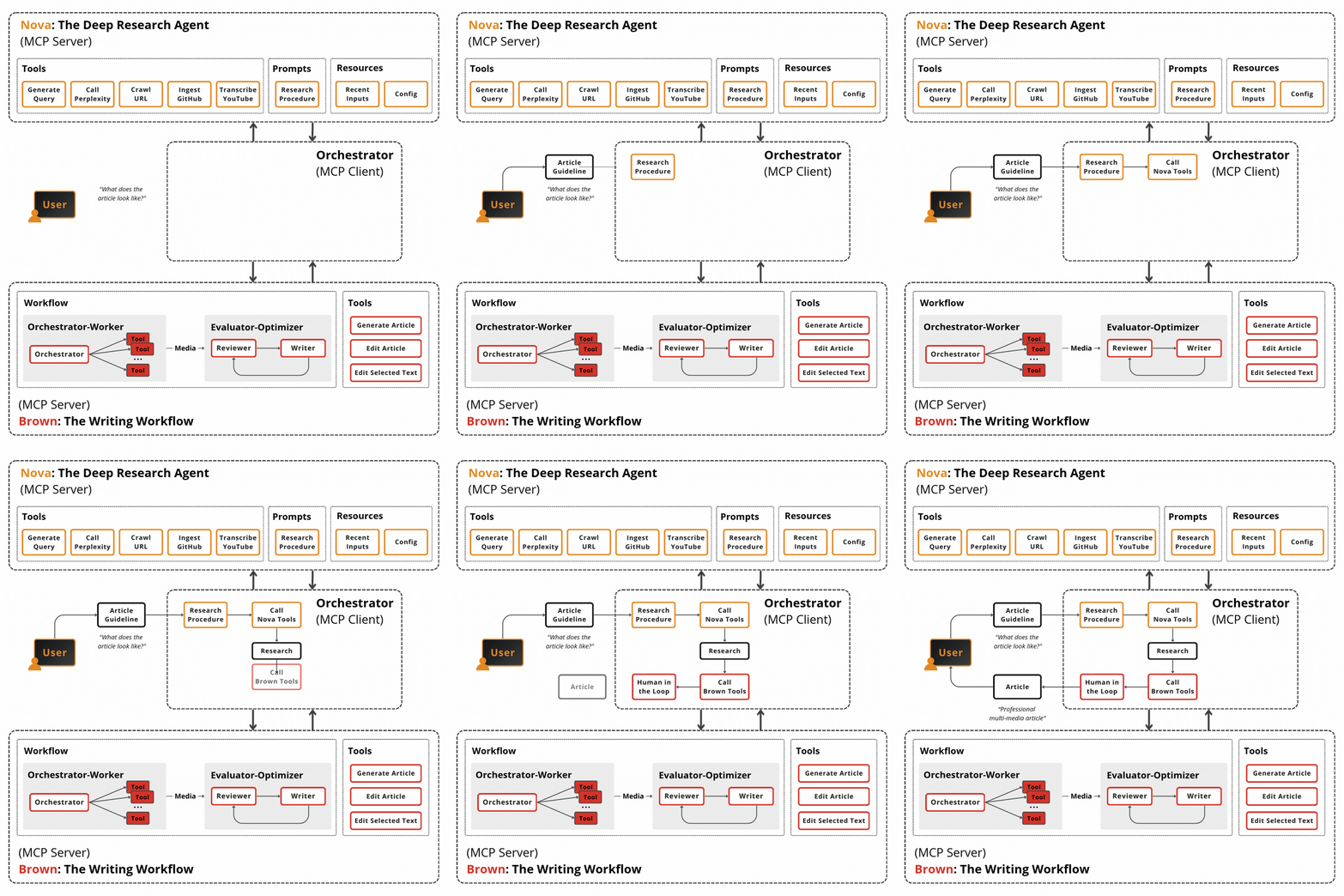
The three-skill + memory-folder pattern in this article is one slice of harness engineering. If you want to master the rest, such as orchestration, context engineering, evals, and production deployment, check out my Agentic AI Engineering course, built with Towards AI.
34 lessons. Three end-to-end portfolio projects. A certificate. And a Discord community with direct access to industry experts and me.
Rated 5/5 by 300+ students. The first 6 lessons are free:
Three Skills, Three CLIs, One Memory Folder
The system relies on three distinct skills. First, /research_create builds a memory/ folder from scratch for a given topic or brain dump. Second, /research_search handles the read side, letting any future agent query an existing memory/ folder via index.yaml with progressive disclosure.
Third, /research_distill takes a finished piece of content and extracts only the sources that were actually used into a single portable research.md appendix.
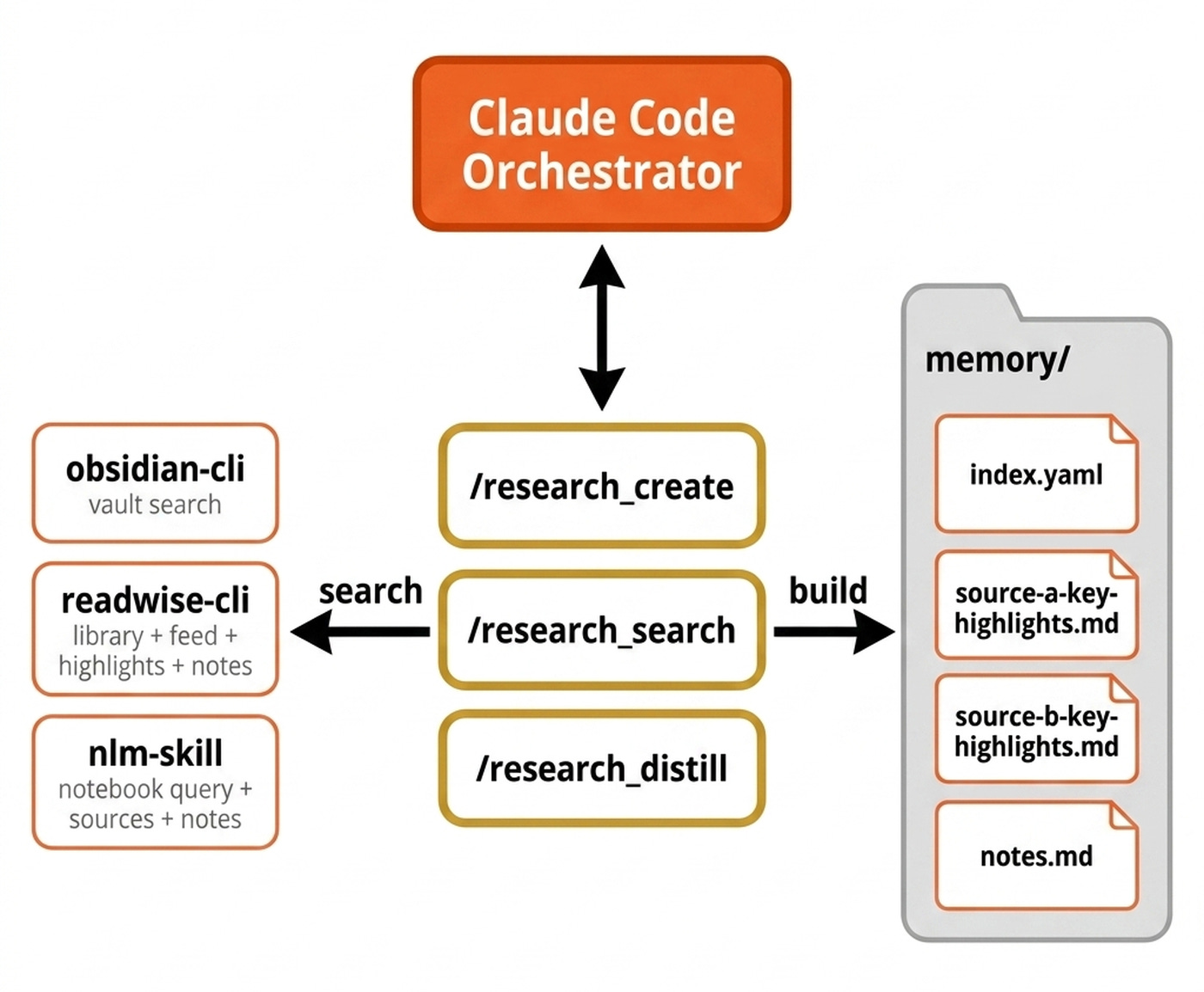
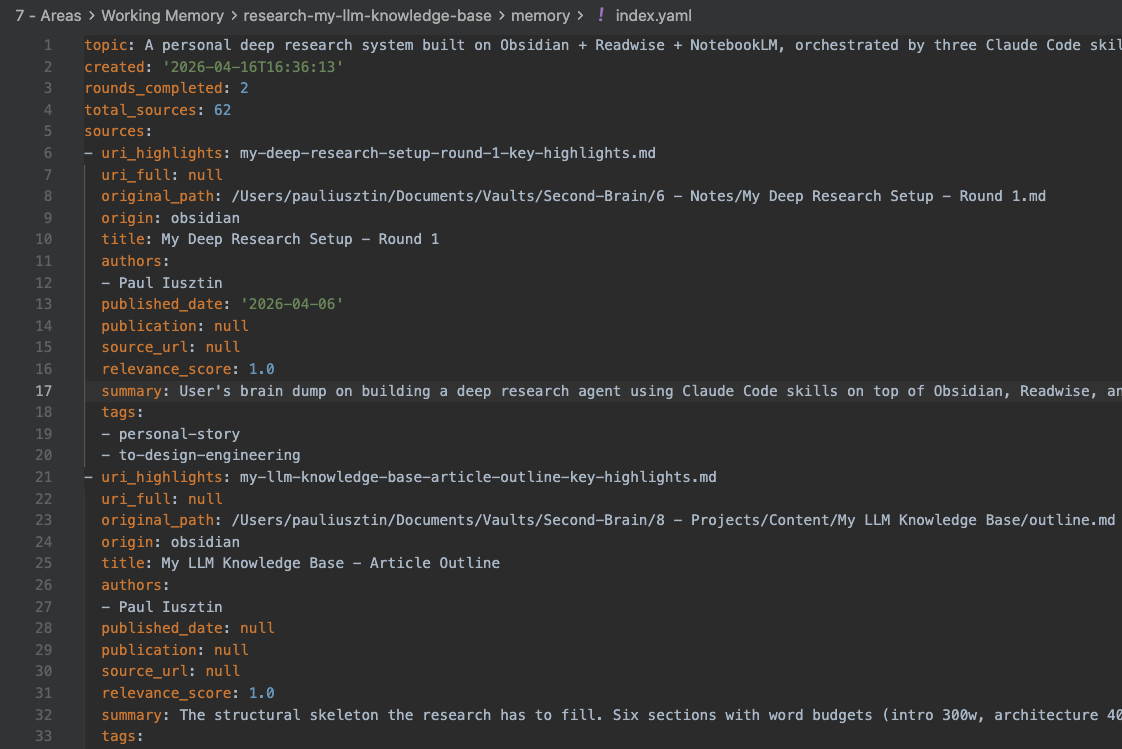
The memory/ folder is built around index.yaml. It holds metadata per source, including uri_highlights, uri_full, original_path, and origin. The LLM reads the index first, then picks three to five relevant files based on summaries and reads those directly.
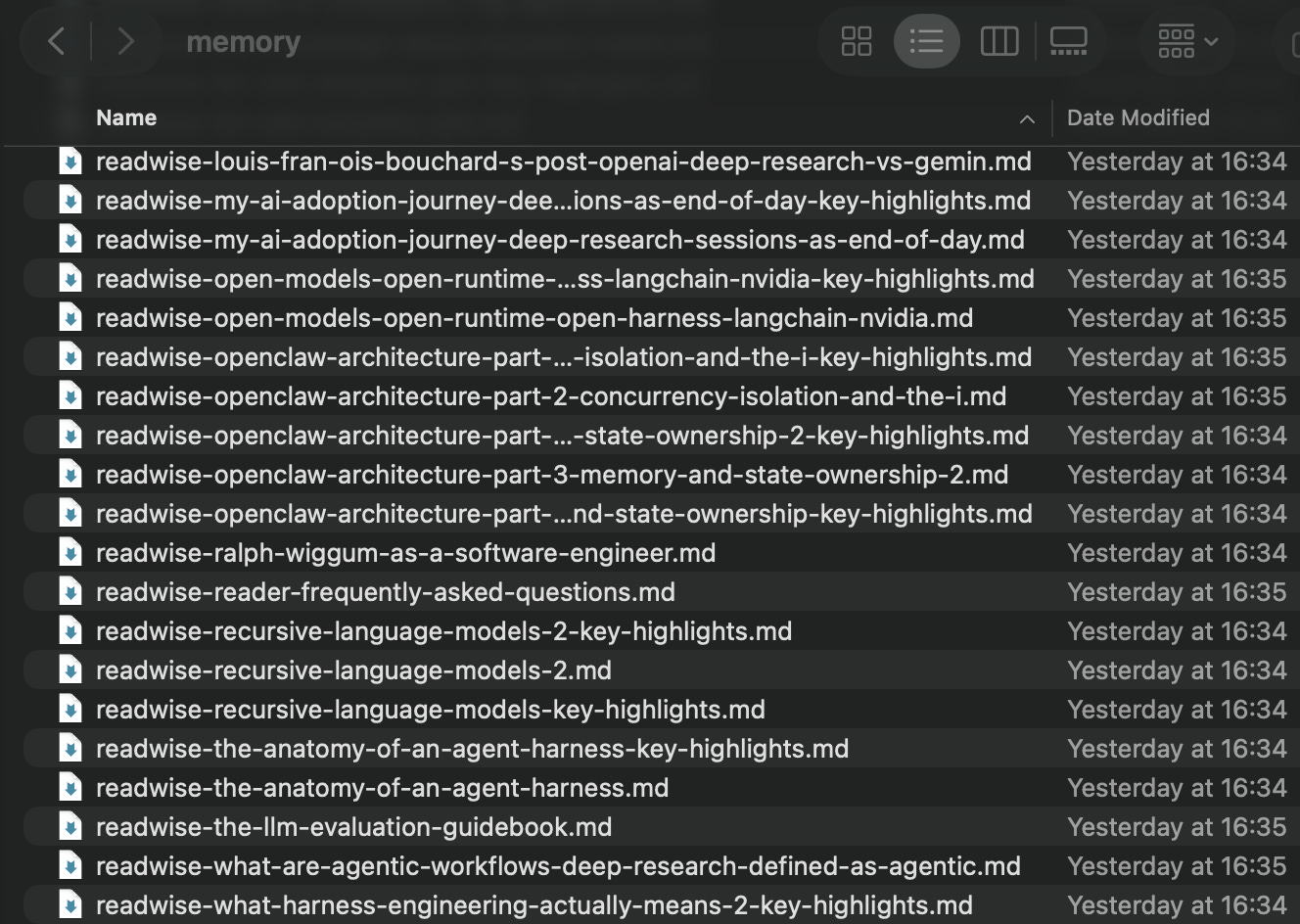
memory/ folder on disk — index.yaml alongside each source’s key-highlights and full-document files.There are no embeddings, no chunking, and no vector store to maintain, ensuring references stay perfectly traceable. Like OpenClaw, we treat memory as plain Markdown in the agent workspace, where files are the source of truth and the model only remembers what gets written to disk [1].
The Obsidian, Readwise, and NotebookLM files act as the raw, immutable data. We touch them manually as humans, never through this pipeline. On top of that, /research_create produces a local actionable knowledge base for a specific scope, resulting in an ephemeral memory/ folder per topic.
This separation allows the same raw data to feed many different research projects without contamination. The key invariant of this architecture is that the orchestrator never loads source files. Researcher subagents touch the raw files, while the orchestrator only ever sees structured JSON summaries flowing between steps.
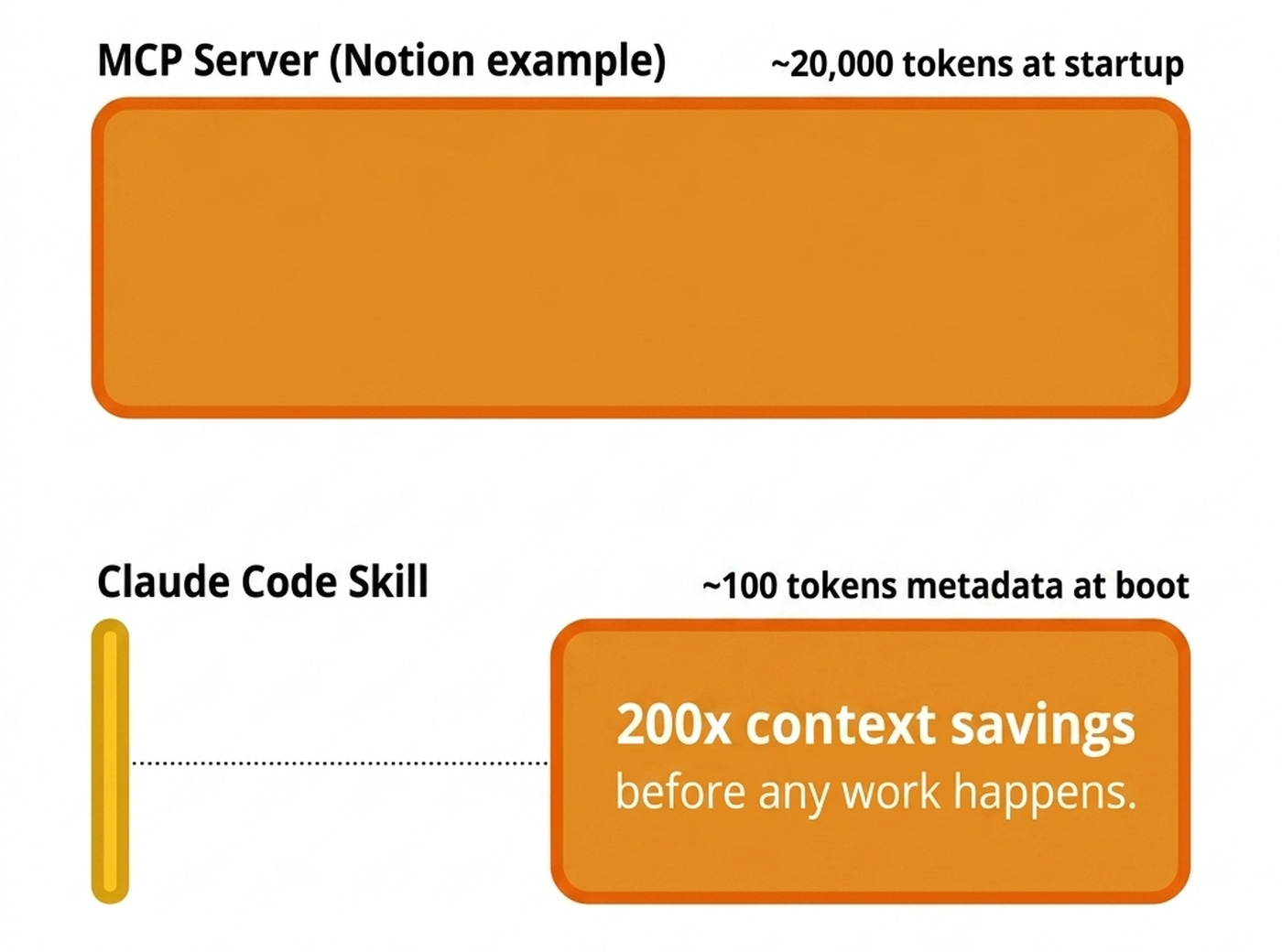
We chose CLIs over Model Context Protocol (MCP) servers for three reasons. First, token economics. A skill enters Claude Code’s context at boot at ~100 tokens of metadata, and the body loads only when invoked.
By comparison, Notion’s MCP server dumps roughly 20,000 tokens of self-documenting tools at startup whether you use them or not. That is roughly 200× less context before you have done anything [2].
Second, CLIs compose with bash. The orchestrator can pipe results through tools like jq or redirect output straight to a file, whereas MCP tool calls must round-trip through the LLM.
Third, Markdown is the native language of LLMs. As Simon Willison argues, Markdown with YAML frontmatter is more in the spirit of LLMs than MCP, because you put text in the context and let the LLM pick [3].
That is the whole architecture. Now let’s open up the heaviest of the three skills, /research_create, and watch the multi-round research loop in detail, where the orchestrator-never-loads invariant earns its keep.
How /research_create Works
The process starts with a brain dump from the user, which can include text, URLs, or local file paths. During the deep research, you confirm three configuration knobs in one prompt: the number of rounds, queries per round, and a topic slug. Seed URIs from the brain dump always land in the output with a relevance score of 1.0, bypassing reranking because they are your explicit picks.
The orchestrator generates queries and dispatches one researcher subagent per query in parallel. Each researcher runs platform-specific searches. For Readwise, this means querying the library, feed, highlights, and document notes. For Obsidian, it means querying the local vault files. For NotebookLM, it means querying the projects and their associated sources and notes.
For Obsidian, we found that using its CLI — which leverages its index — is 10× more efficient than letting the LLM roam around your vault.
The subagent does its own within-agent deduplication by original path. It captures metadata while files are open. It also caps output at a top-15 limit of unique findings.
Between rounds, a gap_analyzer subagent reads the deduplicated findings via jq without full reads. It flags thin or missing themes against the initial key themes and emits the next round’s queries. After all rounds, a reranker subagent scores every candidate between 0.0 and 1.0 using the cheapest sufficient signal. It checks metadata first, then reads the head and tail of the doc, and uses full reads only as a last resort.
Finally, a builder subagent invokes a Python script to emit the YAML deterministically, placing seeds first, then descending by score.
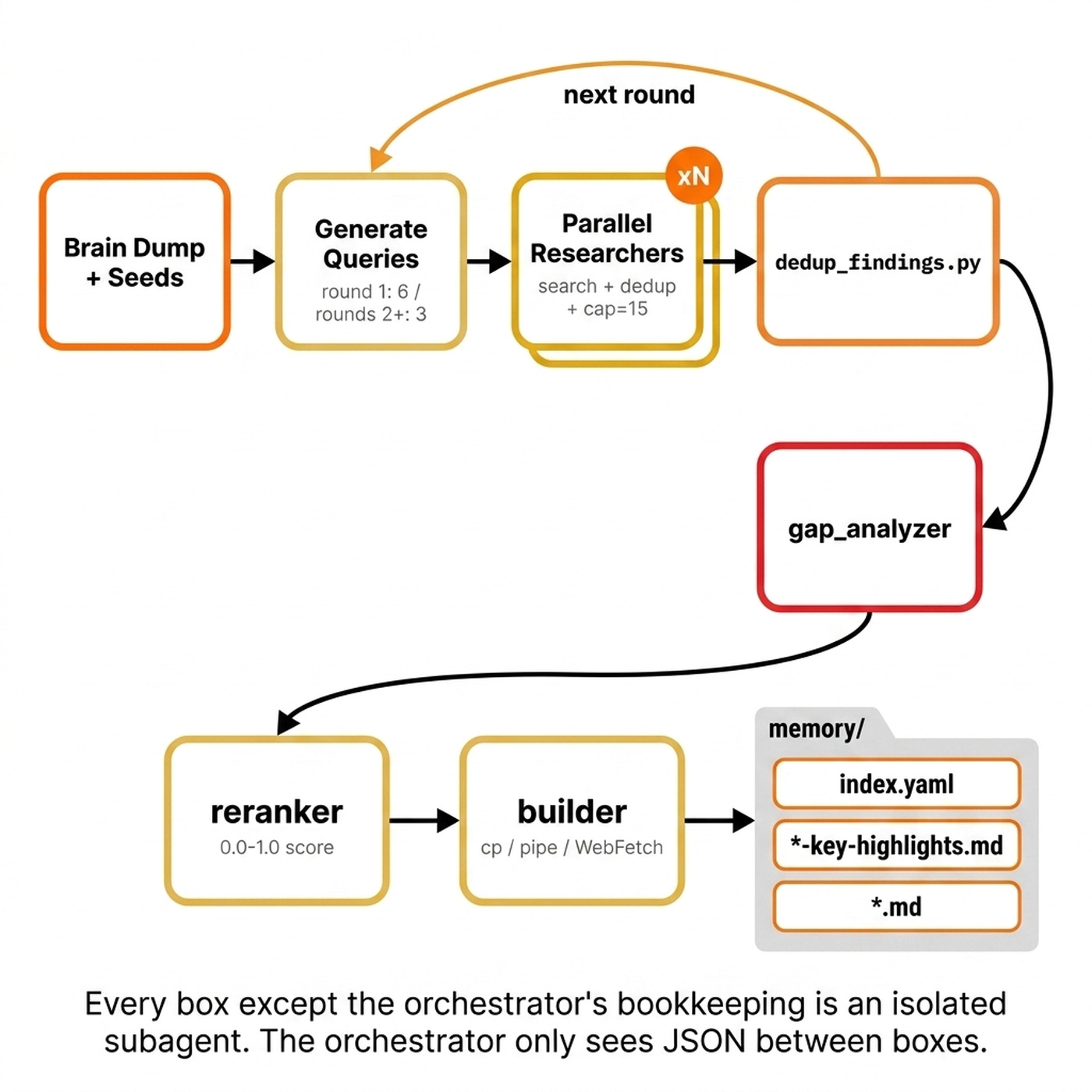
/research_create pipeline. The orchestrator schedules. Subagents do the heavy reads.We use this shape because context isolation is our central design choice. Every step that touches real source content runs in an isolated subagent with its own context window. The orchestrator only sees the compacted metadata of each file, while moving the actual file using mv bash commands into the memory folder.
The index.yaml file holds pointers and metadata for every file in the wiki. The orchestrator holds pointers, while subagents hold content. Geoffrey Huntley, creator of Ralph Loops, states that your primary context window should operate as a scheduler, scheduling other subagents to perform expensive allocation-type work [4].
Subagents compress tens of thousands of input tokens into 1,000–2,000 output tokens before handing back to the orchestrator. That compression ratio is the whole point. The researcher subagents read deeply, and the orchestrator stays light.
Once the memory/ folder exists, anyone can read it without loading source files. We use the /research_search skill to query this index.
How /research_search Works
The /research_search skill handles the read side of the system. Any agent can be handed a memory/ folder and query it without loading source files into context. The skill encodes the protocol once so future agents do not have to re-derive it.
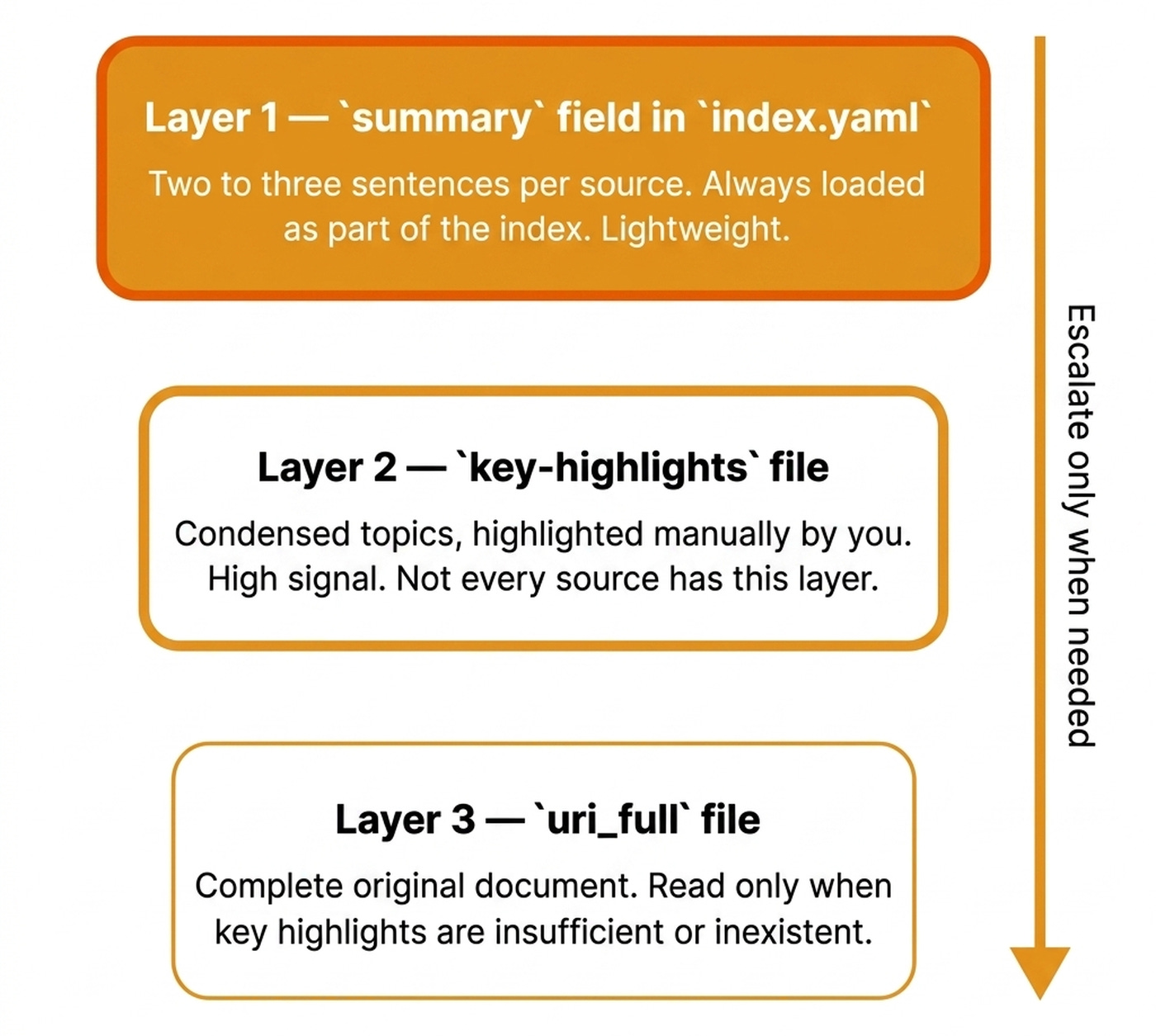
The system uses three layers of detail. Layer 1 is the summary field in index.yaml. It contains two to three sentences per source and is always loaded as part of the index. It is enough to answer what you have on a topic or build a table of contents.
Layer 2 is the key-highlights file, which holds the condensed topics of a file. This is extremely powerful when using reader tools such as Readwise, as these highlights are made manually by you, the reader, consisting of huge signal. Thus, not every source has this layer. It’s better not to have it at all than to have an LLM extract it.
Layer 3 is the uri_full file, representing the complete original document. You read it only when key highlights are insufficient or inexistent.
Anthropic notes that models are great at navigating filesystems, and presenting tools as code on a filesystem allows models to read tool definitions on-demand, rather than reading them all up-front [5]. That maps exactly onto index.yaml plus lazy key-highlights loading.
Intuitively, the index.yaml file gives us progressive disclosure — the same pattern used inside skills — so the agent can choose from many options without drowning in information [6].
The agent slices index.yaml by origin, location, relevance-score threshold, tags, author, publication, date range, or NotebookLM notebook.
The most beautiful part? Because index.yaml is structured data, the agent writes code on top of it. It uses jq filters, Python sorts, and awk projections.
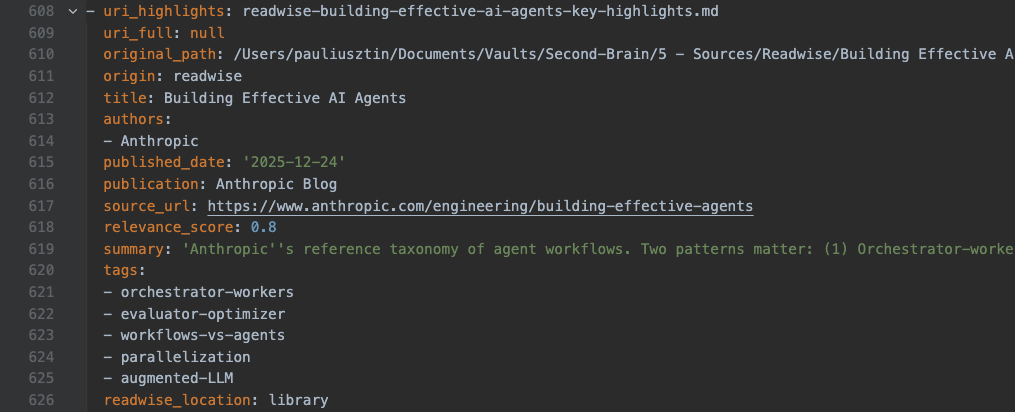
index.yaml — origin, authors, relevance score, and the URIs that power progressive disclosure.LlamaIndex’s head-to-head benchmark proves this scales. A filesystem-explorer agent beat a hybrid vector RAG pipeline on correctness (8.4 vs 6.4) and relevance (9.6 vs 8.0) at a sub-60 document scale, precisely because the LLM saw whole files instead of chunks [7].
Portability comes for free. Hand the self-contained memory/ folder to any agent, and they get up to speed instantly. Search lets agents find what is there. But once you have drafted an article, you also need to know what part of the wiki you actually used within your piece. That is /research_distill.
How /research_distill Works
Given any piece of content and the memory/ folder used during writing, the skill walks every source in index.yaml. It decides whether the content actually used it by checking for explicit references or traceable ideas. The process is conservative by default. It is better to miss a borderline source than include one that was not actually used.
The output is a single research.md file. It is fully self-contained, meaning you never need to go back to the memory/ folder again. For this very article, /research_distill should match around 15 to 20 of the 62 sources in the memory folder.
This matters because downstream generation loops re-load the research on each iteration. For example, within the evaluator-optimizer pattern, the system generates, critiques, and revises [8]. Keeping the anchor research small is the difference between an article that stays grounded and one that starts hallucinating.
As I explained in my article on Recursive Language Models (RLMs), when the corpus fits in context with progressive disclosure, fancy retrieval is overkill [9].
What’s Next
For personal-scale research involving hundreds of sources, a well-structured memory/ folder with an index.yaml beats a RAG pipeline on every axis. It gives you full lineage back to source URLs, portability to pass the folder to any agent, and lower costs with no embedding model or vector store.
To further optimize the system, making it more context-efficient, I am considering moving the deduplication and re-ranking fully into Python scripts, adding a local cross-encoder reranker to avoid LLM calls for scoring, and extending the researcher with tag-aware filtering.
But here is what I’m wondering:
What data source in your work makes you most want a private deep research agent? Is it your Obsidian vault, your Readwise library, a code repository, or your team’s shared documents?
Click the button below and tell me. I read every response.
Enjoyed the article? The most sincere compliment is to restack this for your readers.
Whenever you’re ready, here is how I can help you
Go from agent user to agent builder. Master the foundations of AI agents and turn fragile demo code into reliable, production-ready systems with my course, Agent Engineering: Building Multi-Agent Systems (made with Towards AI).
35 lessons. Pure foundations from scratch. 4 mini-projects. 2 production systems. A certificate and direct access to me & industry experts in our Discord.
Built for software and data professionals transitioning into AI engineering. Rated 5/5 with 300+ students. The first 7 lessons are free:
Not ready to commit? Start with our free Agent AI Engineering Guide, a 6-day email course on the mistakes that silently break AI agents in production.
References
Govindarajan, V. (2026). OpenClaw Architecture Part 3 - Memory and State Ownership. The Agent Stack. https://theagentstack.substack.com/p/openclaw-architecture-part-3-memory
Talebi, S. (2026). Claude Skills Explained in 23 Minutes. YouTube. https://youtube.com/watch?v=vEvytl7wrGM
Bowne-Anderson, H. (n.d.). Episode 70: 1,400 Production AI Deployments. Vanishing Gradients Podcast. https://read.readwise.io/read/01kh8p44e70a1273g7ykgx7h5y
Huntley, G. (n.d.). Ralph Wiggum as a “software engineer”. ghuntley.com. https://ghuntley.com/ralph/
Anthropic. (n.d.). Building More Efficient AI Agents. Anthropic Blog. https://www.anthropic.com/engineering/building-more-efficient-ai-agents
Griciūnas, A. (n.d.). Agent Skills: Progressive Disclosure as a System Design Pattern. SwirlAI Newsletter. https://newsletter.swirlai.com/p/agent-skills-progressive-disclosure
LlamaIndex. (n.d.). Did Filesystem Tools Kill Vector Search?. LlamaIndex Blog. https://www.llamaindex.ai/blog/did-filesystem-tools-kill-vector-search
Anthropic. (2025). Building Effective AI Agents. Anthropic Blog. https://www.anthropic.com/engineering/building-effective-agents
Iusztin, P. (n.d.). Your RAG Pipeline Is Overkill (RLMs). Decoding AI Magazine. https://www.decodingai.com/p/your-rag-pipeline-is-overkill-rlms
Images
If not otherwise stated, all images are created by the author.
Awesome. I was hoping we’d see some great posts on adoption or using this. Its a cool idea.
This is super cool, thanks for sharing!