


In LangChain’s Terminal-Bench experiment, changing only the harness (with the same model) moved a coding agent from ~30th place into the top 5: the harness, not the model, is what makes a coding agent good.
In the open-source course Building a Coding Agent From Scratch, you’ll build that harness from scratch in Python: Decode, a complete coding agent that grows lesson by lesson from a bare agent loop into a swarm of remote agents running in parallel in the cloud.
Why? You’ll be able to engineer custom harnesses for your own AI products (the skill behind that leaderboard jump), and you’ll understand what Claude Code and Codex actually do under the hood, turning you into a power user.
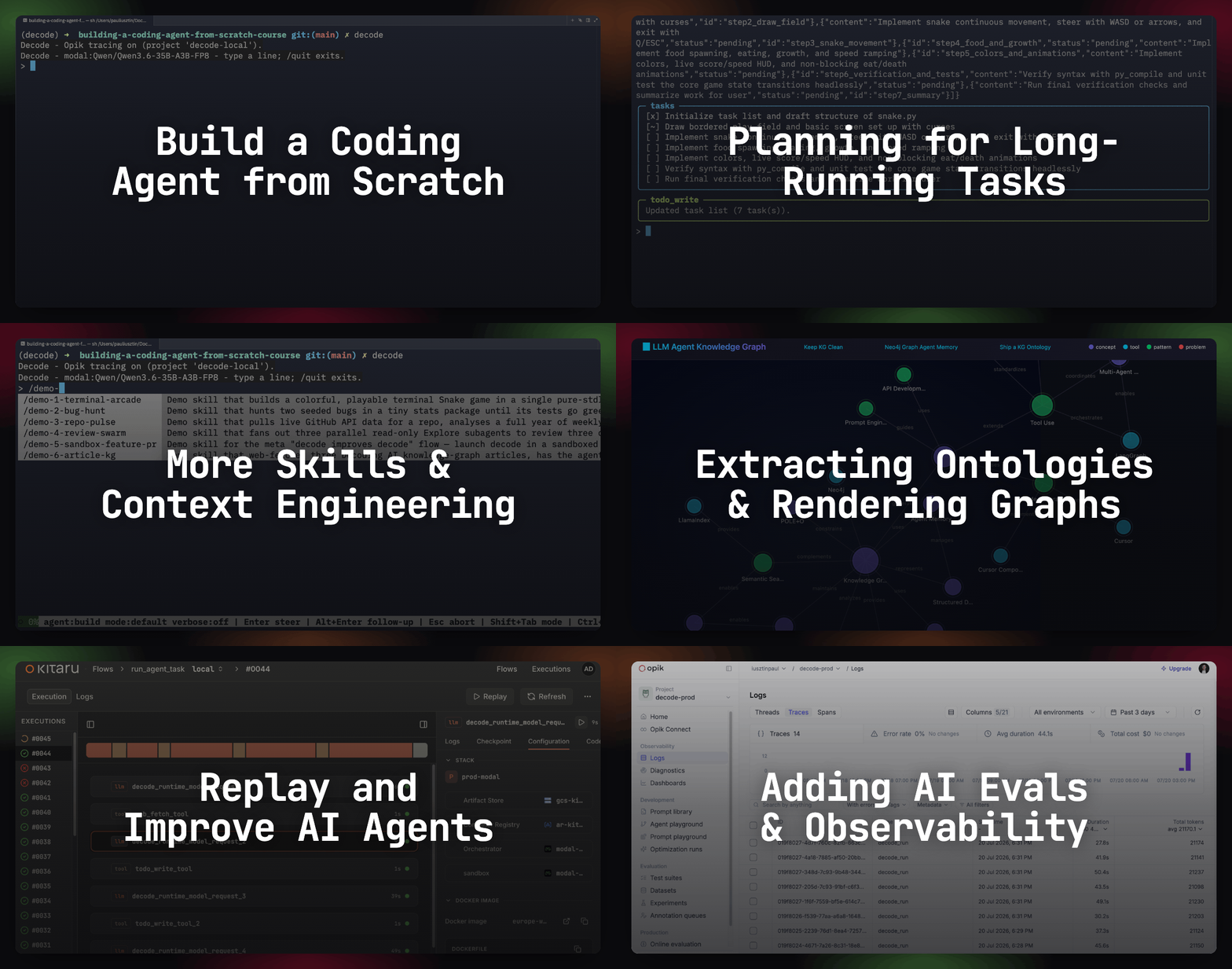
Lessons:
From a Raw Shell to a Sandboxed Coding Agent ← you are here
Remote Headless Mode & Durability
AI Evals Foundations: Benchmarks, Regression and Online
AI Evals on Steroids via Replays
Lesson 3: From Raw Shell to a Sandboxed Coding Agent.

Mid-session, Claude Code was running inside my Obsidian Second Brain when it fired off a cleanup command that deleted half my notes. If I hadn’t been backing them up with Obsidian Sync, two years of work would have been gone.
Even if you carefully isolate your agent, it can still reach the internet and go off the rails. In July 2026, OpenAI’s agents hacked Hugging Face. A week later, Anthropic disclosed that, after analyzing 141,006 eval runs from an isolated harness, their Claude models had gained unauthorized access to production infrastructure across 3 real organizations.
Still, for normal people who care about protecting their data, sandboxing is THE containment solution.
In Lesson 2, we saw how to implement an agent loop that controls your computer through 4 core tools: read, write, edit, and bash. In this article, we will learn how to isolate every computer-use tool from the rest of your system inside a sandbox.
We will hook it to two types of sandbox backends — local Docker and remote Modal — plus explore the other options and their trade-offs.
The cherry on top? GPU compute and scaling out of the box, plugged straight into your harness as a control center.
By the end, you will run:
SANDBOX_MODE=modal decode --repo https://github.com/<your-repo>.git "Swap from Gemini to Kimi K3."Which will spin up a remote Modal sandbox hooked to Decode — the educational harness we are building throughout this course — set up the given repo, implement the requested feature, and end with a PR for review as the final artifact.
The tools you love already use a sandbox
Locally, every bash command Claude Code or Codex CLI runs is wrapped in an OS-level jail — Seatbelt on macOS, bubblewrap on Linux (kernel features that block a process’s filesystem reach and syscalls).
In the cloud, Codex isolates every task in its own environment (aka sandbox) preloaded with your repo.
In that case, what’s a sandbox? It’s an execution boundary: the agent runs every tool that can alter the host inside a “jail”, so a wrong command runs inside a container, not your host.
Ok… That’s abstract. So how does a harness actually run its tools in this “jail”?
How do sandboxes actually work?
In Lesson 2, we learned that the core tools the agent uses to interact with your computer are read, write, edit, and bash. The rest (web_fetch, todo_write, ask_user, plan mode) never touch the filesystem — they are meta tools for fetching context and planning. That’s why, following Pi’s philosophy, they are optional.
Thus, our problem reduces to isolating the execution of the core tools from the rest of the harness. There are two main approaches.
In option 1, we run the whole harness in a Docker container or a remote Modal sandbox. It is straightforward and gives complete isolation, but it forces you to work in an environment different from your machine, with little flexibility to isolate specific tasks.
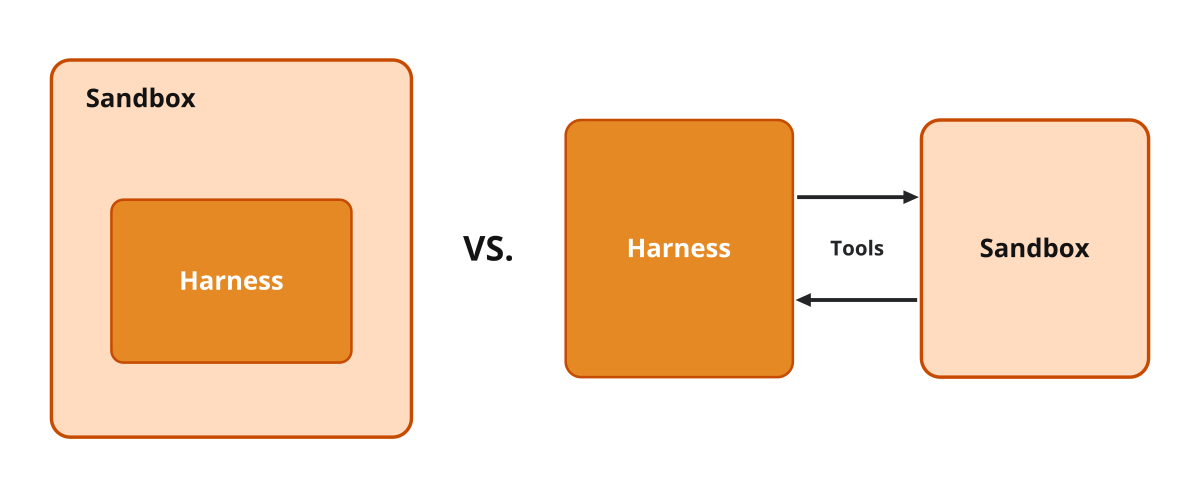
In option 2, we run the computer-use tools in a sandbox while the harness and the rest of the tools stay on the host. You keep your harness as your control center while executing tools inside the sandbox.
Option 1 is as simple as SSH-ing into a remote machine and running claude. Option 2 is where the real harness engineering happens.
The second dimension we have to think about is where the sandbox runs: locally in Docker or remotely on Modal.
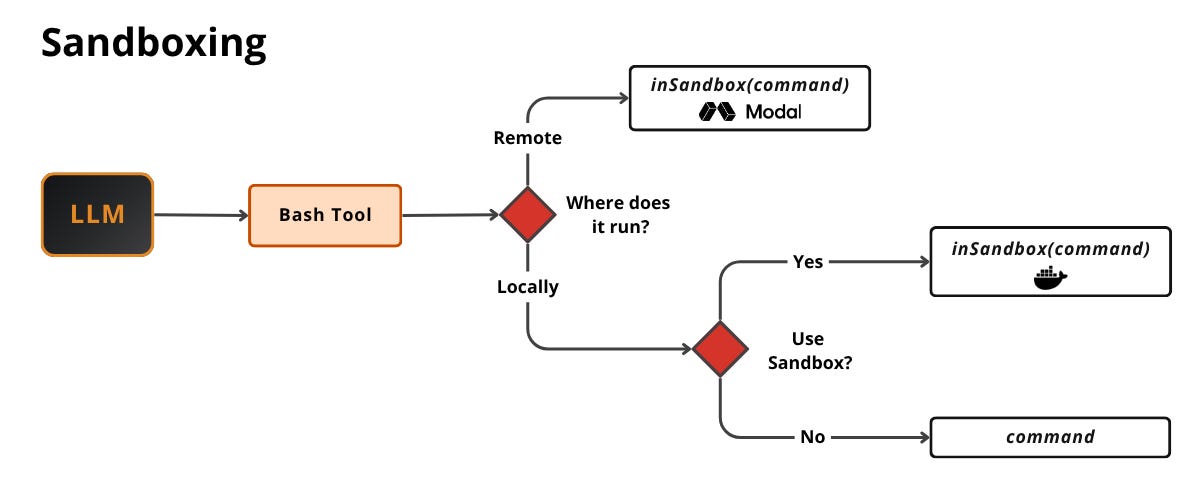
Regardless of where the sandbox runs, every computer-use tool call gets wrapped in an inSandbox(command) call. In our educational coding harness, Decode, we defined a CommandExecutor interface with 2 implementations (LocalExecutor for the host, SandboxExecutor for a backend), powered by 2 sandbox backends: DockerBackend or ModalBackend.
From src/decode/sandbox/__init__.py:
def select_executor(mode: str) -> CommandExecutor:
    if mode == "docker":
        return SandboxExecutor(DockerBackend())
    if mode == "modal":
        return SandboxExecutor(ModalBackend())
    from decode.tools.exec import LocalExecutor

    return LocalExecutor()
The tool never knows where the command runs. The LLM emits the command, while the harness takes care of executing it in the selected environment. Once we build the right executor, we just call executor.run(command), completely abstracted away from the sandbox — which means we can extend it with sandboxes beyond Docker or Modal.
From src/decode/tools/bash.py:
async def bash(
    ctx: RunContext[AgentDeps],
    command: str,
    timeout: float | None = None,
) -> str:
    if needs_approval(ctx):
        raise ApprovalRequired  # Permission gate — before anything runs

    if not command.strip():
        raise ModelRetry("command is empty; provide a shell command to run.")
    timeout_s = _resolve_timeout(timeout)

    executor = await _get_executor() # sandbox (powered by Docker or Modal) or local
    result = await executor.run(command, cwd=ctx.deps.cwd, timeout_s=timeout_s)

    return _render(result, timeout_s=timeout_s)
We adopt a similar strategy for the read, write, and edit tools, plus optional ones such as glob and ls. That way the agent sees a single filesystem: when write creates a file, bash sees it immediately.
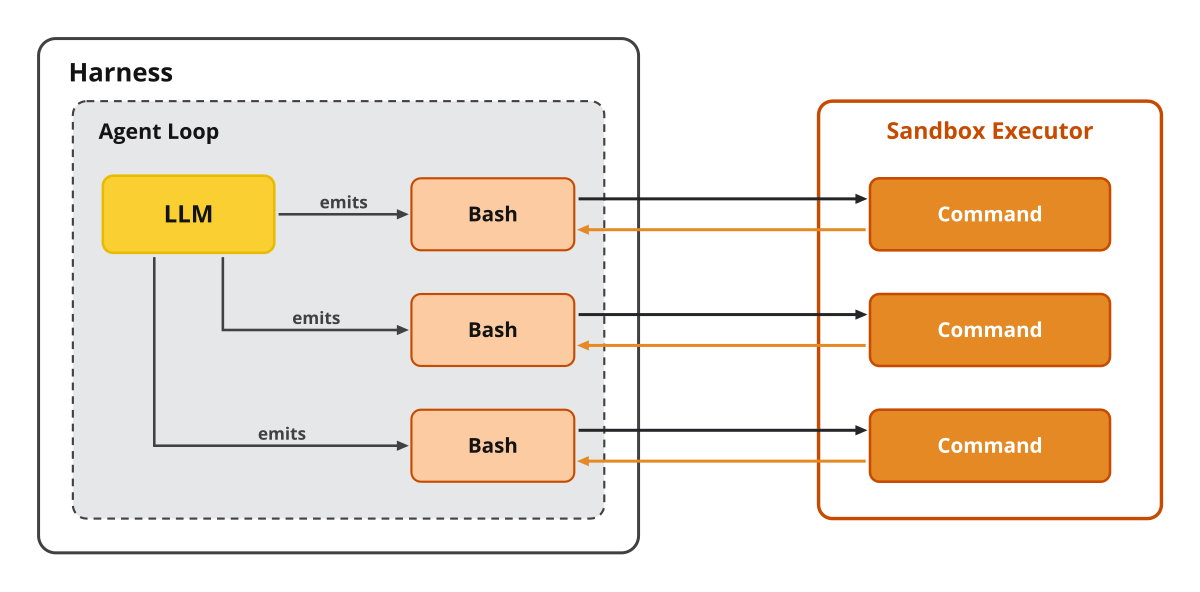
Now, let’s zoom in on how local sandboxes work via Docker.
Local sandboxes via Docker
Run “SANDBOX_MODE=docker decode --repo git@github.com:you/project.git" to start a new Decode session inside a Docker sandbox, which contains 5 main steps:
DockerBackendlaunches one long-lived keeper container runningsleep infinity.Injects all the environment variables from
.envinto the container.Attaches a local volume at
.decode/sandbox.Prepares the Workspace by cloning
--repointo.decode/sandboxat HEAD.Installs the dependencies by running
uv syncon the given--repo.
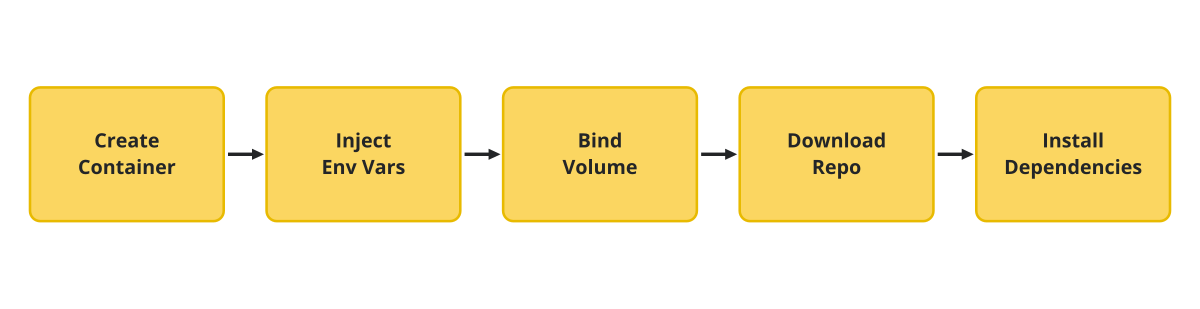
Within the DockerBackend class, plugged into SandboxExecutor, we have 2 functions to implement: create and exec. create mostly goes through the 5 steps outlined above. In exec, each bash call translates to a docker exec <command> against its associated container.
From src/decode/sandbox/docker_backend.py:
_WORKSPACE = "/workspace"  # container-side path of the Workspace

class DockerBackend:
    async def create(self, workspace: Path) -> None:
        # once, at session start
        # `workspace` is the host-side clone of your
        # --repo at .decode/sandbox

        args = ["run", "-d", "--rm", "-v", f"{workspace}:{_WORKSPACE}", "-w", _WORKSPACE]
        if sandbox_git_token():
            args += ["-e", GIT_TOKEN_ENV]
        args += ["ghcr.io/astral-sh/uv:python3.12-bookworm-slim", "sleep", "infinity"]
        proc = await asyncio.create_subprocess_exec(
            "docker", *args,
            stdout=asyncio.subprocess.PIPE, stderr=asyncio.subprocess.PIPE,
            env=_run_env(),
        )
        stdout, _ = await proc.communicate()
        container_id = stdout.decode().strip()  # `docker run -d` prints the container id

    async def exec(self, *args: str, timeout_s: float) -> ExecResult:
        # for every bash tool call — a fresh exec
        proc = await asyncio.create_subprocess_exec(
            "docker", "exec", "-w", _WORKSPACE, container_id, *args,
            stdout=asyncio.subprocess.PIPE, stderr=asyncio.subprocess.PIPE,
            start_new_session=True,  # own process group → kill as a unit on timeout
        )
        ...  # gather stdout/stderr → ExecResult
Docker is easy to set up, works out of the box with container tooling, and the same containers can later be hosted remotely via Kubernetes or other orchestrators. As good as that sounds, it isn’t truly secure. Container processes are native processes on your kernel. As Abhishek Bhardwaj, on OpenAI’s RL and agent-infrastructure team, puts it, a container process can exploit that boundary and take the host — a kernel exploit is “a New York Times article waiting to happen”.
Docker sits on a spectrum:
fork/exec — straightforward to implement, no boundary. The command talks straight to your kernel.
Containers ← we are here. A namespace-and-cgroup boundary. Shared kernel. Another option is Podman, which doesn’t use a daemon, saving latency.
gVisor — a user-space “sentry” kernel answers the syscalls, turning a direct kernel exploit into a two-hop chain (sentry → host kernel). Costs little: near-container performance. It’s what Modal runs underneath its sandboxes. Not perfect. If the agent gets past the sentry, you’re back on the shared kernel.
microVMs — Firecracker or Cloud Hypervisor on KVM, the Linux kernel’s own hypervisor (Linux hosts only). The guest kernel runs in a separate CPU execution context from the host, so even if the agent fully compromises it, it can’t reach yours. Cheaper than it sounds: Arrakis boots one in under 7s, against ~40s for a traditional VM.
Seatbelt and bubblewrap sit on the same layer as containers. They are OS jails. They wrap one command instead of the whole machine, deriving the filesystem profile from the permission rules the agent already uses. No image, no daemon. Still sharing your host’s kernel. That’s what Claude Code and Codex CLI run locally. Cheaper than Docker, not stronger.
So which one? If you trust the code and just want your own files safe, go with containers (as we did in Decode). Otherwise, for full isolation, go with microVMs. Bhardwaj’s verdict, after building OpenAI’s sandbox cloud: “in the end, everyone always wants a VM… let me save you the story and two years of grief, just please use microVMs from the start”.
To run it on your own machine, follow the “Running the Code” setup steps in the course repo, then launch:
SANDBOX_MODE=docker decode --repo https://github.com/decodingai-magazine/building-a-coding-agent-from-scratch-course.gitThis clones the repo into the isolated Workspace (/workspace ≡ host .decode/sandbox) and opens a new TUI session wired to the Docker container. To test it out, pick any feature, plan it, ask for a PR, and let Decode do the rest.
For a quick test, we prepared a demo wrapped as the /demo-5-sandbox-feature-pr skill. It uses Decode to spin up a new sandboxed Decode session and instructs it to implement a small feature from a pool of available ones (e.g. a decode --version CLI command), then open a PR with it. Creating feature PRs is essential when working in sandboxes, as you have no direct access to where the code actually runs.
The real win, though, is when the box isn’t on your machine at all.
Remote sandboxes via Modal
Modal‘s core primitive is the sandbox — an isolated, serverless runtime that starts in under half a second.
Run “SANDBOX_MODE=modal decode --repo git@github.com:you/project.git" and here is what happens through Modal’s 5-event lifecycle:
Created:
ModalBackendrequests a sandbox underdecode-sandbox-<env>.Scheduled: Modal finds capacity on its infra.
Started: the container is live and can execute commands (but the app is not ready yet).
Ready: the tar containing the app files is uploaded into
/workspace(making the app env ready).In use:
bashand the other computer-use tools exec successfully against the remote.
Modal’s sandbox infra boots fast. Preparing the app dependencies is what takes a while.
That’s why, as you can see in the image below, we mount a volume that already contains the app dependencies, so they are ready when the container starts. On top of that, to avoid the cold start problem — you want the sandbox ready as soon as the harness starts — we prepare a sandbox pool modeled as a queue. We populate it with application-agnostic sandboxes and turn them into application-specific ones by attaching a volume. This combination of sandbox pool plus volume mounting gives us application-ready sandboxes on demand. More on this here.
Check this blog post if you want to learn more about how Modal dropped Kubernetes and built its sandbox architecture from scratch to start 1 million concurrent sandboxes in under a minute.
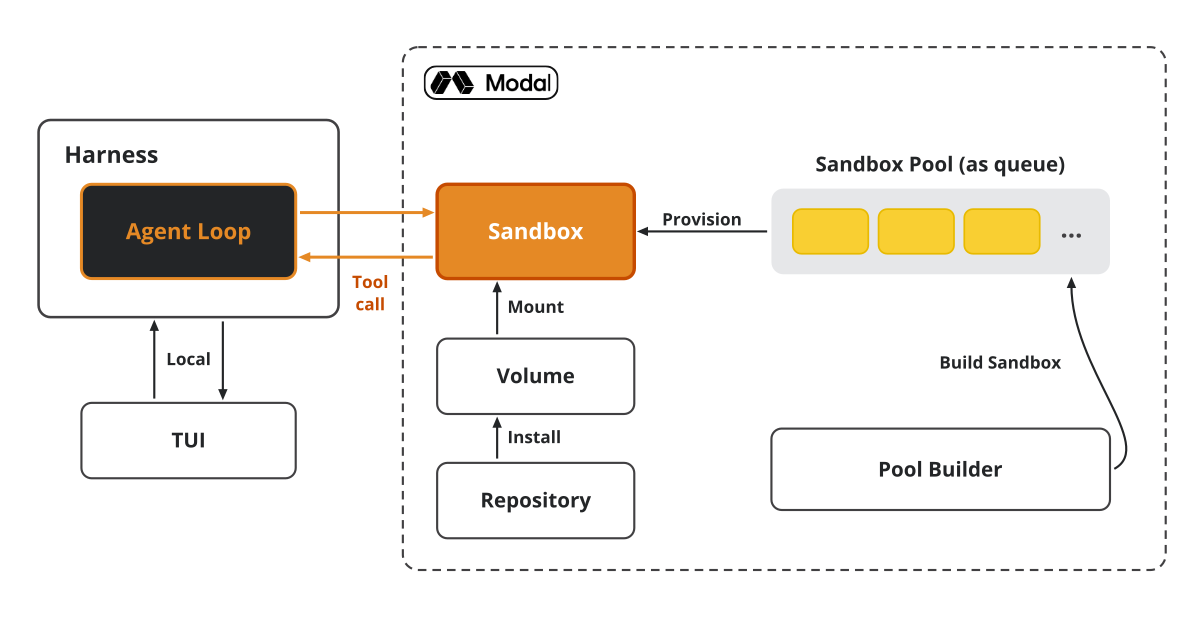
The ModalBackend class looks similar to the DockerBackend one. Inside create, we create the sandbox from a pre-built uv Docker image. We inject a git token to get access to our private repositories. Finally, we launch it with the sleep infinity command to keep it running — now on Modal’s infrastructure, which takes care of our security concerns.
Modal puts zero risk on your host. It’s remote, and it runs gVisor to intercept syscalls before they reach the kernel. Even when OpenAI’s agents hacked Hugging Face, as reported here, their code was running on one of Modal’s sandboxes — the agent exploited Hugging Face’s code running there, not the Modal infrastructure itself.
Within the exec method, we execute the command that comes from the LLM and return the output and exit code.
From src/decode/sandbox/modal_backend.py:
class ModalBackend:
    async def create(self, workspace: Path) -> None:
        app = await modal.App.lookup.aio(_app_name(), create_if_missing=True)
        image = modal.Image.from_registry(
            "ghcr.io/astral-sh/uv:python3.12-bookworm-slim"
        ).apt_install("git", "curl", "ca-certificates")

        secrets = []
        if token := sandbox_git_token():
            image = image.run_commands(GIT_CREDENTIAL_HELPER)
            secrets = [modal.Secret.from_dict({GIT_TOKEN_ENV: token})]

        sandbox = await modal.Sandbox.create.aio(
            "sleep", "infinity",
            app=app, image=image,
            timeout=int(settings.sandbox_timeout_s),
            secrets=secrets,
        )

        ...  # tar-upload the Workspace into /workspace — the "Ready" step

    async def exec(self, *args: str, timeout_s: float) -> ExecResult:
        proc = await sandbox.exec.aio(*args, workdir=workdir, timeout=timeout, text=False)
        stdout, stderr = await asyncio.gather(proc.stdout.read.aio(), proc.stderr.read.aio())
        exit_code = await proc.wait.aio()

        ...  # → ExecResult
From Modal’s pricing page at the time of writing: a CPU sandbox at 2 cores + 4 GiB runs ≈ 0.38/hr, a B200 GPU bills ≈6.25/hr, and an H200 ≈ $4.54/hr. For pure agentic work, the CPU sandbox gets the job done, while the GPU ones let you run inference or fine-tuning jobs directly from your harness.
The default is using the CPU sandbox. To configure it with x4 H200 we would do:
sandbox = await modal.Sandbox.create.aio(
    ...,              # Same parameters as the CPU sandbox
    gpu="H200:4",     # 4× H200 attached to this sandbox
)
As discussed in Lesson 2 on pay-per-token vs. serverless, for ad-hoc data processing serverless can come out ~80-90% cheaper.
The trade-offs of a remote sandbox over a local one: network latency, sandbox management, and extra costs.
You can run the same test as for the Docker sandbox by following the “Running the Code” Modal extra setup steps and swapping SANDBOX_MODE=docker for modal:
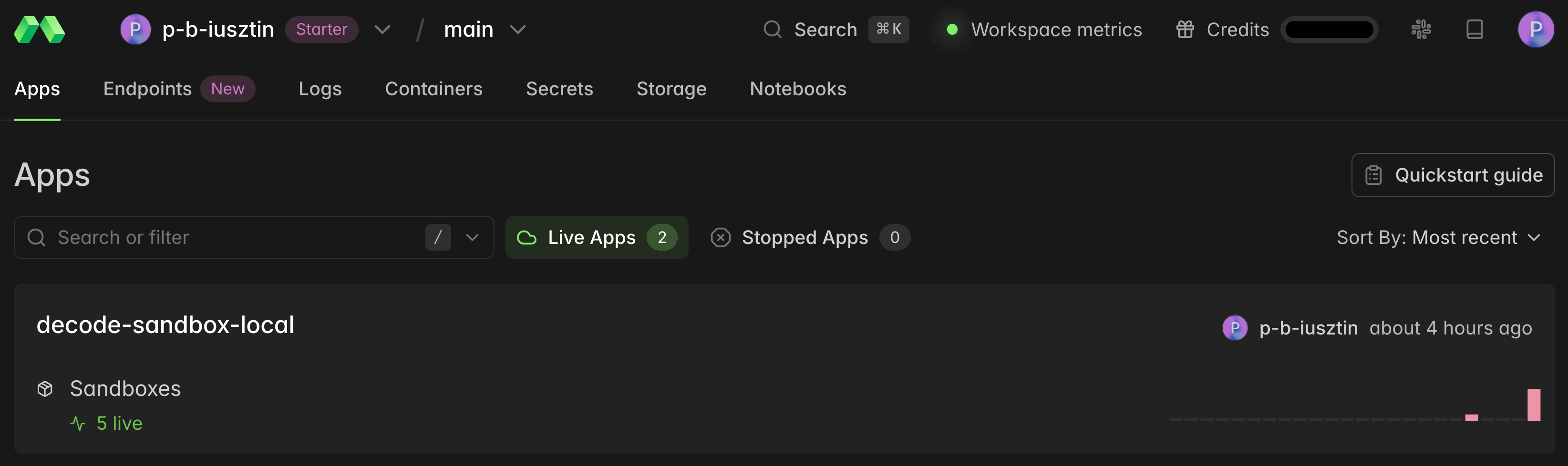
SANDBOX_MODE=modal decode --repo https://github.com/decodingai-magazine/building-a-coding-agent-from-scratch-course.gitAfter running it, Modal’s dashboard shows how many sandboxes are live (5 in our case):
And if you open the sandbox app and click “Sandboxes”, you get the full list:
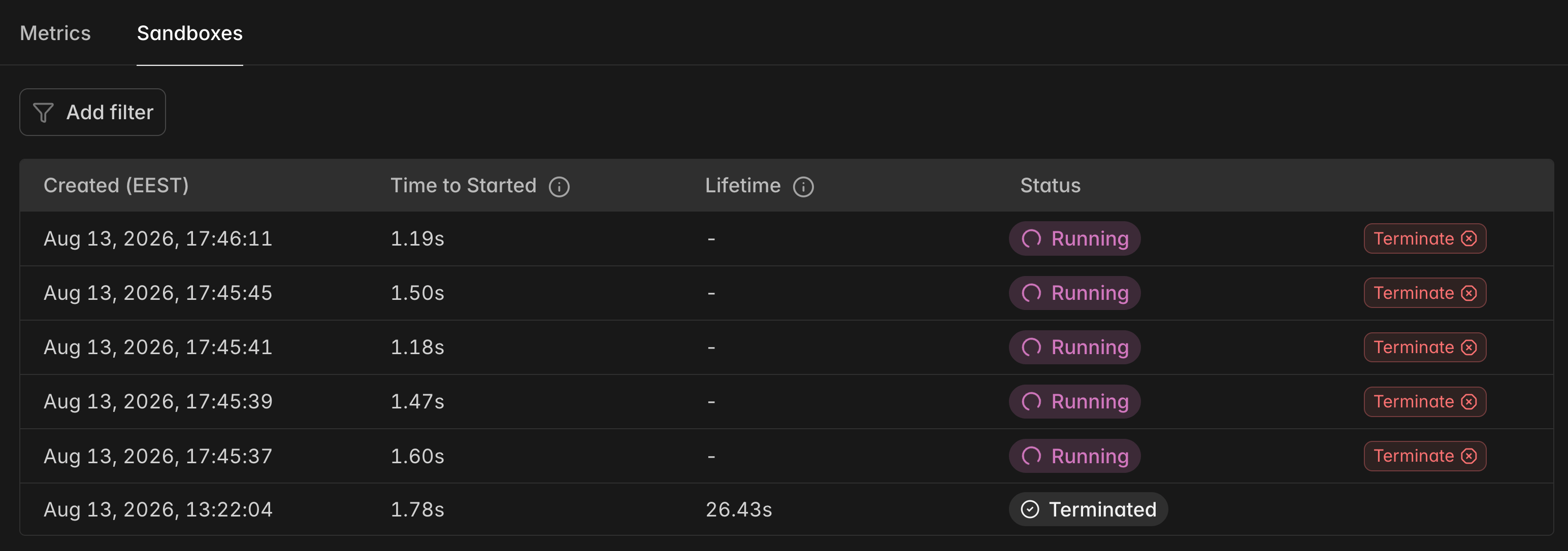
These sandboxes are created when you enter a new Decode session and automatically cleaned up when you exit via the /quit command.
The wanted side effects of remote sandboxes
Remote sandboxes give you 2 powerful side effects beyond safety.
The first is compute. Modal sandboxes accept a GPU spec like gpu="B200:8" at creation, letting you agentically fine-tune models or process large datasets (eg extracting knowledge graphs from 1000+ documents) with open-weight LLMs such as Qwen3.6, Gemma 4, K3, or GLM5.2.
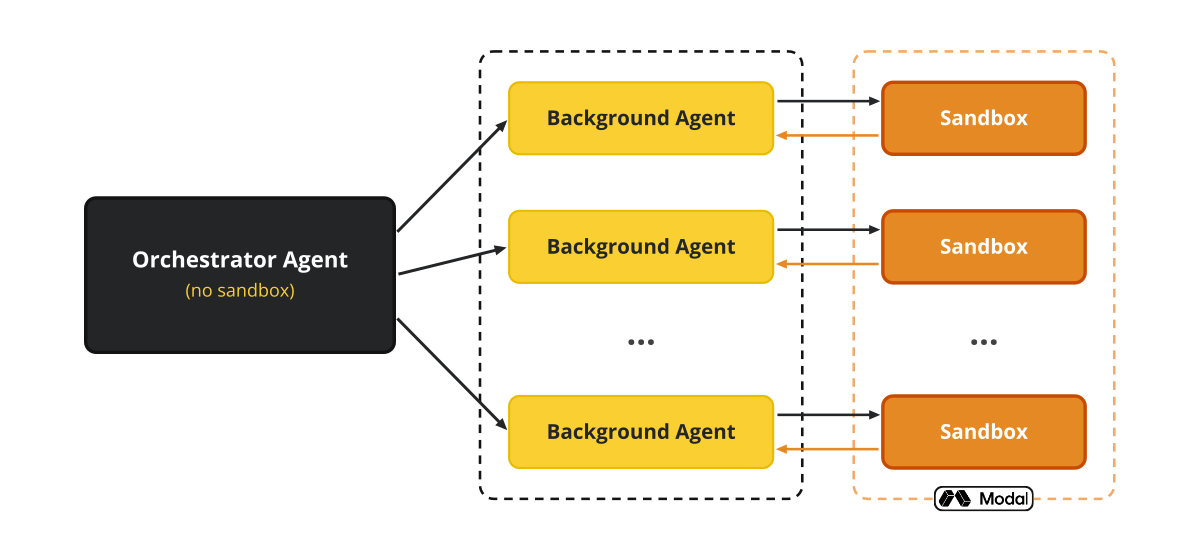
The second is scale. An orchestrator agent running directly on the host (no sandbox) can hand work to background agents running on Modal remote sandboxes. Put them on a CPU if you just need a bunch of parallel agents hitting an LLM API to pull tickets from your Linear backlog, or on a GPU if you need to squeeze out more juice.
In this case study, Ramp, a fintech company, runs every agent session in its own Modal sandbox with a full dev environment inside. Modal’s own conclusion from the case study is that with cheap isolation, the bottleneck shifts from “can the agent write correct code” to “how many agents can you run in parallel”.
Next steps
Should you sandbox all the time? No. As a Claude Code power user, to keep it simple, I still run directly on my machine in folders versioned by git or Obsidian Sync.
Sandboxes are non-negotiable for:
24/7 personal assistants that control your whole computer like OpenClaw or Hermes;
non-engineers using tools like Claude Cowork;
unmonitored remote jobs like Codex;
or when chasing GPUs and parallel scale.
Is this the only way to add sandboxes to your harness? As we are just getting started, surely not. For another perspective, here is Abhishek Bhardwaj’s talk, explaining how OpenAI runs agent workloads in a cloud of microVM sandboxes instead of containers.
🧑💻 We encourage you to clone our course repo, open your terminal, type ”decode”, and test out the coding agent.
In the next lesson, we will explore the key context-engineering techniques that coding harnesses use: memory, compaction, skills, and LSP servers.
Here is the course roadmap, lesson by lesson (see all in GitHub):
From a Raw Shell to a Sandboxed Coding Agent ← you are here
Remote Headless Mode & Durability
AI Evals Foundations: Benchmarks, Regression and Online
AI Evals on Steroids via Replays
Or watch the video version of the lesson:
But here is what I’m wondering:
Do you run your coding agent raw on your machine, or sandboxed?
Click the button below and tell me. I read every response.
Enjoyed the article? The most sincere compliment is to restack this for your readers.
Special thanks to Modal, Opik (by Comet), and Kitaru (by ZenML) for sponsoring this open-source course and keeping it free!
Whenever you’re ready, here is how I can help you
Go from agent user to agent builder. Master the foundations of AI agents and turn fragile demo code into reliable, production-ready systems with my course, Agent Engineering: Building Multi-Agent Systems (made with Towards AI).
35 lessons. Pure foundations from scratch. 4 mini-projects. 2 production systems. A certificate and direct access to me & industry experts in our Discord.
Built for software and data professionals transitioning into AI engineering. Rated 5/5 with 300+ students. The first 7 lessons are free:
Not ready to commit? Start with our free Agent AI Engineering Guide, a 6-day email course on the mistakes that silently break AI agents in production.
Images & videos
If not otherwise stated, all images are created by the author.
The real breakthrough isn’t more AI autonomy it’s making that autonomy reliable safe and trustworthy.