



For a while now I’ve been trying to build a proper memory layer on top of my research, writing, and content creation. Today it all lives in my Second Brain in Obsidian, where the primitives are files like notes, videos, and articles.
What I actually want is to shift those primitives from files to entities and relationships, such as people, locations, objects, topics, preferences, and facts. I want the memory to get closer to reality so I can watch how things evolve over time. I want a knowledge graph.
Everyone agrees knowledge graphs and GraphRAG provide a more performant substrate for a unified agent memory layer than plain RAG. But kicking one off is far harder. The resistance always collapses to the same wall: how you model your data. Your ontology is the hardest part of the system.
If you can’t define your ontology properly for your domain, the graph won’t represent the reality you want. The right entities and relationships simply aren’t there. As a result, GraphRAG ends up performing worse than the simple RAG you were trying to beat.
This translates straight to a memory layer. There’s no dodging it. Even if you stay file-only (a “virtual knowledge graph,” like an LLM knowledge base over your notes), you still hit the same data-modelling question: which primitives, and which entities, do you even extract?
The instinctive reaction is to design the perfect, complete ontology upfront. That’s exactly the trap that freezes the project.
The strategy is a not-overkill ontology. You need something flexible enough to kick off with almost no friction before you really know your domain, extending it with domain-specific detail as you explore your data.
Concretely, you use a small, fixed, generic, but extendable noun data model, known as POLE+O. Plus two core primitives, Preferences and Facts, for everything that doesn’t fit into the nouns.
You ship something that works, then add subtypes as a lightweight data-exploration step shows you where the generic types clash with your real data.
This approach lets you stand up a knowledge-graph memory layer for your own assistant without burning weeks on schema design. To build this, we first need to understand what an ontology actually is and why targeted models beat exhaustive ones.
Start Your Transition Into AI Engineering (Product)
This article showed how to design the ontology your knowledge-graph memory needs. My Agentic AI Engineering course shows the harness around it. I just released a free preview to build and run a working agent in 5 minutes.
You build a multi-agent system with two MCP servers (Research Agent + Writing Workflow), a deep research algorithm, an evaluator-optimizer loop, observability, and LLM-as-judge evals. Patterns required to ship AI.
Built for software, data engineers or scientists transitioning into AI engineering.
7 free lessons, 2 MCP agents ready for your GitHub portfolio. Part of our 35-lesson course. Rated 5/5 by 300+ students.
What Is an Ontology?
An ontology is the formal answer to 1 question. When you read the world, what do you write down as nodes, and what do you draw as edges? It specifies the kinds of things that exist in your domain, their properties, and how they relate to each other.
The ontology’s job is to map a targeted slice of the real world into the digital world. A good ontology is highly targeted to the problem you actually want to solve. If you over-model, you drown in noise and never ship. Plus, it get’s extremely expensive to extract and maintain the knoweldge graph. If you under-target, the graph doesn’t reflect the reality you care about.
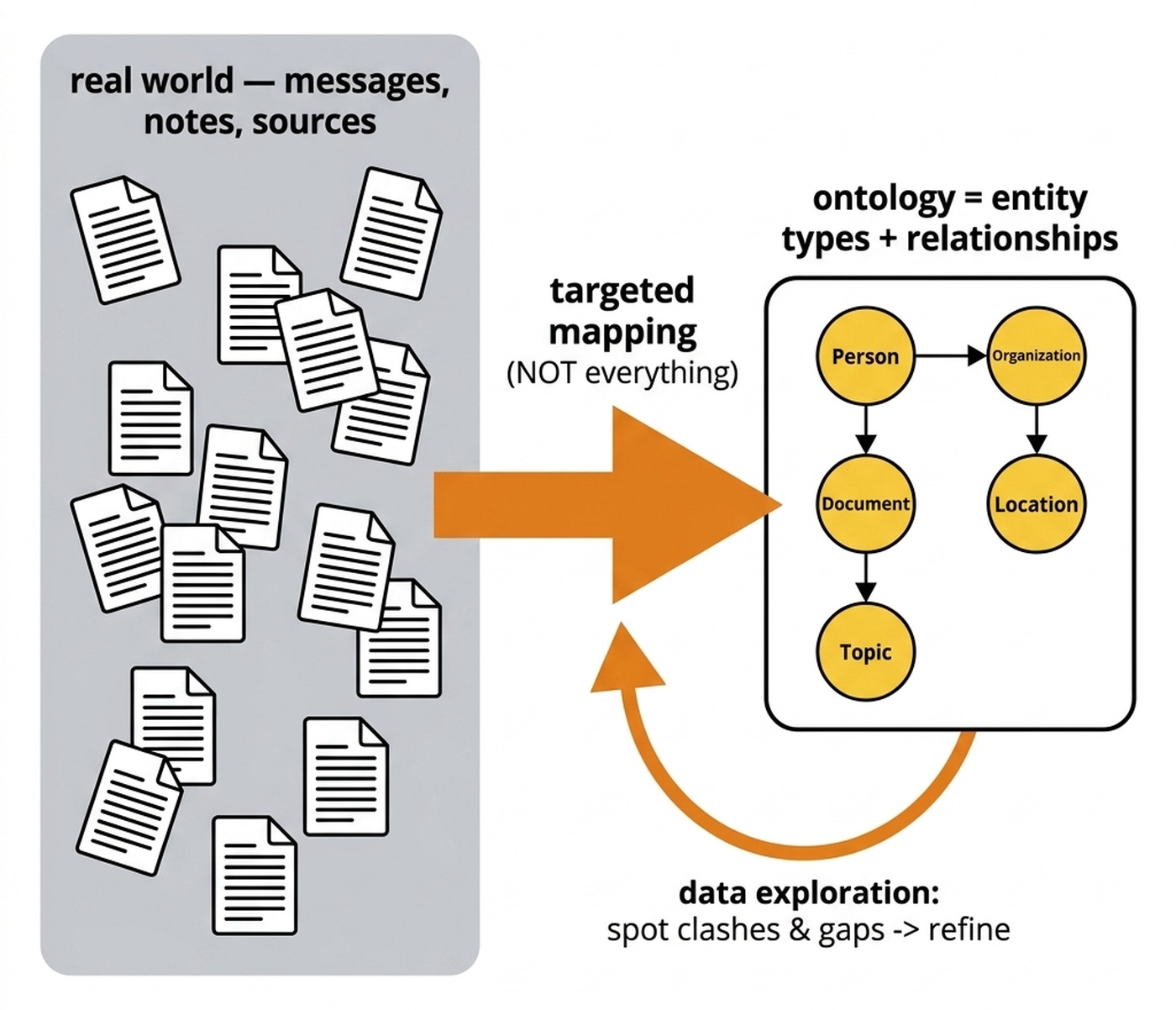
Look at concrete, shipped ontologies for real-world proof. The create-context-graph domain catalog made by Neo4j publishes 22 ready-made domain ontologies. Every single one lands at exactly 10 to 12 entity types. They use a shared 5-noun base plus only 5 to 7 domain-specific nouns.
For example, the Personal Knowledge domain models the world as Note, Contact, Project, Topic, Bookmark, and JournalEntry. The Agent Memory uses Agent, Conversation, Memory, ToolCall, and Session. The lesson here is that real ontologies are small on purpose. They capture only the entities required to answer the questions the system is designed for.
So if targeted and small is the goal, why does everyone — me included — reach for big and perfect first? That’s the trap.
The Overkill Trap: Why My Knowledge Graphs Never Shipped
When I first encountered the ontology concept, I assumed I had to study my domain in depth. I thought I needed to model all of finance, for example, and design the ideal ontology before working with any real data. You can’t actually do that before you have a system running and data to look at. You just pile up assumptions that mostly turn out wrong.
I got frozen. Every knowledge-graph solution I started stayed on my laptop and never got used, because I was waiting on an ideal ontology I could never reach. Without understanding the ontology, I couldn’t even write a decent extraction step to populate it. I was deadlocked, bringing 0 value.
The breakthrough was realizing I need a couple of models that let me start generic and extend over time. As I get more data, analyze it, and actually understand my problem, the schema evolves. Let’s meet the base model that lets you start in 5 minutes instead of 5 weeks.
The POLE+O Data Model
POLE+O is a tiny, fixed, top-level vocabulary that can classify almost anything you pull out of text. It stands for Person, Object, Location, Event, and Organization [2]. It originated in law-enforcement and intelligence analysis. The Organization type was added for general-purpose entity extraction. The point of a fixed base is queryability. There are always exactly 5 base nouns to filter on, so the graph stays answerable no matter how it grows underneath.
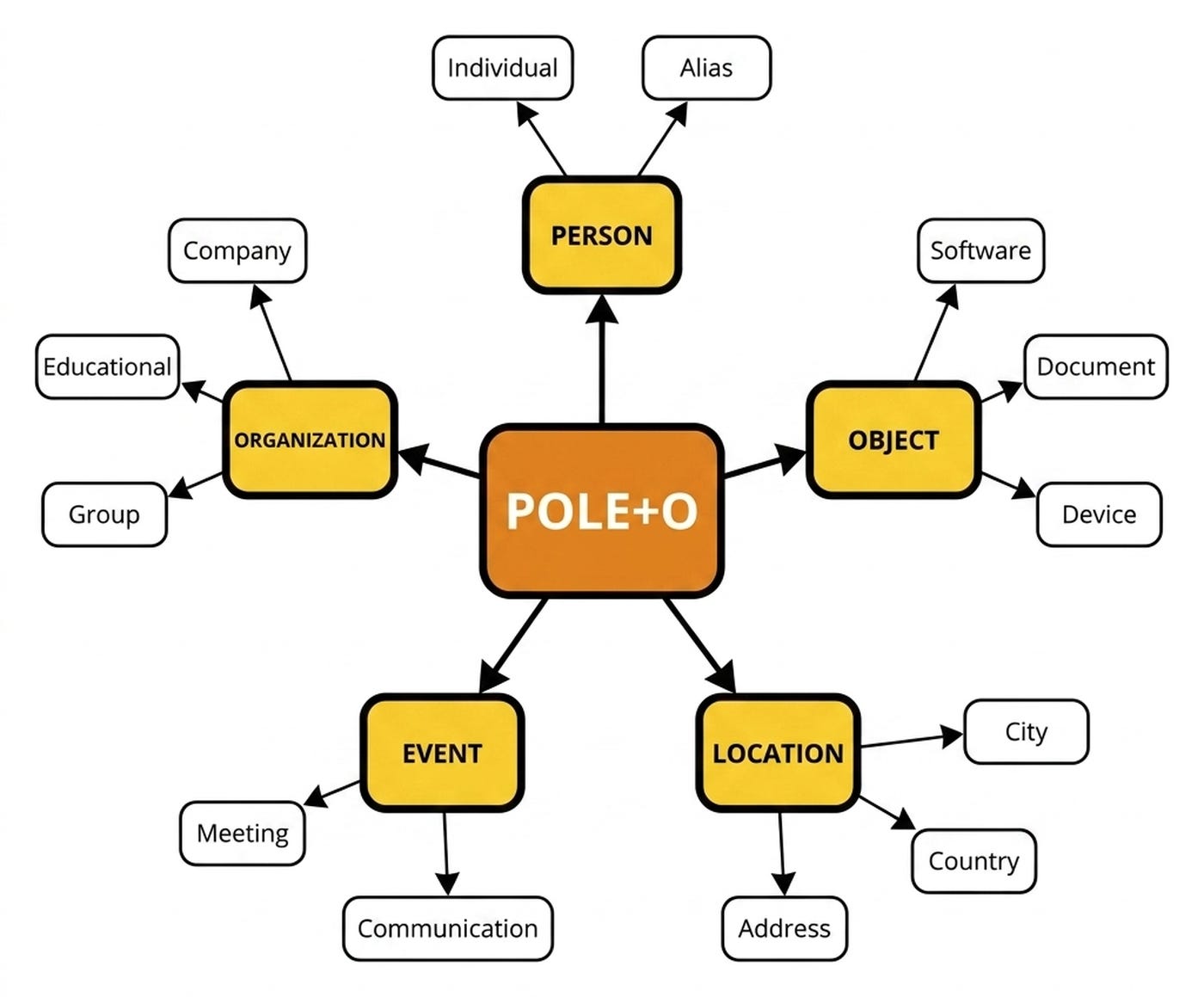
Person covers people, aliases, and personas. Object covers physical or digital things. Location covers places, addresses, and regions. Event covers meetings, transactions, and incidents. Organization covers companies, teams, and institutions. Two or three of these catch the overwhelming majority of what a personal assistant needs.
Here are POLE+O’s five base types and the default subtypes each one ships with:
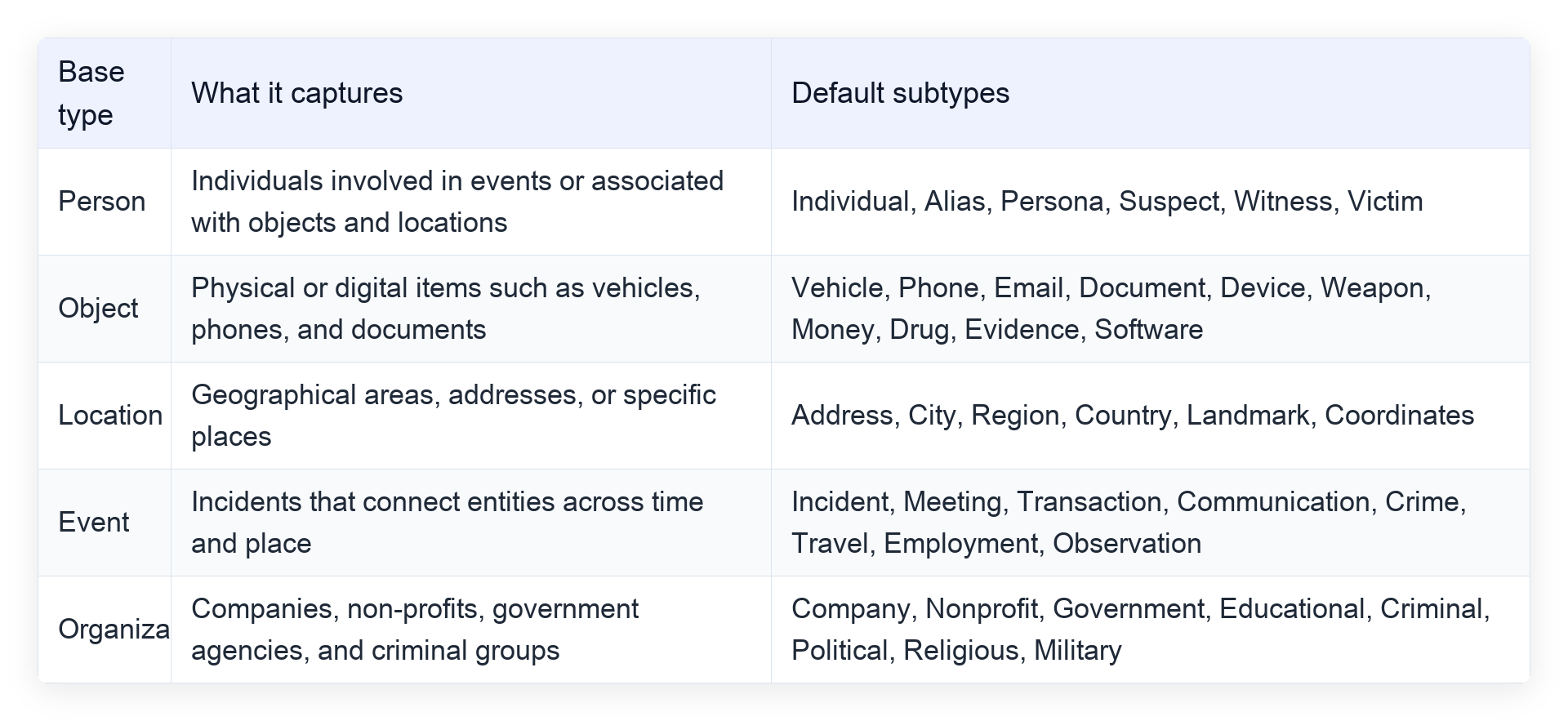
Here’s the beauty of this approach. You extend the base nouns with your own subtypes, and that’s how you tailor a generic ontology to your specific domain. It works exactly like object-oriented programming. You start from base classes you adopt without thinking. Then you subclass into specifics as your use case clarifies.
You can kick off with nothing extended and add concrete types only as you understand your data better. Neo4j’s agent-memory library uses precisely this approach. POLE+O is its default, swappable ontology.
The data-exploration workflow runs in a simple loop. First, kick off with generic POLE+O. Second, run an exploration extraction over your real data. Forget production reliability. You only care about understanding what’s there. Third, inspect the graph for clashes where the generic model lies about your data. Fourth, add or rename subtypes to fix each clash. Finally, repeat the process. You won’t get it perfect, and that’s the point. You iterate like any other AI app instead of freezing.
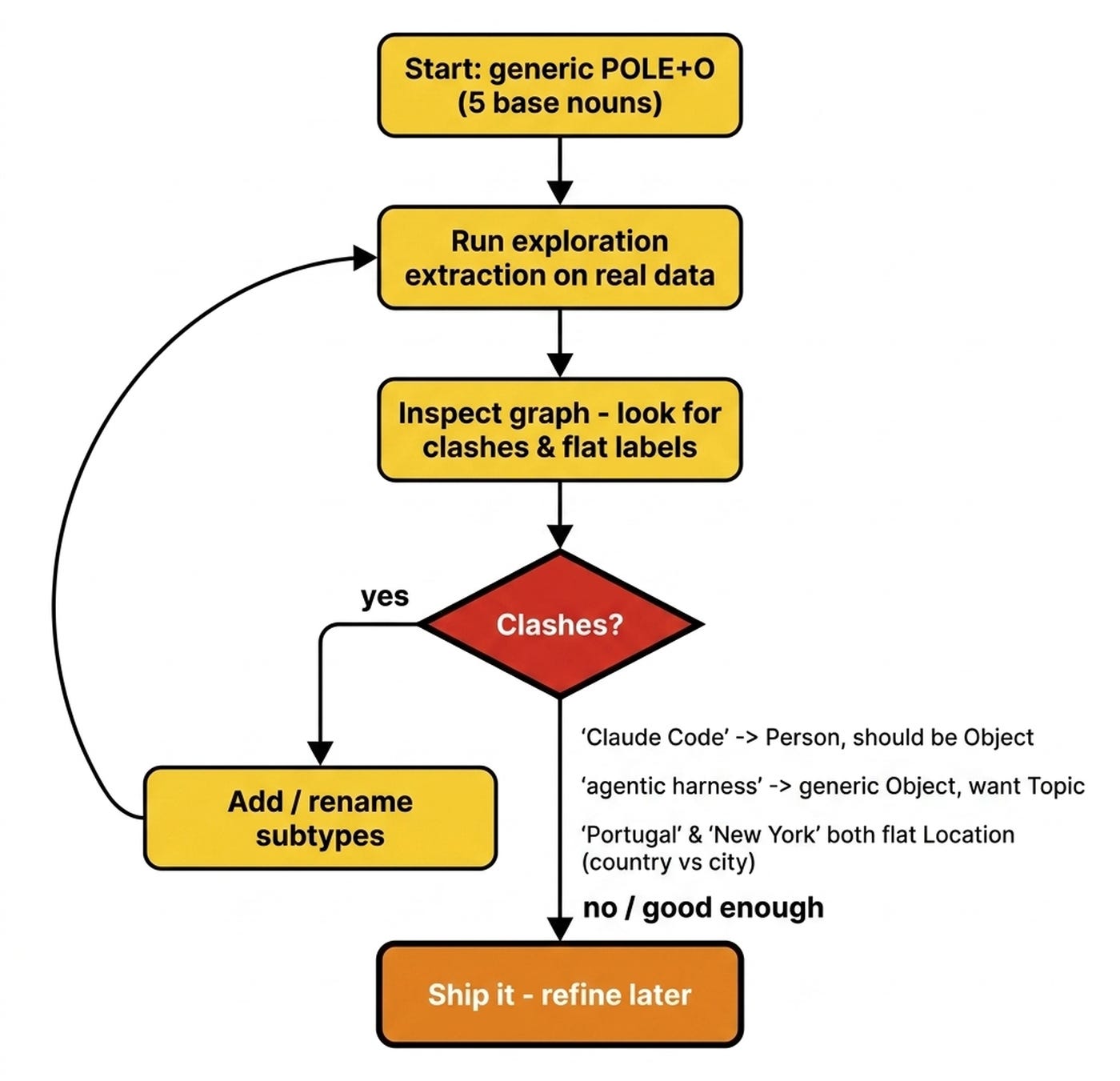
Look at named examples from real extraction runs. Claude Code comes back tagged as a Person when it’s clearly an Object. The “AI Engineer” conference lands as an Event when you wanted an Organization. DeepSeek is tagged a Person, not an Object.
Portugal and New York both get a flat Location label even though one’s a country and one’s a city. An agentic harness shows up as a generic Object when, for knowledge work, you’d rather have a Topic type. Each clash is a signal to add 1 subtype, not to redesign the whole schema.
POLE+O nouns and their subtypes cover the things in your world. But to fill in the gaps there are two specials tricks we have to go over.
Preferences: The Things a Noun Likes
Preferences are the second family of entities you attach to the graph. They are things a noun likes or dislikes. A Preference is a characteristic of an entity. It represents a stance. The canonical case is a person who likes, prefers, or dislikes something.
Concretely, a Preference entity looks like this:
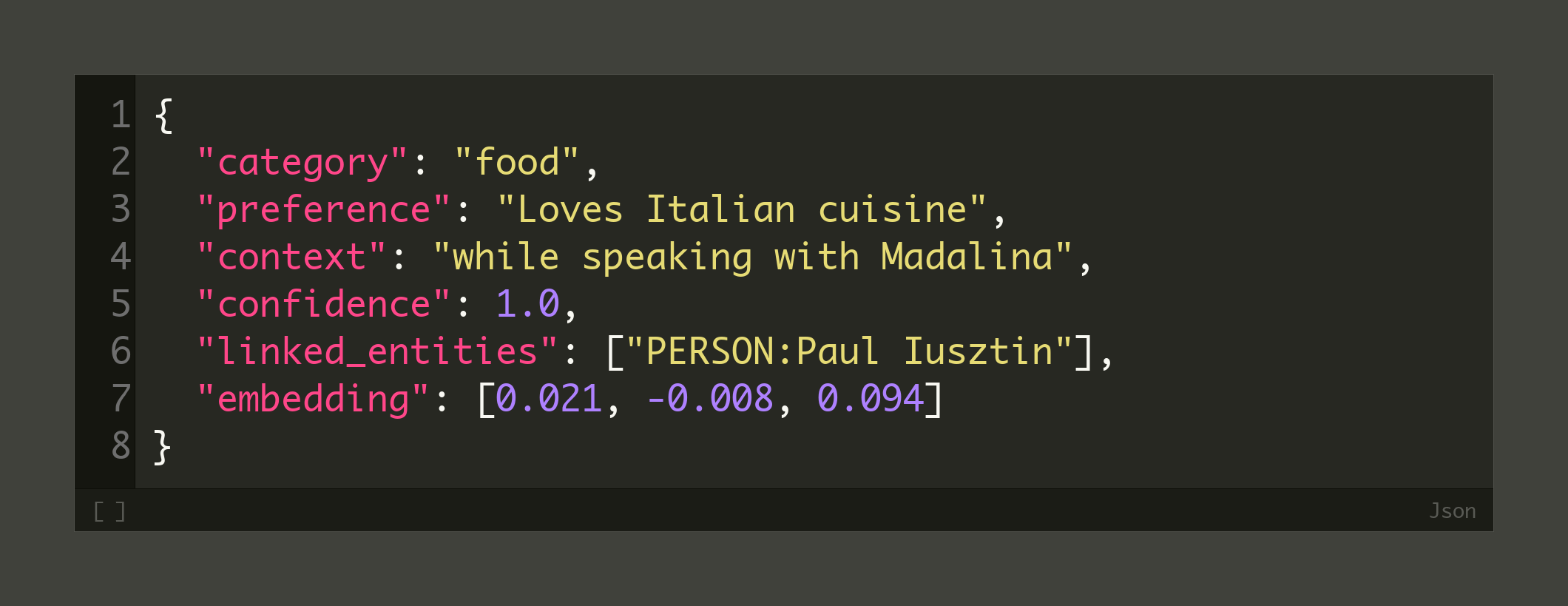
category groups the preference, preference is the statement itself, and context optionally records when or where it applies. confidence runs from 0 to 1. The embedding makes it semantically searchable.
Make it concrete. “Loves Italian food”, “prefers dark mode”, and “dislikes long meetings” are clear examples. Each is a stable stance the assistant should remember and adapt to.
By default, a Preference hangs off the Person. That’s the most common and useful case. You can extend preferences to other objects, like an Organization’s policies, a car’s settings, or an Event’s dress code.
Because I’m building a personal assistant, I start by attaching Preferences only to the Person. This keeps the graph clean, low-noise, and small. I’ll extend it later only when a concrete use case demands it.
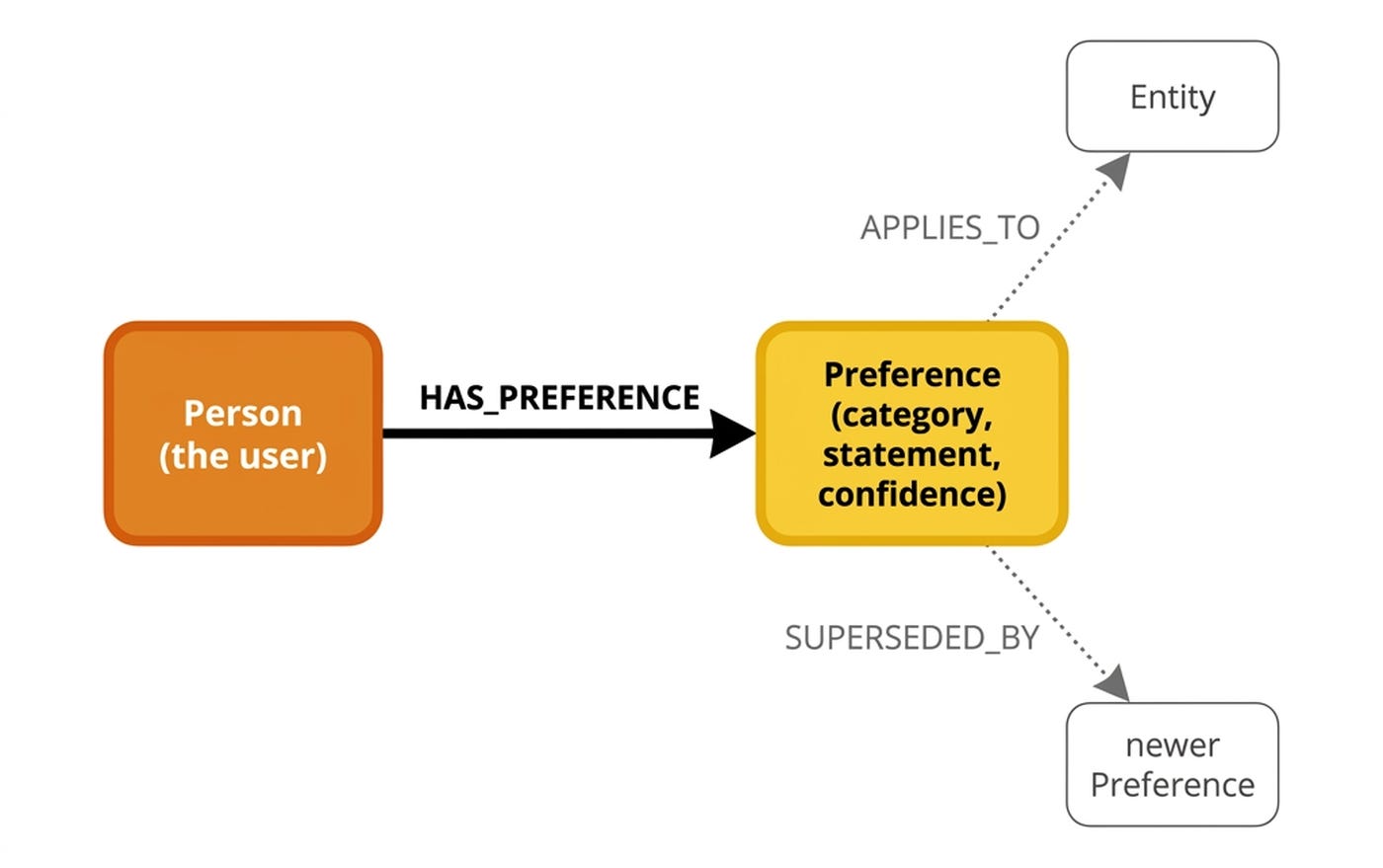
Preferences are the personalization layer. They act as the memory of the user’s stances. They are the “sweet sauce” that makes every future response feel tailored.
There is one issue. Plenty of useful knowledge is just an atomic fact. Forcing all of that into the ontology is how graphs explode in complexity. The fix is a deliberately generic primitive.
Facts: The Trick You Haven’t Thought Of
The Facts entity is the fallback for everything that doesn’t cleanly fit a noun or a Preference. You drop the claim into a generic Fact. This is the move that keeps the ontology small and stops you from over-thinking the schema.
A Fact is the closest thing to a classic-RAG chunk. An LLM produces each Fact during extraction. Each Fact holds a single, atomic concept which works like a charm via semantic search.
The beauty is that with facts you avoid the usual chunking errors, such as splits mid-thought, mixed concepts, and arbitrary boundaries. In reality, a Fact is a triplet. A subject, predicate, and object like “Eiffel Tower / is / 330m tall” gets embedded and stored as 1 granular unit.
Here is the shape of a Fact entity:
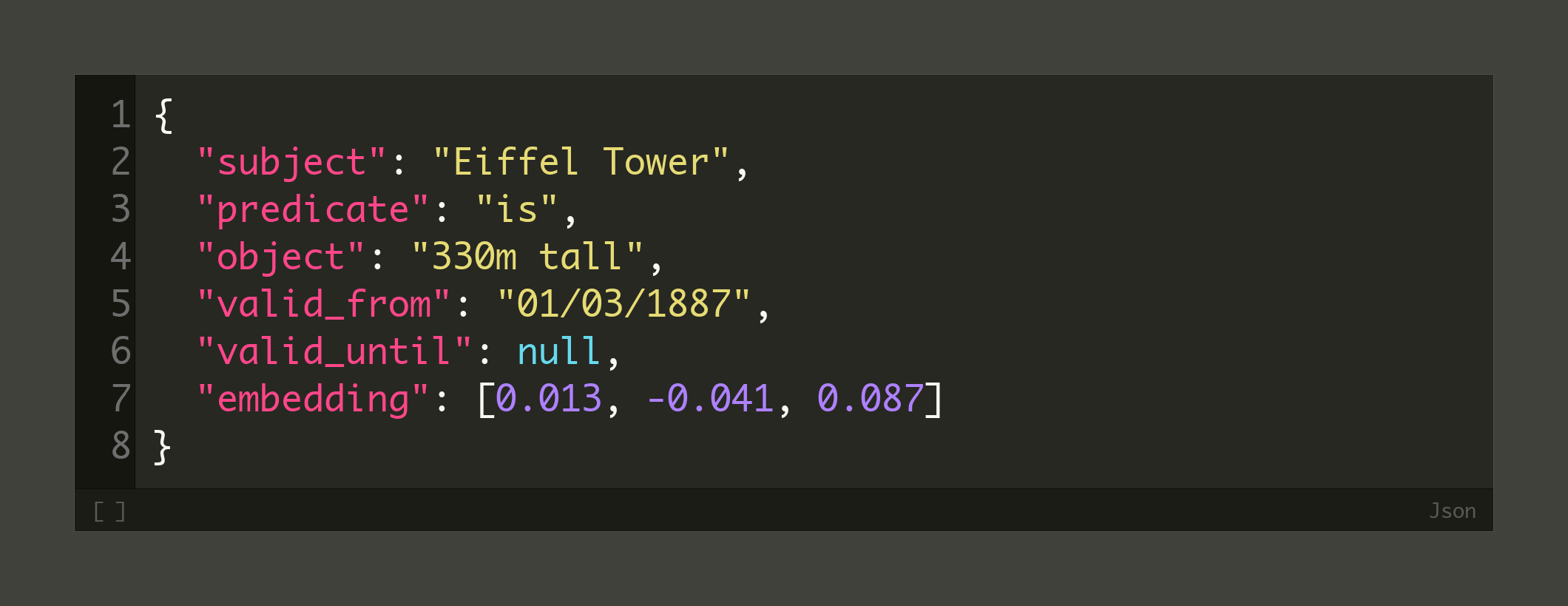
The triplet — subject, predicate, object — is the whole fact. valid_from and valid_until give it optional bi-temporal validity. The embedding, computed over the concatenated triplet, is what makes the fact retrievable by semantic search.
It’s confusing that we have a triplet stored as a node. But this is what it makes it flexible. We don’t worry about modeling these one-off triplets directly into the ontology, but the LLM extracts them as-is from the text.
Facts are usually wired to nothing. They have no relationships to other entities. They are retrieved only via semantic search and text search. A Fact stays in the graph but is independent of it. This works because a graph store runs vector search and graph traversal in the same query engine [4]. Which means facts are retrieved only via semantic/text search.
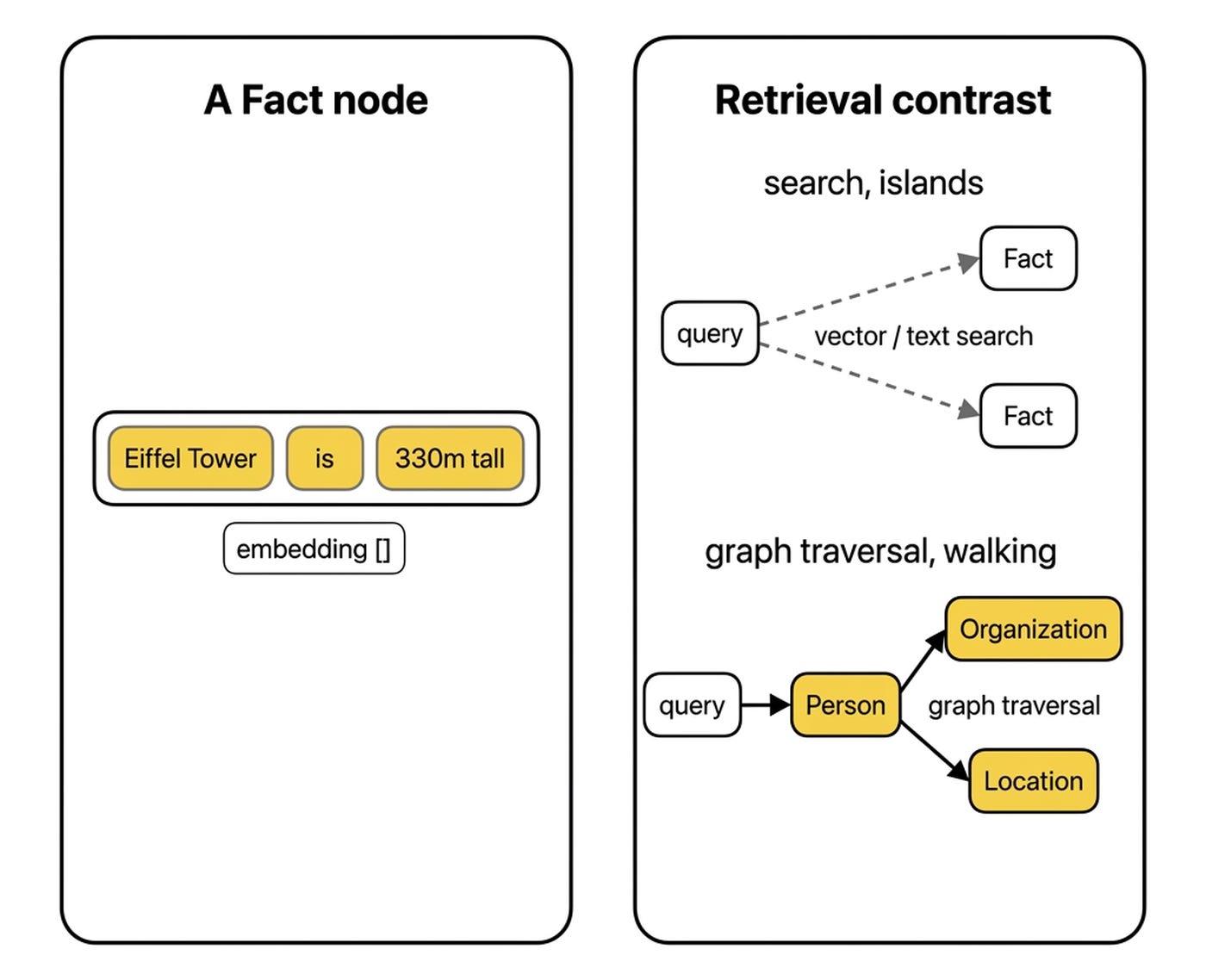
Facts let you ship a memory layer before you have the perfect ontology. Anything you can’t yet model degrades gracefully into a searchable atomic node instead of blocking the build. Early on, you lean on Facts. As the graph matures, claims migrate toward typed entities and edges. It costs nothing to schema and nothing to maintain when entities merge or get deleted.
What’s Next
The takeaway is the posture. An ontology is a living artifact you bootstrap from a fixed generic base and grow through a data-exploration loop, exactly like any other AI application.
If you want to see the whole strategy implemented, the fastest path is to play with Neo4j’s agent-memory SDK or its MCP server. It uses POLE+O as a swappable default, subtypes as cheap extensions, and Preferences and Facts as first-class primitives. Studying it is what made all of this finally click for me.
I’m actively migrating my own Obsidian Second Brain toward the POLE+O, Preferences, and Facts primitives. This turns thousands of files into a graph I can actually traverse, visualize, and watch evolve over time.
But here is what I’m wondering:
If you worked with Knowledge Graphs, what was your process in discovering your own ontology?
Click the button below and tell me. I read every response.
Enjoyed the article? The most sincere compliment is to restack this for your readers.
Whenever you’re ready, here is how I can help you
Go from agent user to agent builder. Master the foundations of AI agents and turn fragile demo code into reliable, production-ready systems with my course, Agent Engineering: Building Multi-Agent Systems (made with Towards AI).
35 lessons. Pure foundations from scratch. 4 mini-projects. 2 production systems. A certificate and direct access to me & industry experts in our Discord.
Built for software and data professionals transitioning into AI engineering. Rated 5/5 with 300+ students. The first 7 lessons are free:
Not ready to commit? Start with our free Agent AI Engineering Guide, a 6-day email course on the mistakes that silently break AI agents in production.
References
Create Context Graph. (n.d.). Domain Catalog. create-context-graph. https://create-context-graph.dev/docs/reference/domain-catalog
Neo4j Labs. (n.d.). POLE+O Data Model. Neo4j Agent Memory. https://neo4j.com/labs/agent-memory/explanation/poleo-model/
Neo4j Labs. (n.d.). Neo4j Agent Memory. GitHub. https://github.com/neo4j-labs/agent-memory
Neo4j Labs. (n.d.). Why Neo4j? Graph-Native Memory Architecture. Neo4j Agent Memory. https://neo4j.com/labs/agent-memory/explanation/graph-architecture/
Images
If not otherwise stated, all images are created by the author.
Really fascinating article. Im also working my way into understanding how to create a real world, practical ontology. In my case I struggle with a normalized data mindset but this is a whole different game, we have to be able to tolerate ambiguity first and then let patterns emerge. Kind of like the stages of data pipeline architecture.
Ontologies are useless but ontologizing is essential