




Most AI demos work. Most AI products don’t. This series is a collection of interviews with engineers who shipped AI agents to production, covering the stacks they chose, the architectures they regretted, and what actually held up at 3 am.
This is an interview with Michael Maximilien, former CTO and Distinguished Engineer at IBM and Chairperson of the Board of the NodeJS Foundation. Now, the founder and CEO of ClawMax.ai, an AI agent orchestration platform powered by OpenClaw and the creator of weave-cli, an open-source tool for shipping Retrieval-Augmented Generation (RAG) systems.
Watch our full interview on YouTube ↓
Michael Maximilien spent a year building RAG systems for customer after customer. Every new project required navigating dozens of moving parts. He had to pick a vector database, select an embedding model, chunk the data, ingest it, search it, and iterate.
“I was doing this a lot and I wasn’t getting the results I wanted.” — Max
The failures were concrete. Halfway through an ingestion run, Milvus would run out of memory. Two collections made it in. The third was broken. Without a checkpoint or resume function, he had to recompute everything from scratch.
“The experiment doesn’t just run, it fails. You have to be able to pick up from the failure.” — Max
Another failure mode involved manually comparing Weaviate against Milvus. One configuration typo could lead to drawing the wrong conclusion.
“You might end up thinking Weaviate is better than Milvus when actually your comparison was wrong.” — Max
This manual flywheel stole time from actually helping his customers ship their products. He burned days on reset and re-ingest cycles that failed halfway. Worse, he produced results he could not trust.
Most teams treat RAG as a simple setup task. They picked a vector database because it trended online. They pick an embedding model because OpenAI is the safe default.
They guess a chunking strategy, guess the top-K retrieval parameters, and ship it. Then they spend the next six months vibe-checking the system.
Users complain. The team swaps a configuration knob. Nobody knows if it actually helped because nothing was measured.
“There’s a lot of steps.” — Max
You lose the working system you thought you had. You burn weeks debugging silent ingestion failures because no trace exists.
Customer trust evaporates when the same question gets three different answers across releases.
Max took the opposite bet. He built Weave CLI: a unified command-line tool for RAG over eleven vector databases.
It features first-class observability implemented with Opik, an open-source evaluation and optimization tool, baked in from the first commit. You can try out their managed platform for free here for 25k spans/month.
By the end of this case study, you will understand how to unify your RAG stack so that switching a database, an embedding model, or an agent is merely a config change. You will learn how to measure everything, so every switch is tracked, evaluated and compared. Ultimately, you will learn how to benchmark your solution against multiple parameters to find the best configuration for your problem.
“There’s no one solution. You iterate and evaluate.” — Max
But first, let’s understand what Weave CLI is and how it works.
Understanding the System Architecture of Weave CLI
Weave CLI wraps 11 vector databases behind a single interface. From the outside, it looks and feels like any other RAG system. On the ingestion side, it populates the chosen vector database with chunks, metadata, and embeddings. On the query side, it takes natural-language questions and returns top-k ranked chunks that an agent can use to create an answer with citations.
What makes Weave CLI special is that everything is swappable via a configuration file: the vector database, the embedding model, the chunking strategy, the query agent, the RAG agent that interprets the chunks and so on. With the goal of making it very easy for you to benchmark, iterate on and improve your RAG solution.
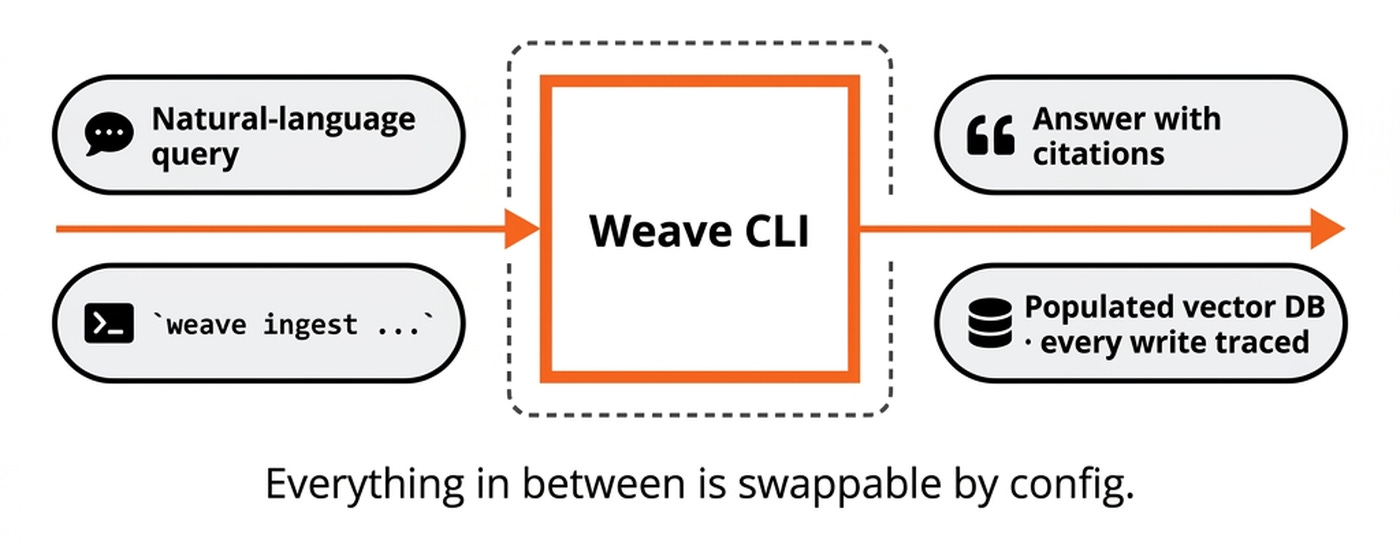
Weave CLI is composed of seven core components, each swappable by configuration.
The user-facing component is the Cobra-based CLI and the interactive REPL. Weave stack sits underneath as the deployment layer. It brings the whole system, the databases, up or down with a local Docker/Podman Compose fallback.
Behind that surface sits the intelligence layer. Ten built-in agents share an AgentChain sequencer. Agents are used both within the CLI and during ingestion. Weave CLI supports RAG, QA and summarization agents, but what’s more interesting is during ingestion. For example, you describe your data, the SchemaAgent proposes a collection schema and a vector-database fit, the ChunkingAgent recommends a chunking strategy and an embedding provider is picked to match. The Executor drives a seven-step orchestration covering query analysis, planning, user confirmation, execution, reporting, display, and evaluation metrics.
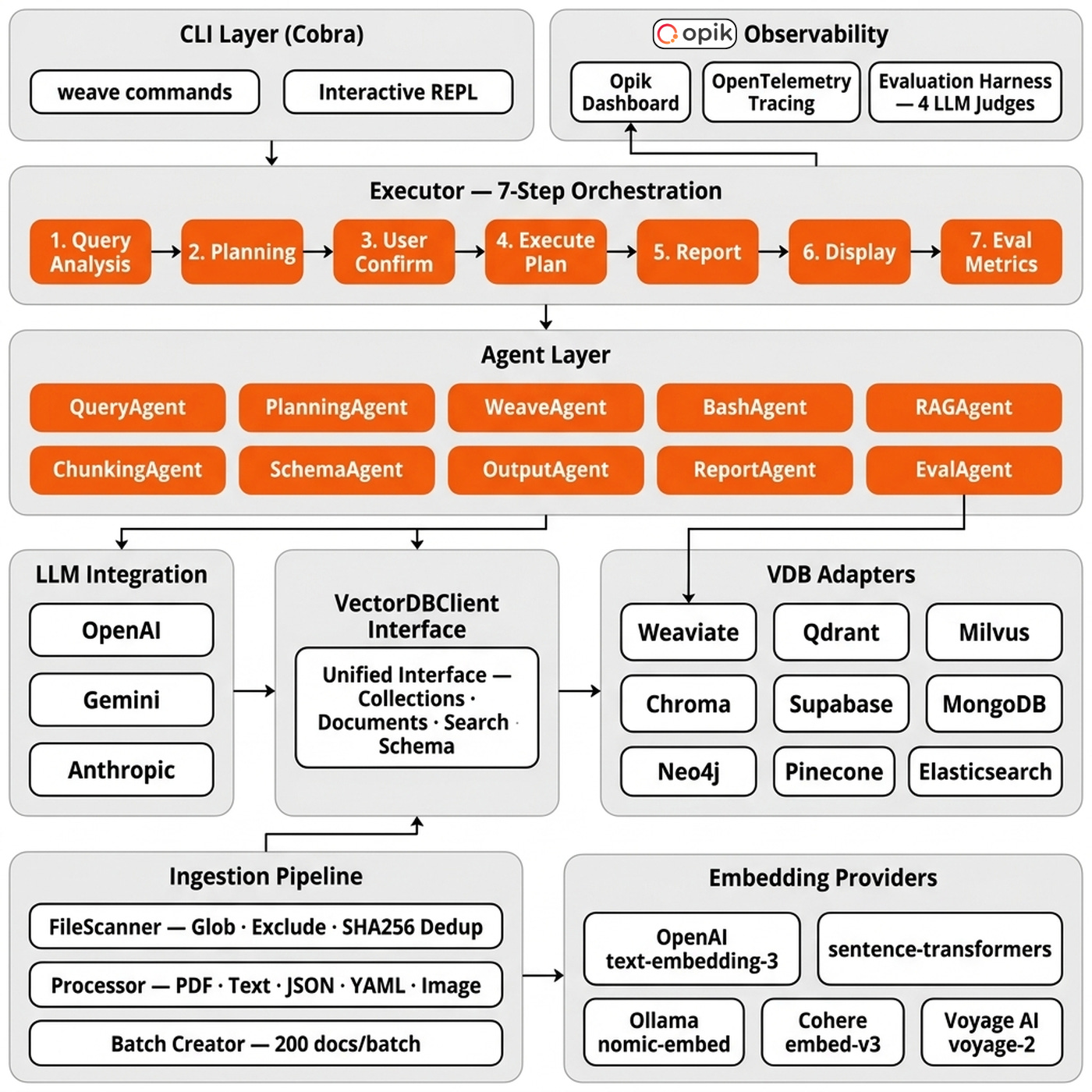
The data layer is built around the VectorDBClient interface in src/pkg/vectordb/interfaces.go. It is cleanly split into four sub-interfaces: CollectionOperations, DocumentOperations, QueryOperations, and SchemaOperations. A package-level factory registry in factory.go registers all 11 adapter sub-packages using the ports-and-adapters pattern.
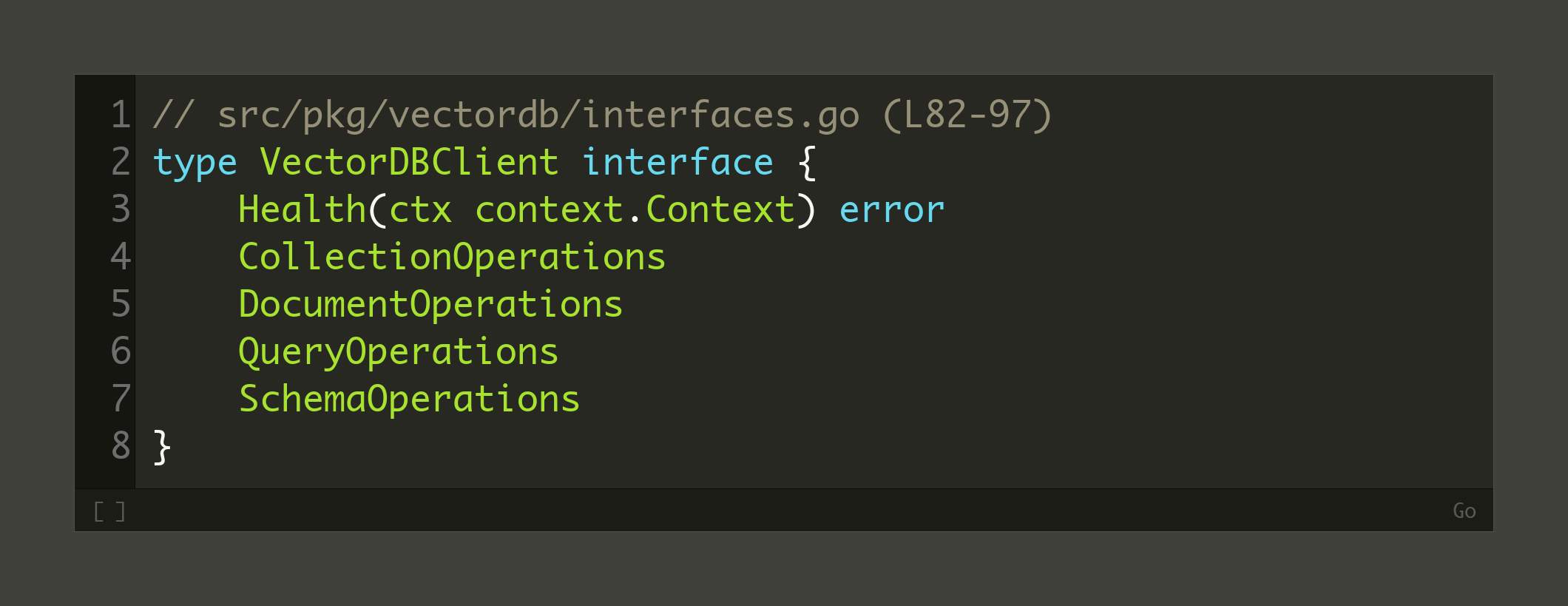
Still... There is a trade-off to this design. A unified interface is a lowest-common-denominator by construction, so if you need PGVector’s transactional semantics or Neo4j’s native graph traversal as first-class features, a unified adapter costs you that expressiveness.
On top of the vector-database layer sit five embedding providers: OpenAI, sentence-transformers, Ollama, Cohere, and Voyage. The ingestion pipeline runs alongside these, handling file scanning, processing, and batching.
As of April 2026, Max has strong views on which vector database to choose. Weaviate is his default for cloud deployments. Pinecone is the pick for hosted solutions. OpenSearch covers self-hosted cloud. Milvus handles both local and cloud. Qdrant is his go-to for local use because its Rust implementation is low-memory and fast.
On top of the agent layer, we have the observability layer implemented using Opik and OpenTelemetry, along with an evaluation harness with four LLM judges. The evaluation harness is itself pluggable between a local evaluator and Opik.
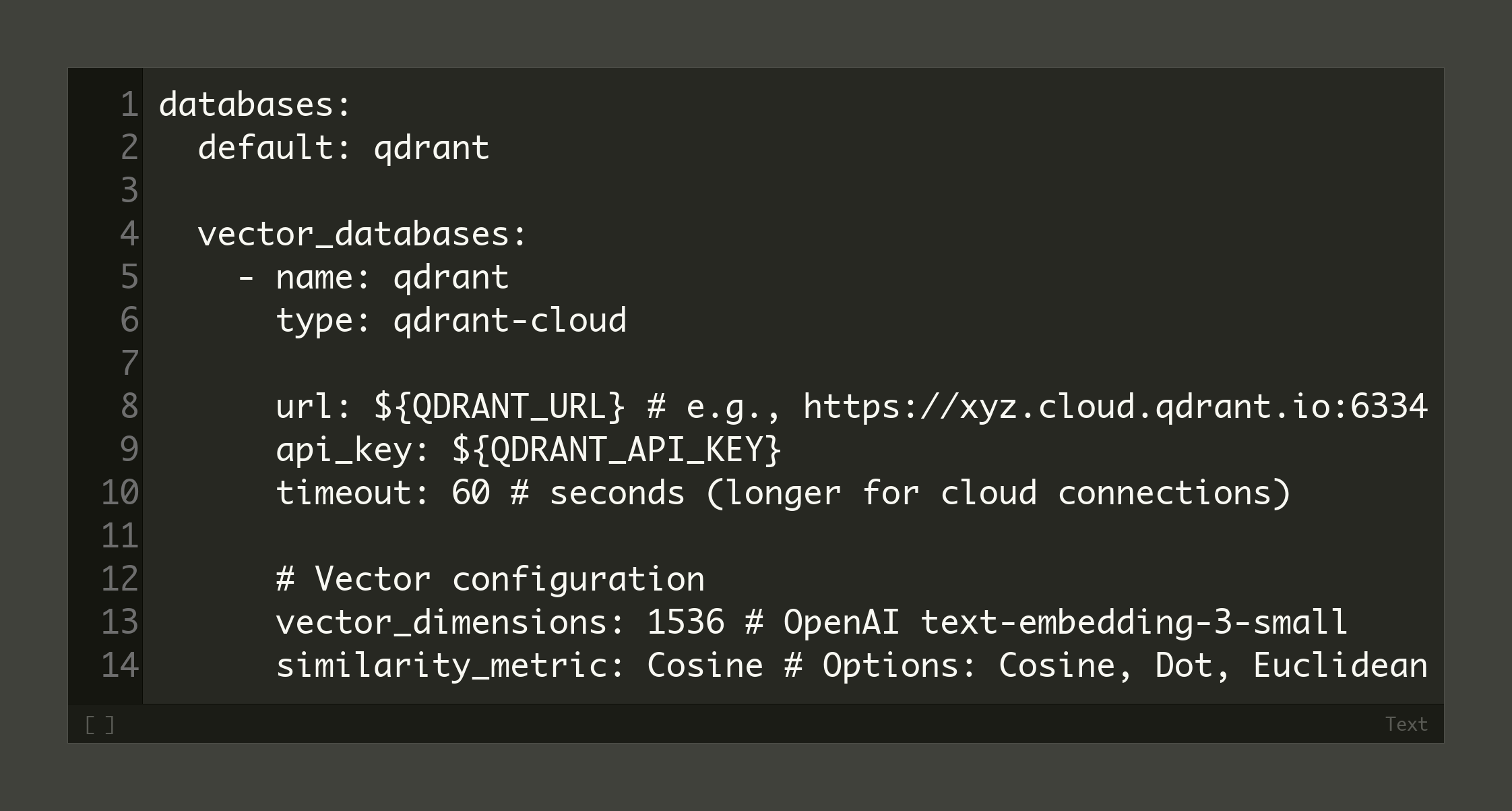
The configuration is the source of truth for the whole stack. A config.yaml file holds the non-secret details of the vector database, agent, embedding model, and LLM, while secrets are loaded from a .env file. Check all the configs here.
Let us trace a query through the system end-to-end using a concrete example: a user asks about Leica Noctilux lens auctions. The flow unfolds across nine hops, each an Opik span. First, the user submits the natural-language query to the REPL, which immediately starts monitoring the trace with Opik.
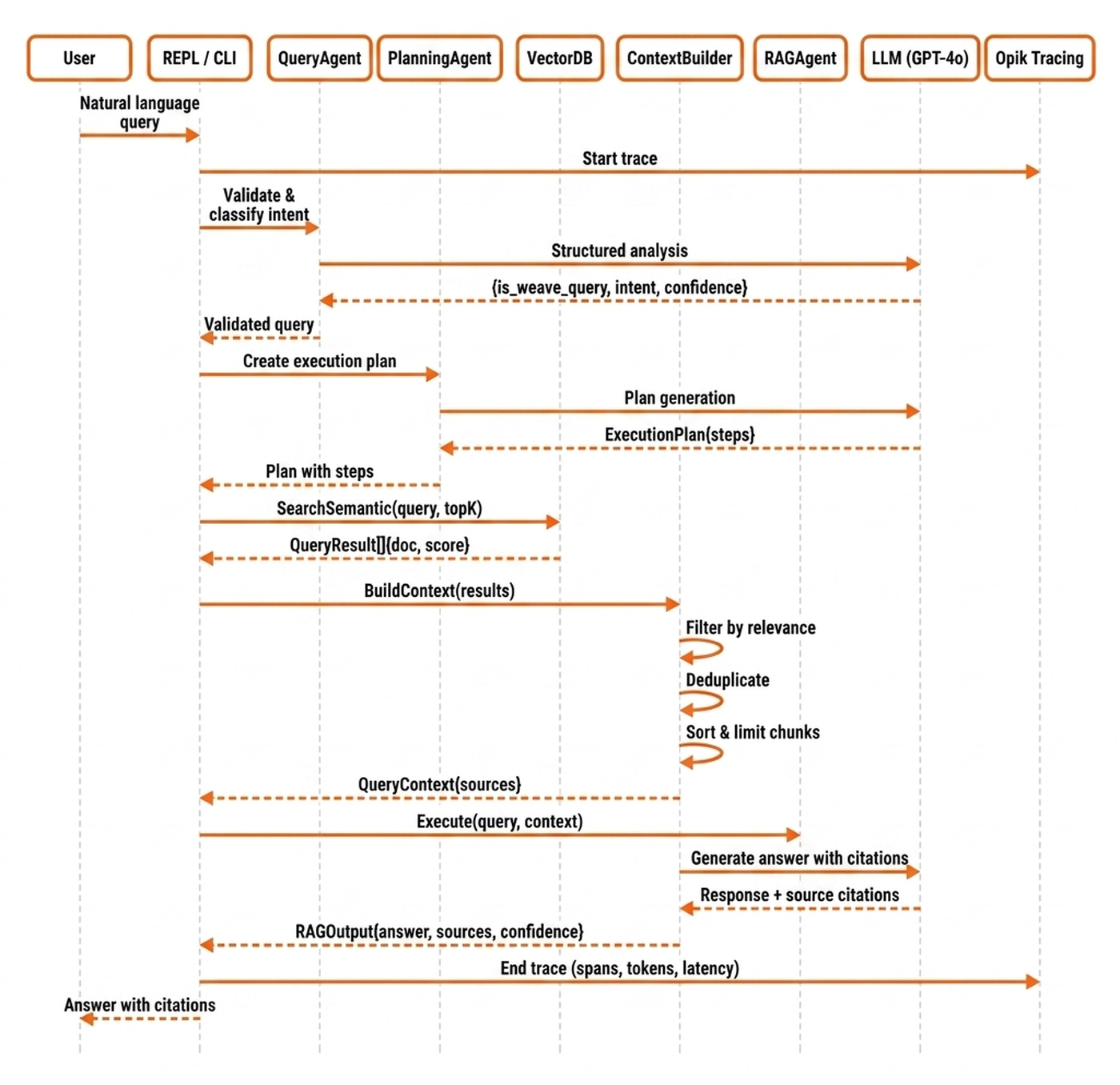
The QueryAgent then validates and classifies the intent, passing control to the PlanningAgent to generate an execution plan. Next, the VectorDB adapter performs a semantic search to retrieve relevant documents. The ContextBuilder filters, deduplicates, and sorts these results before handing them to the RAGAgent, which generates the final answer with citations. Finally, the REPL ends the Opik trace, in which every step emits a span containing details such as costs, latency and input/output.
Why Building in Go and Not TypeScript or Python
Most popular agentic CLIs / REPLs, such as Claude Code or OpenCode, are built in TypeScript. But Max, as a former Node.js board chairperson, strongly suggests just going with Go or Rust if memory constraints are a concern.
Why? Because Go apps ship as single binaries. Simple. Beautiful. It runs everywhere.
On-premise customers cannot rely on npm, uv, or JVM registries being reachable inside their own networks, and dependency pinning does not fix network isolation. A single compiled binary sidesteps the entire problem. Go’s track record as the language of Kubernetes is the existing proof that this trade-off works for infrastructure tooling, which is exactly the category Weave CLI sits in. Max himself spent 10 years writing Go on those systems.
Max’s second argument is that language choice matters less than it used to, because AI coding assistants lower the learning-curve barrier across the board.
“Most people don’t write code anymore.” — Max
Still... Max’s newer project (ClawMax.ai) is mostly in TypeScript because it is the best tool for the job, not because he switched allegiances.
“The stack decision has to be what your system wants, not what the herd is doing.” — Max
Next, we zoom into the layers doing the heavy lifting, the ingestion pipeline and the unified VDB interface.
Supporting 11 Vector Databases
The vector database layer is where the ingestion pipeline meets the unified VDB interface. To see how they work together, we’ll trace Max’s Leica Noctilux auction catalog through the system one step at a time.
Each document in the catalog is a single lens listing. It contains a photo of the Noctilux, a short caption with the model number and condition, a price, and a few lines of provenance. The text is sparse. Most of the signal sits in the image itself, and the caption is just enough to disambiguate one Noctilux from another. That sparseness drives a multi-modal ingestion decision up front. The image and the surrounding caption are embedded into two separate collections, one keyed on image vectors and one on caption text vectors. At query time, the auction agent fans out to both collections and merges the results through the ContextBuilder.
Before the actual ingestion, we run a FileScanner that walks the 426 listing files on disk, applying glob matching, exclusion filters, and SHA256 deduplication (src/pkg/pipeline/scanner.go). Re-running ingestion on the same directory skips unchanged documents, making this step fully idempotent and computationally cheap.
The DocumentProcessor extracts text and images from each listing (src/pkg/pipeline/processor.go). For the Leica dataset, the PDF extractor pulls the caption text, and OCR runs on the lens photo to catch any model number printed on the barrel. This step is idempotent but computationally expensive due to PDF parsing and OCR, and it fails if the document format is unsupported. Next, the ChunkingAgent dynamically selects the best chunking strategy for each document.
💡 Chunking is a tier 1 knob. Public benchmarking shows that swapping between recursive, sentence-level, and token-level strategies can move retrieval accuracy by double-digit percentages on the same corpus [1].
Next, we move to embedding (src/pkg/embeddings/model_registry.go). In the Leica flow, caption text flows through the text embedder, and image descriptors flow through a separate image embedding model. Raw images larger than per-backend limits (Milvus caps fields at 65KB) get offloaded to S3/MinIO, leaving only a URL in the VDB payload. The default option is to use OpenAI’s embedding model, which is highly expensive in compute and API costs and can fail if you hit rate limits. When scaling, you can use open-source embeddings via Ollama. They run locally with no API key.
The BatchWriter processes documents with durability, such as checkpoint and resume functionality. For example, when ingesting data at scale, you often have network I/O failures or database connection drops. Through checkpointing, we ensure the state is idempotent. Batch checkpointing is the difference between a short retry and a multi-hour rebuild.
“You have to recompute everything from scratch, which is crazy.” — Max
The VectorDBClient Interface sits at the core of the adapter pattern (src/pkg/vectordb/interfaces.go) used to support the 11 databases. The project started with Weaviate. Milvus was surprisingly similar. Qdrant was also very similar. MongoDB was a different beast, but the interface still fit.
“The biggest surprise was PGVector.” — Max
PGVector is the most incompatible on paper. Postgres is a relational database with its own migrations. Yet the unified interface fits.
The pipeline ends at any of the eleven vector databases (src/pkg/vectordb/factory.go), emitting a final vectordb.adapter span. The 426 Leica listings are split into roughly 426 caption vectors in one collection and 426 image vectors in a parallel collection, both sharing listing IDs as the cross-reference key.
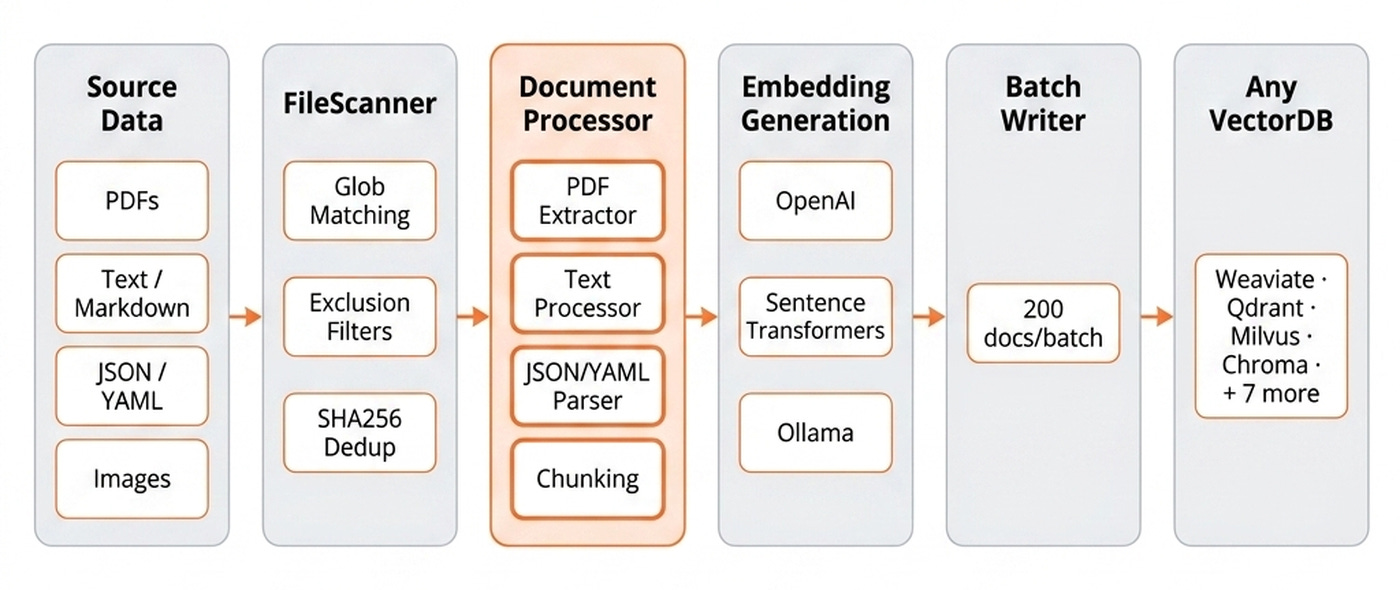
These steps cover every component any production ingestion pipeline needs, and Weave CLI ensures each one is swappable by configuration (src/pkg/stack/ingest.go): the FileScanner, the DocumentProcessor, the ChunkingAgent, the embedding provider, the BatchWriter, the VectorDBClient interface, and the concrete VDB adapter.
During retrieval, when a user asks weave query "summarise the 2024 auction catalogue", the QueryAgent classifies the intent, the PlanningAgent decides to hit both Leica collections, and the VectorDB adapter runs a semantic search on each. The ContextBuilder then merges the image-collection hits with the caption-collection hits, deduplicates by listing ID, sorts by relevance score, and extracts content in priority order (caption text first, image metadata second, URL fallback last) into a single prompt for the RAGAgent.
The ingestion pipeline and VDB interface are the skeleton of Weave CLI. The agent layer is what makes it feel like Claude Code for vector databases.
Zooming into the REPL
Weave CLI provides a Claude-Code-like experience for vector databases, which, at its core, is a Read-Eval-Print Loop (REPL) environment hooked up to multiple agents.
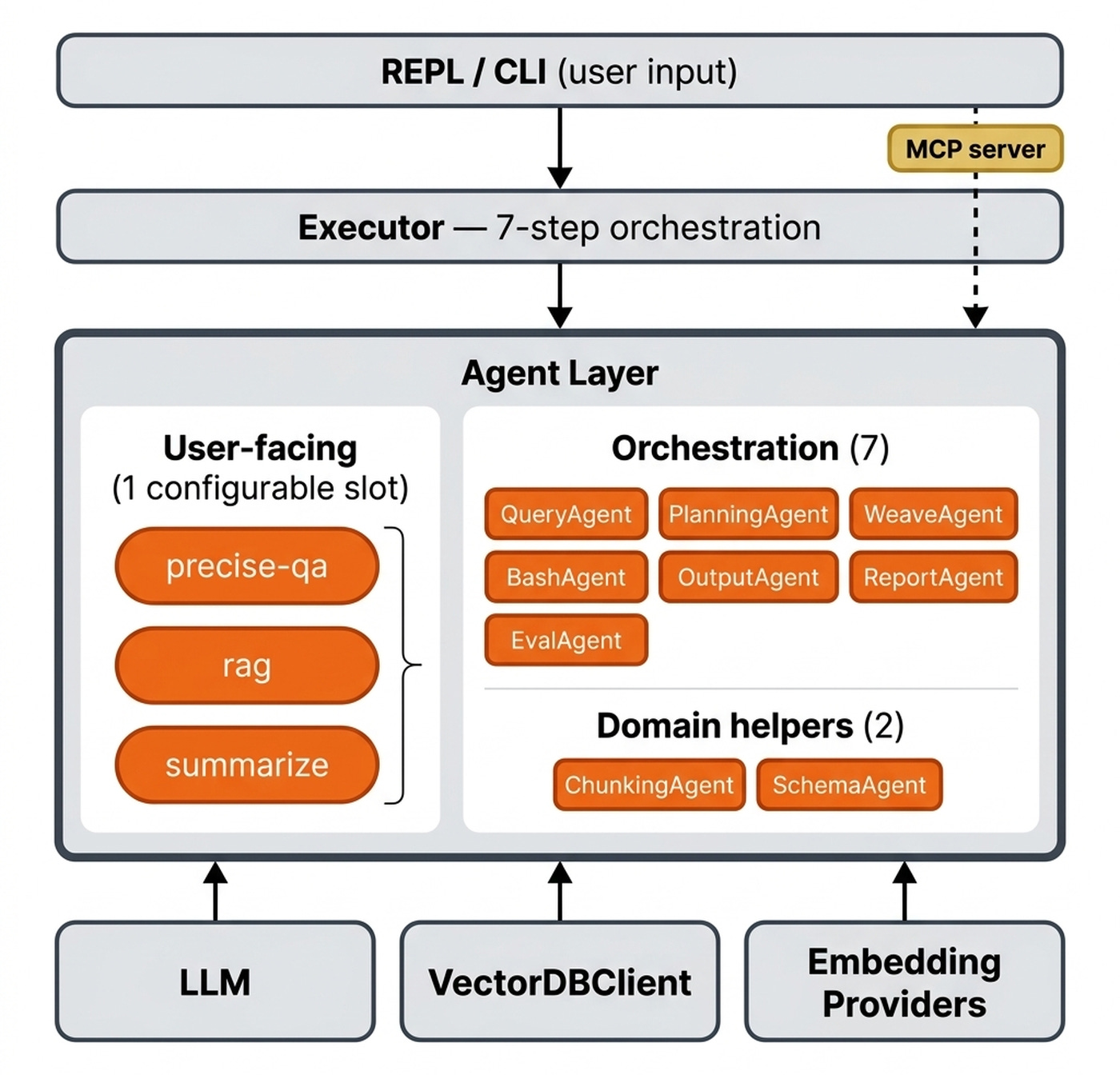
Weave CLI ships with 12 built-in agents that you configure via YAML. Three of them are user-facing:
Precise QA — asks a question and answers it, and says it cannot answer when it lacks information. Zero hallucination tolerance.
RAG — finds the closest chunks and generates an answer over them. This is the default.
Summarize — produces a short summary of retrieved chunks.
💡 The beauty is that you can add or modify them as you please.
The next eight agents power the Claude-Code-like orchestration loop: the QueryAgent for intent classification, the PlanningAgent for the execution plan, the WeaveAgent for tool execution with retries, the BashAgent for safe execution, the RAGAgent that the RAG persona dispatches to, the OutputAgent to format progress, the ReportAgent to generate operation reports, and the EvalAgent to track metrics.
The final two are domain helpers used during ingestion: the ChunkingAgent and the SchemaAgent.
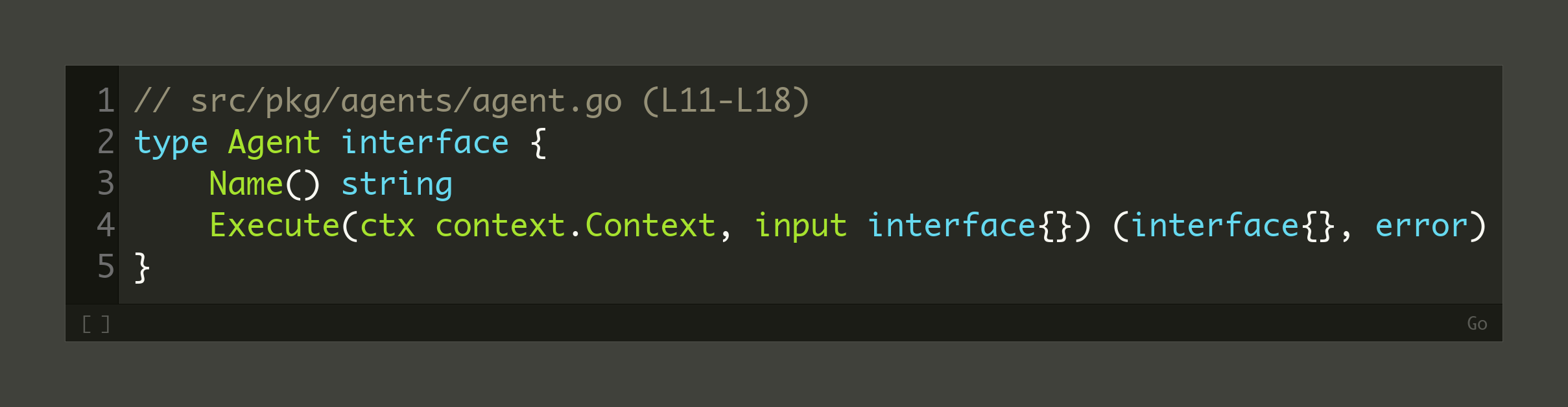
Similar to the vector database layer, all the agents implement the same interface:
Let’s tie everything together. When you ask a query, the QueryAgent classifies intent and acts as a router. The PlanningAgent generates a plan of CLI commands. The BashAgent executes them and pipes the output through a command-line JSON processor for filtering. The OutputAgent formats the result. This is the Claude-Code-like loop in action.
The cherry on top is that the Weave CLI capabilities are also exposed as a Model Context Protocol (MCP) server. Thus, instead of using the Weave CLI directly, you can leverage its full functionality through your harness of choice (Claude Code, Codex, etc.).
Twelve agents, eleven databases, five embedding providers, and multiple chunking strategies create a lot of surface area. Opik is what makes the whole thing observable when something breaks.
Monitoring the System
With so many moving parts, you need to know the system is working. Opik is how Weave CLI answers that question: it traces every LLM call, every agent step, and every database write as an OpenTelemetry span.
“Using Opik to tell me how many LLM calls, tokens, and cost per query.” — Max
During development, Max tracked a bug in which documents appeared to be ingested but were never persisted to Milvus. The Opik trace waterfall showed the database flush operations were silently timing out.
💡 If you want to try it out, you can create an account for free on Opik’s managed platform here for 25k spans/month.
The fix was adding dedicated timeout contexts per collection. Without the trace, this would have been a multi-day hunt through logs.
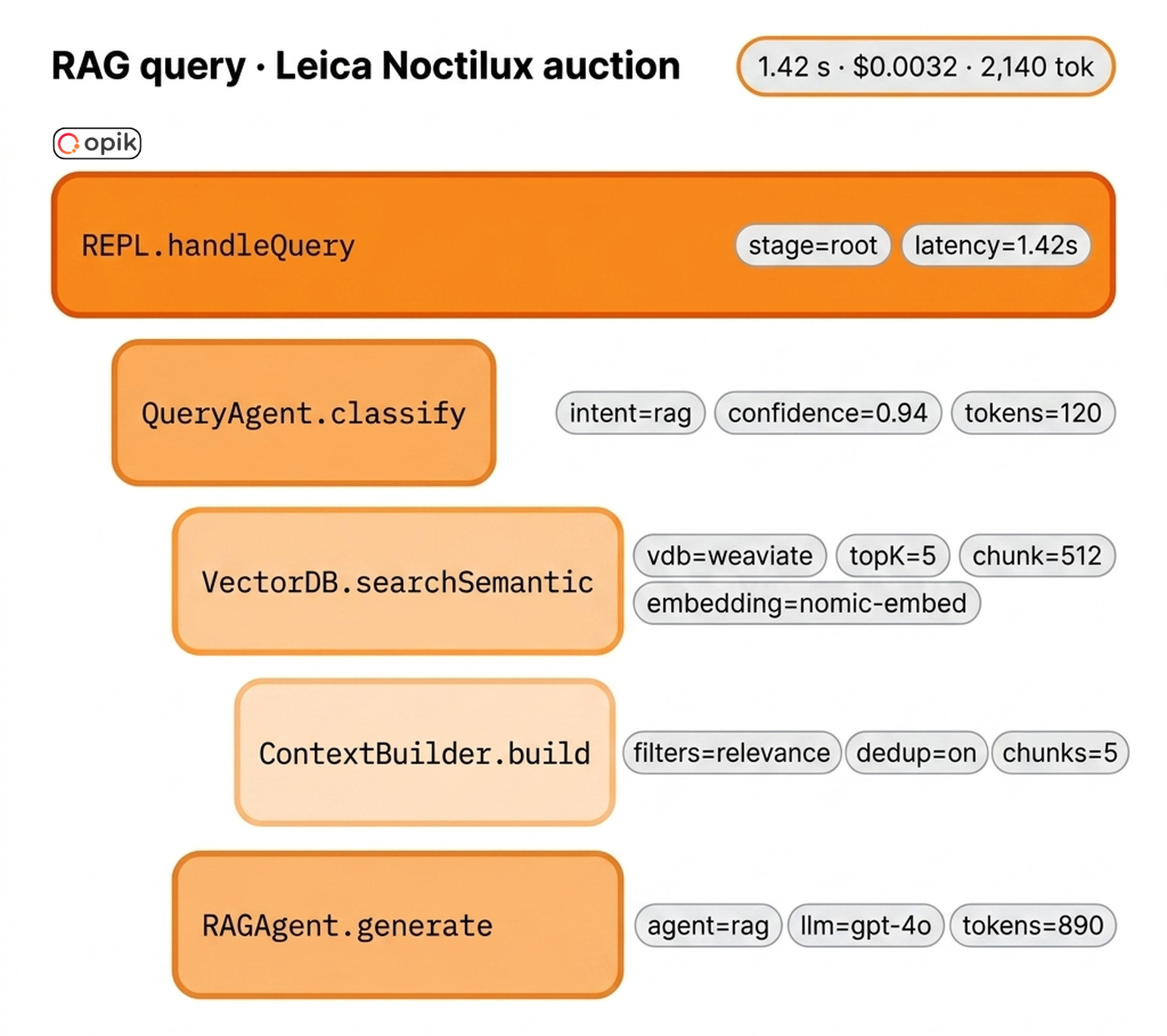
The integration provides cost and latency visibility per trace. You see tokens and dollars per query without writing custom logging. It provides a latency breakdown.
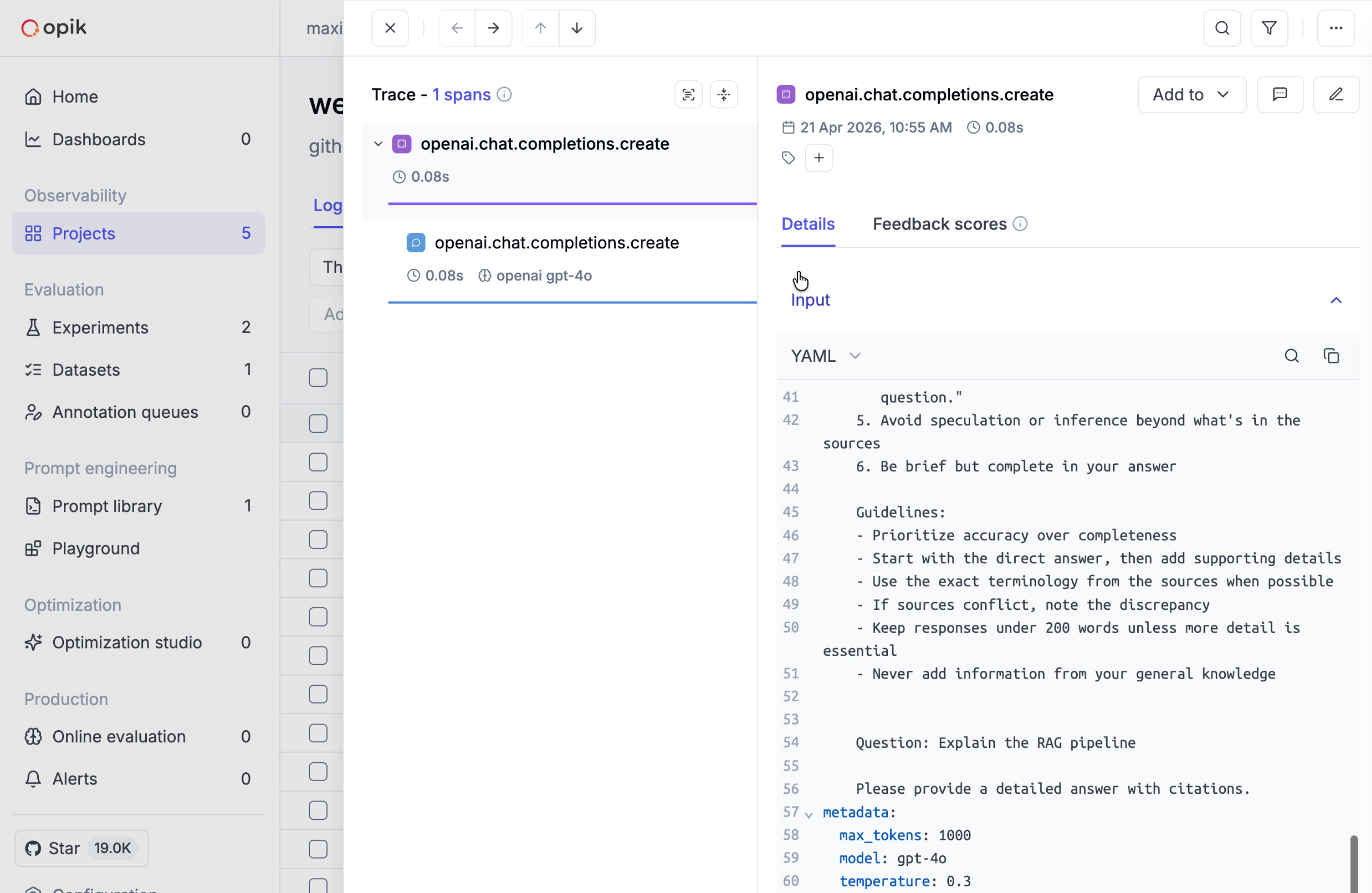
Finally, it provides error visibility to make silent failures loud.
How hard was it to integrate Opik into Weave CLI?
“It’s a very straightforward integration — I pass all queries to the LLMs through Opik via OpenTelemetry, and then I query Opik to aggregate cost from the start of the command to the end.” — Max
Every step in the ingestion and retrieval data flows emits a span (src/pkg/llm/opik.go), which are aggregated under traces containing all the steps between a user request/response.
It includes the query, the LLM reasoning, the tool calls, and the final response. The executor initializes Opik tracing here (src/pkg/executor/executor.go).
Monitoring helps you debug your system. Evaluation moves everything forward, allowing you to quantify your application’s performance.
Evaluating the Default Setup
How do you know your agent is actually better after you swap an embedding model, a vector database or your chunking strategy? You need a good evaluation practice.
“My customers always have five or six questions they ask every release to sanity-check the system. They know what to expect. So I took their QA questions and made them the baseline eval dataset.” — Max
Evaluation datasets come from real user behavior anchored in your business use case, not from standardized, generic benchmarks. If you do not have users yet, you should compile a small set of sanity questions a domain expert would actually ask.
How does this work in Weave CLI?
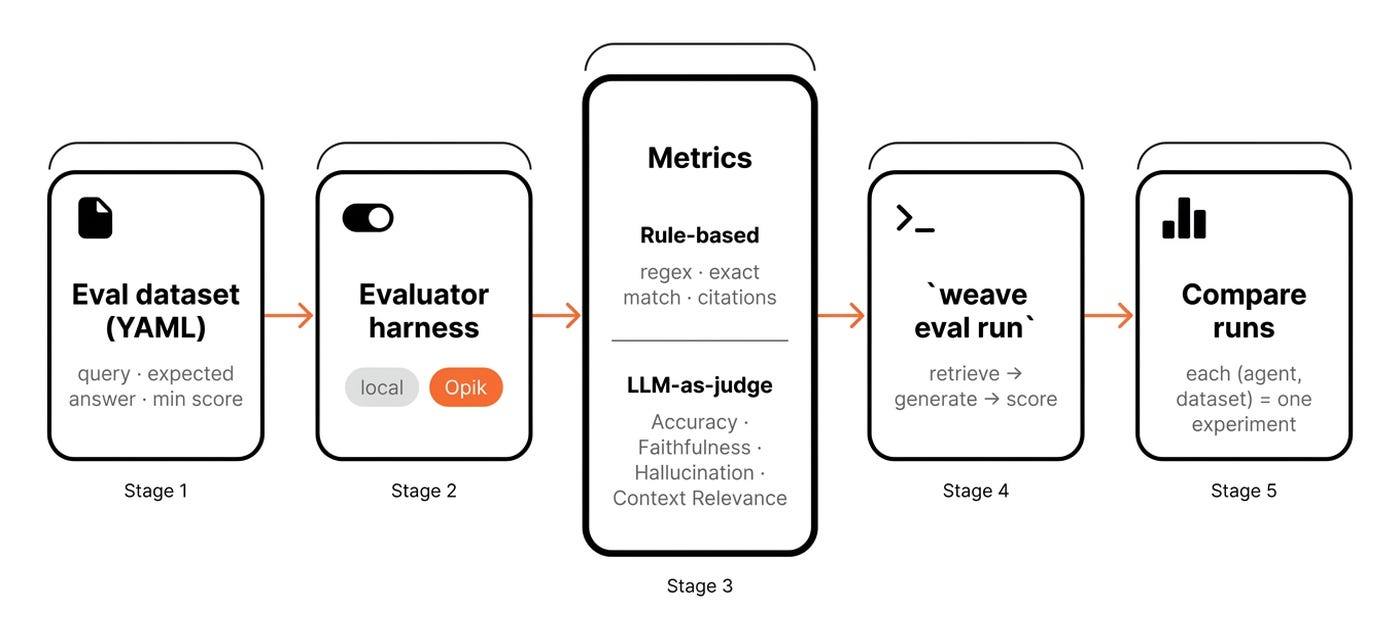
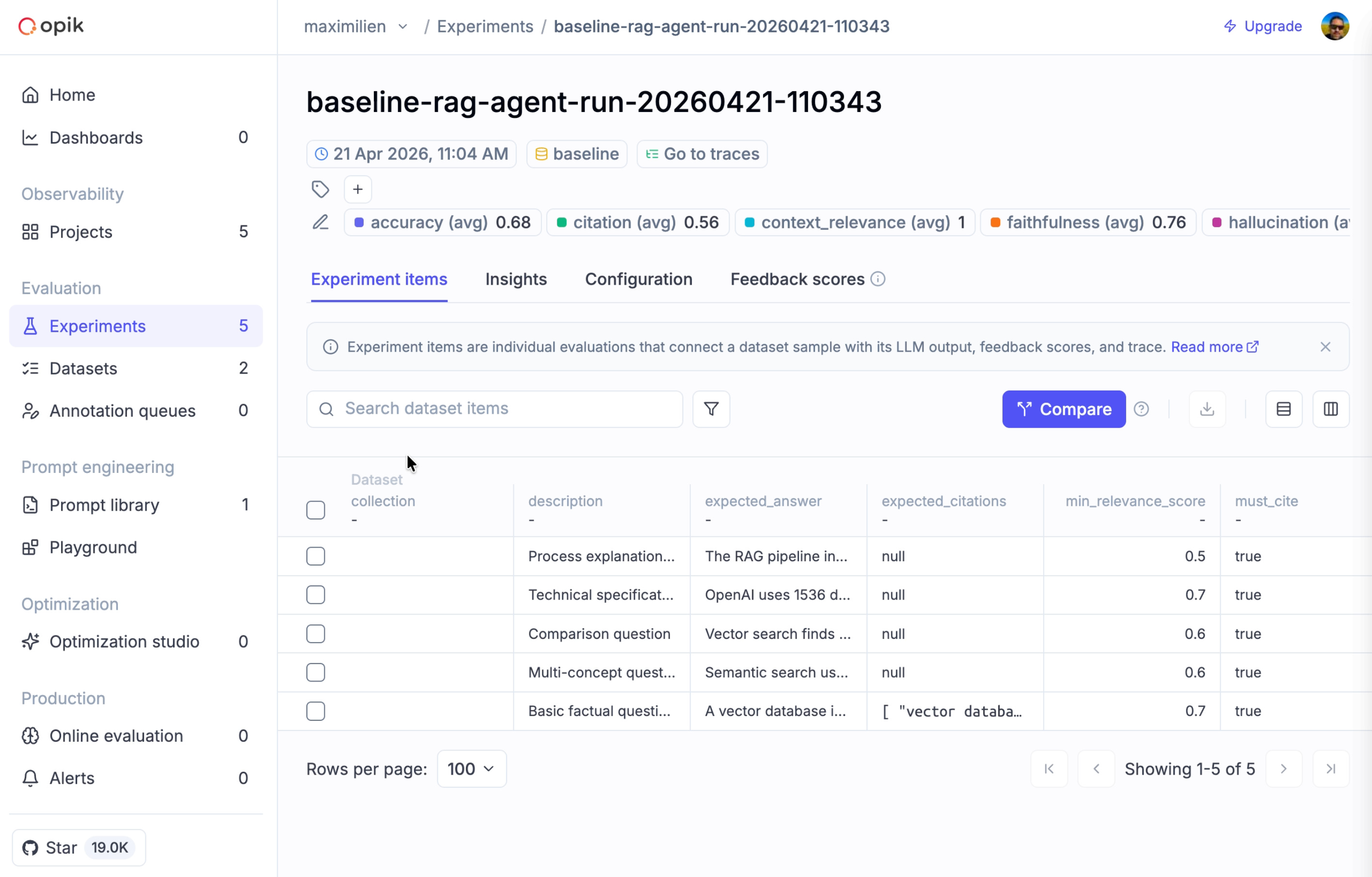
You start by defining an evaluation dataset in YAML format. This includes the query, expected answer, expected citations, and a minimum relevance score.
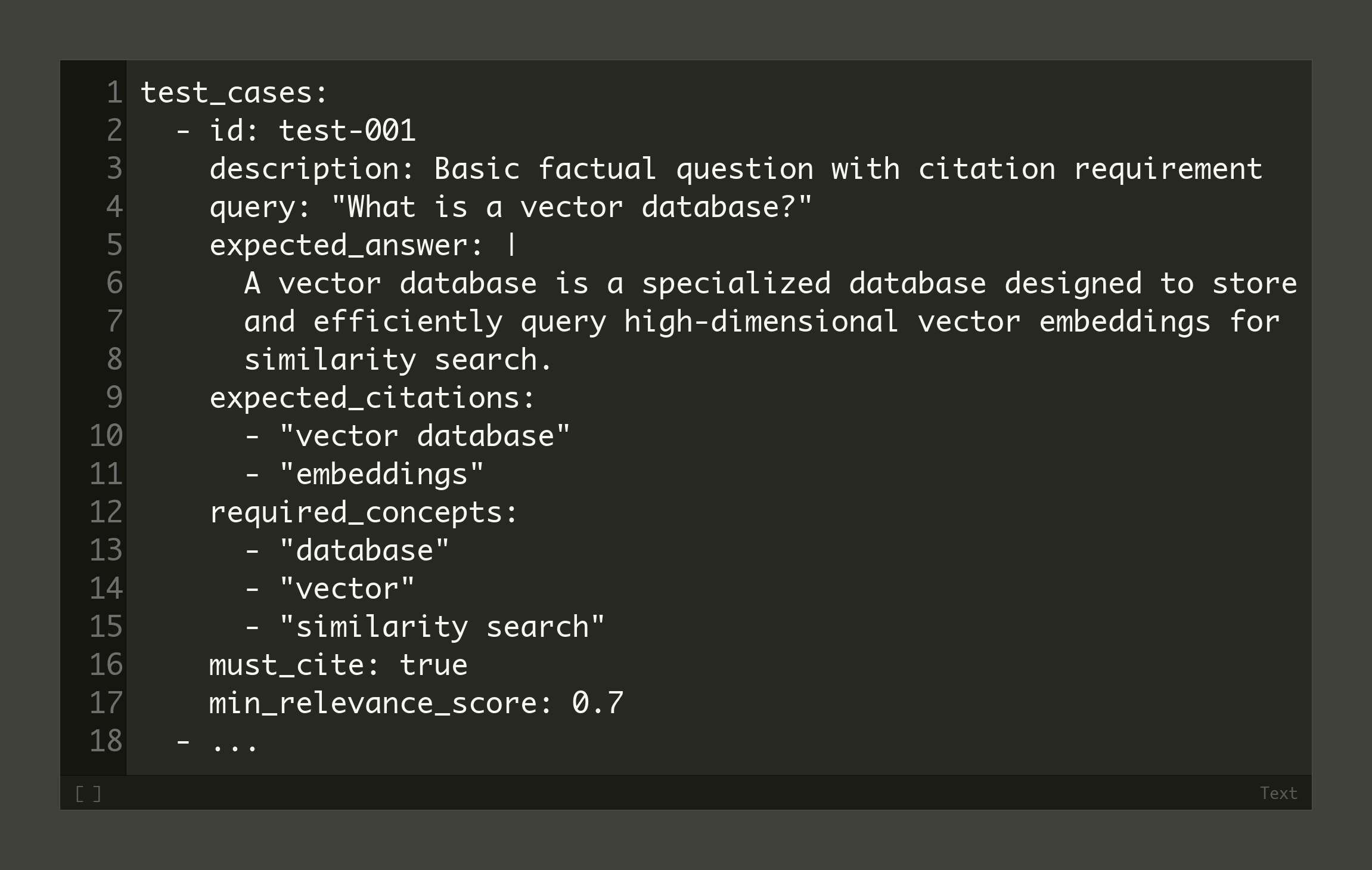
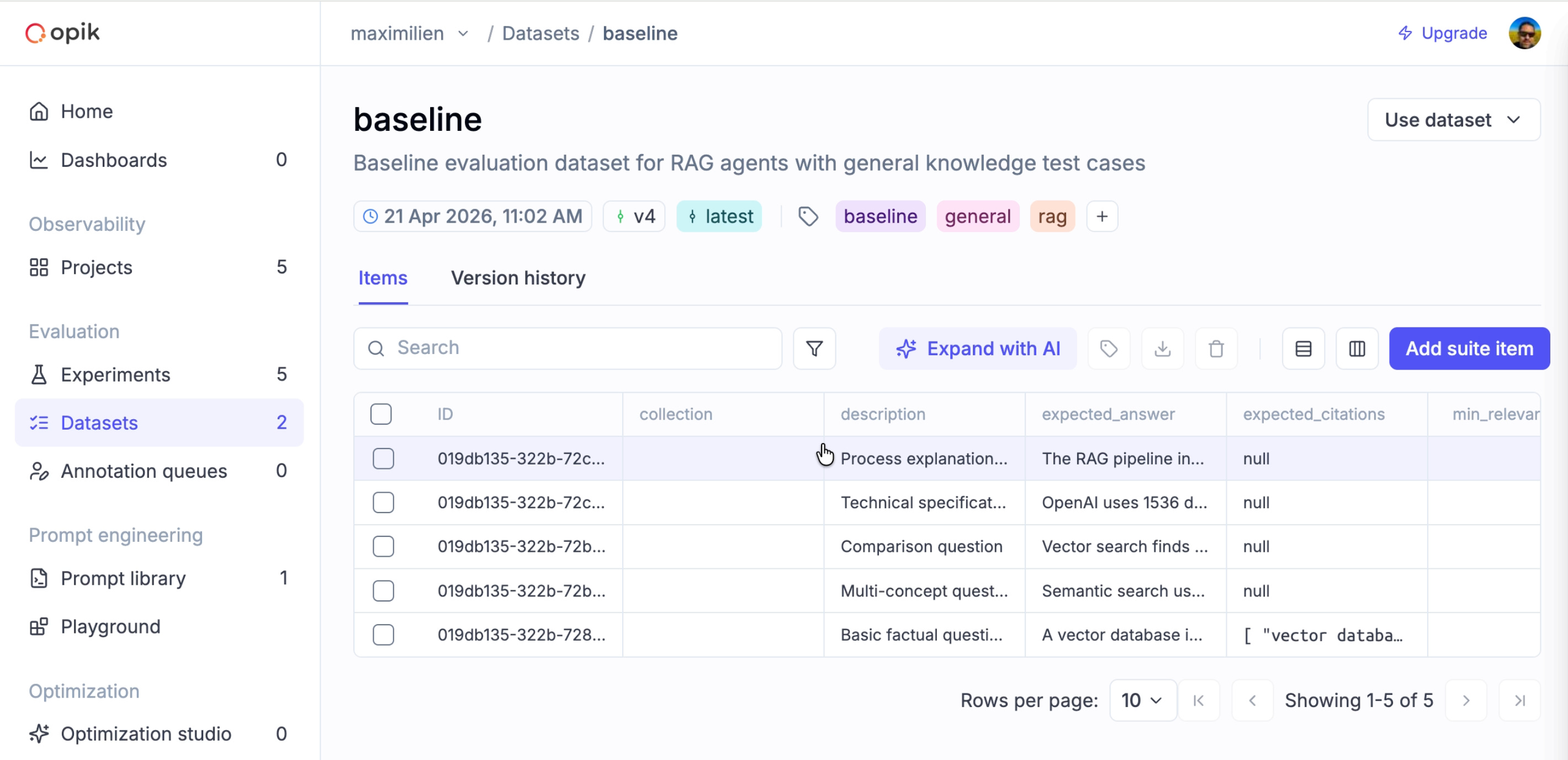
Here is the full baseline.yaml file. Or this is how it looks in Opik:
Then you pick an evaluator harness that includes a set of metrics to evaluate against. This harness is itself pluggable: you pick between a local evaluator and Opik (src/pkg/evaluation/provider.go).
We use two families of evaluators. Rule-based evaluators use regular expressions, exact matches, and citation presence (src/pkg/evaluation/custom_evaluator.go) to compute metrics such as CitationMatching for the RAG agent.
They are fast, deterministic, and free. You use them for structural checks.
The second family uses an LLM as a judge. Weave CLI ships four of these judges (src/pkg/evaluation/provider_opik.go). They evaluate Accuracy, Faithfulness, Hallucination, and Context Relevance.
They are slower and cost tokens. You use them for semantic quality.
“The hallucination, citation, and accuracy metrics are all from Opik’s library — I ported them to Golang.” — Max
💡 One key step most people forget is to align the LLM judge with the human expert. In our use case, the correlation between an LLM judge’s faithfulness score and human judgment hovers around 0.55. Judges are a signal, not a ground truth. For example, on average, I spent three weeks labeling a few-shot examples and computing agreeability scores before I trusted my own judgment.
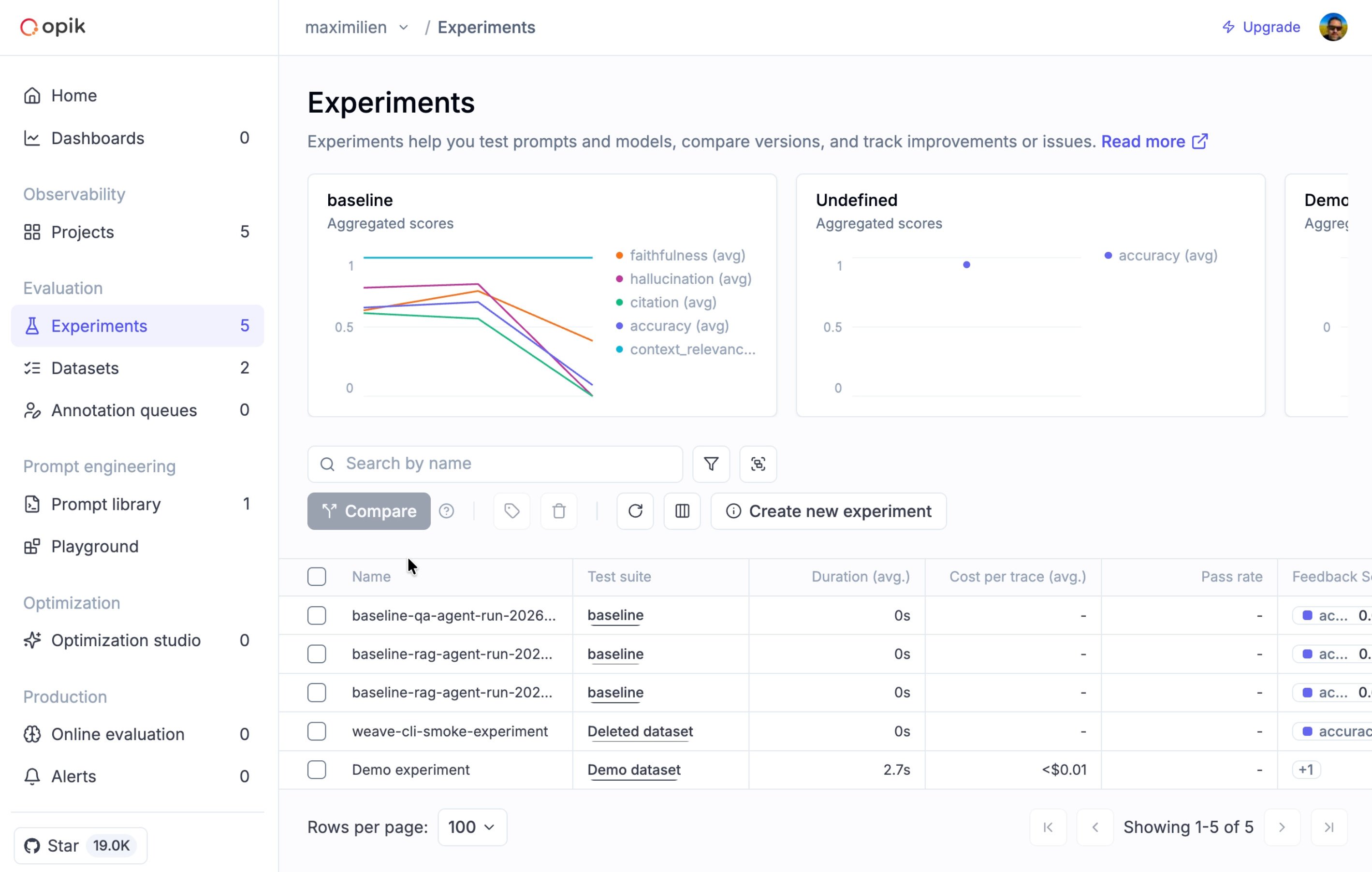
Then, you run the evaluation command against a chosen agent. Finally, you compare the result of the experiment with the previous run. Each pair of agent and dataset is one experiment (src/cmd/eval/run.go).
The --use-opik flag ships every trace and evaluation result to Opik (src/pkg/evaluation/runner.go). Once in Opik, you get dataset management and experiment comparison.
Scoring every run forces a decision on which agent to ship. Benchmarking on top of your custom datasets provides a structured way to choose a parameter, such as your chunking strategy or top k results, without guessing.
Benchmarking and Optimizing the System
An experiment is a single parameterized run over an agent, dataset, embedding, chunking strategy, database, and judge. A benchmark is a structured set of experiments.
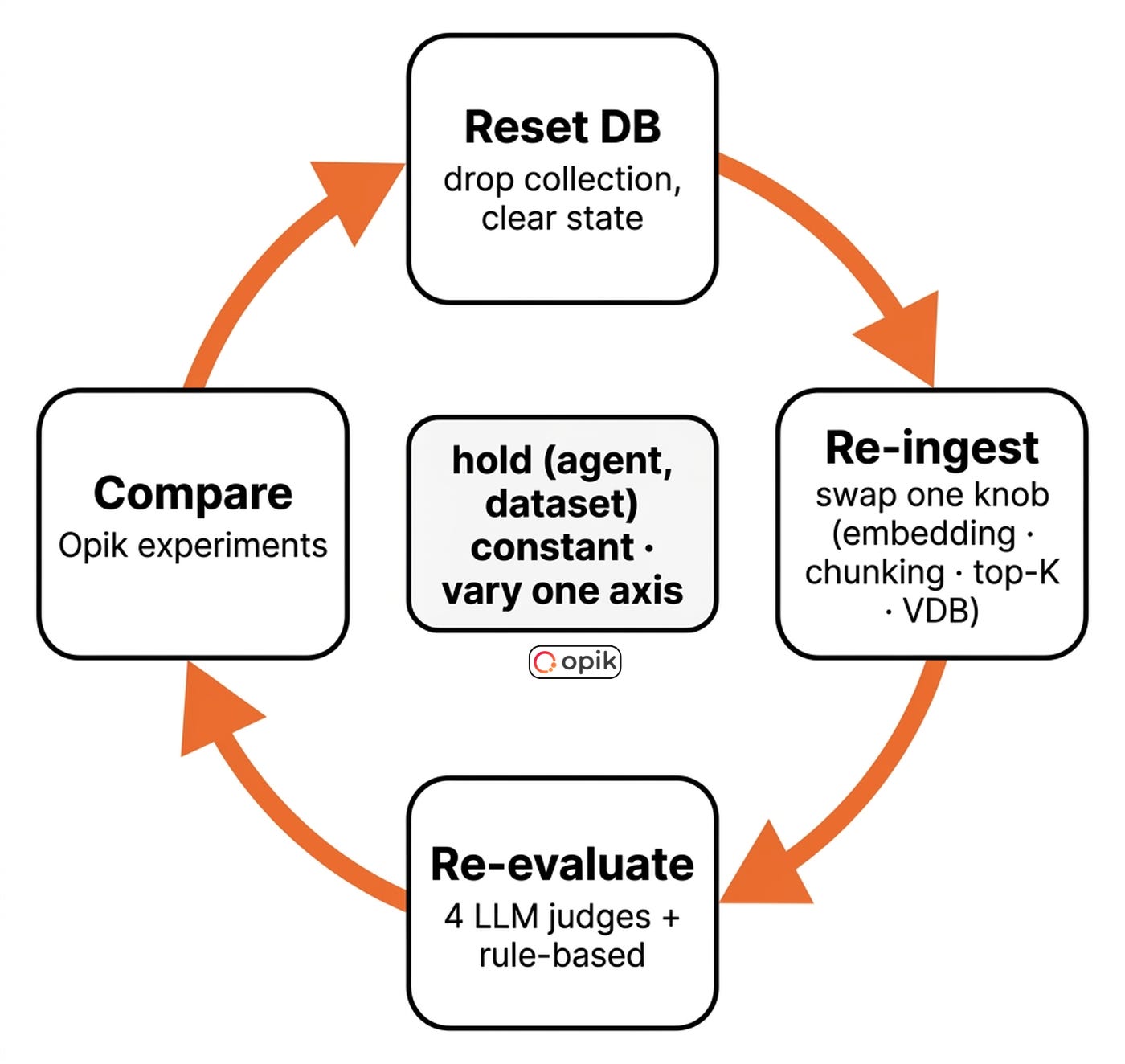
You hold most variables constant to isolate the effect of one. Benchmarking is how you turn random runs into a parameter- and prompt-search problem. This is often known as the optimization flywheel.
“That’s the reason I created Weave CLI. Because this is tedious, but also error-prone.” — Max
Every benchmark is one configuration typo away from drawing the wrong conclusion. Disciplined benchmarking catches that error.
Experiment metadata guarantees reproducibility. Every experiment records the database, embedding model, chunking strategy, dataset, and everything else required to reproduce it. That’s usually the whole config.
Opik tracks this out of the box. Without it, a benchmark from four weeks ago is useless.
When working on RAG systems, the optimization flywheel involves resetting the database, re-ingesting data with new parameters, re-evaluating, and comparing on your metrics of choice.
“Benchmark is comparing multiple agents side by side. Same dataset, different agents — and each (agent, dataset) combination is its own experiment, you can compare later with its metadata.” — Max
You fix a baseline dataset and hold it constant. You vary one axis, typically the agent. You score against multiple metrics.
Each pair of agent and dataset is one Opik experiment. You compare them side-by-side to spot regressions and unexpected wins.
You trigger this loop via the command line with weave eval run --dataset baseline --agents precise-qa,rag,summarize --use-opik. Every subsequent benchmark streams into the same Opik project.
Max ran this loop for his Leica auction customer. He held the dataset and agent constant.
He varied only the embedding provider. He tested OpenAI against sentence-transformers. The open-source model won on quality by 11 percent.
It was 240 times faster for re-embedding. The vectors were 50 percent smaller, and the cost was zero.
This is a counterintuitive outcome. Without a structured benchmark, Max would have defaulted to OpenAI and been wrong.
How to Keep the Flywheel Under Control?
This optimization process involves running your ingestion and retrieval hundreds of times. Which can get costly fast. Super fast. The ingestion checkpointing makes it affordable.
Still, you should optimize your system in order of cheapest-to-change, biggest-win-first [8]. First, tune retrieval parameters like top-K. They are free to change and often provide the biggest wins.
Second, tune the embedding model. It is the cheapest component to swap and has a huge impact. Third, tune the chunking strategy. It requires re-ingestion but offers moderate quality gains.
Finally, tune the vector database. It has the highest switching cost and usually the smallest difference in quality.
The optimization flywheel effectively isolates variables, but it remains a manual process today.
The good news is that Weave CLI is heading toward full automated hyperparameter optimization across databases, embeddings, and chunking strategies. Just imagine. You will launch it before the weekend, and it will return on Monday with the best configuration for your dataset.
💭 P.S. If you want to use Weave CLI but think it’s missing a feature, Max is more than pleased to add it. Just open a PR/issue on the repository.
You can reproduce this benchmark step by step on your own stack by following this doc.
Watch our full interview on YouTube for all the 3am stories ↓
Final Thoughts
Looking back, what was the hardest thing to implement, and what surprised you the most while building weave-cli? — Paul
The hardest part was designing a unified VectorDBClient that felt natural across 11 providers with wildly different APIs. The adapter pattern was the insight that made it work.
The biggest surprise was benchmarking OSS embeddings against OpenAI on the client’s data and finding them 11% higher quality, 240x faster, and free. A call we’d never have made without evals in place.
If you had to rebuild Weave CLI from scratch, at what point would you introduce monitoring and evaluation? Would you do it earlier, later, or at the same time? — Paul
I’d introduce monitoring from day one. Having Opik traces during the early vector DB work would have immediately surfaced issues such as the silent Milvus persistence failures, which we debugged manually. As for evals, I’d keep at the same stage (after the core RAG pipeline was functional), but I’d design the harness interface up front for citation tracking and confidence scoring.
Opik was easy to integrate and was key to getting the client dashboard working, since I could just run experiments and use evaluations and tracing to decide on the best options for the client.
Now, your next practical step is to experiment with Weave CLI on a real problem. Point it at 100 documents you want to do RAG on, ingest everything into two collections with two different embedding providers, and run the benchmark against the baseline evaluation dataset.
You can follow the step-by-step tutorial from here
But here is what I’m wondering:
While building your latest RAG system, what was your strategy to find the right parameters, such as the embedding model, chunking or retrieval strategies?
Click the button below and tell me. I read every response.
Enjoyed the article? The most sincere compliment is to restack this for your readers.
Whenever you’re ready, here is how I can help you
Go from agent user to agent builder. Master the foundations of AI agents and turn fragile demo code into reliable, production-ready systems with my course, Agent Engineering: Building Multi-Agent Systems (made with Towards AI).
35 lessons. Pure foundations from scratch. 4 mini-projects. 2 production systems. A certificate and direct access to me & industry experts in our Discord.
Built for software and data professionals transitioning into AI engineering. Rated 5/5 with 300+ students. The first 7 lessons are free:
Not ready to commit? Start with our free Agent AI Engineering Guide, a 6-day email course on the mistakes that silently break AI agents in production.
Thanks again to Opik for sponsoring this case study and keeping it free!

If you want to monitor, evaluate and optimize your AI workflows and agents:
References
Chroma. (n.d.). Evaluating Chunking Strategies for Retrieval. Chroma. https://research.trychroma.com/evaluating-chunking
OpenTelemetry. (n.d.). Traces & Spans specification. OpenTelemetry. https://opentelemetry.io/docs/concepts/signals/traces/
Husain, H. (n.d.). Creating a LLM-as-a-Judge That Drives Business Results. Hamel Husain. https://hamel.dev/blog/posts/llm-judge/
Husain, H. (n.d.). Escaping POC Purgatory: Evaluation-Driven Development for AI. Hamel Husain. https://hamel.dev/blog/posts/evals/
Liu, J. (2025, May 19). There Are Only 6 RAG Evals. Jason Liu. https://jxnl.co/writing/2025/05/19/there-are-only-6-rag-evals/
Comet. (n.d.). Opik — LLM observability & evaluation platform. GitHub. https://github.com/comet-ml/opik
Yan, E. (2024, August 18). Evaluating the Effectiveness of LLM Evaluators (LLM-as-Judge). Eugene Yan. https://eugeneyan.com/writing/llm-evaluators/
Liu, J. (2024, February 28). Levels of Complexity: RAG Applications. Jason Liu. https://jxnl.co/writing/2024/02/28/levels-of-complexity-rag-applications/
Images
If not otherwise stated, all images are created by the author.