



This article originally appeared in Hugo’s newsletter, Vanishing Gradients, and is republished here with the authors’ permission.
Paul: Today, two of the industry’s brilliant minds own the scene.
You’ll learn from Hugo, who teaches LLM systems to engineers at Netflix and Meta, and Eleanor, a former principal engineer at Microsoft and Google who’s now building evidence-based, production-ready AI at Jimini Health and Agentic Ventures.
They’ve created this dope course on building an agentic software factory. Decoding AI community members get 25% off via the link or code FRIENDSOFPAUL at checkout, plus $500 in Modal credits.
P.S. Take notes on this one. ✍🏼
Agentic software factories are here
Stripe’s Minions turn engineering requests into candidate pull requests. Ramp’s Inspect puts coding agents to work in the background, with tools to check their changes. Warp Factories takes work from tickets and chat through agents, checks, and human review. Agentic software factories are here.
Are you sick and tired of babysitting Codex, Claude Code, or OpenClaw?
Do you have agents that can build features, but still leave you responsible for remembering where they stopped, explaining how each feature fits the project and deciding what happens next? You make progress in each conversation, then development waits for you to return.
It doesn’t have to be this way. A software factory lets you delegate more of that process!
You agree on an outcome, give the system the context and authority it needs, and let it work while you do something else. When you return, there should be
a result you can inspect, with evidence of what was checked; or
a specific reason the work could not continue.
Your next conversation can then focus on the result and the decisions that remain.
As we’ll show you, your first software factory doesn’t need to be that complex at all: it can begin with a single agent and an automation.
What makes it a factory
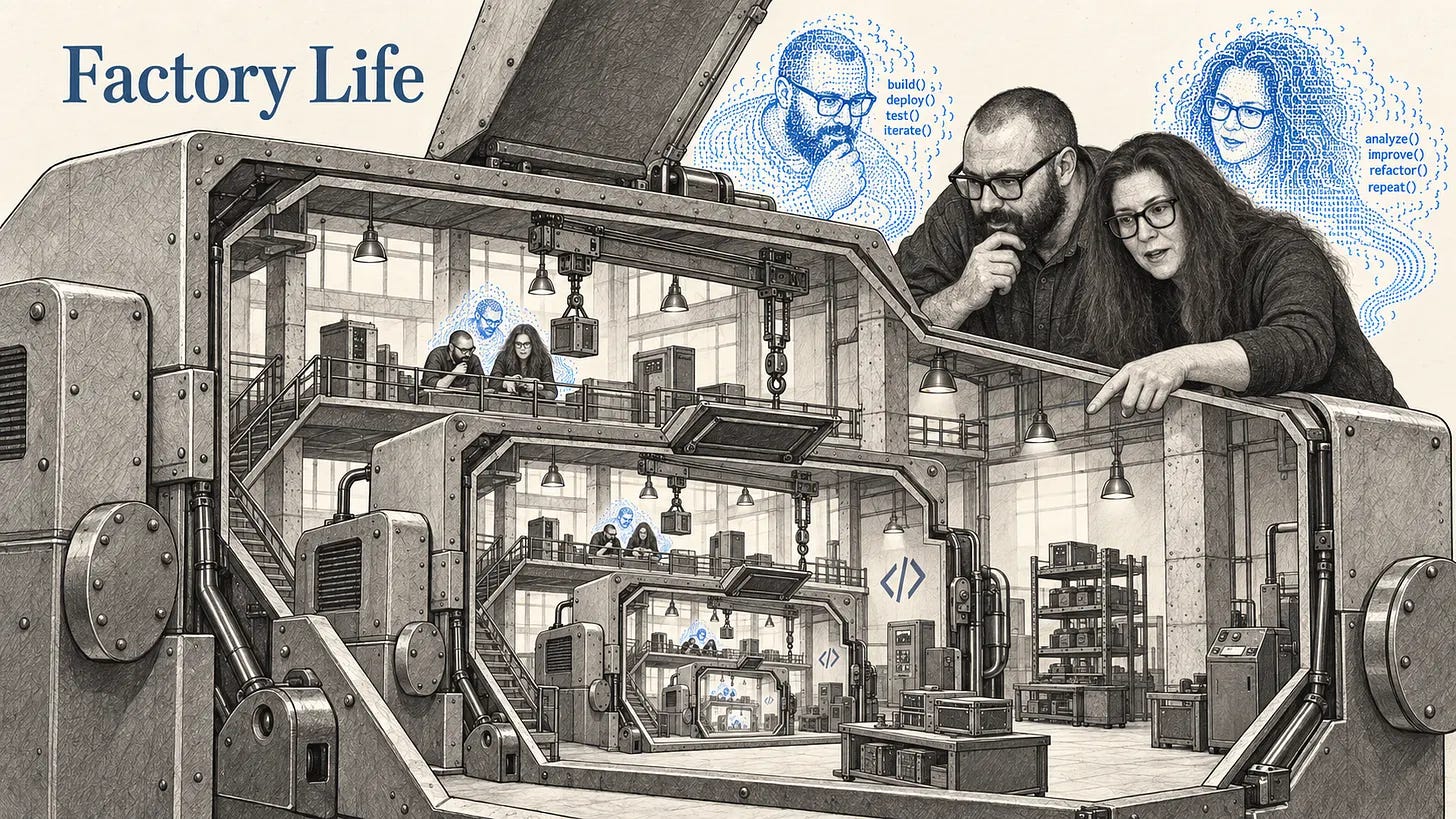
The defining combination is autonomous and asynchronous execution.
Autonomous: the agent chooses and carries out steps towards an agreed goal. It can inspect what happened, adjust its approach and continue within its authority.
Asynchronous: that work can proceed without your ongoing attention. You can leave and return to its result.
A scheduled job can run without you. A coding agent can choose and revise an approach during an interactive session. A factory combines those capabilities, with enough context, tools and feedback to carry out the delegated work.
Software factories have been hypothesized for decades. Now that we have agents, we’re actually able to operate them. The principles apply to software work traditionally carried out by teams of humans, from bespoke tools for teams and individuals to large and complex software systems.
To illustrate these principles, we’ll use an invoice tracker throughout this article, an application we’ve needed for our own businesses. The same approach applies to research tools, publishing systems and software for teams. Suppose you run a small business and want an invoice tracker that fits how you work:
Build an app that creates invoices from my template and tracks which are unpaid, paid or overdue. Keep it local for now. Preserve the records when it restarts, and show me checks that the totals and payment statuses are correct.
You can agree on this brief with the agent, leave it to work while you do something else, and return to the app and evidence of what was checked. If a check fails, it can investigate and adjust within its agreed scope. If it encounters a product decision it cannot make, it should bring that question back to you.
You might imagine a clean separation: the factory builds the invoice tracker, then the finished app does its job. That’s one way to run it. But agents can also help operate the software they build, and that combination is useful.
The tracker can store invoices and calculate outstanding balances. An agent can use those records alongside customer correspondence to prepare follow-ups: one customer has promised to pay on Friday; another is disputing a charge. You don’t need to turn every situation into a new software feature before the agent can help. You give it the relevant context, authority and a way to check its work.
This changes what you need to build! Some behaviour belongs in code, such as calculating balances consistently. Other work can be delegated to an agent that responds to the circumstances. If a recurring need emerges, you can ask the factory to build it into the software. The factory builds tools that agents can use, and experience using those tools helps you decide what to build next.
You still decide what is worth building, who it should serve and which trade-offs matter. Agents can help you make those decisions too. The practical change is that implementation can proceed between your conversations, including running checks and responding to failures.
This makes factories relevant to people with product, business or creative expertise as well as engineers. You might know exactly how you invoice clients, record payments and chase overdue bills while having little interest in writing software. That knowledge lets you direct the factory towards software that fits your business, including the exceptions and connections that general-purpose tools handle poorly.
The software factory hierarchy of needs
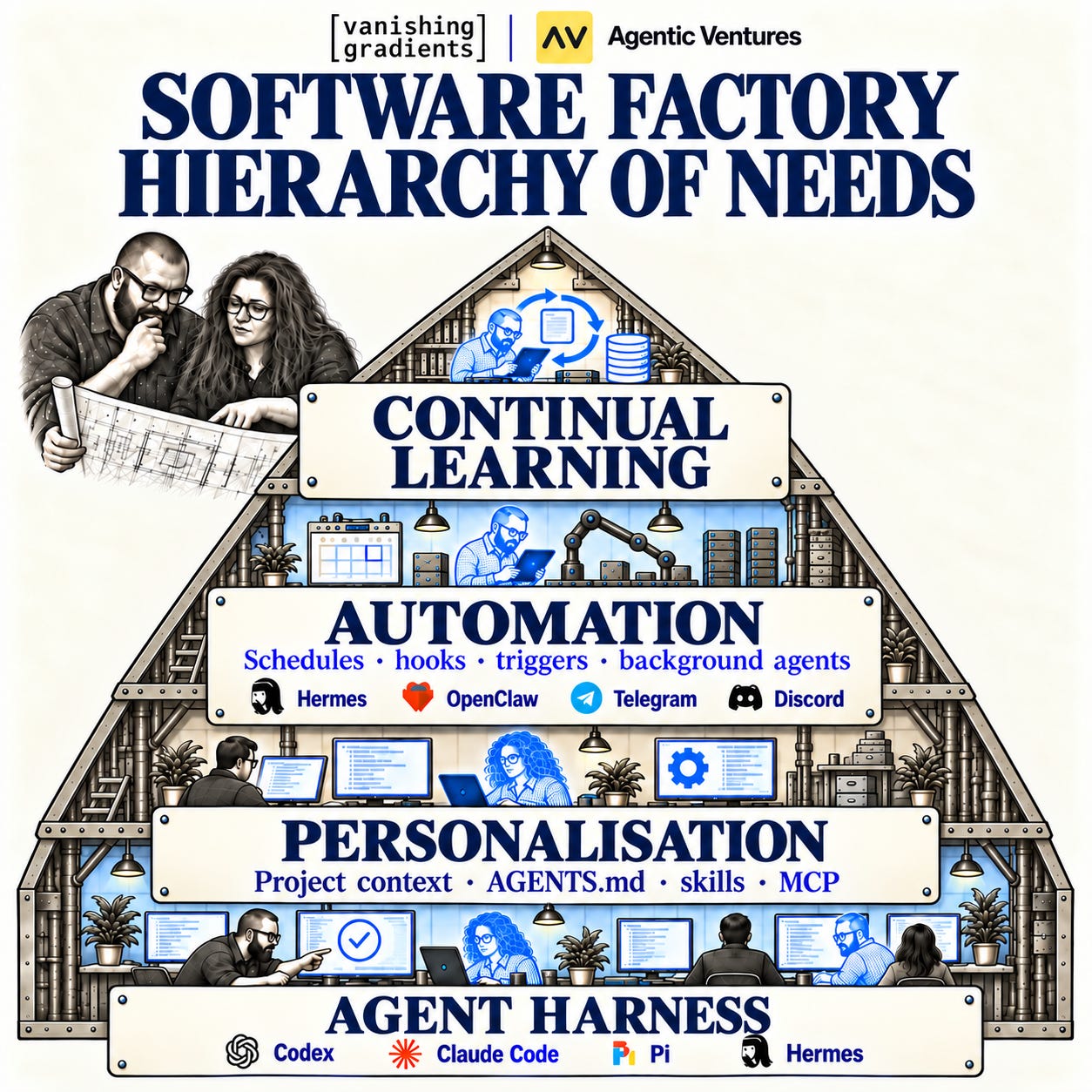
Monica Rogati’s original AI hierarchy of needs described the foundations beneath successful AI work. We find that dependency framing helpful for factories too, with four different layers.
Harness. The environment around the model: tools, a workspace for project files, execution and feedback. It lets an agent read files, change software and run it. If a check fails, the harness must give the agent enough information to investigate what happened.
Personalisation. The context and capabilities for your work: project direction, rules, reference material, skills and connections to other systems. The agent needs to know what you are trying to accomplish and which existing decisions it should preserve. Permissions limit access to tools and systems; sandboxing restricts the environment where actions can run.
Automation. A way to start and continue work without a fresh instruction from you each time. A schedule or event can trigger a task or the pickup of ready work. It also needs direction about what qualifies as ready and where to leave the result.
Continual learning. A process for learning from completed and failed runs, improving the factory and carrying those changes into later work. That might change an instruction, a checking procedure or a tool the agent uses.
Automation needs a harness able to do the work, plus direction about what to do. Continual learning needs runs to inspect and a way to put improvements into use. These capabilities can develop together: a familiar harness, a short brief and a basic automation are enough to start. You can personalise further as work reveals what is missing.
Two practices run through every layer: specification and verification:
Specification makes the intended outcome, constraints and criteria for success explicit. In our invoice brief, that includes preserving records after a restart and calculating payment statuses correctly.
Verification checks the software and the work agents perform against those requirements.
Agents can help you refine the specification and perform the checks. Your role is to decide whether the requirements capture what you need and whether the evidence supports accepting the result. As the factory takes on more work, these practices give you a way to direct it and assess what comes back.
Let’s now see what’s up in each layer.
1. Agent harness
First, you’ll need an agent harness. If you’re using Codex, Claude Code, Hermes, or OpenClaw, you already have one. It gives the model tools to read and edit files, run your software and see what happened.
For our invoice tracker, the agent can build the app, create an invoice, record a payment and restart it to check that the invoice and payment records survived. If a paid invoice still shows as overdue, it can investigate, fix the problem and try again. You shouldn’t have to narrate every step. But if it needs a decision about how your business handles partial payments, that’s a question for you. If it lacks access or authority, the agent should stop and name the blocker.
You’ll also need somewhere for the harness to run. A cloud machine lets the agent keep working while your laptop is closed or disconnected. You can also run it on your own computer, but the machine needs to stay awake and connected for the work to continue.
2. Personalisation
Next, give the agent the context it needs to work your way. For our invoice tracker, that means your template, payment terms and conventions for recording payments. You don’t want to explain all of that again every time you start a new task.
Keep it somewhere future workers can find it:
Rules: preserve existing invoice records; ask before changing payment-status calculations.
References: your template, payment terms and example invoices.
Skills: repeatable procedures for testing invoice creation, payment updates and persistence.
An instruction file such as AGENTS.md can point to this material. OpenAI’s harness-engineering account describes using a short guide that points into maintained project documentation. Give a new or scheduled worker a small task and check that it actually follows the guidance.
Be specific about when instructions apply. Eleanor once told an agent to write tests, and it wrote tests for a README. Enthusiasm wasn’t the problem 😂
You’ll also need to set permissions and sandboxing to control what the agent can access and execute. Written instructions alone don’t enforce those boundaries!
3. Automation
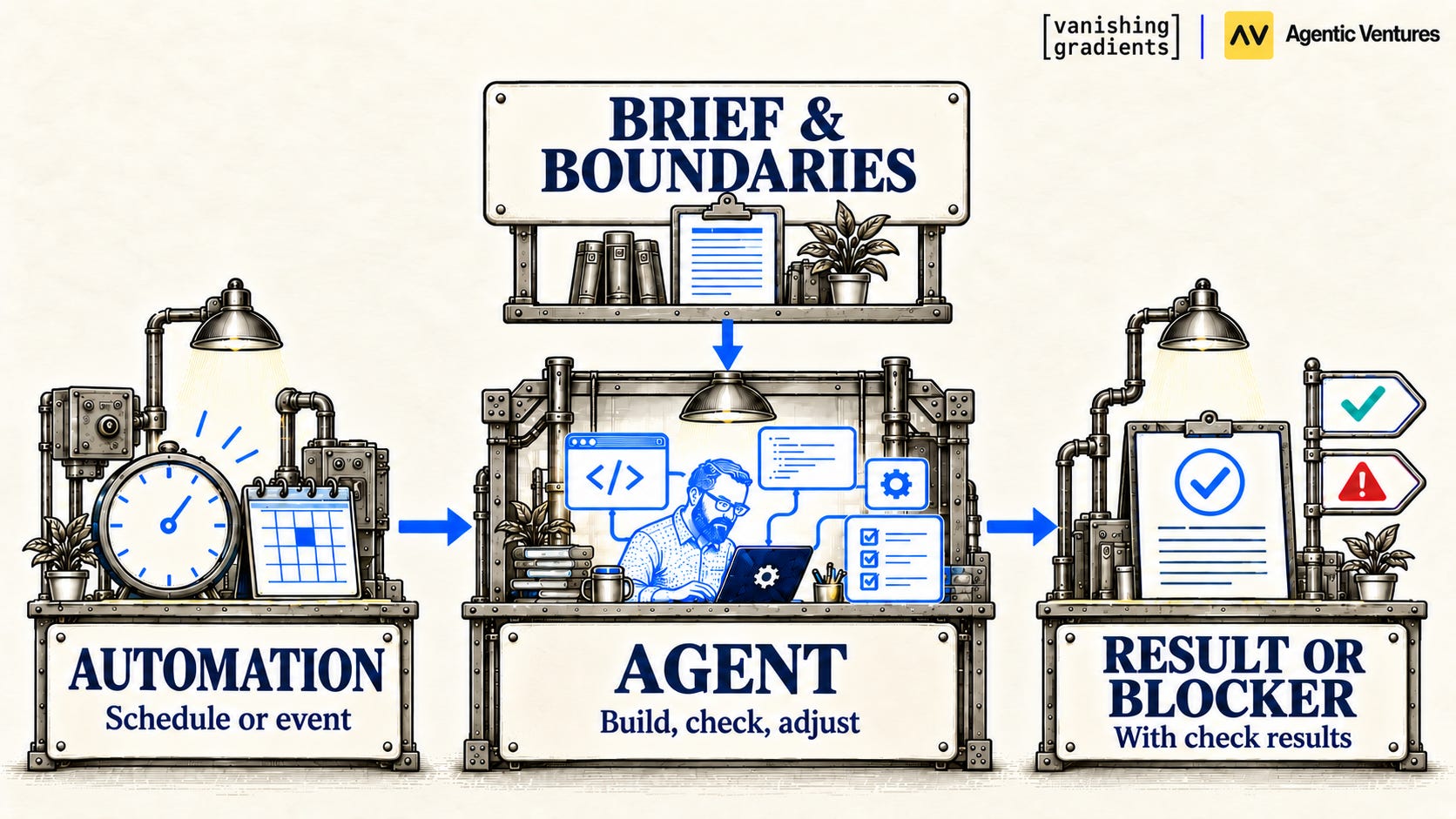
Now let’s give the factory a way to get started without waiting for you. A schedule or event can launch an agent with its brief, project guidance and tools. You come back to a result, evidence of what was checked or a specific blocker that needs your attention.
One agent working in the background
For our invoice tracker, a morning automation could check a saved task list and pick up the next agreed task, such as adding partial payments. You’ve decided what you want and how success will be checked. The agent gets on with it while you do something else.
There are a few practical details to get right. Don’t start the same task twice, leave an empty queue alone, and set limits on time and spending. Save progress so a later session can continue without you having to reconstruct the whole conversation.
One worker may be plenty. But perhaps you have independent tasks that could run in parallel, or you’d like another agent to review a change. That’s where coordination comes in.
Coordinated work
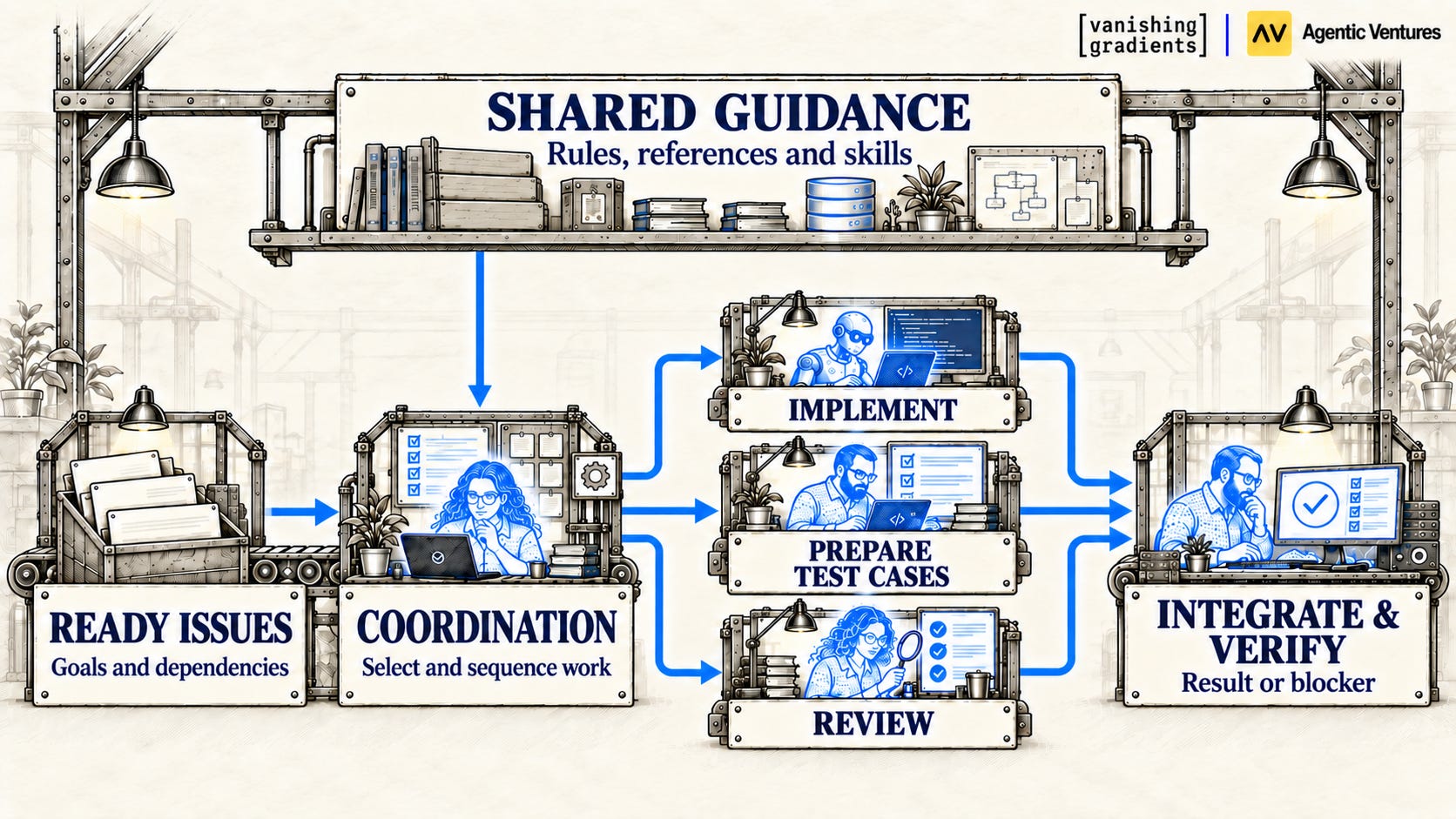
With several agents, everyone needs somewhere to see what’s ready, what’s underway and what’s waiting on something else. A shared task list or issue tracker can hold that information. You agree which tasks are ready; a coordinating agent or automation assigns them, supplies the relevant context and records what happens.
Suppose one task adds partial payments, another overdue follow-up emails, and a third PDF exports. Follow-ups need the correct outstanding balance, so they wait for the payment behaviour to be checked. PDF exports might proceed independently if the changes don’t overlap.
You can also split the roles. One agent builds the feature while another prepares payment scenarios to test it. A third might review the completed change.
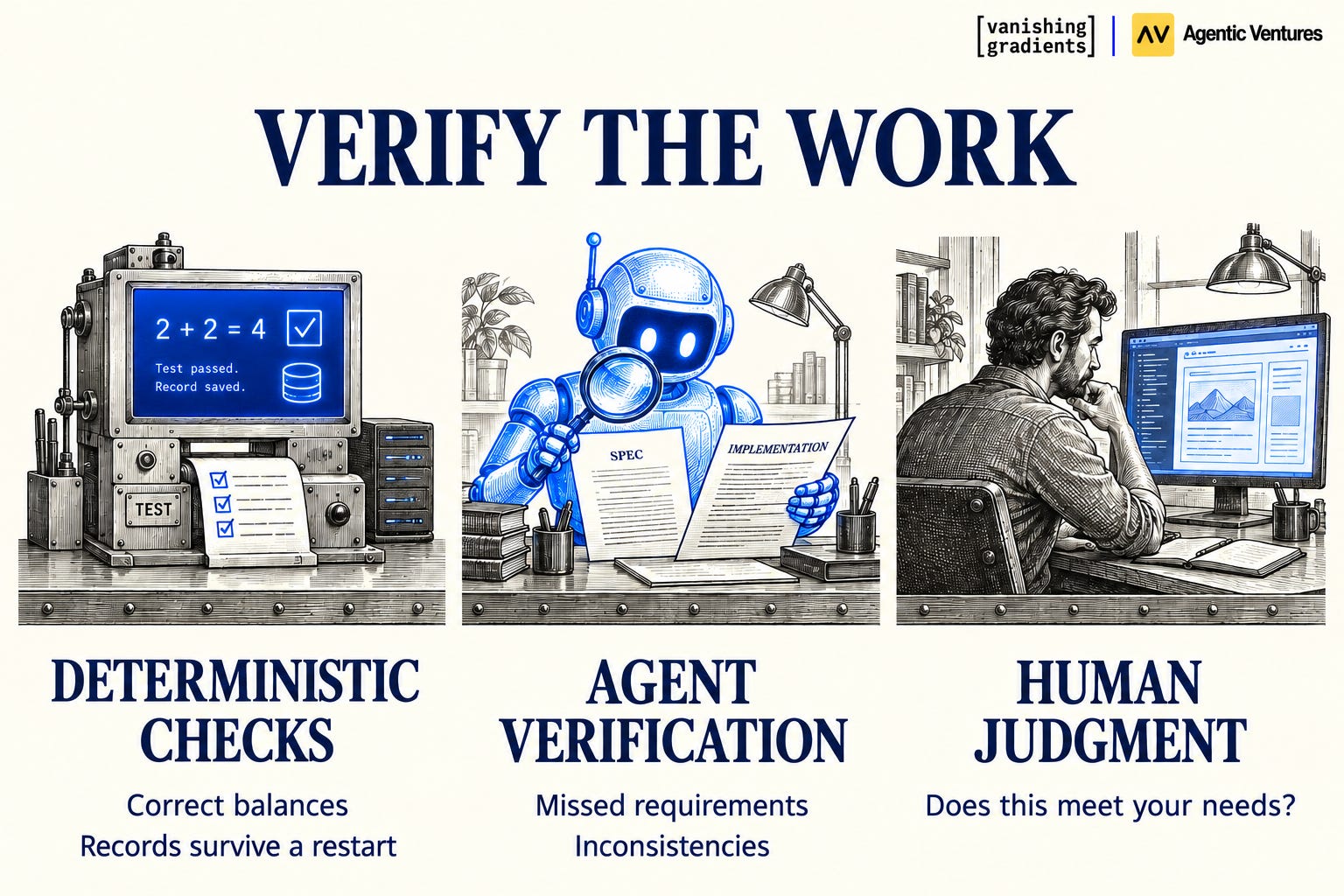
Assign responsibility for combining the changes and verifying the whole application. Different questions call for different checks. Deterministic tests can establish whether balances are calculated correctly and payments survive a restart. Agent verification can help identify missed requirements or inconsistencies across the changes. Human judgment can assess whether the workflow fits how you actually work. You’ll often want a combination, with more than one kind of check on the same result. Anthropic’s evaluation guide describes these complementary approaches: code-based checks, model-based checks and human evaluation.
Once you’ve checked that the combined features work together, you might task your factory with building a phone-friendly interface so you can check invoices and record payments on the move.
The factory can also help run the invoicing workflow as well as improve its software. A scheduled agent could review overdue invoices, consult customer correspondence and prepare follow-ups for your approval. If that work repeatedly requires information the tracker doesn’t record, you can give the factory a task to add it. Building and operating feed into one another: agents use the software, and what happens in use informs its next improvement. This brings us to continual learning.
4. Continual learning
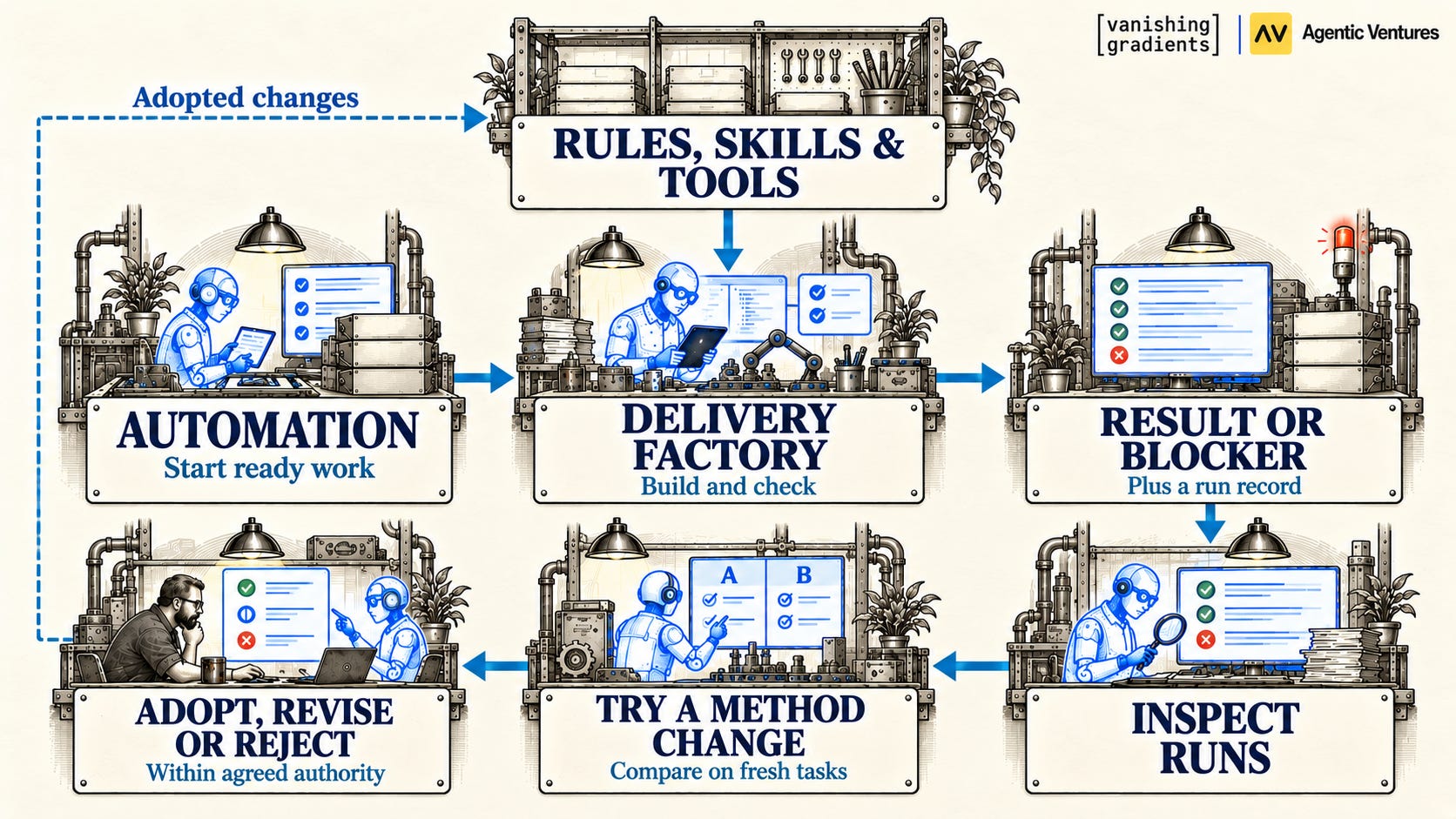
Your factory can also get better at how it works. Suppose payments disappear after restarting the invoice tracker, even though the agent reported that its checks passed. You’ll want it to fix the bug, of course. But why did its checks miss the problem?
Keep a record of assignments, checks and difficulties so a review agent can identify recurring problems and propose improvements. Did the worker lack a way to restart the app, or did it simply skip that check?
If it skipped the check, the agent could propose a skill that saves a payment, restarts the app and verifies the remaining balance whenever a change affects stored records. Test it against the original failure, then on further tasks. Does it catch problems with stored customer details too? Does it avoid unnecessary checks when a task only changes a heading?
The results help you decide whether to adopt, revise or reject the method. Apply changes within the authority you’ve agreed and keep them reversible. Warp’s self-improving factories illustrate this approach: failed checks can lead to proposed changes to prompts, skills or configuration, submitted for human review with evidence from the runs behind them.
Reassess methods as the project and model change. Anthropic’s work on long-running application development describes removing procedures as model capabilities improved and checking the effect.
A saved lesson needs to reach later workers and improve their results. This learning happens through changes to the instructions, tools and methods around the model, without requiring the model itself to be retrained.
What would you build?
Your factory could build a research tool that collects sources and lets you assemble briefings, a family intranet for shared plans and documents, or a private community space. Start with something useful to you, then give the factory further work as you discover what’s missing. Agents can also help operate what you build, from preparing a research briefing to organising incoming material.
Hugo uses this combination to run Vanishing Gradients, his media and education business. After a guest prep call, an automation retrieves the transcript and prepares interview topics, questions, titles and thumbnail options for review. After a livestream, agents can propose clips, cut video, add captions and prepare upload drafts. Saved editorial guidance and skills shape the work; Hugo chooses what to publish.
He also maintains the system, improving checks when agents miss instructions and updating skills based on results. More autonomous continual learning remains something he’s exploring. He describes the setup in How I Built a Media Empire With an Agentic Software Factory.
What’s one simple task you do repeatedly for your community, audience or business that you could start automating?
Decide what your factory needs next
Look at what keeps bringing you back to the work. If the agent cannot run the app or inspect a failure, improve the harness. If you keep repeating project context and decisions, personalise it. If development waits for you to start each task or manage every handover, add automation. If the same failures recur across runs, build a learning loop that changes how later work is done.
Start with work you care about and inspect what comes back. One agent can use all four layers. Add capabilities where they help you delegate more useful work, while keeping specification and verification part of the process throughout.
Build your own software factory
Ready to put these ideas to work? Hugo and Eleanor teach Build Your Agentic Software Factory, a two-week course where you’ll build a factory around something you want to create.
You’ll put the practices in this essay to use: give agents direction, set them working in the background, and learn to inspect and verify what comes back. You’ll leave with software of your own and a process you can keep using to build for yourself, your team or your business.
Bring an idea you’re excited about, or choose a provided starter project. No coding experience is required. The course runs October 13–22, 2026, with two live workshops, office hours for help with your setup and project, and a community of fellow builders.
Every student also gets $500 in Modal credits to run agent jobs in the cloud, experiment with open-weight models, or host something they’ve built. Your factory can keep working while your laptop is off.
Hugo and Eleanor are kindly offering my community 25% off, bringing the price from $950 to $712.50 USD. The link below applies the discount automatically, or you can enter FRIENDSOFPAUL at checkout.
Join Hugo and Eleanor and build your factory.
Enjoyed the article? The most sincere compliment is to restack this for your readers.
Images & videos
If not otherwise stated, all images and videos are created by the author.

