



Models are commoditizing fast. Harnesses already have. What you care about is your research, your notes, your conversations, your tasks, your preferences, and your domain knowledge.
“Free” open-source harnesses don’t make you free. What you want to own is the context layer. Every agent is the same model + runtime + harness underneath, rebuildable on an open stack [1].
I hit this myself. The deeper I built into a single harness, the clearer it got how much I’d lose the day I had to leave. The loss comes in 3 forms.
Failure 1 — You start from scratch. You’ve run Claude Code for 6 months. You switch to an open model and every past conversation, every preference the agent learned about you, is gone. You begin again from zero.
Failure 2 — Your skills are hostage. The harder lock-in is your business logic. If your skills and workflows are coupled to one harness’s features and keywords, switching doesn’t just lose chat history — your custom logic breaks or quietly performs worse on the next tool.
Failure 3 — You’re billed at their mercy. The plan you depend on can be pulled, suddenly gated behind expensive pay-as-you-go, restricted from the latest models (e.g., the Fable story), or repriced from 200 to 1,000 overnight. With high switching friction, you can’t leave. You never know how the AI world can change. But for sure it won’t stay as is now.
So what do you do?
Keep your context layer detached from the harness. Any harness, any model (open or closed), plugs in and within ~5 minutes knows who you are, what you’re working on, what matters to you and how you like things to get done.
Everything that follows is based on the two projects I am working on: Scrabble, my own context layer anchored into my Obsidian notes, Readwise library, Notion, and Google ecosystem; and Tree, the project I am working on with Maxime Labonne for our next book, where we teach how to build a personal AI assistant from scratch.
The Architecture of Your Context Layer
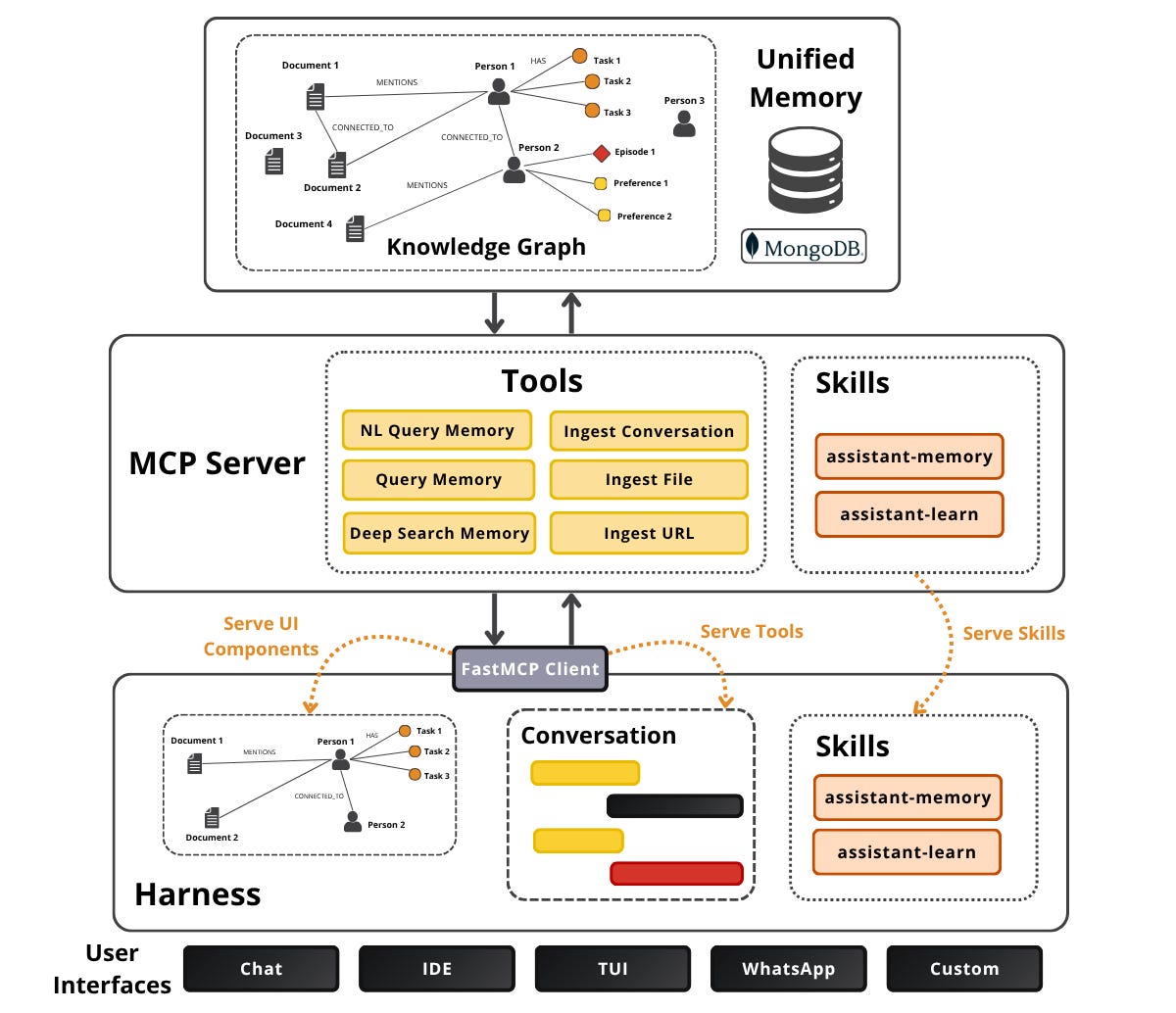
A context layer is made out of 3 core components. First, a unified memory that holds everything you know. Second, a serving layer (MCP server or skills) that is the interface to that memory and the business logic that defines how the memory is used. The harness sits on top and is deliberately disposable.
The unified memory fuses what used to be separate systems: a filesystem, keyword search (BM25), semantic vector search, and a knowledge graph of typed POLE+O nouns (Person, Organization, Location, Event, Object), all in one place. The goal is a memory that belongs to you.
What I always preach is to try your best to build your unified memory on top of a single database that supports text, semantic, and graph search (such as MongoDB). Start simple and add complexity only when your use case demands it.
The serving layer has 2 angles. The first is an MCP server, surfacing Tools, Resources, Prompts, Skills, and even MCP Apps (e.g. a graph visualizer) [2]. It wraps the business logic for how memory is queried and updated. That’s what makes it portable.
The second form skips the server entirely, which is based on skills shipped straight on the filesystem (an AGENTS.md plus a folder of skills). Skills are an interface too. They’re leaner, with nothing to run, but more tied to a given harness’s conventions. It’s how Scrabble’s wiki layer gets consumed.
In practice the strongest setups do both: a portable MCP server for memory access, skills layered on top for higher-level workflows [2]. To avoid fragmenting your business logic, host the skills directly on your MCP servers, coupling them with the rest of the server’s business logic.
In Tree, where I am building a unified memory powered by knowledge graphs, everything is discovered as ordinary MCP tools. That is exactly why “swap the harness, keep the memory” is a one-line config change, not a migration.
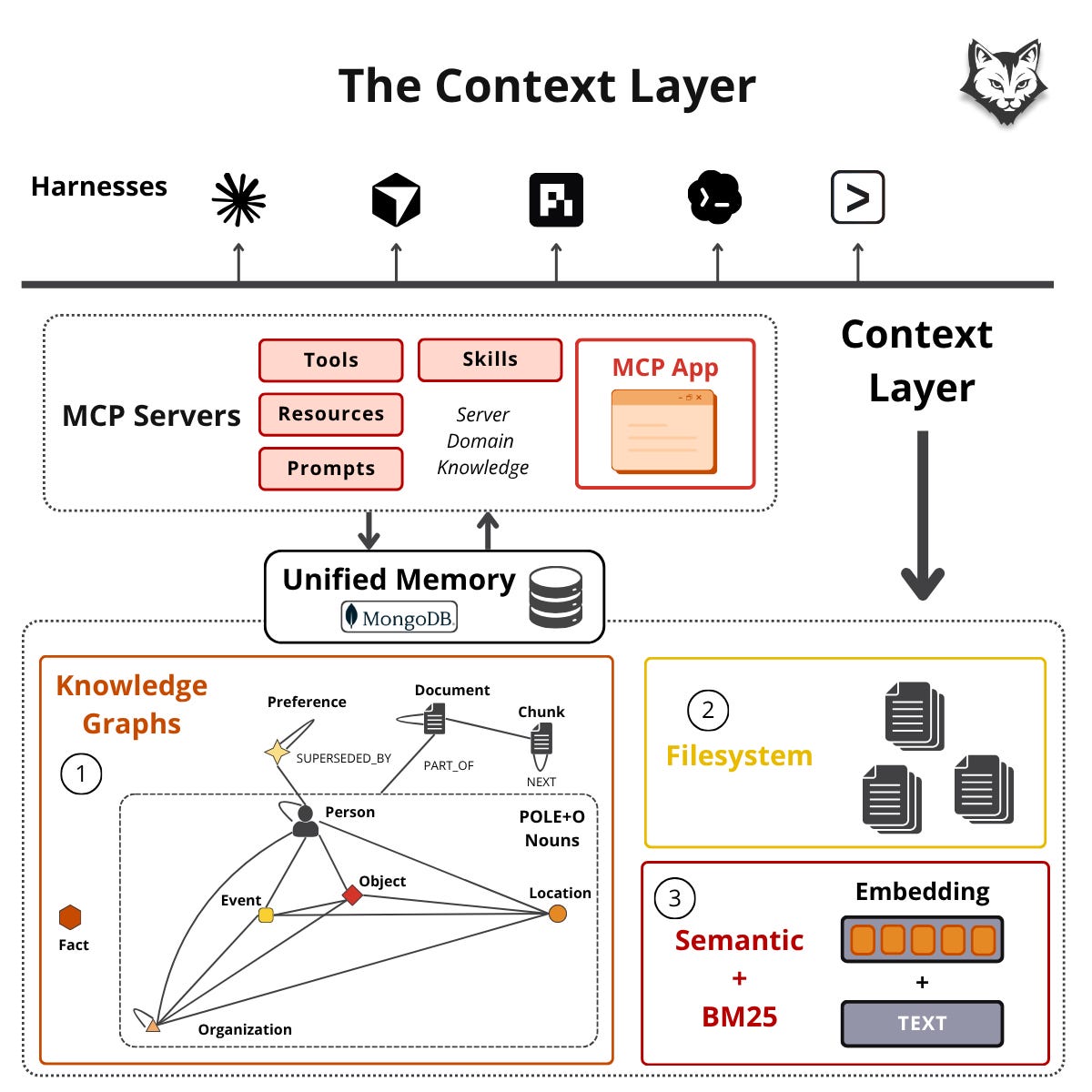
Here is what happens when you interact with the context layer:
You enter a prompt into the harness, which becomes an MCP tool call to the server. The server queries the unified memory, and results flow back into the agent’s context. Nothing crazy so far.
The interesting part happens when you start adding stuff to your memory. It’s where continual learning happens.
Building a Unified Memory for Continual Learning
At a high level, the pipeline is simple. Ingest data into the unified memory → extract entities and relationships into a graph → index for hybrid and graph retrieval → expose everything through an MCP server → connect it to a harness like Claude Code or OpenCode. Building the knowledge graph was the easy part. Designing how the agent interacts with it was the hard part.
Don’t expose raw database operations. Agents struggle with them. Instead, design the server around how agents actually search and write, giving them high-leverage primitives they can compose like LEGOs inside skills. In Tree that’s 6 tools: 3 to search, 3 to write.
There are 3 search tools. nl_query_memory is the default — an LLM maps a natural-language (NL) question into a MongoDB hybrid-search + graph query. query_memory is the deterministic fallback for structured filters when NL fails. deep_search_memory handles large result sets (50+ docs) via progressive disclosure: it writes intermediate results to a YAML index creating a localized LLM wiki on the fly.
The distinction between nl_query_memory / query_memory and deep_search_memory is important because when retrieving chunks from the unified memory, you need to further compress them before adding them into the context window to avoid exploding your costs. But that means you lose a lot of information. Thus, creating a wiki on the fly trades latency for performance and lower costs.
There are also 3 write tools: ingest_url, ingest_file, and ingest_conversation.
The last is auto-triggered by a hook that ingests incrementally every ~10 conversation turns and finalizes when the conversation ends. That hook is what makes the learning loop continual: the system writes back what it just learned without you asking, so it gets smarter the more you use it.
And “smarter” is concrete. Across tens of thousands of notes, it finds links between things you’d long forgotten you had, connections you’d never have made by hand. It’s how you finally harvest your own past work and your graveyard of bookmarks.
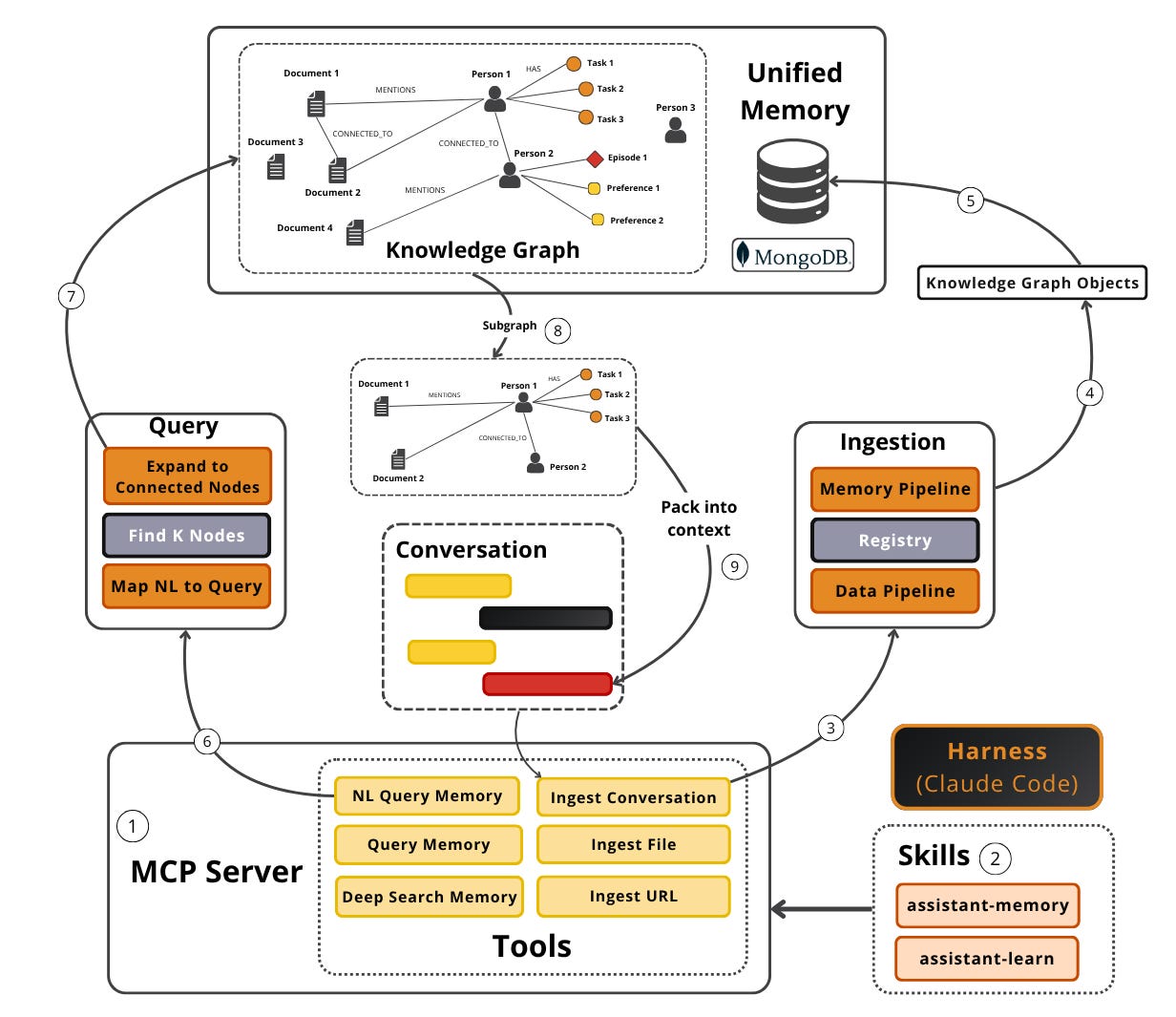
Now, let’s see how to actually build the unified memory layer.
Build It Three Ways
You’re implementing 3 pieces: the unified memory, your custom business logic, and the serving layer. How much you build yourself is also split into 3 levels of effort, which translates to a build vs. buy discussion.
Level 1: Build all three from scratch on a database that supports everything at once (such as MongoDB), implementing the memory and the MCP serving layer yourself. Maximum control, maximum effort.
Level 2: Build only the business logic and serving layer, on top of an SDK that already implements the memory layer: Graphiti, a bi-temporal entity/fact/episode graph; Neo4j-Labs’ agent-memory, a graph-native POLE+O store; or mem0, a vector-first layer that stores facts as rows.
Level 3: Off-the-shelf memory engines you mostly just run: cognee, an Extract-Cognify-Load pipeline of typed nodes that are graph + vector at once; or managed services like Zep (temporal context graphs on the open-source Graphiti engine) and HydraDB (a graph DB on tiered object storage, pitched as “own your memory, no data leaving your stack”). Lowest effort, least control over the data model, and a vendor dependency. Cognee can import and export memory across Mem0, Zep, and Graphiti if you need to switch.
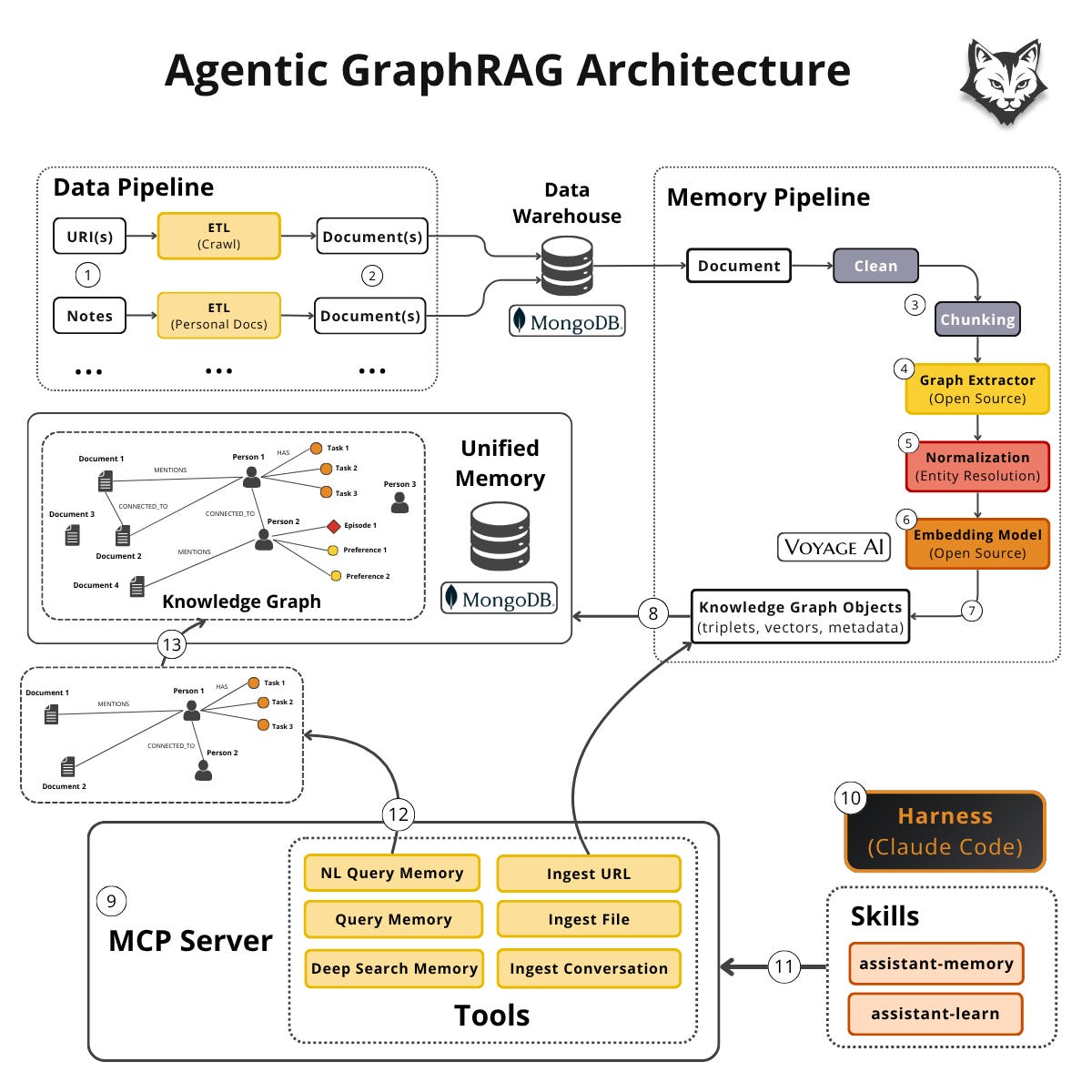
Now zoom into Level 1, the from-scratch path. Building the memory yourself splits into 2 versions. Version 1 (more complex), such as Tree, the agent memory I am building, which is a GraphRAG system whose retrieval fuses vector and keyword search with knowledge-graph traversal. It contains a POLE+O ontology, the index (graph + vector + text), the data and memory pipelines that ingest into it, and the query algorithms that read it.
POLE+O is a popular data model for building ontologies, borrowed from law-enforcement and intelligence analysis. Its beauty is that it’s perfectly balanced. It’s not too shallow, nor too deep. Perfect for an LLM to extract KG triplets from your data. Here it is as a thin StrEnum of the 5 node types:
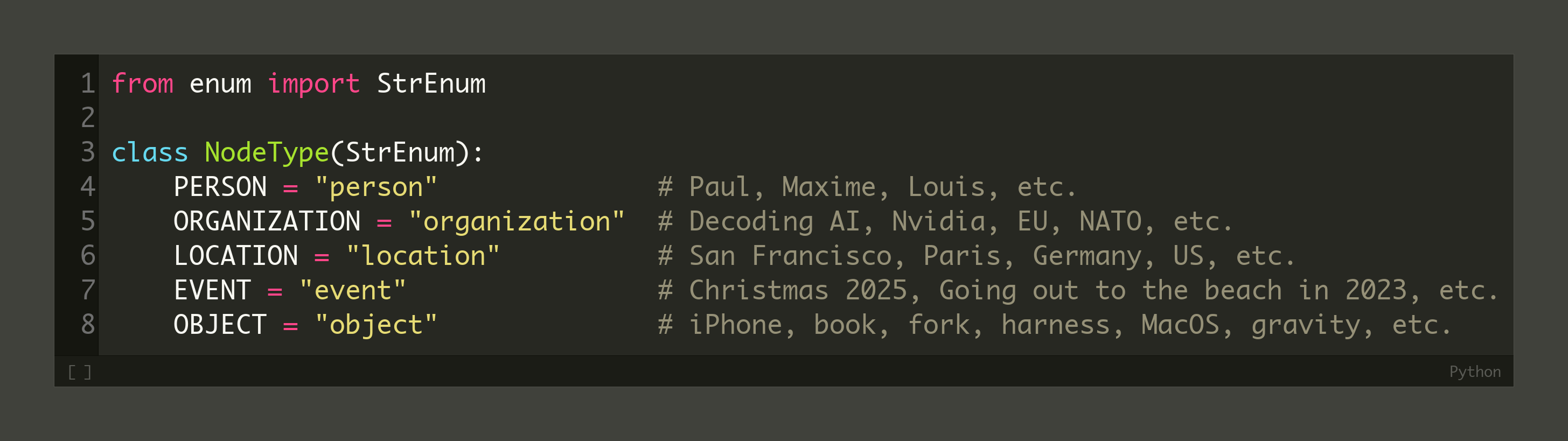
In case you want more granularity over your POLE+O model, you can introduce subclasses, such as:
Person: individual, alias, persona
Organization: company, nonprofit, government, ...
Location: address, city, region, country, ...
Event: meeting, transaction, communication, ...
Object: device, software, document, task, topic, project
To learn more, I have a full article on agentic GraphRAG and another one on designing an ontology for your context layer.
Version 2, the lighter one, is based on LLM wikis, such as Scrabble, my current agent memory. Markdown files with YAML frontmatter and cross-references, sitting directly on top of your existing infrastructure (Obsidian, Notion, Google Drive) — exactly how Scrabble runs over my own second brain. Google recently formalized this pattern as the Open Knowledge Format (OKF), a vendor-neutral directory of markdown + YAML whose only required field is type [3]. The filesystem is the state; no database required.
Which do you pick? It depends on how much control over the data model you want and your technical depth. Personally, I use both: Scrabble for everyday research across my second brain, and I plan to use Tree when I need precision at scale. Such as mining high-signal knowledge from 10,000+ documents.
Still, when it comes to implementing a unified memory layer on top of a knowledge graph, I keep getting asked one question: is a single database (MongoDB) enough? Why not throw in a specialized graph database like Neo4j or a vector database like Pinecone?
Is MongoDB Enough?
The simplest system that works wins. Instead of 3 databases (a SQL/NoSQL store, a vector DB, and a graph DB), you want one store that does all three. The payoff is concrete: far less operational overhead (one production DB, not three), less deep expertise required (being a power user of one engine beats being mediocre at three), and the ability to join documents, vectors, and graph in a single query. That last point matters most for memory: a single-store join is faster, cheaper, and lower-latency.
MongoDB is a good example, because it’s schema-less, supports all indexing operations, and has a huge ecosystem around it, with both an open-source version and their self-managed Atlas version. Another option I’ve tried that works well, but with more developer friction, is Postgres.
Also, as the cherry on top, you get lineage for free. Which is essential for adding references, understanding where each node came from, or simply preparing for an audit. You keep references on each knowledge-graph node instead of copying all data onto it: the document(s) a node was extracted from, the user who owns it, other metadata. That gives you easy lineage and versioning, and lets your memory connect to the rest of your system with no cross-database sync tax.
Now what about scale? For personal assistants, where you have only 100-10,000 documents, a single MongoDB cluster is more than enough. But even for medium to big enterprises, you can easily scale to millions of documents by adding more clusters (aka horizontal scaling).
After a conversation with a principal MongoDB engineer I understood that the real bottleneck is RAM. RAM is the most expensive component from your database cluster and you want to keep it as low as possible.
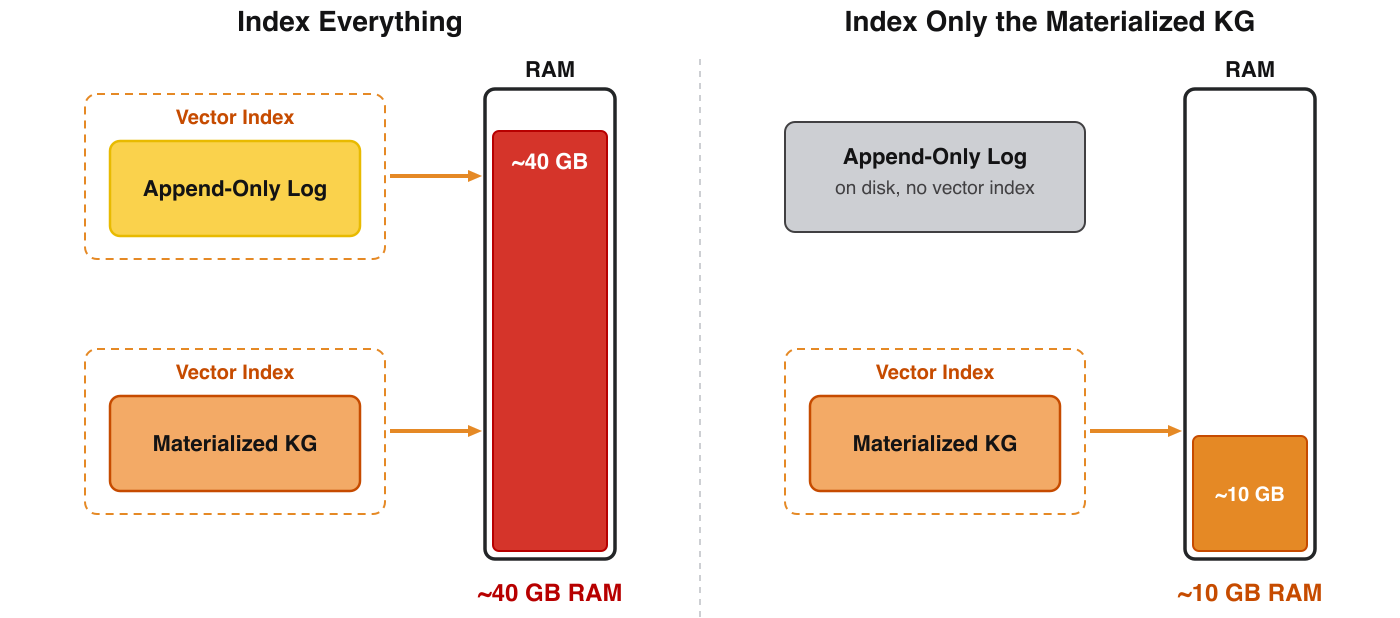
So index only what you query. Your memory holds 2 snapshots of the same knowledge: an append-only log (the immutable record of everything ingested) and a materialized view (the queryable graph rebuilt from that log). Vector indexes are inverted indexes ≥ the data they cover, so indexing both blows ~10 GB of data up toward ~40 GB of RAM.
Keep the log on disk (no vector index) and index only the materialized view, and it collapses back toward ~10 GB with the same data, at a quarter of the RAM.
When does it make sense to use a specialized graph DB like Neo4j? The reality is that for most use cases, you will do only 2-3 hops traversals. Such as getting all the preferences of a user, and the documents/conversations they were extracted from. In these cases, a single database that does it all is amazing. But there are cases when you should reach for a specialized graph DB like Neo4j. For example, when you need to do 3+ hop traversals, your whole business logic relies on graphs or simply as an internal visualization tool. You could sync your MongoDB production database to Neo4j, just for exploration reasons, as their Cypher engine + visualization ecosystem is stronger.
Using Your Context Layer With Any Agent
The wiki version is the simplest to switch between agents. If your context layer is shipped as an LLM wiki, switching harnesses is just handing the new harness a path. For this article, I literally pointed the harness at the research wiki folder from my Second Brain. Without any fancy skills or plugins in place.
Or a step further, is to point it at my entire second brain — that’s Scrabble — whose AGENTS.md explains how to navigate it and which CLI tools and skills to use. It works out of the box because it’s just files.
The MCP version is a bit more work, but not much. Serving memory over an MCP server means re-pointing one config entry from one harness to the next — switch from Claude Code to Codex by configuring the path to your MCP server, and your whole memory moves with almost zero friction, regardless of harness or model.
Each MCP server ships its own tools (read tools and write tools), and the tool descriptions are the contract the agent reads. It gets especially interesting on the write side, where the tools decide when to persist (e.g. parsing a whole conversation into memory when it ends).
Skills are where the leverage compounds. On top of this memory, you can write deep-research, writing, or coding-agent skills that remember your preferences. A few of mine, all part of Scrabble:
/research, which runs deep research on a topic and produces a localized wiki (I have an open-source version in my latest ai-research-os-workshop talk made for the AI Engineer World’s Fair SF - full video);/article-guideline, which expands a brain dump into an article plan anchored in a wiki;/squid:plan, part of my Squid software factory, which plans a feature from my spec, codebase, and memory — injecting my personal takes on how I write software.
What’s Next
Agent memory is an unsolved, fast-moving topic. These designs work, but they’re far from perfect, and your data is still segregated across Obsidian, Notion, local files, and messages in ways that are hard to unify. In practice, I lean on the lighter wiki-based approach. One per project does the job. I reserve Tree’s heavy knowledge-graph memory for the few high-precision cases that earn its cost.
But here is what I’m wondering:
Your data can move between harnesses, but can your skills? I have this issue with Claude Code’s workflows and agents embedded into my skills.
Click the button below and tell me. I read every response.
Enjoyed the article? The most sincere compliment is to restack this for your readers.
Special thanks to MongoDB for sponsoring this article and keeping it free!

Whenever you’re ready, here is how I can help you
Go from agent user to agent builder. Master the foundations of AI agents and turn fragile demo code into reliable, production-ready systems with my course, Agent Engineering: Building Multi-Agent Systems (made with Towards AI).
35 lessons. Pure foundations from scratch. 4 mini-projects. 2 production systems. A certificate and direct access to me & industry experts in our Discord.
Built for software and data professionals transitioning into AI engineering. Rated 5/5 with 300+ students. The first 7 lessons are free:
Not ready to commit? Start with our free Agent AI Engineering Guide, a 6-day email course on the mistakes that silently break AI agents in production.
Explore Next
LangChain. (n.d.). Open Models, Open Runtime, Open Harness — Building Your Own AI Agent With LangChain and Nvidia. YouTube. https://youtube.com/watch?v=BEYEWw1Mkmw
Soria Parra, D. (n.d.). The Future of MCP. YouTube. https://www.youtube.com/watch?v=v3Fr2JR47KA
McVeety, S., & Hormati, A. (n.d.). Introducing the Open Knowledge Format. Google Cloud. https://cloud.google.com/blog/products/data-analytics/how-the-open-knowledge-format-can-improve-data-sharing
getzep. (n.d.). Graphiti. GitHub. https://github.com/getzep/graphiti
Neo4j Labs. (n.d.). agent-memory. GitHub. https://github.com/neo4j-labs/agent-memory
mem0ai. (n.d.). mem0. GitHub. https://github.com/mem0ai/mem0
topoteretes. (n.d.). cognee. GitHub. https://github.com/topoteretes/cognee
getzep. (n.d.). Zep. https://www.getzep.com/
HydraDB. (n.d.). HydraDB. https://hydradb.com/
Iusztin, P. (n.d.). ai-research-os-workshop. GitHub. https://github.com/iusztinpaul/ai-research-os-workshop
Iusztin, P. (n.d.). squid. GitHub. https://github.com/iusztinpaul/squid
Images
If not otherwise stated, all images are created by the author.
That distinction helps. In clinical AI, memory without the business-logic layer can become an archive the team still has to interpret.
Around an OR, the context layer would need to classify what it carries: read-only background, state that changes setup, or an exception that needs a named human owner. Otherwise the system remembers a lot, but the workflow still cannot tell what is allowed to move.
Thanks for the article and interesting read much needed one in the proliferation of harnesses. Do you have any course or procedure around how to go about building one or the one you built