



What would it take to trust an AI agent to work on your code overnight? Without burning through LLM API credits to reach its goal no matter what, exposing your credentials to the AI overlords, or losing hours of progress when something crashes at 5 AM.
Long-running agents that implement huge chunks of work while you do something else are the future. You have to be delusional not to accept that.
That’s why in the past month, I asked exactly these questions on LinkedIn and X, and about 100 engineers answered. All of them felt this pain and asked me to propose a way to set a spend cap the agent can’t override, credentials it can never read, and a crash that costs one round, not the entire run.
I created a prototype that touches all these problems while building CodeClimb, an overnight eval-driven code search inspired by Andrej Karpathy’s autoresearch.
In my first CodeClimb vanilla form, I topped up OpenRouter with $10, not knowing what a run costs. After 6 rounds, it burned through all my credits, and the run died mid-turn, losing all my work. Sounds familiar? These are the pain points I want to solve by designing durable, secure, long-running agents! Using CodeClimb as an example.
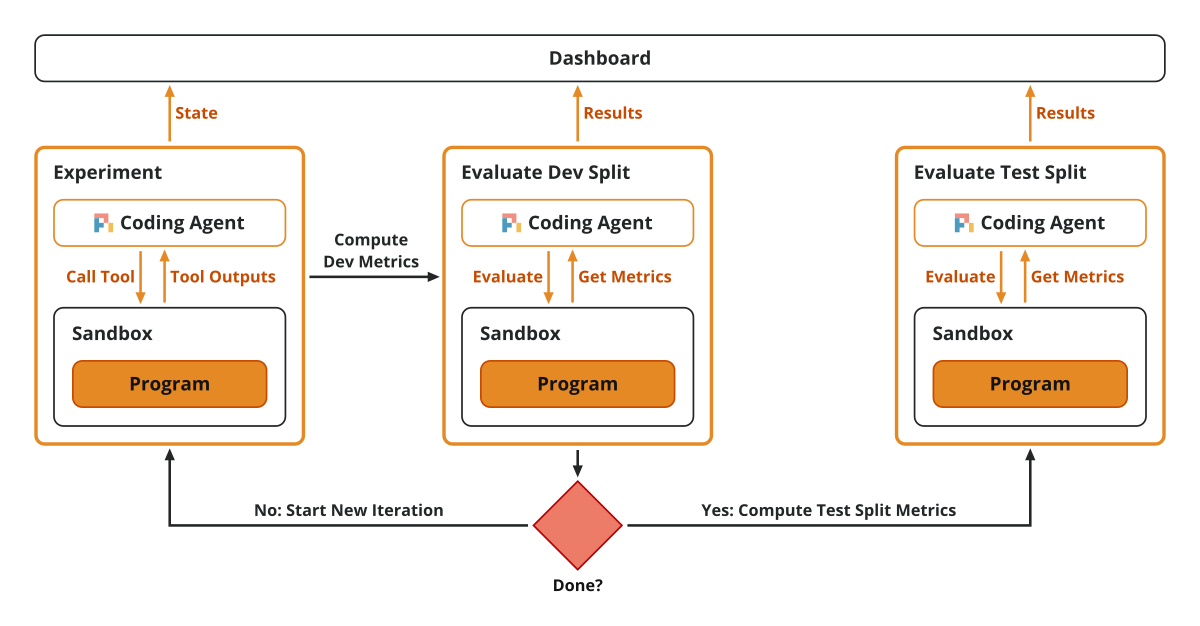
Image 1 shows CodeClimb’s loop at the highest level: the coding agent writes the solution as an experiment, then we evaluate it on the dev split and repeat until done. Ultimately, we compute the metrics on the test split to see if it overfits. Bringing a data science mindset to coding agents.
In this article, we will touch on each pain point progressively:
A clear way to quantify the quality of generated code during long-running jobs, so you can tell in time whether the code is good or should be thrown away.
Guardrails in code to stop relying on the agent to decide when to stop due to cost or quality caps.
Pipe everything through a proxy to avoid dumping the credentials into the sandbox and trusting the agent will behave.
Using a durability engine (our choice is Inngest) to retry failed steps or replay stopped or crashed runs.
Add a human-in-the-loop channel to pause if the night runs out of credits, or if we want to inject some human wisdom.
And finally, deploy everything to the cloud, because why not!
Now, let’s start by understanding what the vanilla CodeClimb workflow does, its problems, and then make it durable and secure.
The bare-bones CodeClimb loop
In late 2026, the biggest issue with building reliable software with coding agents is verifying their output in terms of both clean code and performance.
Let’s be honest: when you see a PR with 23,546 lines of code changes from your coding agent, you are not going to review that. In that case, how can you make sure that the output is correct?
At Decoding AI, we are focused on building AI software, which means we are interested in using coding agents to implement other agents, RAG algorithms and fine-tuning pipelines. The beautiful part about AI software is that it’s measurable. You can encode the quality of your RAG algorithm solely by looking at the retrieval and generation scores such as F1 and mean reciprocal rank (MRR) metrics.
With CodeClimb, we want to double down on that. We implemented an eval-driven code search workflow where the coding agent is guided purely by a spec, plus a dataset and a set of metrics specialized for your problem. Instead of relying on unit or integration tests, which are not that great when written by the coding agent, we rely on a data-driven loop to extract signal on what to improve.
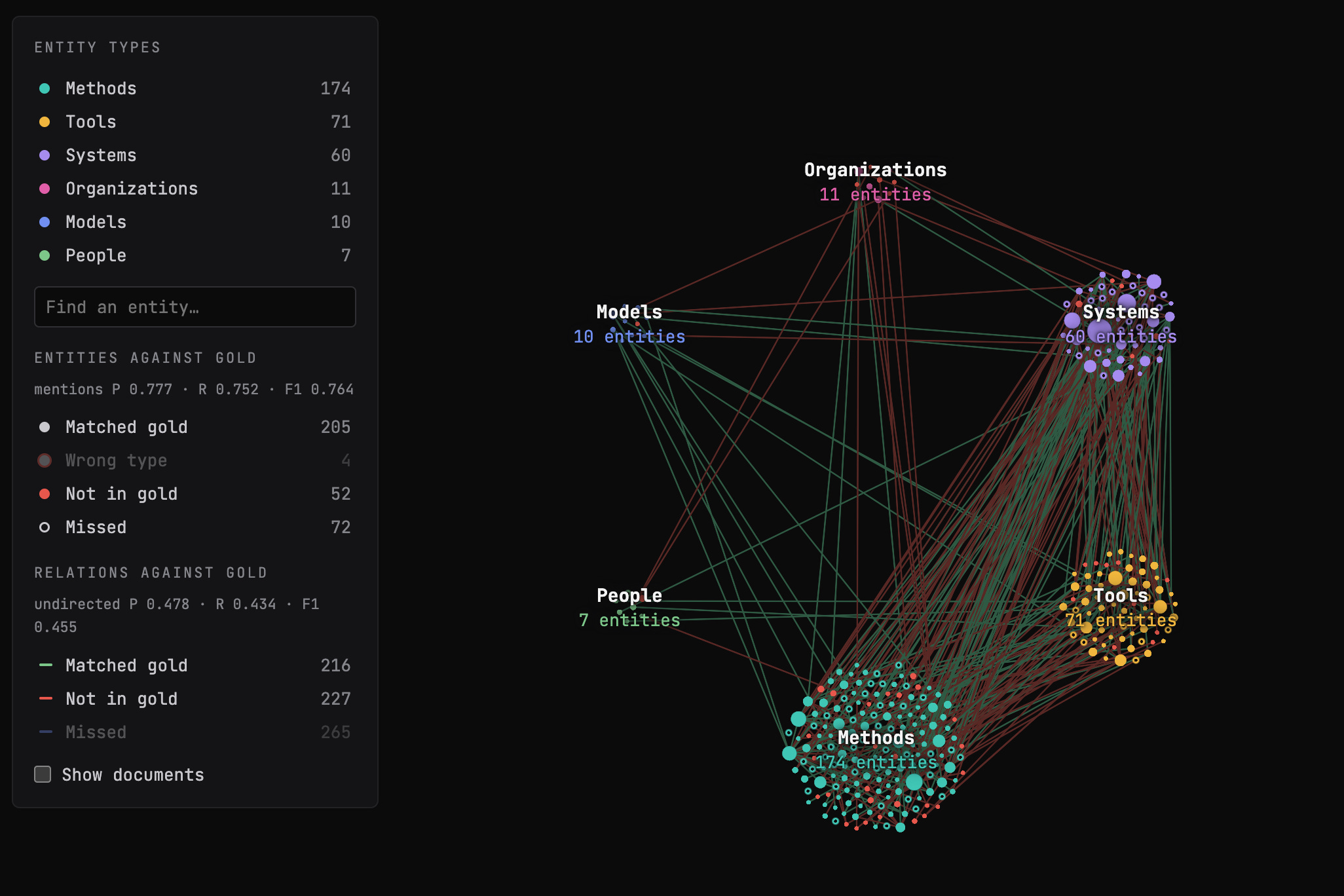
For this article, we used CodeClimb to implement a GraphRAG algorithm from scratch. GraphRAG extracts the entities and relationships from your documents into a knowledge graph (shown in Image 2), merges the duplicate entities found across documents, then retrieves over that graph to answer questions. We considered GraphRAG a cool example, as it’s hard to make it work on your exact data models (your ontology). It needs a ton of tweaking. Plus, you can extract a ton of signals at multiple points in your pipeline: your node and entity extractor, duplicate-node merging and retrieval quality. We left generation out of the equation for this exercise. If you’re new to GraphRAG, I explain how agentic GraphRAG works in a separate article.
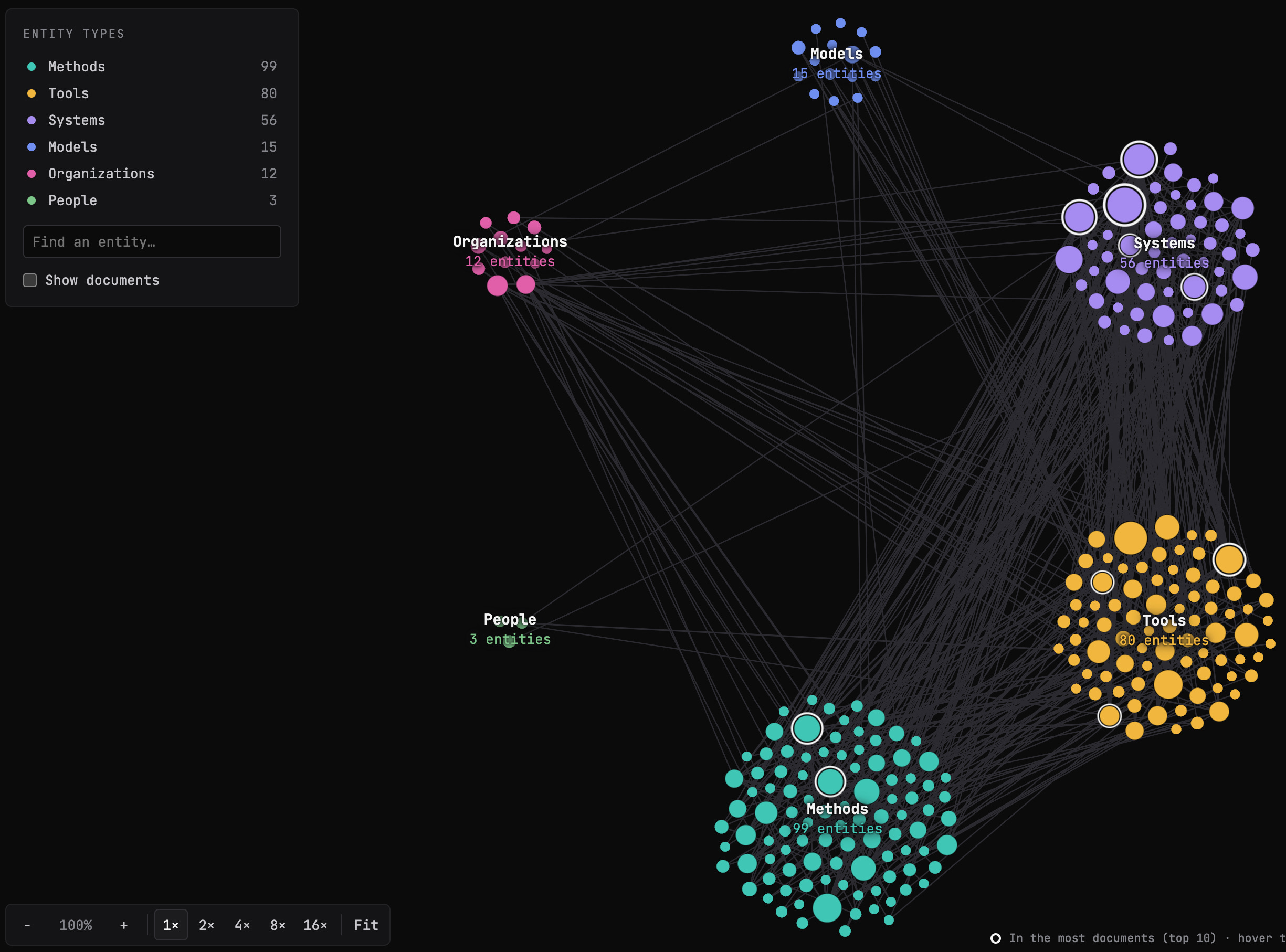
The first (and hardest) step is to build the GraphRAG dataset that will drive the whole CodeClimb coding process. We took 22 Decoding AI articles (because it’s easy for me to debug as the domain expert) and split them into 6 train, 8 dev and 8 test. We used a combination of Opus 5.5, Fable 5.1 and human reviews to extract the knowledge graph based on our ontology: people, organizations, tools, methods, systems and models. As for the metrics, we used F1 on extracted entities and relationships, recall on how well mentions of the same entity across documents merge into one node, and recall and MRR on retrieval.
You don’t need to understand GraphRAG for the rest to make sense. You need to understand that the coding agent uses the dataset and metrics as signals while coding, and that they let us quantify code quality without looking at the code. It’s just a set of clear numbers that tell you if the code is working or not. It’s similar to training a model, but here the model is our code.
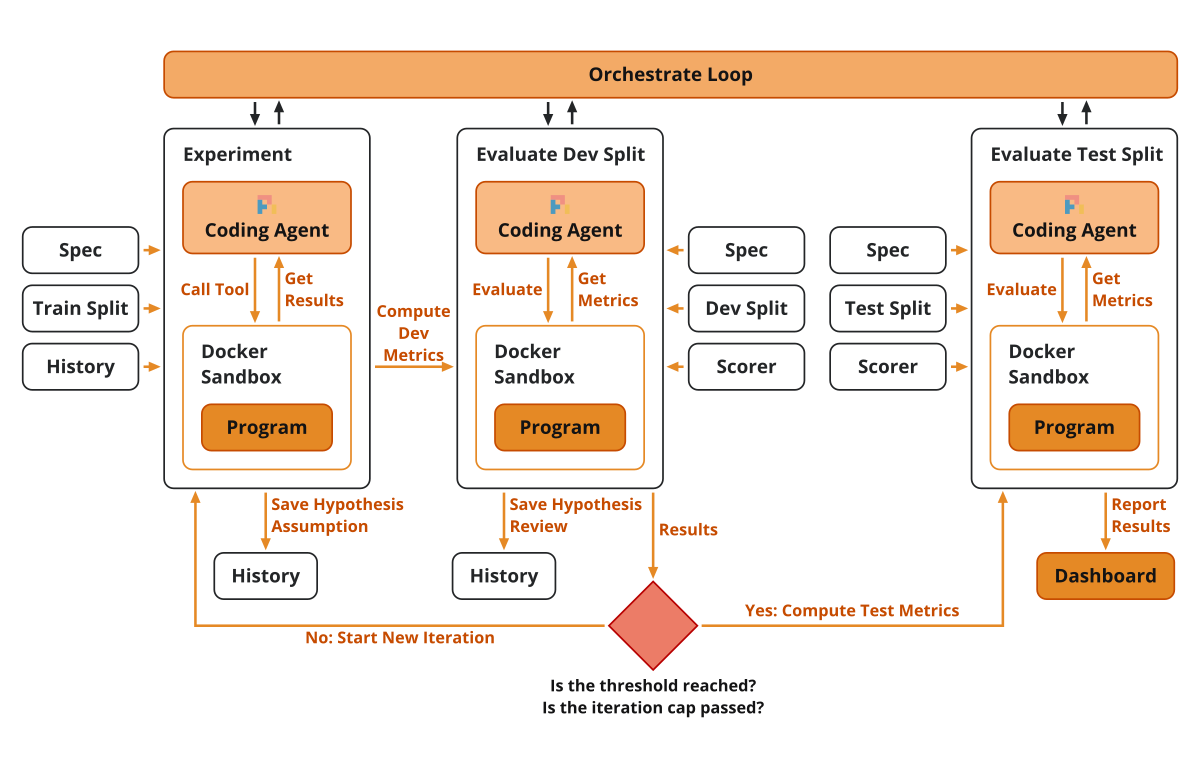
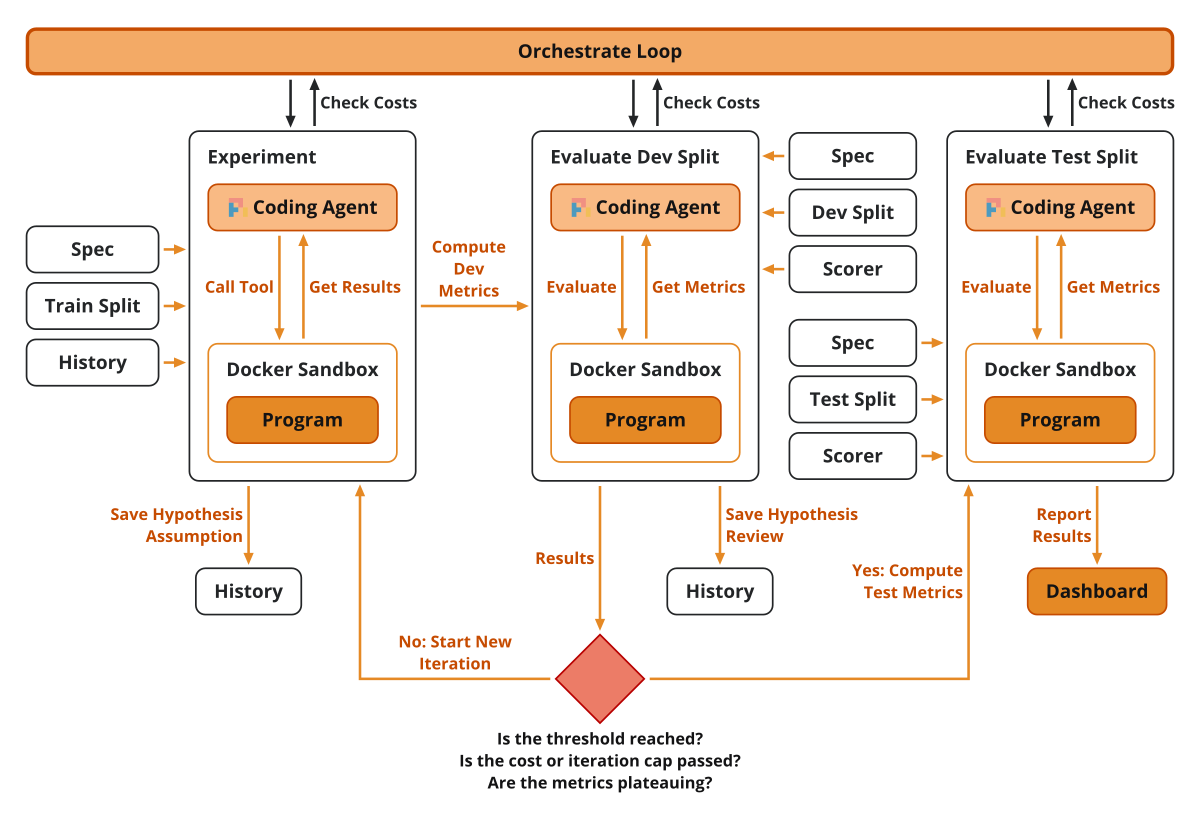
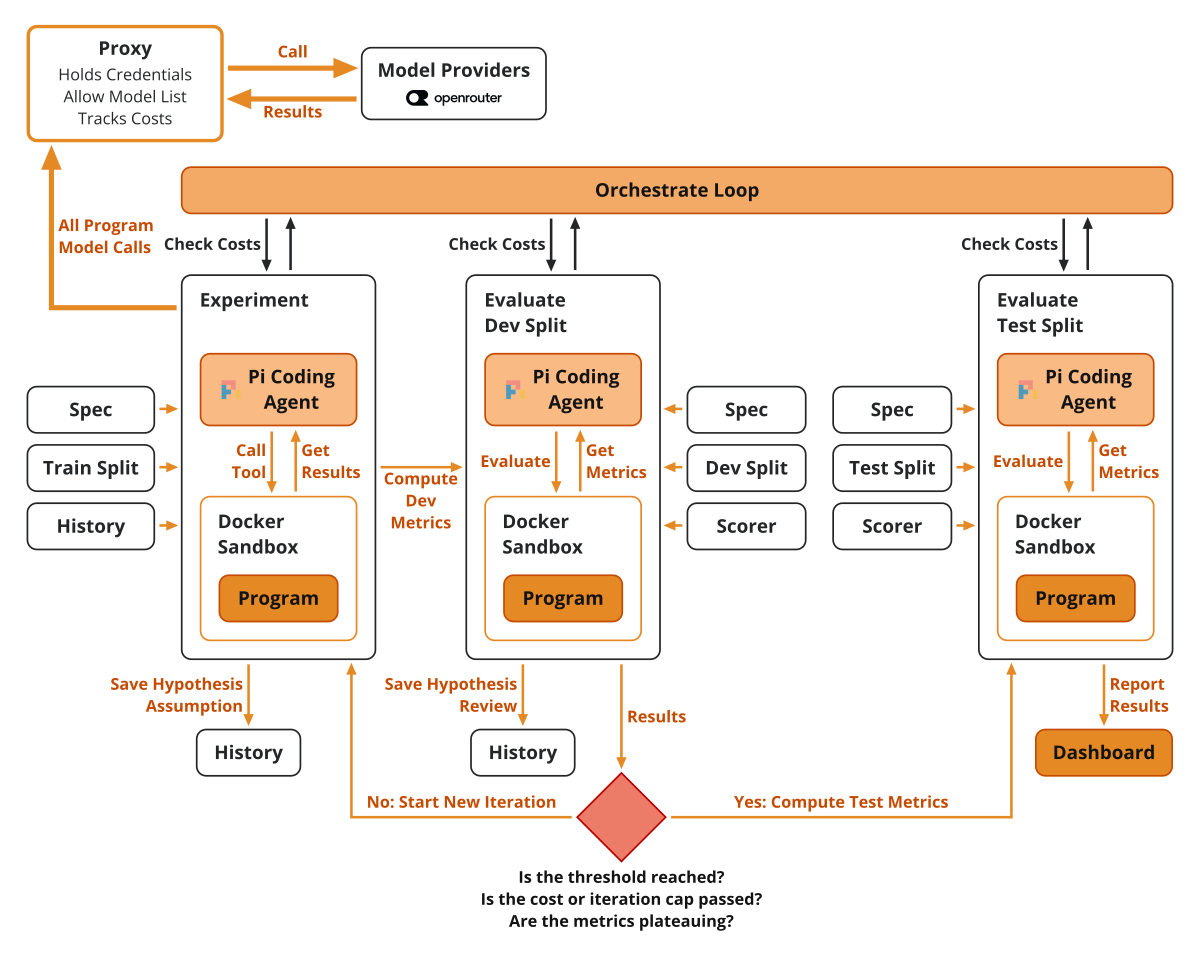
Image 3 zooms into each piece of the bare-bones loop and what data it is allowed to see.
Here is how CodeClimb works. The workflow is split into:
The experiment, where we use a Pi coding agent to write the code within a Docker sandbox. It gets as input the GraphRAG spec, the train split, which it can use as few-shot examples to verify its work, plus the history from previous experiments.
The evaluator takes the code from the experiment and computes the metrics on the dev split. On top of that, we use another Pi coding agent, running in a completely different Docker sandbox, which, based on the code and the metric results, writes a review that guides future iterations.
The experimentation and evaluation steps are orchestrated by TypeScript code. After each evaluation, it combines all the dev metrics into one weighted score, where each metric counts only up to its threshold, such as 0.8 on the extraction F1 score. An experiment is kept only if this score beats the best checkpoint by more than the evaluation’s noise, which we measure by scoring the kept code a second time without changing it. Otherwise, the next round reverts to the best checkpoint. Either way, the experiment’s assumption and the reviewer’s results go into a decision history, kept for the dropped experiments too, so the coding agent knows what works and what doesn’t, and doesn’t repeat itself. The loop goes on until every threshold is met or a stop condition fires.
After the loop finishes, we compute the metrics once on the test split. If the dev scores are much higher than the test ones, the code overfits.
We report all the results to a Next.js dashboard where we can monitor, stop or resume a night run.
The numbers this loop produces are only reliable because we completely decoupled the coding from evaluation. You could have passed this dataset directly to Claude Code via vanilla prompting or skills, but agents are well known for cheating. Nothing would have stopped the coding agent from looking into the dev or test split results.
That’s why the coder never grades itself. The coding and evaluation steps are isolated in different Docker sandboxes. The Pi coding agent never sees dev or test data, or their gold answers. The only bridge is the reviewer’s feedback.
On top of the per-night decision history, we also track learnings between nights, distilling each night’s decision log into a 200-line Markdown file that aggregates them. Thus, even if we start a night from scratch, it can tap into the wisdom of its predecessors.
Every night is also reproducible by construction. The night’s configuration lives in a YAML config file, so the models, the reviewer model and the dataset split are always known. The dataset isn’t huge, so it’s committed to git along with the evaluators and the Markdown file that aggregates the decision-log memory between night runs. What we cannot control is the stochasticity of the coding agent, but at least we know all the inputs and metadata parameters.
Here is the GraphRAG night run config file:
scenario: scenarios/graphrag
sandbox: docker
max_rounds: 26
plateau_rounds: 9
deadline: 24h
timeouts:
  experiment_min: 30
  eval_min: 10
model: anthropic/claude-opus-5-5
coder_thinking: medium  # off | minimal | low | medium | high
reviewer_model: anthropic/claude-opus-5-5
reviewer_thinking: high
allowed_models:
  - openrouter/deepseek/deepseek-v4.1-flash
  - openrouter/typesafe/jev-1.14
  - openrouter/qwen/qwen3-embedding-4b
  - openrouter/qwen/qwen3-reranker-8b
primary_metric: extraction.mentions.f1
thresholds:
  extraction.mentions.f1: 0.8
  extraction.relations.undirected.f1: 0.6
  graph.b_cubed.recall: 0.98
  retrieval.by_kind.single_hop.metrics.edge_recall_at_k.mean: 0.95
  retrieval.by_kind.single_hop.metrics.answer_mrr.mean: 0.9
budget_usd:
  experiment: 2.5
  night: 120
results_path: graphrag/results.jsonl
Image 4 shows the node extraction F1 of our winning night. CodeClimb did not get stuck in the first rounds and kept climbing. For F1, one is the best and zero is the worst.
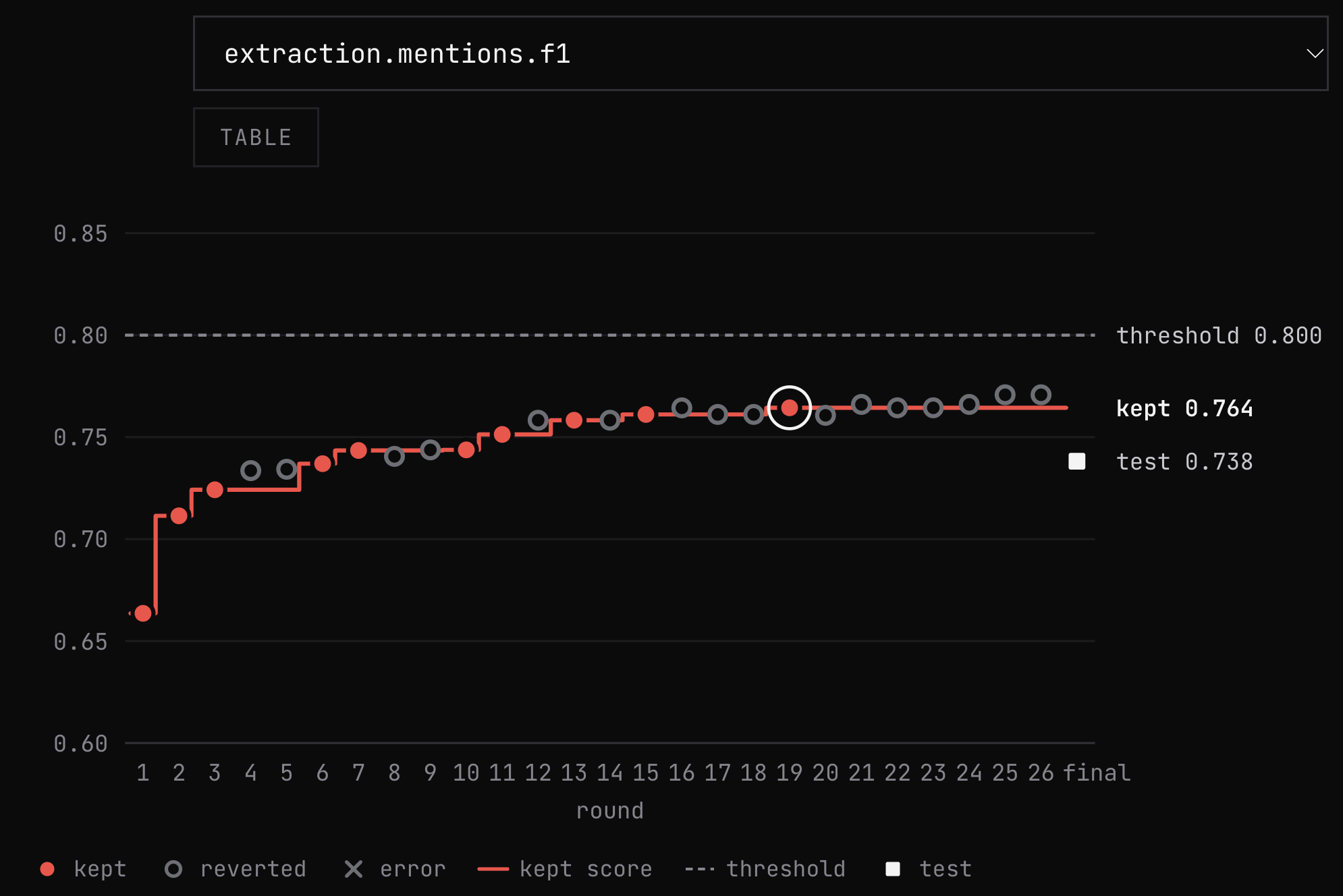
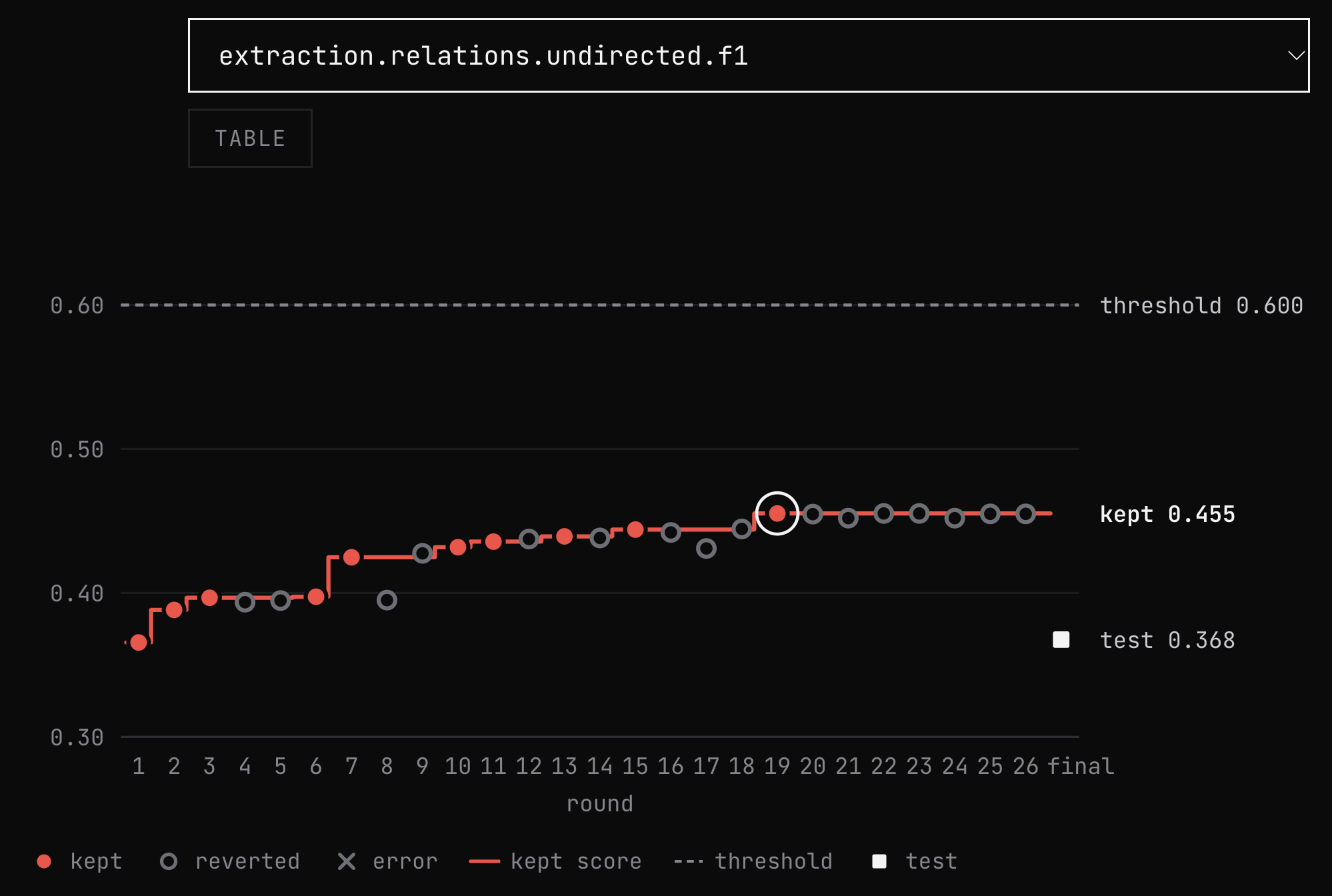
The infrastructure supports letting the agent run for more iterations, which would let it explore more branches and potentially find a better solution that hits our expected threshold. But this night ended on its 26-round cap, and we ran out of credits.
Image 5 shows the same climb for edge extraction, the harder problem:
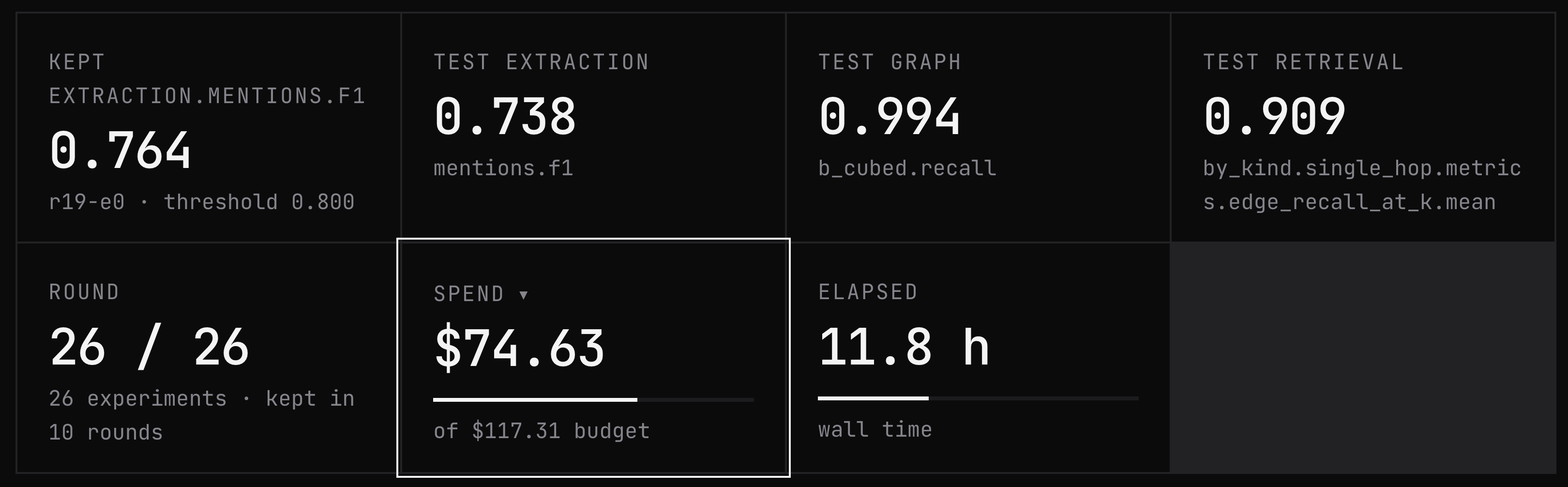
The graph merge recall (0.994), retrieval recall (0.909) and MRR (0.922) metrics all scored over 0.9 on the test split, where 1 is maximum for all metrics.
For our tests, we powered Pi with our GitHub Copilot subscription (we have Pro for free as an open-source contributor), plus Anthropic models via their API key, as using the subscription is against their policy (we have the Ultra plan, which provides $200 in API credits). The GraphRAG program itself calls 4 cheap models via OpenRouter, listed in the config above.
Across our experiments, we consumed $168 in Anthropic credits, $44 in OpenRouter credits and ~$7 of our GitHub Copilot subscription credits. Almost all of the winning night’s cost went to Opus 5.5 on medium effort ($71.13), and only about $3.50 went to the OpenRouter models. Image 6 shows its dashboard summary.
To double-check the metrics, we also render a graph visualization highlighting the extractions that matched the gold dataset, wrong node types, the extractions predicted but not in gold and the missed ones. Image 7 shows it on the dev split. Looking at the data, some predictions flagged as not in gold are valid (e.g., “unified memory” as a system), so the gold dataset needs another pass. In other words: “Look at your data!”
If you want to learn more about how to design an ontology for your graph, I cover it in shipping a knowledge graph ontology in 5 minutes.
Now that we know what CodeClimb does, let’s circle back to what we came for: durable and secure long-running agents!
Guardrails the agent can’t override
After posting about CodeClimb on my socials, I was hit by this recurring idea: “I want the spend limit enforced outside the agent, not just included in its instructions.”
Relying on the agent to decide whether to stop or continue means relying on the non-determinism inside the agent to follow its own guardrails: the thresholds, the number of rounds, the plateau, the costs.
So we moved all the guardrails within a TypeScript orchestrator, as shown in Image 8. A programmatic layer sits between the sandboxes and checks state between rounds with plain if-else statements. It ends a night on 5 conditions: metric thresholds reached (is the F1 score bigger than 0.8?), the iteration cap (26 rounds), the deadline (24h), the night budget ($120), or a plateau (9 rounds in a row with 0 improvements). For guardrails, deterministic code wins all the time.
As the node and relationship F1 scores never hit the thresholds, the iteration cap, cost cap and plateau are what stopped the night runs in practice.
How did we track costs? The Pi coding agent reports the cost of every message it sends, so we sum it as it goes. The trickier part was the code the agent writes, which calls models on OpenRouter whenever it runs. For that, we route every one of its calls through a metering proxy that keeps track of the cost per experiment and per run.
Spend and time can’t wait for the round to end, so a monitor runs alongside the experiment and checks both. In the GraphRAG config, an experiment is capped at $2.50 and 30 minutes, and the night at $120. The cap is checked before every model call, so the call that crosses it still runs, and then the coding agent loop is aborted.
For cost alone, we could have used the OpenRouter API or an observability tool like Opik or LangSmith, but the proxy comes with other goodies. Let’s see what these are.
A proxy for credentials and allowed models
Without a proxy, you face 2 problems. First, dumping credentials into the sandbox lets the model use them as is. They’re easy to load into memory and then into the chat, which exposes them all. This can work if you keep rotating them, which I personally don’t like doing as a one-person engineering team.
Second, a GraphRAG program needs several models (extraction, merging, embedding, reranking). Remember that agents are goal-achieving machines. So the moment they hit a bump with the models listed in the config, they can always decide to use more powerful (and costly!) ones just for “the greater good of achieving their goal”.
Both problems are fixed by the same metering proxy that already tracks cost: it holds the real credentials, and it acts as a firewall that decides which models a request may reach. As illustrated in Image 9, the program sends its requests to the proxy, which implements the OpenAI protocol and routes them to OpenRouter. From inside the sandbox, it looks like an OpenAI endpoint with provided credentials.
On the sandbox side, the OpenAI proxy endpoint is reached with a one-off token, which is extremely easy to rotate because CodeClimb manages it. The token is accepted only by the proxy. It’s valid for 1 coding session or 1 evaluation, carries a dollar cap and is revoked when the run ends. The real credentials are added inside the proxy and accessed only programmatically.
The proxy accepts 4 models: DeepSeek v4.1 Flash for extraction, Typesafe Jev 1.14 as the decision model, Qwen3 Embedding 4B and Qwen3 Reranker 8B. A request for any other model is refused.
The Anthropic key gets the same protection a different way: Pi runs on the host, so its credentials never enter the sandbox. Only its shell and file tools do. We covered how coding agents use sandboxes in depth in this article.
The cons are that you need to implement an interface for every service you want to use (which isn’t that hard to do with coding agents) and every call has an extra network hop. If you sidecar the proxy near your sandbox, the extra hop is easy to manage.
This is how we made CodeClimb secure. Now let’s move on to my favorite part and see how we made it durable.
Checkpoints that survive a crash
Three types of events can interrupt a night run. First, infrastructure fails, such as a dropped internet connection. Second, another service fails, such as a model provider going down or running out of credits. Third, a human stops the run, looks at the results and wants to continue from there.
All three are fixed by a durability tool, such as Inngest, as shown in Image 10. The night run becomes an Inngest function that invokes 1 child function per experiment and per evaluation. Each piece of work (coding, evaluation, review) is a saved step.
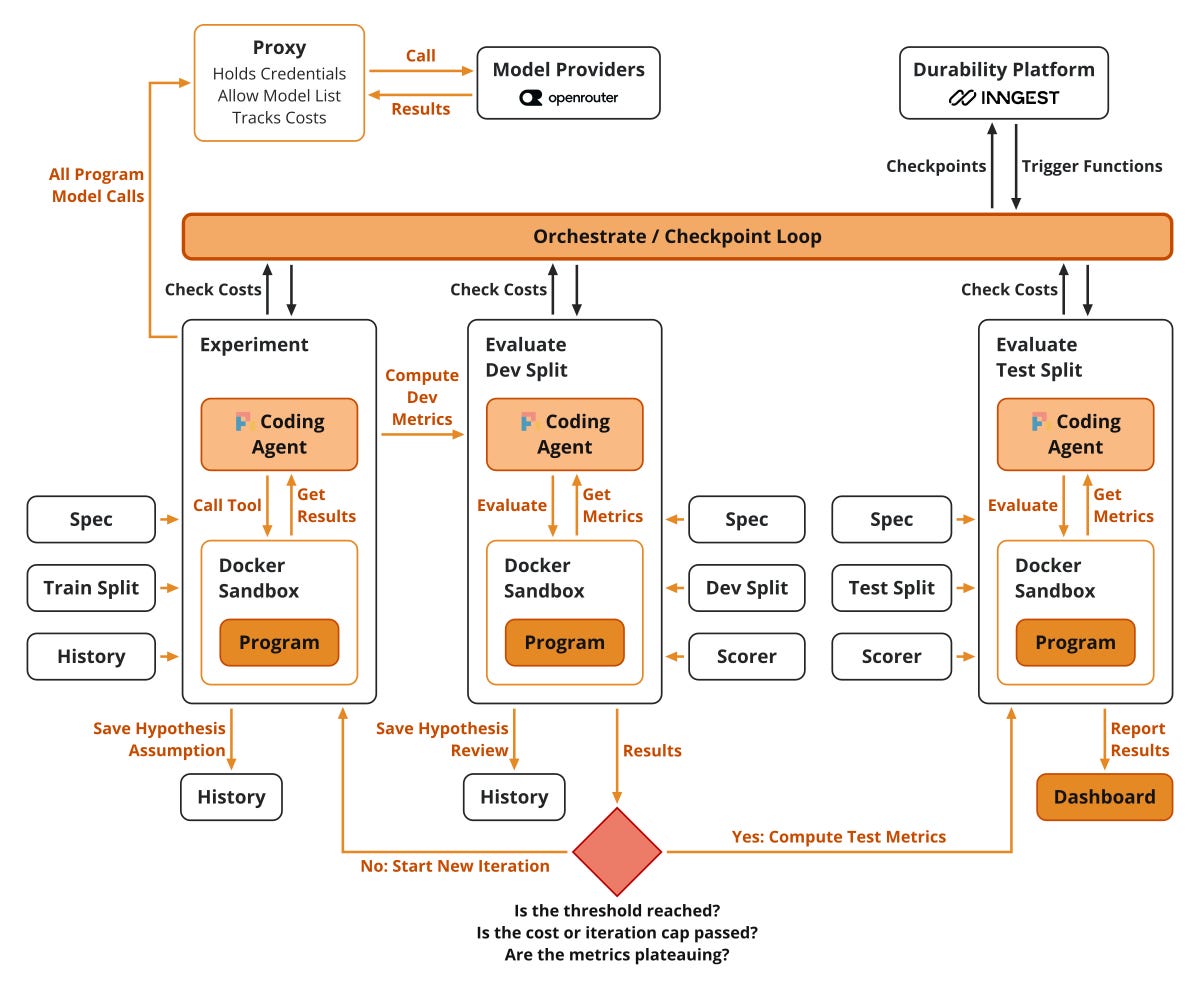
Once a step finishes, Inngest saves its result. After a crash, the function replays, skips what is already done and continues where it left off.
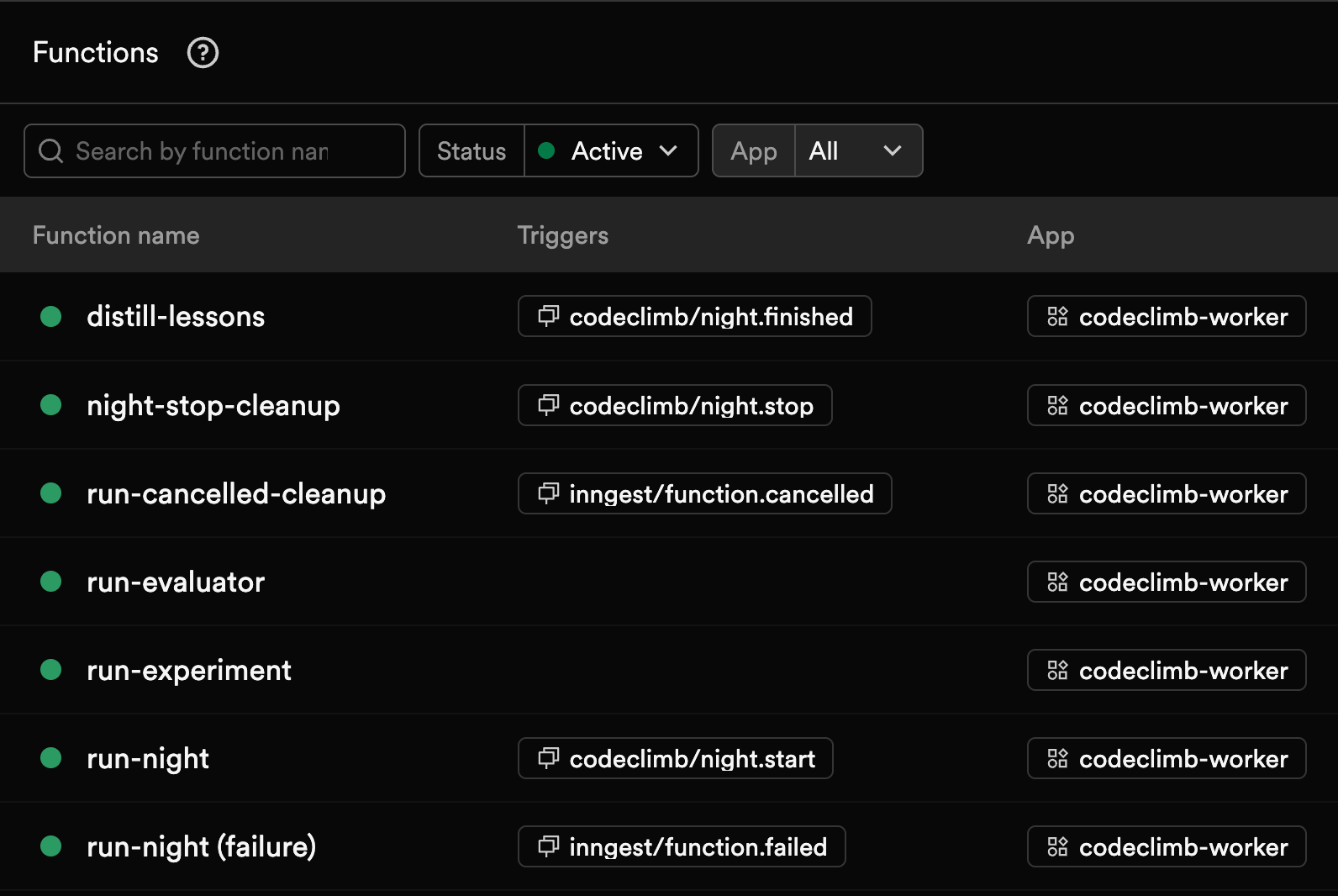
In Image 11, run-night is the parent. run-experiment and run-evaluator have no trigger because run-night invokes them, and the other 4 react to lifecycle events such as night.start or night.finished. Each step is a non-deterministic or state-changing step from your program. You need to design them this way because, on replay, you want to ensure that a non-deterministic experiment or evaluation step always outputs the same values, while a ste
p that records your history log doesn’t repeat the same message.
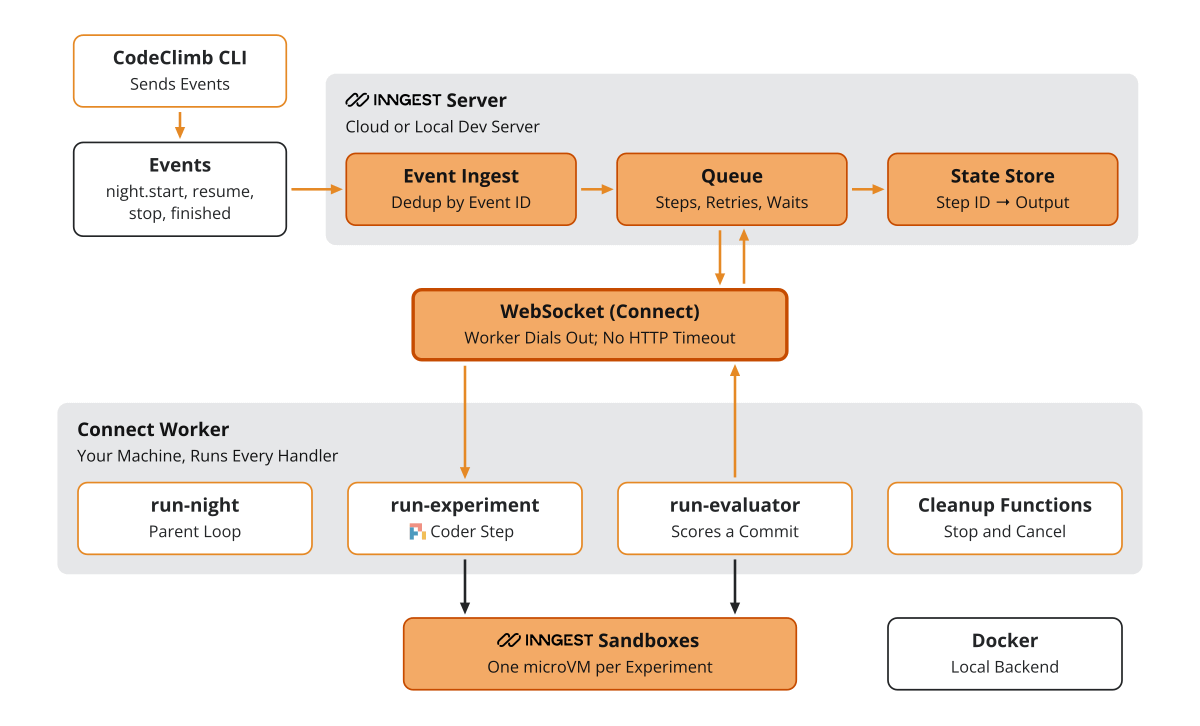
As shown in Image 12, under the hood, the Inngest server queues steps and stores each step’s output by its ID. The functions are triggered on our worker based on the event type via a WebSocket.
In Image 13, you can see a ~9 min test run of our coding night pipeline (on our plan, Inngest stores data for only 7 days, so we lost our main runs), including how long each step takes and its inputs and outputs.
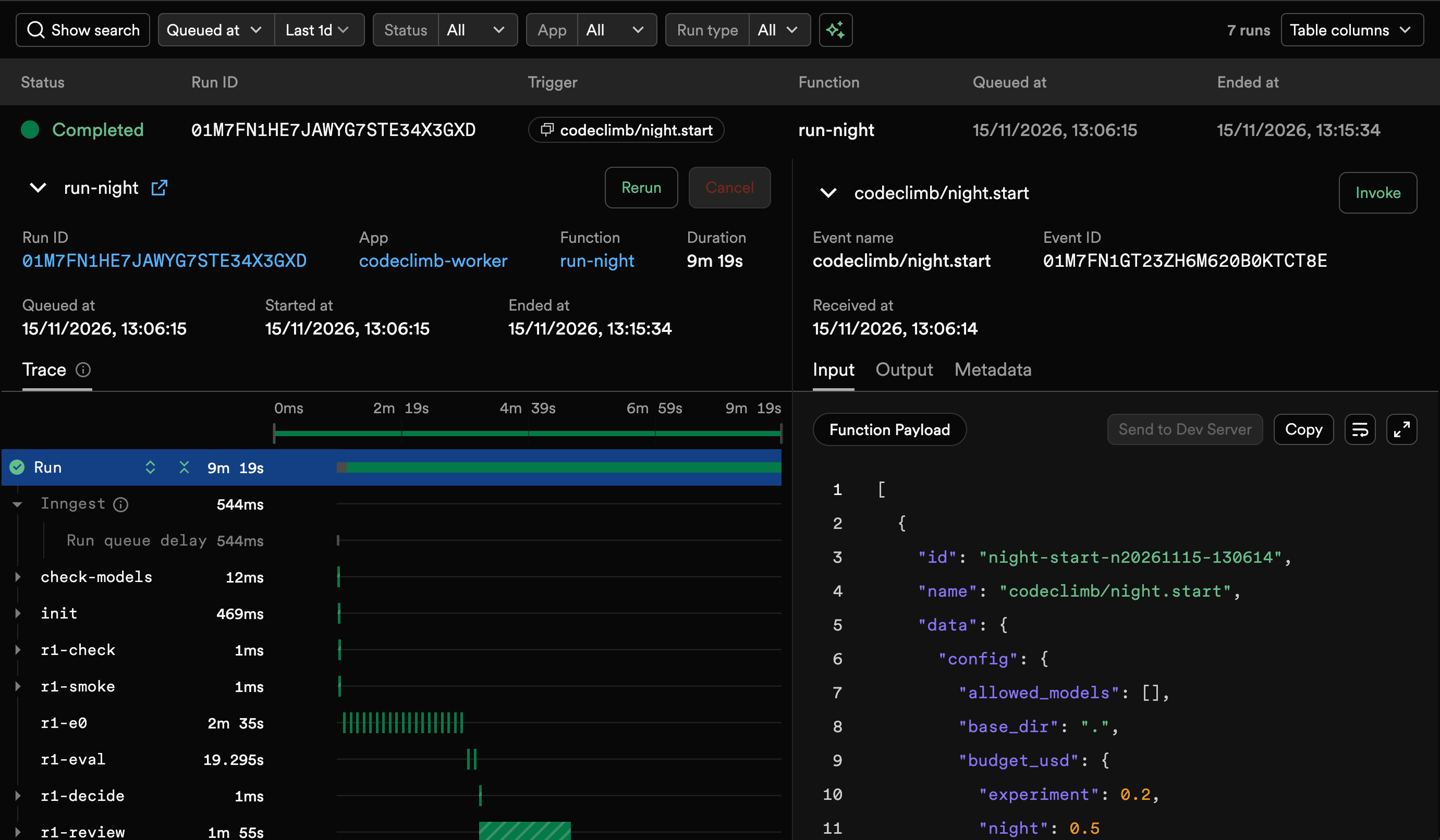
During a GraphRAG night run, I killed the worker in the middle of round 2. About 2 minutes later, the step was retried, the coding agent reopened its session, and the night finished. In another test, I cut my internet for ~30 seconds, long enough for the run to crash. As shown in Image 14, after the internet reconnected, Inngest retried the step, and everything continued.
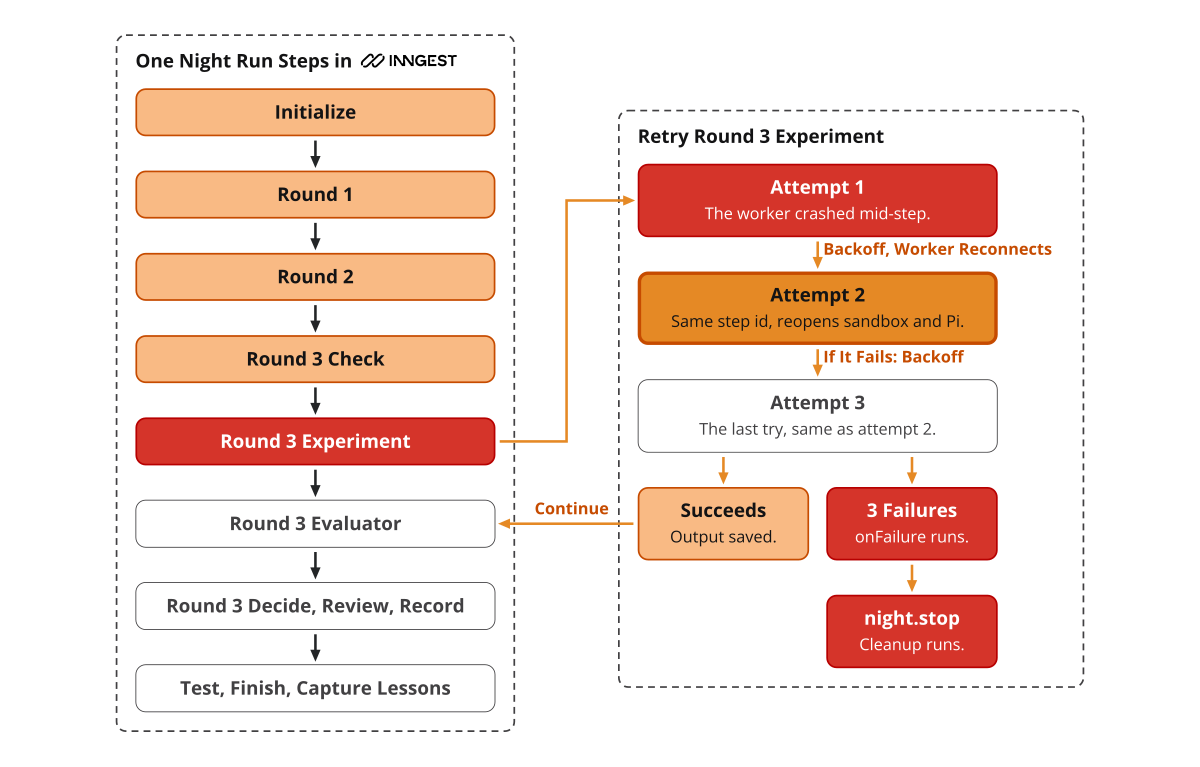
The biggest failure point is our dependency on external LLM providers for our coding agent (GitHub Copilot or Anthropic). If we retry more than 3 times, the run is flagged as failed and can be replayed later. To smooth this out, we run a quick smoke test before each round to test the connection with our providers.
On the other hand, we have the scenario where we stop on purpose and have to safely cancel all resources, such as running sandboxes, to ensure we have zero zombie coding agents still consuming tokens or compute (which gets worse when we pay for remote sandboxes).
Canceling an Inngest run doesn’t interrupt a step that’s already running, so we had to handle in our code aborting the Pi coding agent loop and destroying the live sandboxes.
On top of checkpointing a night’s running state, we version the code. Every experiment is one commit in a local bare git repo. A better experiment becomes the new kept commit, and the next round builds on it. For failed experiments, we just skip the commits, which means that the next round starts again from the commit of the best experiment.
With this strategy, we can also compute diffs between the best solution and the failed ones as additional feedback to pass between iterations in the decision history.
With 1 commit per experiment, I can check out any of them to see what happened, export the best one, or start a new night using the commit as a seed instead of starting from scratch. This is extremely useful if we hit a max rounds cap or a plateau and we decide we want to continue.
The repository is purely local, but we can easily hook it up to a remote origin on GitHub or GitLab. Or take it even further and start each night run from an existing repository where the outcome becomes a PR with a metrics report, instead of a 10,000-line PR to review.
The last piece is a human in the loop to recover or steer the run.
A human in the loop
Remember the run that died mid-turn? At first, because I had trust issues with the Pi coding agent, I kept topping up OpenRouter in $10 batches, and the night runs kept running out of credits mid-turn.
The solution was to catch custom errors, such as OutofBudget, and leverage Inngest’s step.waitForEvent() to pause the night for up to 3 days until a night.resume event arrives. As illustrated in Image 15, the pause fires wherever the credits run out: in an experiment, an evaluation or a review. In our use case, the event is sent after adding credits to OpenRouter or Anthropic, and the night continues from the step that paused.
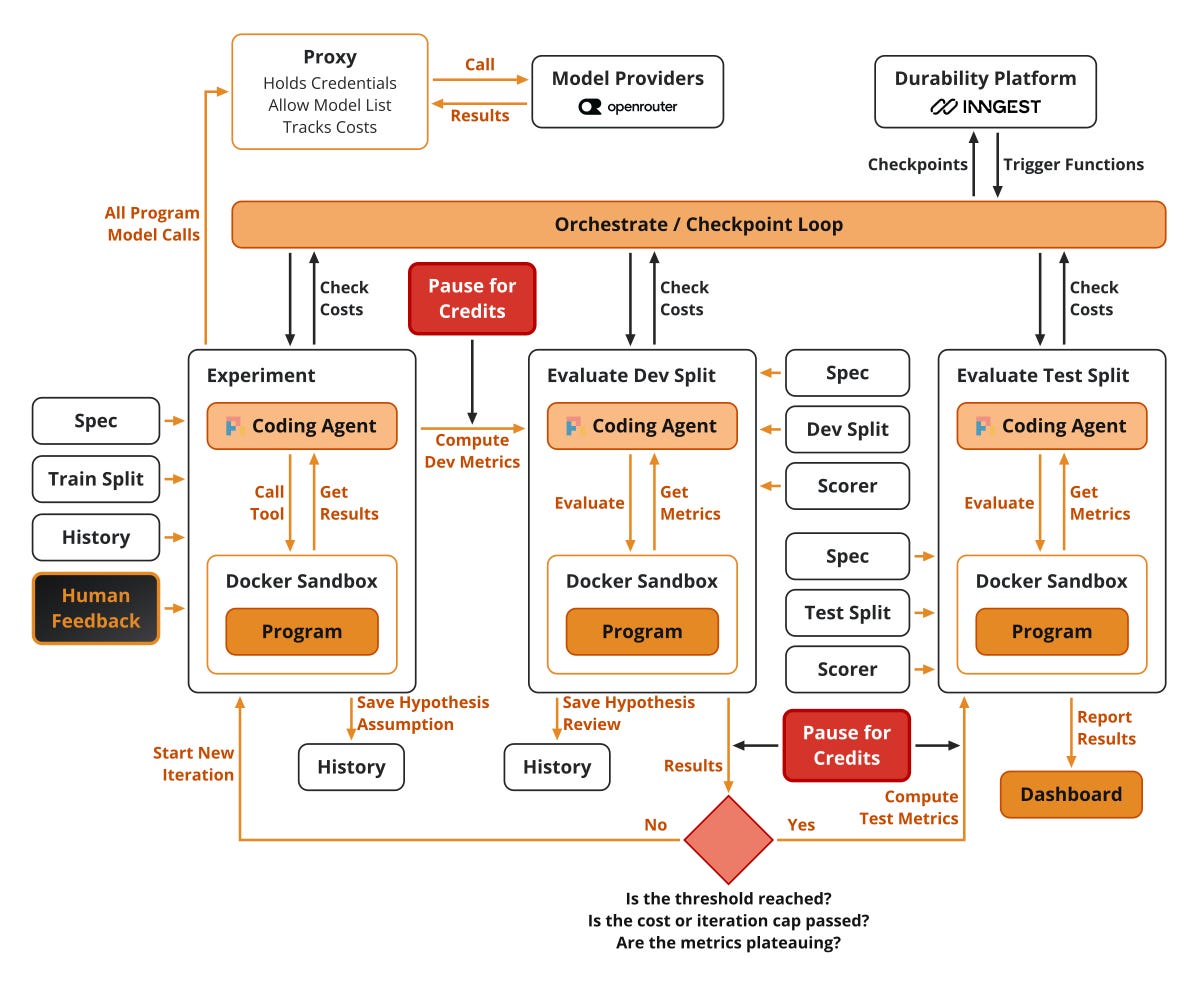
It’s incredibly important to understand that while it waits, the run costs nothing. Inngest suspends the run, so it doesn’t block any worker or sandbox. Any step can wait for a human this way. Otherwise, a standard input command would hold resources that other workflows actually need.
The second human-in-the-loop decision is steering. After a night ends, I analyze it with Opus or Fable, looking at all the logs generated by Pi and the decision history. If I see more potential in the night run, I either continue it for more rounds with a written direction, or start a new night from the best kept commit plus my input. This strategy can be extended further with a steering queue that adds feedback in real time by sending events with Inngest via step.sendEvent("feedback").
From my machine to the cloud
So far, everything runs on my machine, using Inngest’s local dev server and Docker for the sandboxes. This limits the night run to one user, one night run at a time, stuck on my machine. The beauty of this setup is that it can run remotely at scale.
First, as shown in Image 16, we have to deploy the Inngest dev server to their Inngest Cloud managed service. To do so, you only need to subscribe to Inngest (they have a generous freemium plan). Or, as Inngest is open-source, you can host it yourself as well.
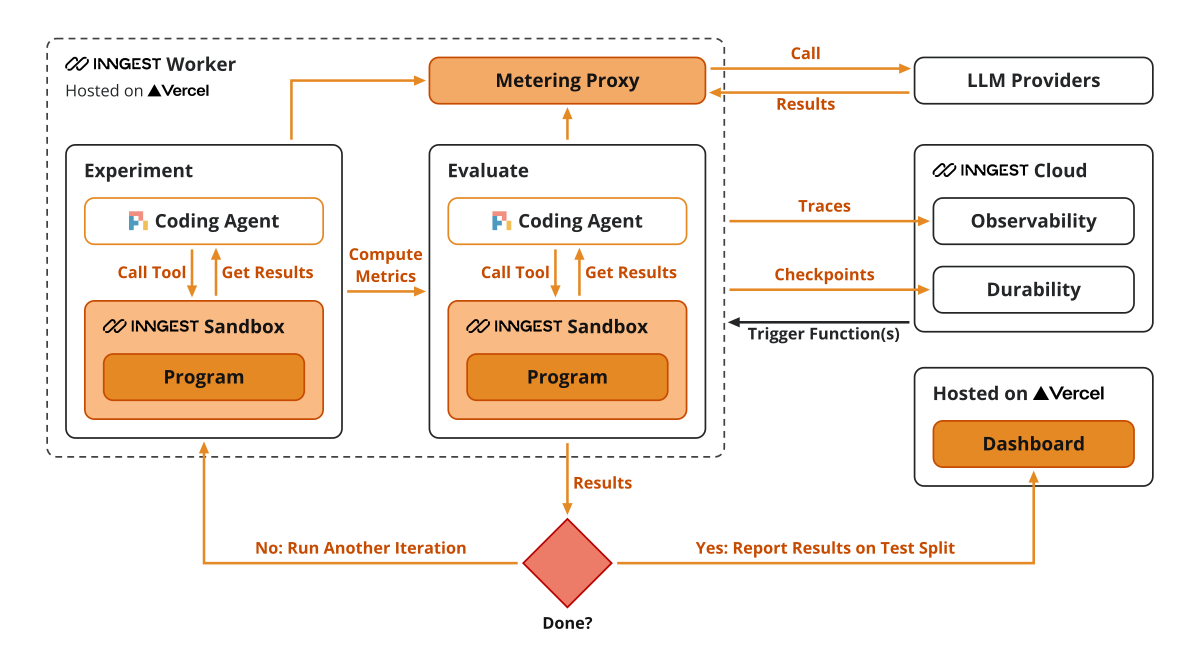
Next, we swap our Docker Sandboxes with Inngest Sandboxes. To do so, we just switch the backend that executes the tools from Docker to Inngest. Each Pi coding and evaluation session gets its own microVM. A sandbox is limited to 1 hour of active runtime, so timeouts would be capped at 50 minutes.
Ultimately, the worker, the metering proxy and the Next.js dashboard are deployed on Vercel, which integrates with Inngest in a few clicks.
Honest thoughts
The durable, secure, long-running agent part works really well. The night run is resilient: it bounces back from every stop and crash scenario I tested. On top of that, I had zero issues with the coding agent going rogue and starting to use models from OpenRouter that I didn’t want it to use. Even though Inngest is the sponsor of this article, our honest verdict is that it made it super easy to make the code durable.
Now what about the idea behind CodeClimb? The idea worked decently well. The coding agent made a lot of progress with almost 0 human intervention, as the loop is 100% encoded into our workflow. It got close to the node extraction threshold, while edge extraction stayed far off.
We modeled the problem around some internal tools that we need at Decoding AI. Most likely we won’t use the code as is, because from a scaling point of view, it isn’t that great (e.g., the ingestion and retrieval code isn’t modeled as pipelines). But we’ll take the algorithm and parameters it found to work well on our dataset and port them into our infrastructure. Similar to the dynamics between research and production.
Without CodeClimb, manually controlling this experimentation and evaluation loop with a coding agent can be super time-consuming and boring. Plus, it’s easy to leak data. Also, in terms of costs, spending ~$75 per night is a decent amount, especially if you leverage the credits from your Anthropic subscription or power Pi with other compatible subscriptions such as OpenCode Go, Grok or OpenAI.
The biggest bottleneck we have is the quality of the dataset. Deciding what nodes and relationships to extract and which to drop needs more work. Once we crack that, it’s autopilot time.
In the next article from the series, we will compare building CodeClimb in Inngest vs. the LangChain ecosystem. I won’t give more spoilers!
Further reading
Whenever you’re ready, here is how I can help you
Go from agent user to agent builder. Master the foundations of AI agents and turn fragile demo code into reliable, production-ready systems with my course, Agent Engineering: Building Multi-Agent Systems (made with Towards AI).
35 lessons. Pure foundations from scratch. 4 mini-projects. 2 production systems. A certificate and direct access to me & industry experts in our Discord.
Built for software and data professionals transitioning into AI engineering. Rated 5/5 with 300+ students. The first 7 lessons are free:
Not ready to commit? Start with our free Agent AI Engineering Guide, a 6-day email course on the mistakes that silently break AI agents in production.
Thanks again to Inngest for sponsoring the series and keeping it free!
Build AI agents and workflows that survive crashes, retries, and long waits:
Images & videos
If not otherwise stated, all images and videos are created by the author.