


Every AI application that wraps an agent is a harness!
In LangChain’s Terminal-Bench experiment, changing only the harness (with the same model) moved a coding agent from ~30th place into the top 5: the harness, not the model, is what makes a coding agent good.
In the open-source course Building a Coding Agent From Scratch, you’ll build that harness from scratch in Python: Decode, a complete coding agent that grows lesson by lesson from a bare agent loop into a swarm of remote agents running in parallel in the cloud.
Why? You’ll be able to engineer custom harnesses for your own AI products (the skill behind that leaderboard jump), and you’ll understand what Claude Code and Codex actually do under the hood, turning you into a power user.
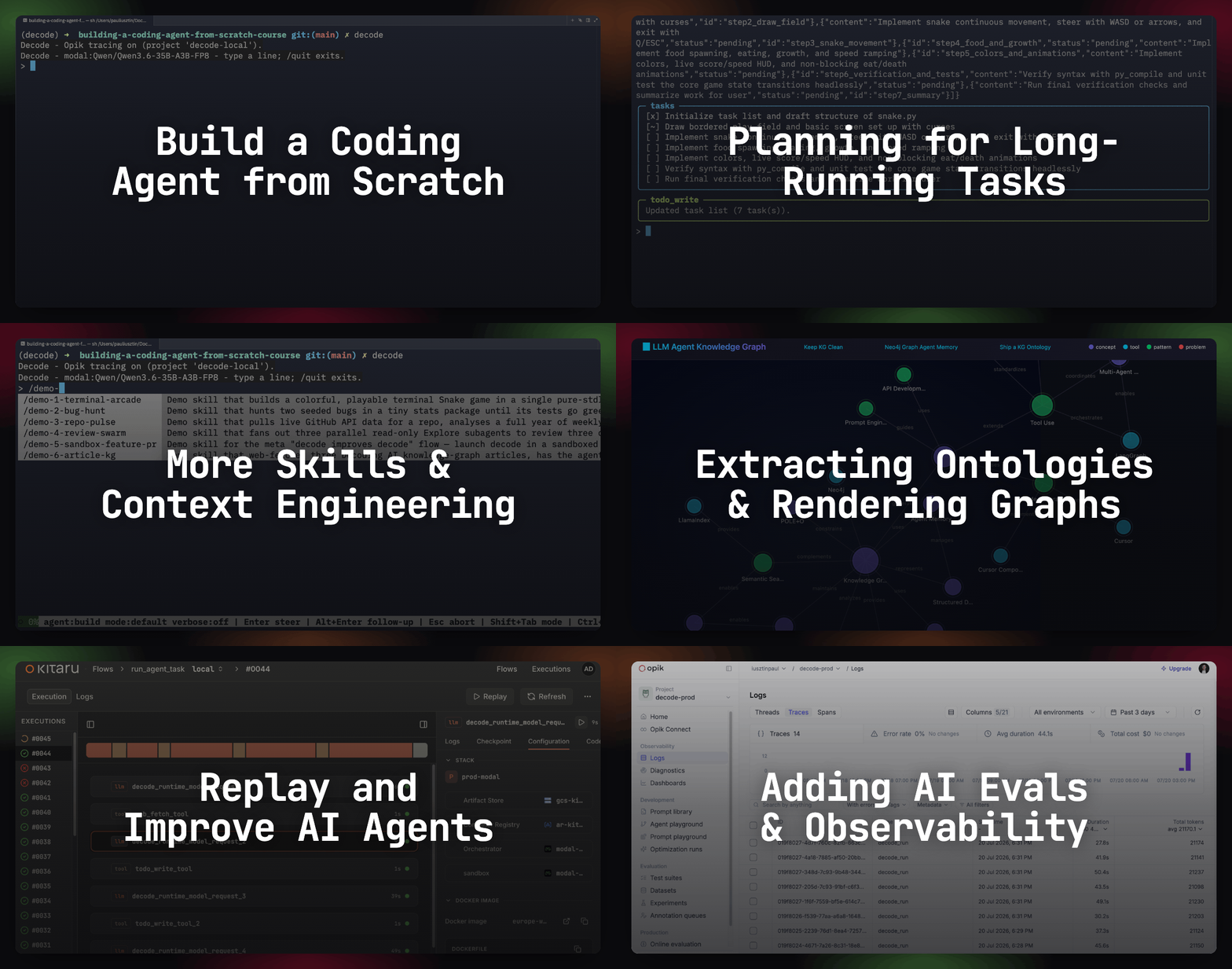
Lessons:
Swarm of Remote Agents ← You are here
Special thanks to Modal, Opik (by Comet), and Kitaru (by ZenML) for sponsoring this open-source course and keeping it free!
Lesson 6: Swarm of Remote Agents

While building automations for Decoding AI and the personal assistant for my next Manning book, I ended up with five coding agents running in parallel. After three hours, I was completely exhausted, losing clarity and forgetting what they were doing and what their scope was. The real issue wasn’t running five agents. It was babysitting them, each needing me present in a terminal.
The goal is to have background agents running in your CI/CD pipeline or proactive agents pulling Linear tickets overnight that launch parallel attempts and pick the best PR for you to review. The goal is to switch from having your work blocked behind a TUI to proactive agents that analyze your KPIs overnight, waking up with the final report to review.
That’s “the goal”, the ideal I am still trying to achieve. But my best attempt to truly understand how these background agents integrate into my daily workflows without throwing money at the problem is to build a simple solution from scratch.
Thus, we will take Decode, the coding harness we built during this course, and deploy it to the cloud as a background agent through three steps:
Switch from a TUI to a CLI headless interface
Ship it to Modal to run it as remote serverless jobs
Add support for parallel sessions to hook it to multiple projects in parallel
By the end, you will run:
uv run decode remote attempts "Add support to attach the agent to Slack" \
  --repo https://github.com/<you>/<your-repo>.git \
  --attempts 3 \
  --sandbox-mode modal
That will spin off 3 independent Decode agents implementing the same feature on Modal, each shipping its own decode/<session-id> branch, which another coding agent can later compare, forwarding only the best one for your review.
Before anything runs remotely, we have to drop the TUI and make the harness headless.
Making the harness.. headless
The headless mode runs the harness directly from the CLI and triggers the agent loop until the given goal is reached: decode run "<goal>". It wraps the same build_agent() agent loop as the TUI, but under a new interface. This is easy to implement when adopting a clean architecture design that separates the app layer (the agent loop) from the serving layers (the TUI and CLI).
Exposing the harness as a CLI will open up tons of possibilities, as you will soon see! A CLI is also scriptable, which is what lets Mario Zechner run subagents as plain pi calls under tmux in his minimal coding agent.
Because the agent runs in the background, everything defaults to bypass permission mode, and the ask_user tool becomes a no-op. On top of that, stdout prints only the final answer, while the full traces are redirected only to Opik, our observability platform.
This design is extremely similar to Claude Code’s claude -p "<goal>" interface.
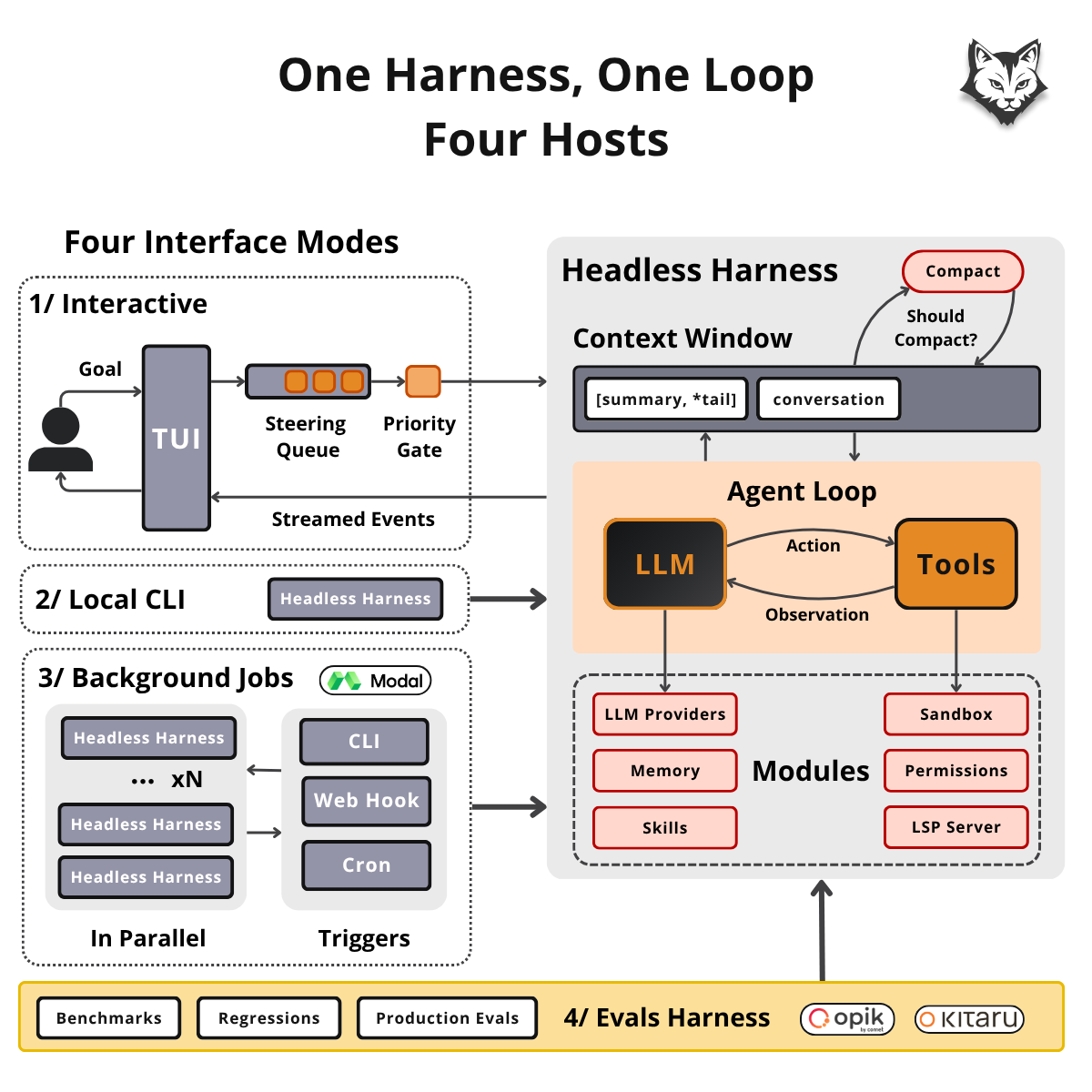
The harness interface is two things: build_agent() (the model, the tools, the instructions) and AgentDeps (the tool scope, an event sink, the gate, and two resolvers for when the loop needs a human). We can add a new serving layer by implementing this interface. As shown in the image above, we will use this design to support 4 modes: the TUI, the local CLI, remote background jobs, and an eval harness (built with Opik and Kitaru).
💡 The remote background jobs and eval harness will be layers on top of the CLI.
From src/decode/agent/deps.py and src/decode/agent/factory.py:
@dataclass(slots=True)
class AgentDeps:
    cwd: Path                                    # the tool scope
    emit: EventSink                              # stream events (eg, TUI)
    gate: PermissionGate                         # allow / ask / deny, per tool call
    resolve_permission: PermissionResolver       # who answers an "ask"
    resolve_user_question: UserQuestionResolver  # who answers the ask_user tool
    harness_home: Path | None = None             # sessions, memory, skills

def build_agent(*, model: str | None = None) -> Agent[AgentDeps, str | DeferredToolRequests]:
    agent = Agent(
        _build_model(model=model),               # gemini | openrouter | modal
        deps_type=AgentDeps,
        output_type=[str, DeferredToolRequests],
    )
    register_tools(agent)                        # read, edit, bash, agent, etc.
    _register_instructions(agent)
    return agent
Under the CLI, when running decode run, we implement the AgentDeps interface as follows: a sink that only logs, a gate in bypass mode, resolvers that deny any human interaction, and one agent.run agent loop in a single Python async loop.
From src/decode/runtime/headless.py:
def _build_headless_deps(cwd: Path, model: str | None = None) -> AgentDeps:
    return AgentDeps(
        cwd=cwd,
        harness_home=Path.cwd(),
        emit=_headless_emit,
        gate=PermissionGate(mode=PermissionMode.BYPASS),
        resolve_permission=_deny_permission_resolver,
        # never reached under BYPASS
        resolve_user_question=deny_user_question_resolver,
        # ask_user is a no-op
    )

async def _run_task(task: str, *, model: str | None, repo: str | None, max_requests: int | None) -> str:
    tool_scope = await _prepare_headless_tool_scope(repo, local)
    # the Workspace in a sandbox mode, else cwd
    agent = build_agent(model=model)
    # the SAME agent the TUI builds
    deps = _build_headless_deps(tool_scope, model)
    result = await agent.run(task, deps=deps, usage_limits=UsageLimits(request_limit=max_requests))
    return result.output

def run_headless_task(task: str, ...) -> str:
    try:
        return asyncio.run(_run_task(task, ...))
    finally:
        ...
In retrospect, here is how we implemented the AgentDeps interface within the interactive mode plugged into the TUI: a sink that renders in the terminal, a gate loaded from your configs, resolvers that await the user, and a Runner that implements a steering queue that pours messages into the agent loop at the right time (full implementation in Lesson 2).
From src/decode/tui/app.py:
decisions = DecisionChannel()                 # mid-turn surface for permissions + ask_user
agent = build_agent()
gate = PermissionGate(user_rules=rules.load_rule_set(permissions_file))
deps = AgentDeps(
    cwd=tool_scope,
    harness_home=harness_home,
    emit=_make_event_sink(console),           # events render live in the terminal
    gate=gate,
    resolve_permission=_make_permission_resolver(decisions, console, gate=gate, ...),
    resolve_user_question=_make_user_question_resolver(decisions, console),
)

handler = AgentTurnHandler(agent, deps=deps, session_log=session_log, ...)
runner = Runner(handler, on_event=_on_event)  # steering queue
The two upcoming serving layers share this same clean architecture: an evals harness running decode run across benchmarks, and the remote background agents we build next.
In this CLI design, one key option is --max-requests N, which limits the maximum number of iterations in a single Pydantic AI agent loop to prevent it from running indefinitely. When running agents interactively, adding a limit is more of a curse than a blessing, but when not monitoring them at all, you want to avoid getting the agent stuck in a doom loop that just burns tokens — one of the failure modes Anthropic covers in its guide on effective harnesses for long-running agents.
Next stop: taking the laptop out of the loop via remote background agents on Modal.
Running the headless harness remotely
The problem with running coding agents locally is that when you close your laptop lid, you are done. I’ve been trying to work around this issue with programs such as Amphetamine that hijack the sleeping processes of my Mac, but they don’t work properly. You always end up with your session stuck.

Instead of maintaining a server, we create a clear boundary between who triggers the harness and where it executes. Your laptop, a cron job, or a webhook only launches it, and Modal executes in fire-and-forget containers with zero idle cost. Modal already served our models and sandboxes. Now it also hosts the harness under serverless functions.
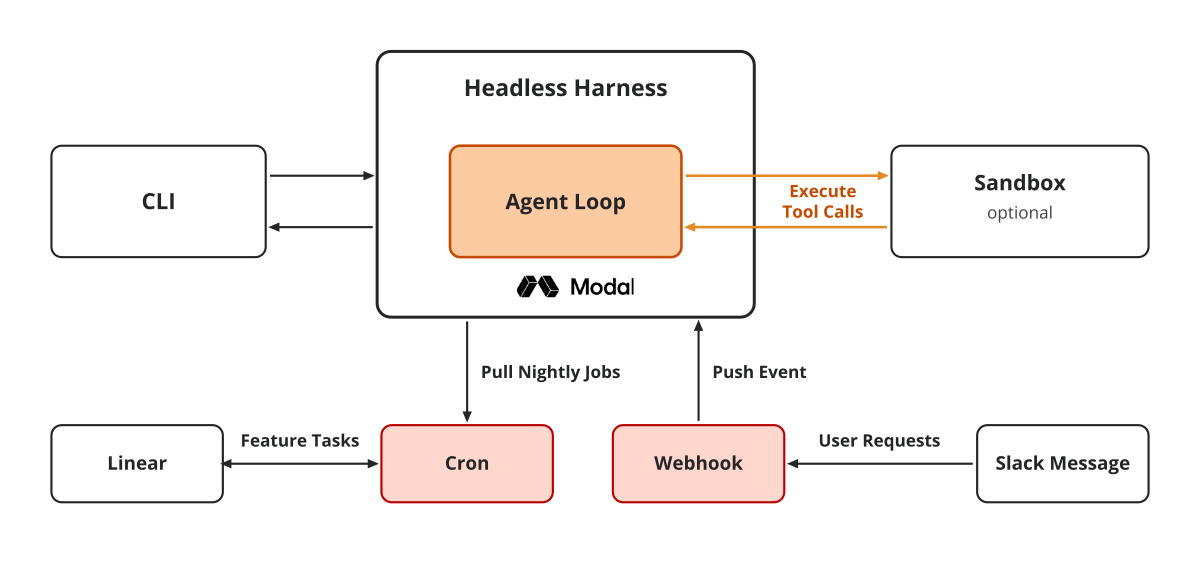
Which means that now we have three ways to trigger the harness:
via
decode remote runordecode remote attemptswhen we want to either manually trigger the harness or hook it into the CI/CD (or any other shell script)a webhook POST that we can use from Slack, Discord or Telegram messages
a cron scheduler that we can connect to our Linear or Notion project manager to implement our tickets overnight for us to review them in the morning
All three are implemented as different entry points into the same Modal app:
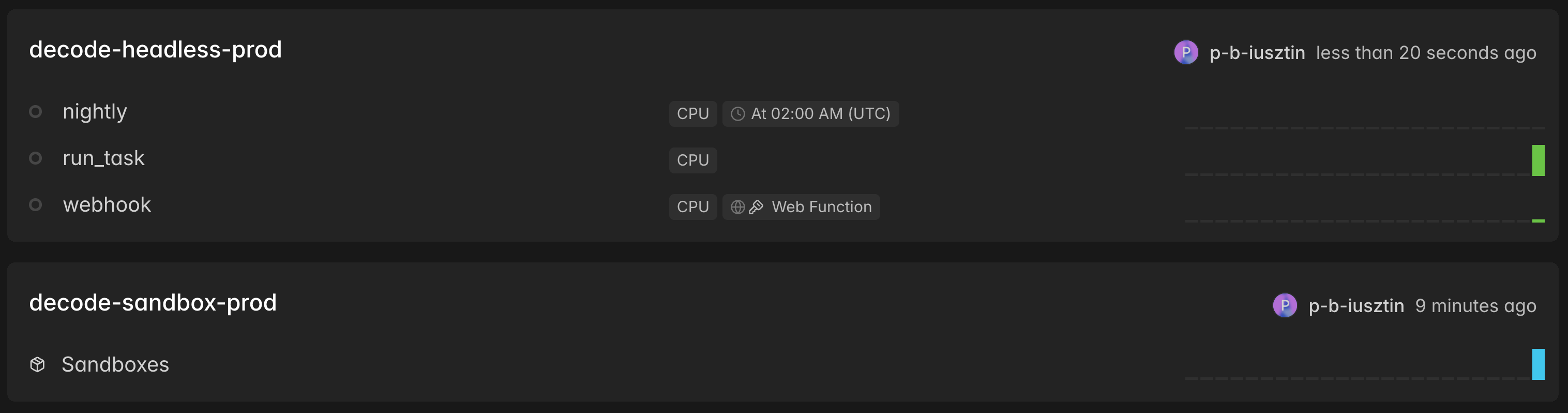
The headless harness per se runs within a Modal app wrapped by one Python function that Modal runs in its own container on demand, each time it’s triggered. More exactly, it runs decode run as a subprocess, similar to what we’ve been running locally so far, inside a gVisor container (the user-space kernel Modal runs under every container).
Because of our modular design, we can hook the headless harness to a remote Modal sandbox that runs filesystem tools such as read, edit, write and bash. Passing --sandbox-mode modal clones --repo into the sandbox workspace runs the tools there and pushes a decode/<session-id> branch to GitHub. Or, as seen in the image below, multiple branches if we choose to attempt multiple implementations of the same feature.

We deploy the Modal app defined in the code snippet below, via decode remote deploy, which builds a Debian image in code with all necessary dependencies and pushes it directly to Modal’s container registry.
In the execute_run() function, we mostly set up the environment, clone the repository if we’re not in a sandbox, and call decode run <"goal "> as a subprocess. That’s it. Modal mostly acts as a middleman between different ways to trigger our headless harness and where to execute it.
From src/decode/remote/app.py and src/decode/remote/headless.py:
IMAGE = build_image(extra_dirs=(REPO_CLONE_DIR,), extra_packages=WEB_PACKAGES)
app = modal.App("decode-headless")

@app.function(image=IMAGE, secrets=[modal.Secret.from_name("decode-headless")], timeout=3600)
def run_task(task: str, repo: str | None = None, sandbox_mode: str = "none",
             model: str | None = None, timeout_seconds: int = 1800, max_requests: int | None = None) -> dict:
    return execute_run(
	    task=task,
	    repo=repo,
	    sandbox_mode=sandbox_mode,
	    model=model,
		timeout_seconds=timeout_seconds,
		max_requests=max_requests
		)

def execute_run(*, task, repo=None, sandbox_mode="none", model=None, timeout_seconds=1800, max_requests=None) -> dict:
    env = decode_run_env(os.environ, sandbox_mode=sandbox_mode)
    # inject env vars: SANDBOX_MODE, DECODE_ENV=prod, GITHUB_TOKEN, etc.

    if sandbox_mode == "none" and repo:
        clone_for_none_mode(repo, env)

    stdout, exit_code = stream_subprocess(
        decode_argv(
            task=task,
            sandbox_mode=sandbox_mode,
            repo=repo,
            model=model,
            max_requests=max_requests
        ),
        cwd=decode_cwd(sandbox_mode=sandbox_mode, repo=repo),
        env=env,
        timeout_seconds=timeout_seconds,
    ) # Run 'decode run "<task>" ...' within a subprocess

    return build_result(sandbox_mode=sandbox_mode, repo=repo, exit_code=exit_code, stdout=stdout, log_text=read_child_log())
Next, we can interact with the deployed headless harness via decode remote, where we can start asking for specific goals via decode remote run "<goal>" or for multiple attempts via decode remote attempts "<goal>". Which under the hood will trigger the Modal run_task() serverless function once or multiple times in parallel.
In the image below, we can see how each remote attempt (3 in our use case) works in its own Modal container and optional sandbox:
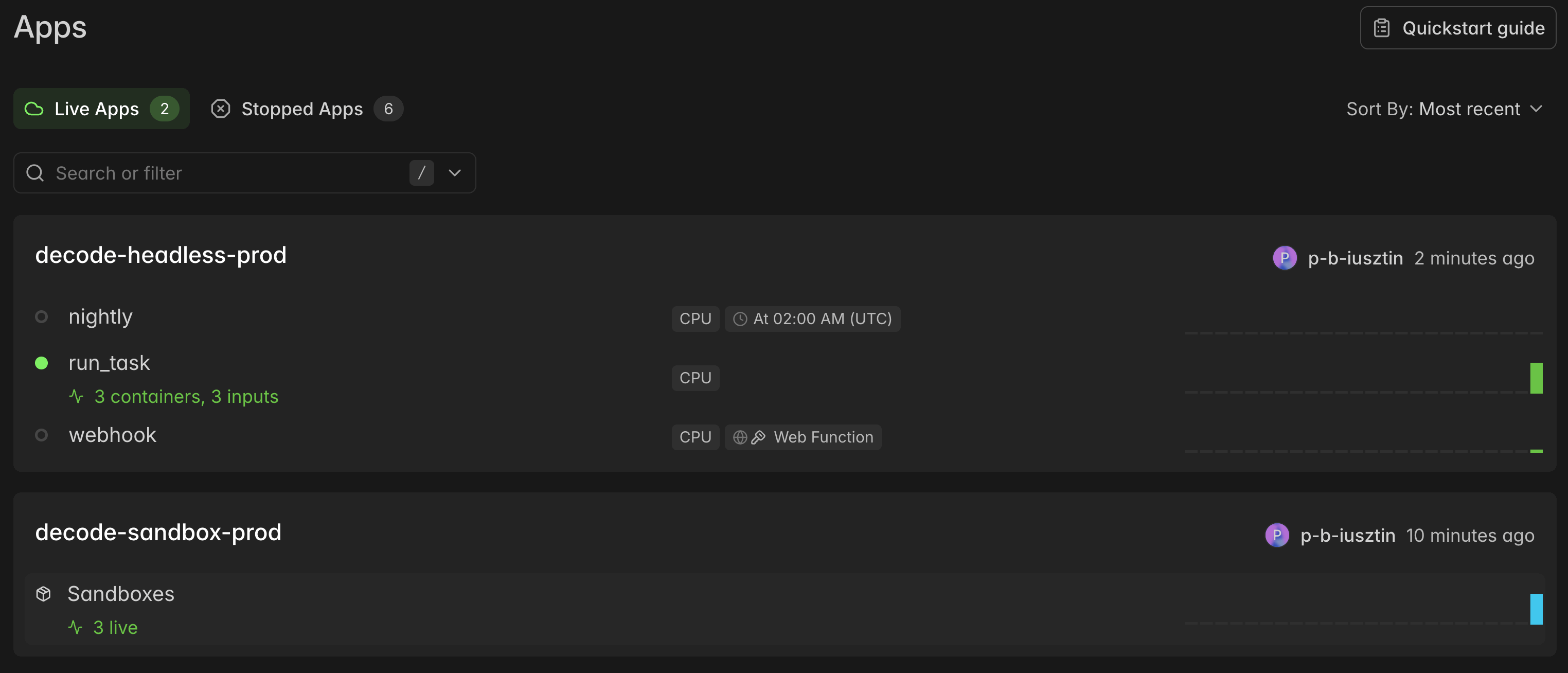
Each with its own branch and optional PR:
The deployed Modal functions form an autoscaling pool of containers that sits at zero. A client looks up the Function by name: modal.Function.from_name("decode-headless", "run_task"). It calls .remote(...) for a synchronous blocking call, or .spawn(...) for an async one.
Modal routes inputs to warm containers or boots new ones up to max_containers, automatically shutting down idle instances. The only latency in modal mode comes from the started-versus-ready gap while the sandbox clones your repo and installs dependencies.
Using a similar strategy, we can implement the remaining two triggers. The nightly cron calls run_task.local() on a schedule set by the DECODE_NIGHTLY_CRON env var.
For the webhook, we need to expose a FastAPI endpoint with proxy auth (a key/secret header pair Modal checks at its edge before your code runs). This time, it spawns a run_task in the background as an async job and returns a call ID in milliseconds.
From src/decode/remote/app.py:
@app.function(image=IMAGE, secrets=[...], schedule=nightly_schedule(os.environ))
def nightly() -> dict:
    return run_task.local(**nightly_run_kwargs(os.environ))   # same container, same subprocess

@app.function(image=IMAGE)
@modal.fastapi_endpoint(method="POST", requires_proxy_auth=True)
def webhook(request: WebhookRequest) -> dict:
    call = run_task.spawn(**webhook_spawn_kwargs(request))    # start it, don't wait for it
    return webhook_response(call.object_id, request)          # the call id + where to watch
Below, you can see how the webhook triggered the run_task serverless function:
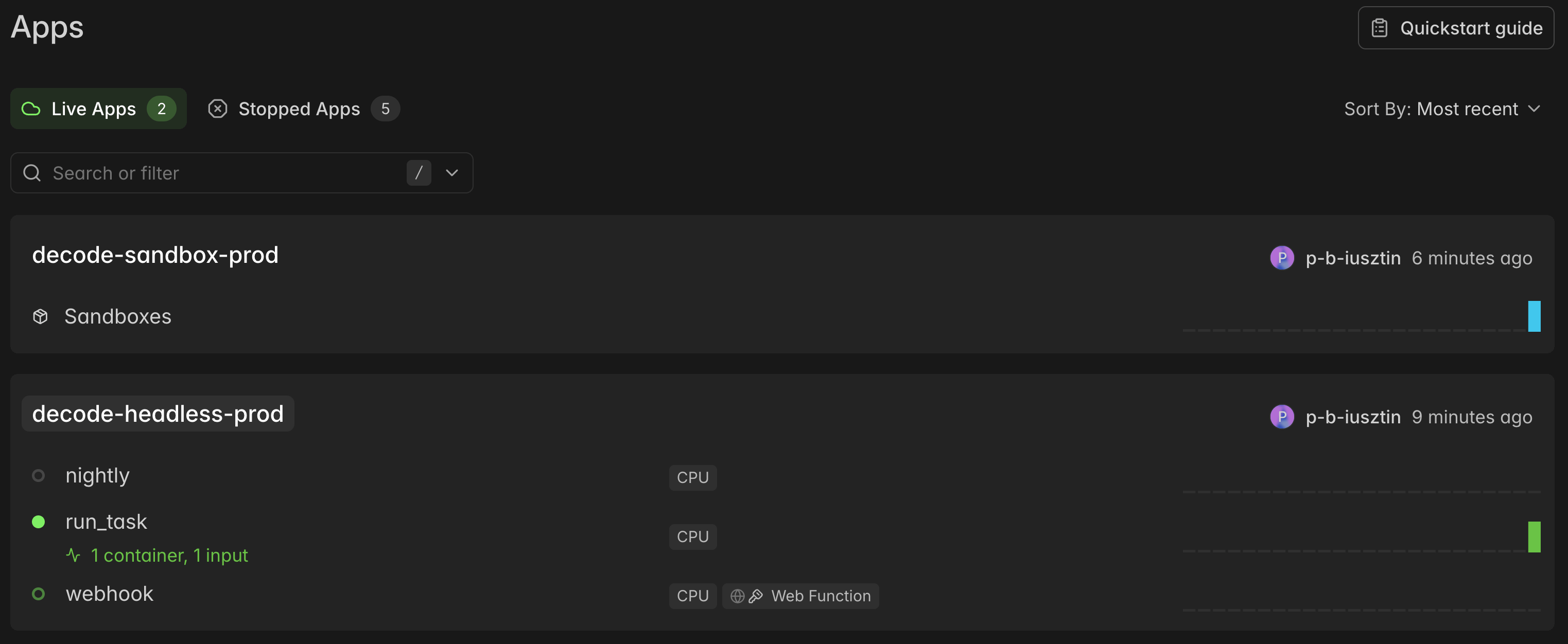
Deploy once to publish run_task, nightly, and webhook:
uv run decode remote deployFire a single synchronous run from your laptop:
uv run decode remote run "<task>" --repo <url> --sandbox-mode modalLaunch N parallel attempts with --detach to exit immediately:
uv run decode remote attempts "<task>" --repo <url> --attempts 3 --sandbox-mode modal --detachSchedule a nightly cron via a UTC crontab. Without DECODE_NIGHTLY_CRON no schedule registers:
DECODE_NIGHTLY_CRON="0 2 * * *" \
DECODE_NIGHTLY_TASK="<task>" \
DECODE_NIGHTLY_REPO=<url> \
DECODE_NIGHTLY_SANDBOX_MODE=modal \
DECODE_NIGHTLY_MAX_REQUESTS=120 \
uv run decode remote deploy
Trigger the webhook over HTTP via authenticated POST:
curl -X POST "$WEBHOOK_URL" \
-H "Modal-Key: $MODAL_PROXY_TOKEN_ID" \
-H "Modal-Secret: $MODAL_PROXY_TOKEN_SECRET" \
-H 'content-type: application/json' \
-d '{"task": "…", "repo": "<url>", "sandbox_mode": "modal", "max_requests": 60}'
Read every run’s answer and summary line, from anywhere:
uv run decode remote logsLooking at the logs in the terminal can be super helpful for detecting build and runtime errors and warnings. But when we have to understand what’s going on inside the agent, a better way to look at its model and tool calls is to use an observability tool like Opik:
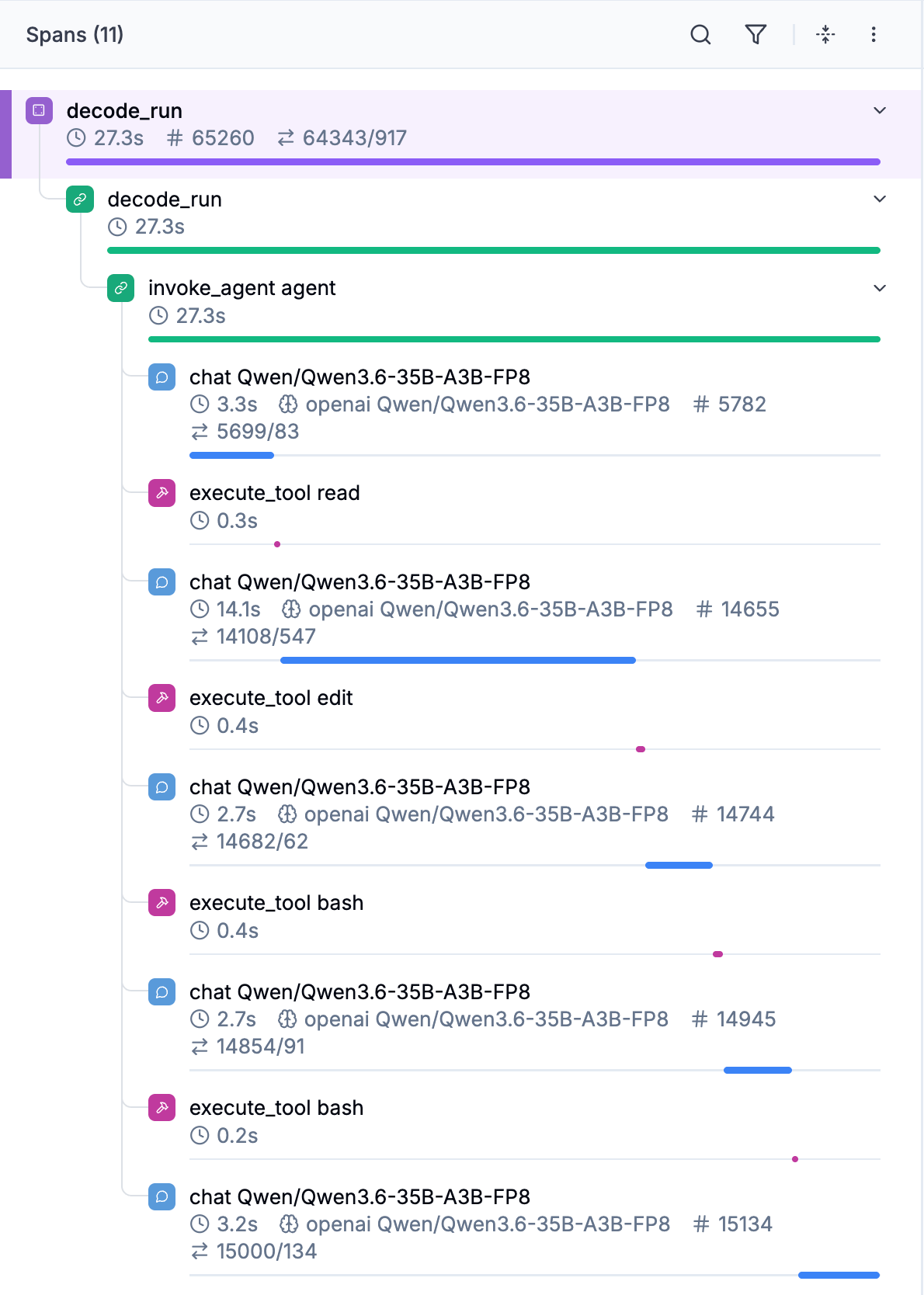
Which can quickly become super useful when running decode remote attemps and comparing their differences in costs (if using an API), latency and token usage:

Because we deployed the whole coding agent to Modal (serving the LLM, the sandbox, and the harness), a pertinent question is whether it’s worth going full serverless versus choosing good old providers such as GCP or AWS.
As always, it depends.
When should we go serverless?
First, serverless simplifies infrastructure: one command to deploy, automatic scale up and down, nothing billed while idle, and CPUs or GPUs one argument away.
Under Modal, you own no machines. On a hyperscaler like GCP or AWS, you maintain virtual machines plus managed services for scaling and monitoring. Bare-metal GPU clouds like RunPod and Lambda provide the cheapest hourly compute and full control, leaving every orchestrator and daemon for you to build.
In other words, if you choose an option other than serverless, you need to be prepared to invest time and resources in setting up and monitoring your infrastructure. For many small teams or early projects, that’s simply not worth it.
Now what about pricing? Isn’t serverless a lot pricier than hyperscalers or bare metal?
Per H100-hour, on demand, at the time of writing:
(That can serve a 7 B to 32B model at high throughput)
Modal ≈ 3.95 (serverless)
RunPod ≈ $3.49 (neocloud)
Lambda ≈ $3.99 (neocloud)
AWS p5.4xlarge ≈ $6.88 on-demand, ≈ $2.63 spot (1×H100) (hyperscaler)
So, as you can see, only RunPod VMs are cheaper than serverless. Plus, with serverless, you pay only for what you use, as it automatically scales to 0 when idle (i.e., $0). The LLM endpoint, the remote sandboxes, the app itself. Everything. If your app mostly depends on bursty agent work, serverless fits like a glove.
On the other side of the spectrum, if you would need access only to interactive TUIs that run 24/7 by your team (hopefully!), you might want to consider other options.
As a small team, I usually start serverless and rent/buy GPUs only when I really need to invest in my own infrastructure.
Running swarms of remote agents
Now, how does this design map to working on multiple coding projects, each with multiple tickets?
A background job can pull tickets from Linear, implement them overnight, and leave PRs waiting for your morning review. We can model this via the cron job or a Linear agent and our webhook, which lists tickets tagged for the agent and passes along the ticket text, repo URL, and other metadata.
Modal spawns a dedicated container for each ticket. Each Decode session clones its repo into its own sandbox, implements the ticket, commits, pushes a decode/<session-id> branch, and opens a PR, so you review finished work instead of watching agents run.
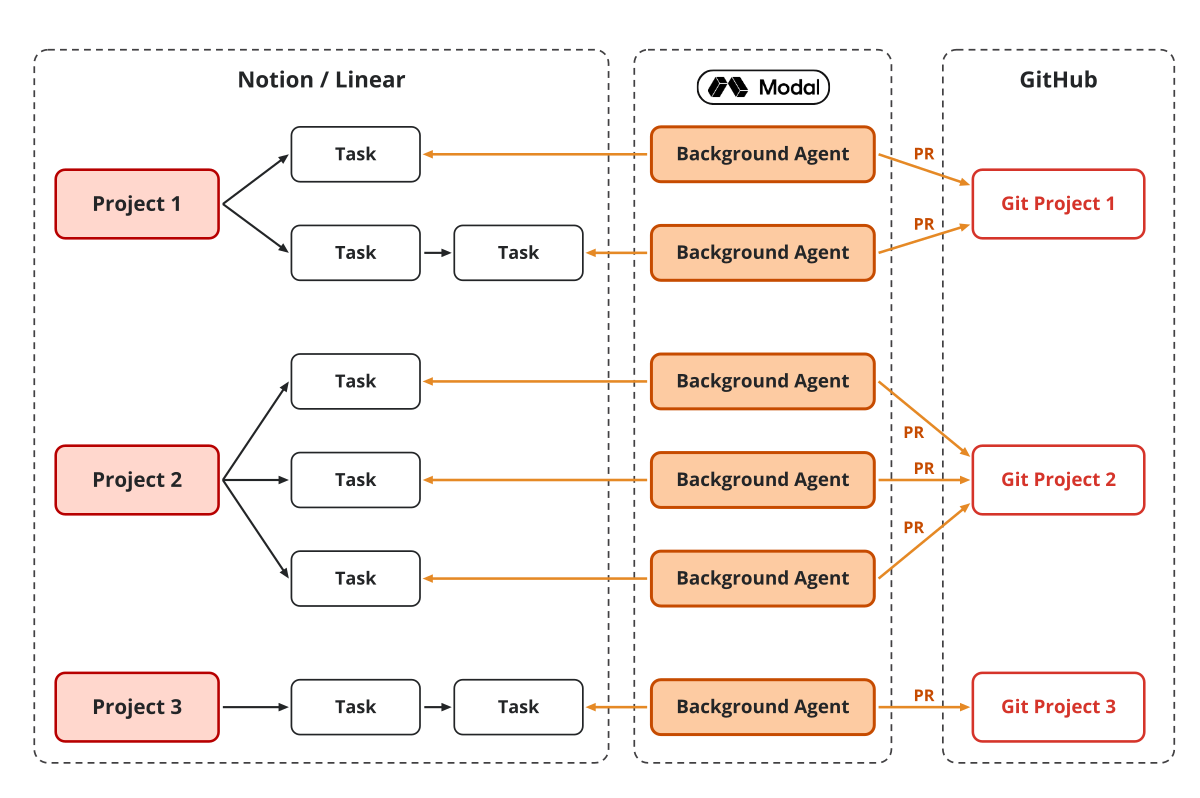
Each ticket session starts from scratch and is completely independent of the others. Ten tickets run in ten containers. It is important to model dependencies between tickets to know what to implement in parallel or sequentially.
Ramp uses the same strategy at production scale with a routing queue and session locks. Review-ready PRs come out, and roughly half of Ramp’s merged PRs use this strategy. Which is huge for a fintech company that needs to be really careful about what code it pushes.
On top of running multiple parallel agents, you can take this step further and run multiple parallel subagents within a single harness session.
One orchestrator, many GPU sandboxes
Let’s assume that we give a coding agent a task to fine-tune a Liquid LFM2.5 model.
It needs to run several fine-tuning experiments in parallel, push each to an experiment tracker, compare them, and let the next round optimize on the last until the target metric is reached. You fire one headless run on Modal, the orchestrator, with the task “get eval accuracy above X on this dataset.”
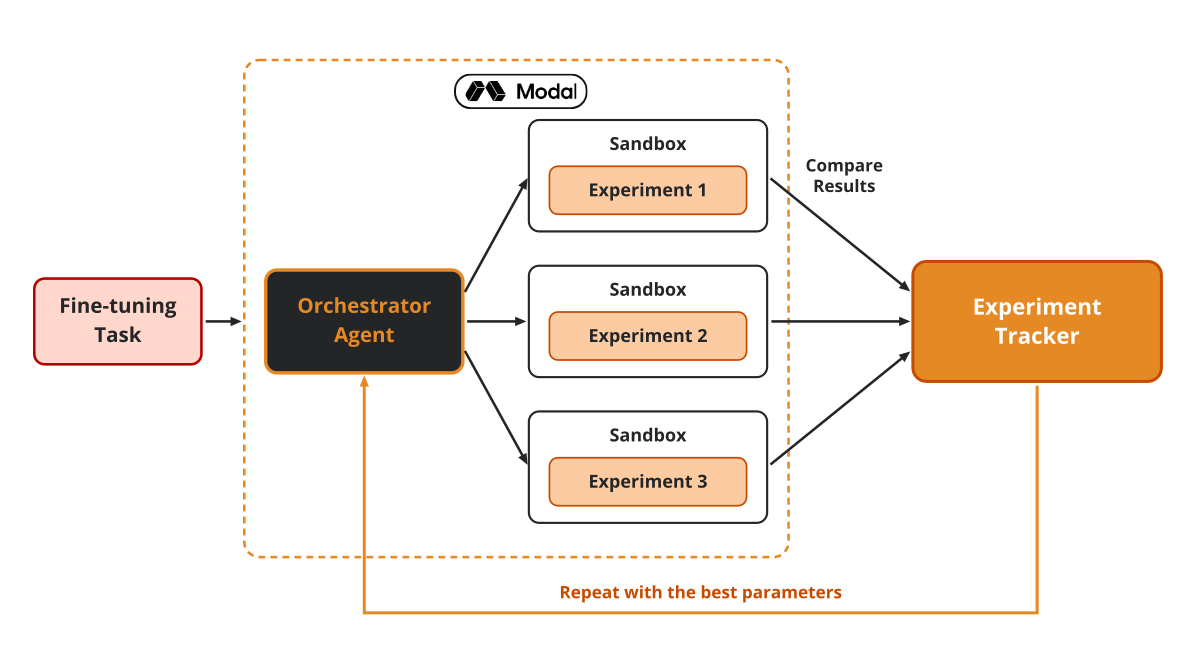
It plans a batch of experiments (learning rates, LoRA ranks, data mixes) and fans it out into multiple subagents. Each child’s tools run in its own Modal remote sandbox created with a GPU spec (eg gpu="H200:4"), so bash trains on an H200 while the orchestrator stays on a CPU container.
The orchestrator reads each run’s metrics, keeps the best configuration, plans the next batch, and stops when it meets the target or hits other thresholds, such as cost or max iterations. You wake up to a leaderboard and a winning checkpoint, not five terminals.
More on this in Lesson 3 and Lesson 5.
Next steps
Now that we’ve seen how to run swarms of agents in the cloud, it’s time to evaluate the coding agent and build the evals harness. In Lesson 7, we will leverage this infrastructure to run benchmarks, regression tests, and online evals at scale.
🧑💻 Clone the course repo, follow the deploy runbook (running_the_code/04_deploy.md), deploy the agent via decode remote deploy once and then put it to work.
Here is the course roadmap, lesson by lesson (see all in GitHub):
Swarm of Remote Agents ← You are here
But here is what I’m wondering:
What would you give a coding agent to do overnight, without wasting your time and tokens?
Click the button below and tell me. I read every response.
Enjoyed the article? The most sincere compliment is to restack this for your readers.
Special thanks to Modal, Opik (by Comet), and Kitaru (by ZenML) for sponsoring this open-source course and keeping it free!

Whenever you’re ready, here is how I can help you
Go from agent user to agent builder. Master the foundations of AI agents and turn fragile demo code into reliable, production-ready systems with my course, Agent Engineering: Building Multi-Agent Systems (made with Towards AI).
35 lessons. Pure foundations from scratch. 4 mini-projects. 2 production systems. A certificate and direct access to me & industry experts in our Discord.
Built for software and data professionals transitioning into AI engineering. Rated 5/5 with 300+ students. The first 7 lessons are free:
Not ready to commit? Start with our free Agent AI Engineering Guide, a 6-day email course on the mistakes that silently break AI agents in production.
Images & videos
If not otherwise stated, all images and videos are created by the author.
Great article, thanks!
The doom-loop you guard against with --max-requests is the small leak. The bigger one is structural: five agents x N attempts x an overnight cron is a recurring cost with no natural ceiling — it scales with your ambition, not your output.
I see the same trap in salaried money: income grows, spend quietly grows to meet it. Compute behaves identically unless you name it as a line item.
So a monthly cap, a cost-per-merged-PR number, and a rule that an agent only runs unattended if its expected