



While building and talking about my latest long-running coding agent, CodeClimb, on LinkedIn and X, people kept asking me about one of their root fears: “If the run crashes after 6 hours, will it cost me twice to resume?”
Just imagine. You left your agent work overnight. It ran for 6 hours, then crashed after a 30-second internet outage. When you go in the morning, excited to verify the results, you see failures instead. Worse, the remote sandbox it was running on hasn’t been stopped and kept consuming credits.
Without the proper infrastructure in place, you just have to start from scratch, wasting a ton of precious tokens. That’s why you have to ask yourself: How will the agent resume from where it crashed? From what step should it resume? Should it retry a failed step? How can you flush all the active resources in case of failure?
All these problems can be solved by adding a durability layer to your agent or workflow. Unfortunately, durability tools are not created equal. If you make the right choice, adding durability into your codebase is quite easy. If not, you might end up fighting the tool to make it fit into your codebase.
For building agents, I reduced this decision to two ecosystems: Inngest vs. LangChain (LangGraph and LangSmith). To get my hands dirty, I built CodeClimb in both stacks to get a hands-on understanding of the pros and cons, including architectural trade-offs, pricing and developer or agent experience. Image 1 shows the two builds side by side.
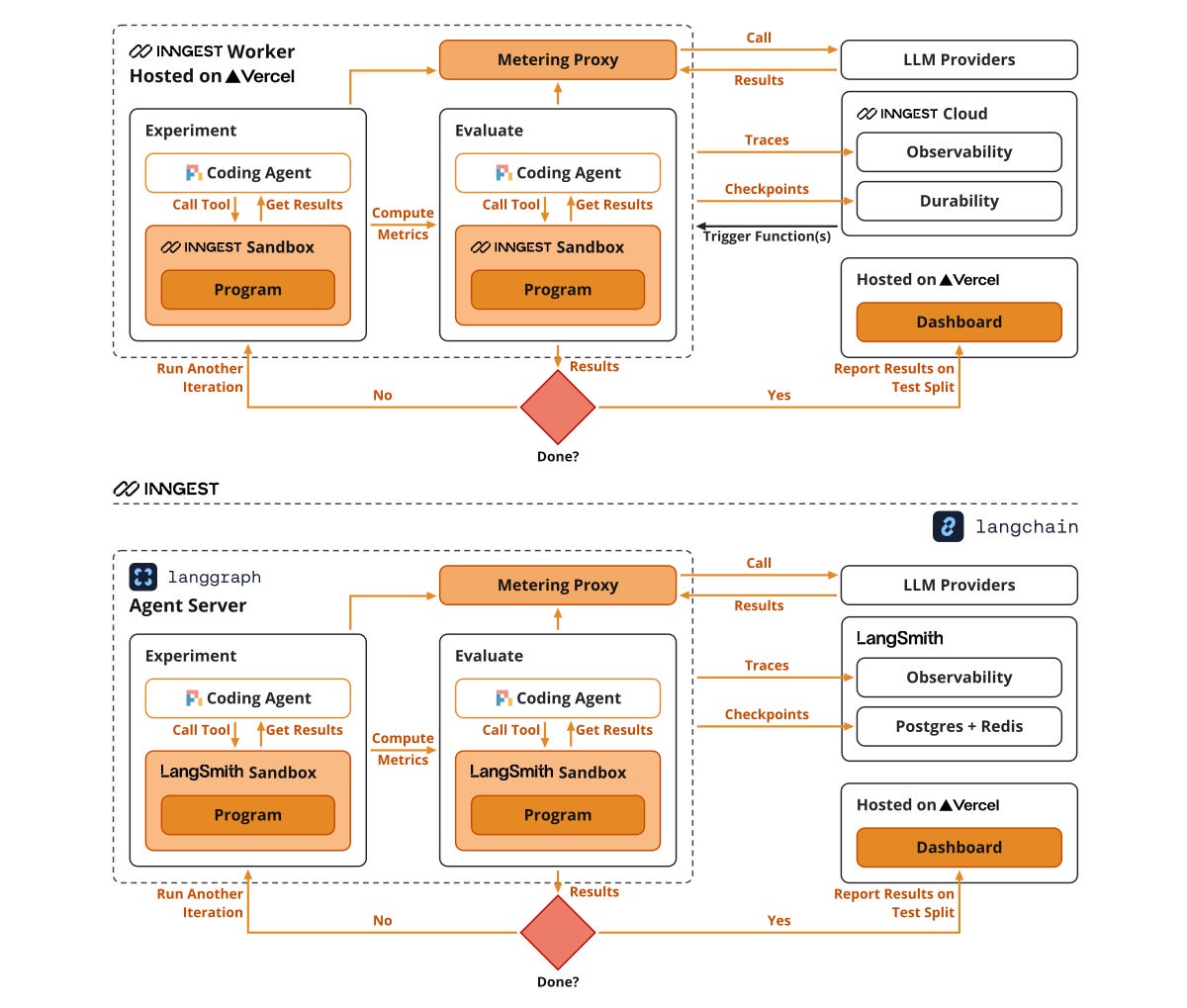
I’ve picked Inngest and LangChain because I wanted to go deep rather than do a wide, superficial comparison. Still, other valid options are Temporal, Restate and DBOS. Also, for full disclosure, Inngest is the sponsor of this article, but the opinions are my own, as I have complete freedom over the final results. They are seeing this article at the same time as you.
Before the comparison, let’s quickly recap what CodeClimb, our example, does and pin down the core properties of long-running agents we want from both stacks.
Core properties of long-running agents
The idea behind CodeClimb started with the biggest bottleneck in coding agents: reviewing PRs with 23,456 line changes or 289 PRs per day. When building AI software, such as RAG solutions, we have a beautiful property: we can clearly measure the quality of the algorithm, such as how well retrieval or question answering works.
That’s why we brought a data-scientist mindset to coding agents and built an eval-driven code search algorithm, where metrics on a dataset guide the coding agent instead of shady unit or integration tests the coding agent wrote.
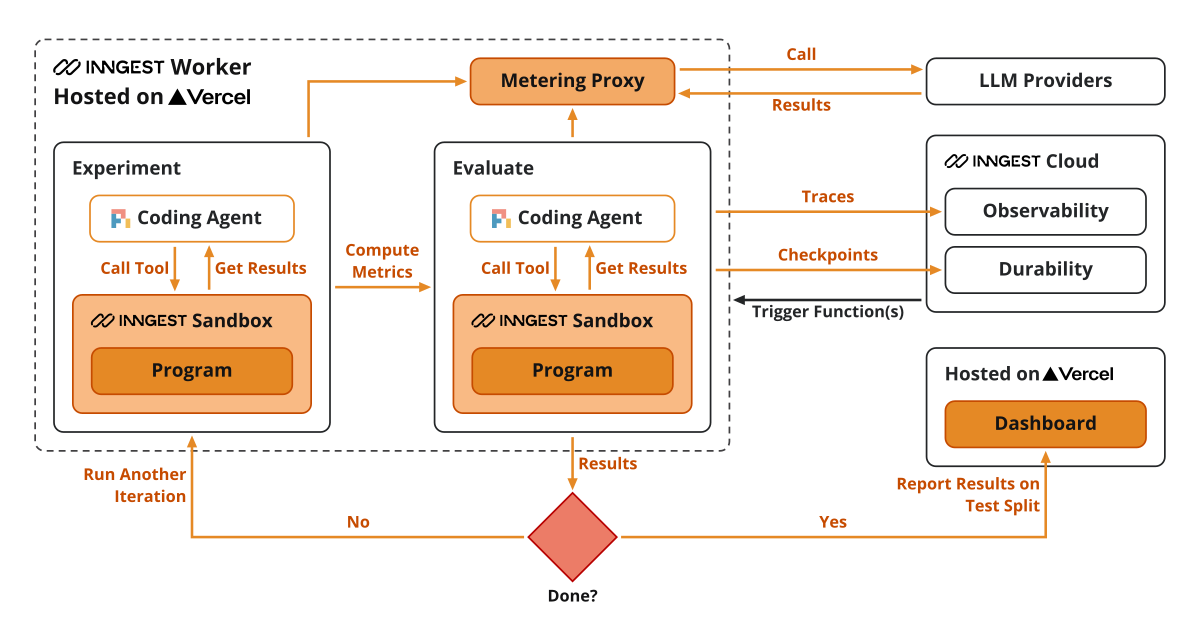
In my example, I built a GraphRAG dataset from 22 Decoding AI articles (6 train, 8 dev, 8 test). As illustrated in Image 2, CodeClimb is modeled as a loop, where a Pi coding agent writes the solution based on the spec and train split. Then, within an evaluation step, we score the quality of the GraphRAG algorithm on the dev split on metrics such as F1 (recall x precision) and mean reciprocal rank (MRR). Then the Pi coding agent gets as feedback the metric results, plus a history of what hypothesis was tested in each experiment and its results. The experiment and evaluation steps run in different isolated sandboxes.
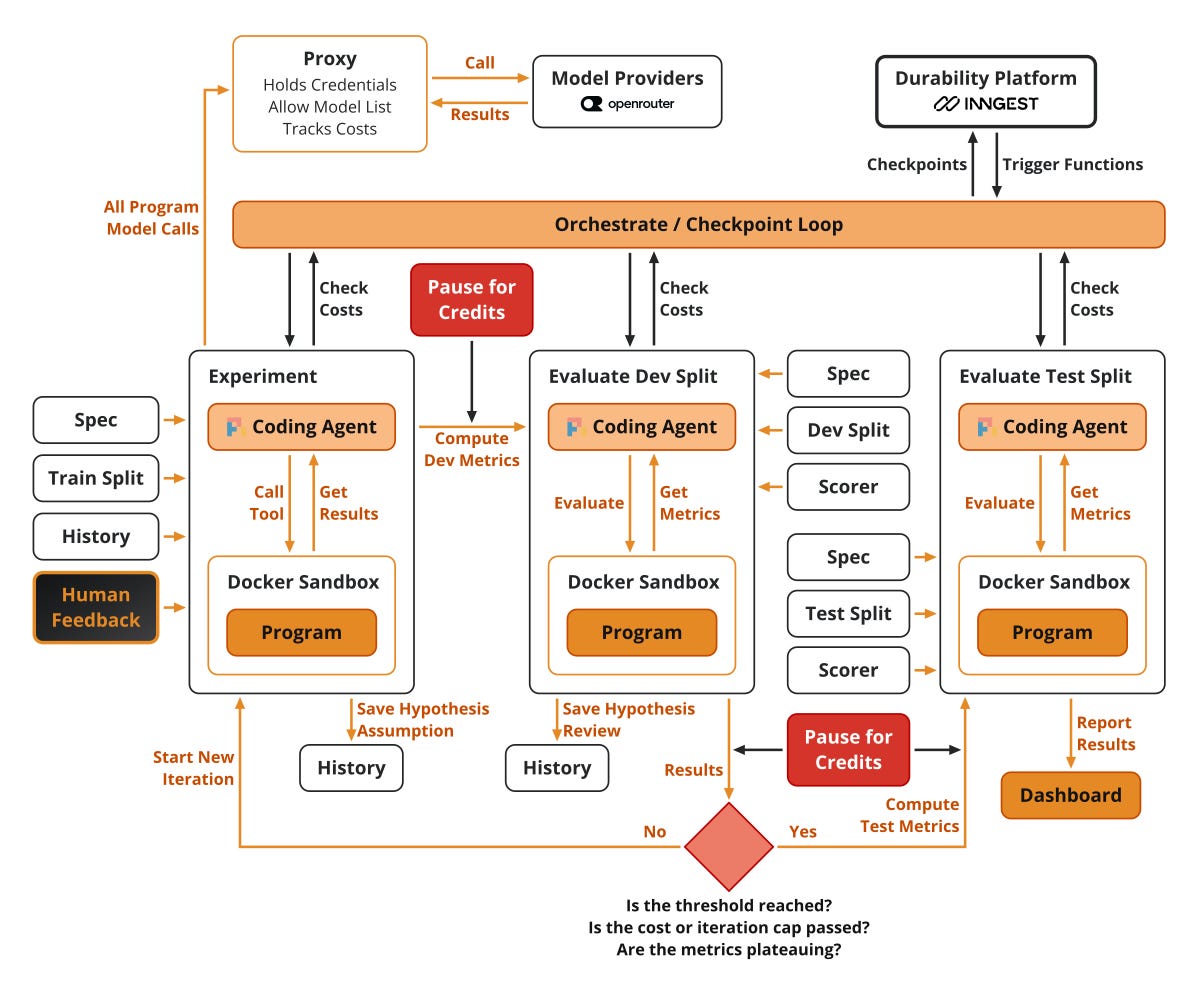
This loop continues until a given threshold is reached on our metrics or other caps are hit, such as costs, max rounds or a plateau. The final step is to compute the metrics on the test split to see if the algorithm overfits or not. The process is extremely similar to training a model or hyperparameter tuning, but here we write the code and tweak the parameters instead. The final output is the code that scored best on the dev split. To switch between different code rounds, we versioned the code with a local git repository.
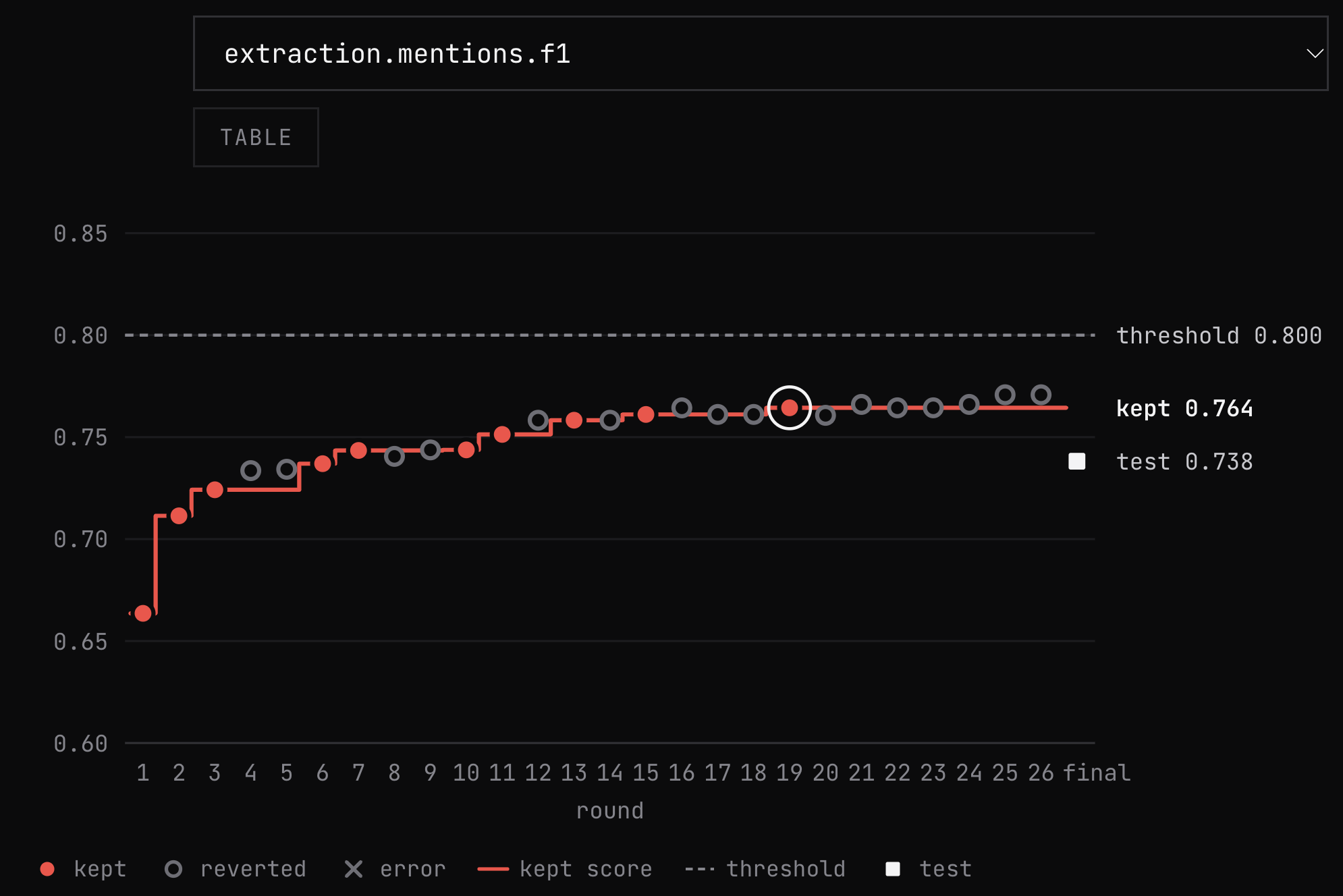
All the results are shown in real time on a Next.js dashboard, as in Image 3. Our best night ran 26 rounds in 11.8 hours for $74.63.
You can find all the design details about CodeClimb in the first article from our series on durable and secure long-running agents.
Build Durable, Secure Long-Running Agents
·What would it take to trust an AI agent to work on your code overnight? Without burning through LLM API credits to reach its goal no matter what, exposing your credentials to the AI overlords, or losing hours of progress when something crashes at 5 AM.

Now, why is CodeClimb an amazing example of building reliable long-running agents?
We need to design guardrails the agent can’t override. Before each model call, we need to check that the $2.50 per experiment, 30 minutes per experiment and $120 per night limits are not exceeded. After each experiment, we need to check whether the metric thresholds or plateau have been reached.
Also, we need to implement a proxy to store our credentials safely and firewall resources that are not allowed.
Most importantly, it’s the perfect system where adding checkpoints that survive a crash is essential to your wallet and sanity, since running one experiment and evaluation loop is expensive and time-consuming. So rerunning from scratch is not an option.
This raises a bunch of design details:
Where does the code run, and who holds the state?
What goes into one step, so a replay never repeats its side effects?
Who notices a crash, and who retries it?
How do we free the sandboxes after a crash or a stop?
How do we pause for a human without holding a worker?
How do we review a 12-hour night run the next morning?
How do we deploy it, and what does it cost?
Let’s answer them by designing CodeClimb, first with Inngest, then with LangChain.
Durable long-running agents powered by Inngest
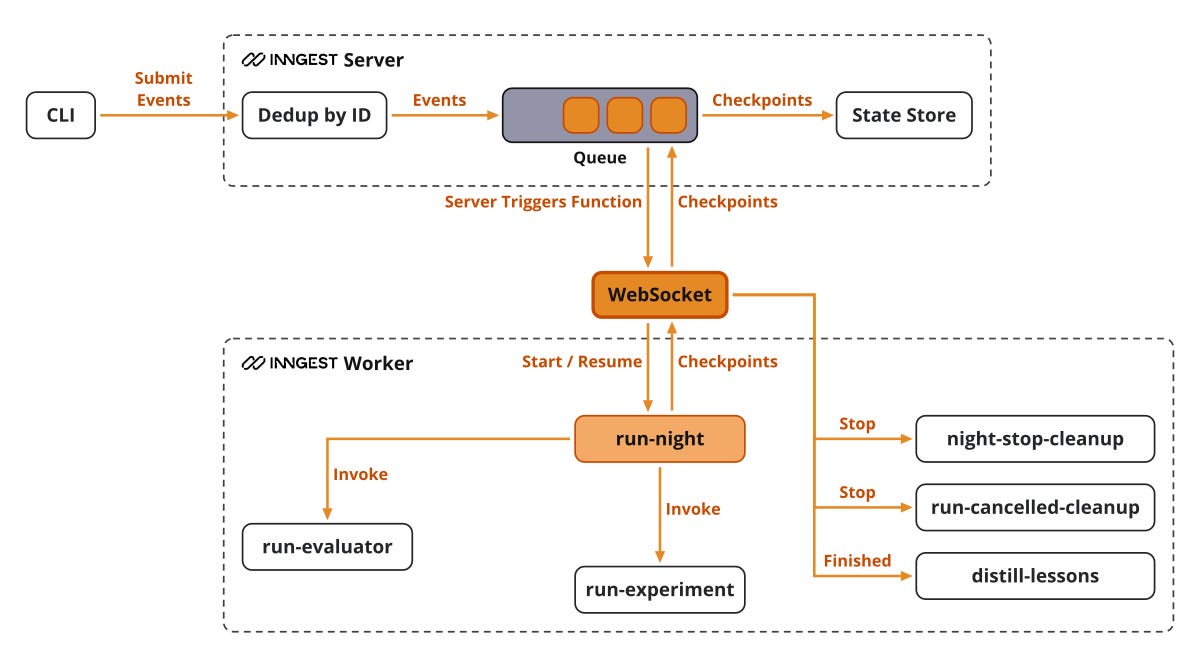
Inngest is split into two main components: the long-lived worker that executes the CodeClimb code and the Inngest server that holds the run state, schedules the steps and triggers the worker. The Inngest server can either run on Inngest Cloud, their managed platform, or, as it’s open-source, you can host it yourself.
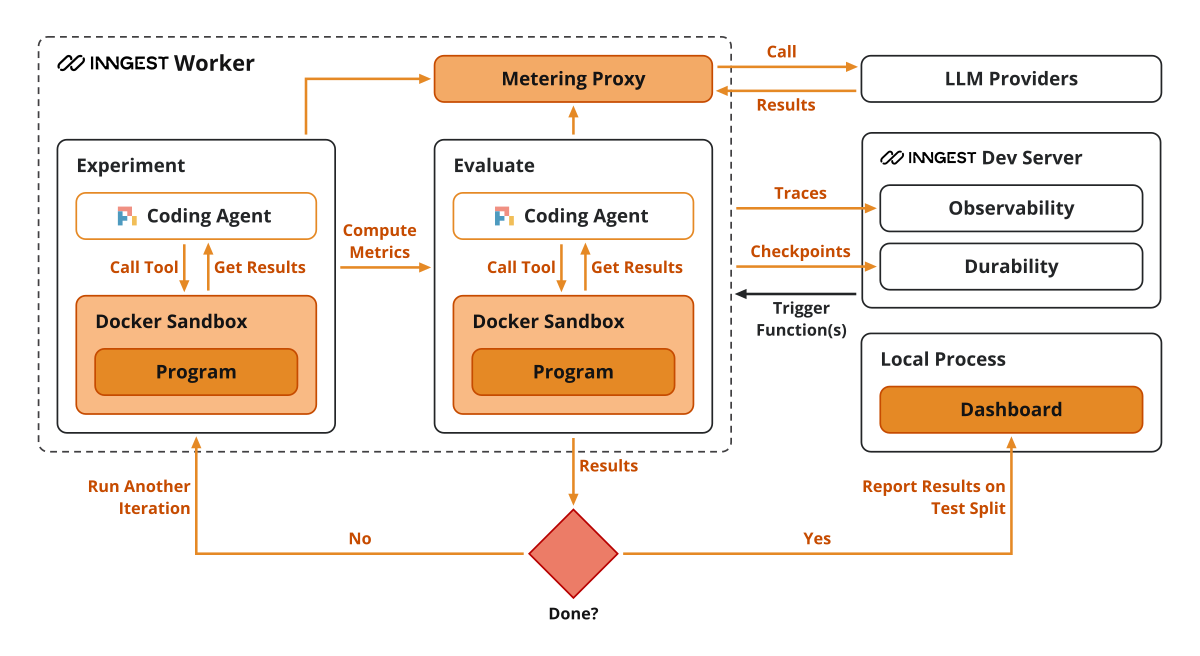
That’s the whole architecture Inngest forces you to adopt. In exchange, we have full control over how our code looks within the worker, as Inngest makes it super flexible to wrap your workflow with its functions and step logic. How you host the metering proxy and store the results from the night run is completely on you. Image 4 shows how CodeClimb runs locally while powered by Inngest.
The Inngest server triggers each function via an event-based system. The entire CodeClimb Inngest application has 6 functions and 4 events, as shown in Image 5. run-night is the parent function that invokes two child functions: run-experiment and run-evaluator.
We can define this in code like this, using Inngest’s TypeScript SDK:
export const runNight = inngest.createFunction(
  { id: "run-night", triggers: [nightStart], retries: 2 },
  async ({ event, step }) => {
    for (;;) {
      const code = await step.invoke(`r${round}-experiment`, { function: runExperiment, data });     // a child run
      const metrics = await step.invoke(`r${round}-eval`, { function: runEvaluator, data }); // a child run
      // ...
    }
  },
);
When using a durability platform, one step should always wrap up non-deterministic and side-effect logic. So when we replay the workflow, we get the same results without altering the state. As each input and output hops between the Inngest server and the worker, we have to keep them small. No whole documents or dataset splits as arguments or step results, or you throttle the network.
That’s why we designed one entire experiment and evaluation as one single step. Both steps are non-deterministic, even the evaluation, as it needs to run the whole algorithm on the dev split. They also have side effects, as they create new git commits and save the decision log to git. The biggest limitation is that one step can run up to an hour. So we limited one experiment to 50 minutes, with 10 minutes as a buffer.
So here is how everything connects. The CLI or dashboard sends a night.start event, and the Inngest server triggers run-night on the worker via a WebSocket. Each round, run-experiment has Pi code in a sandbox, then run-evaluator scores it, and the Inngest server saves each step’s output. The night loops until a stop condition, for hours or days. Because each event is queued first, a fixed event ID deduplicates it based on night-start-<id>.
await inngest.send({ id: `night-start-${nightId}`, name: "night.start", data });A finished night sends night.finished, which starts distill-lessons (which compresses each night’s decisions into a 200-line file for the next night). In other words, Inngest makes it super easy to chain different functions through their event/pub-sub logic.
await step.sendEvent("lessons", { name: "night.finished", data });
await step.sendEvent("stop-night", { name: "night.stop", data });
After a crash, we can safely resume from the last experiment or evaluation step by replaying all the steps successfully executed. As the Inngest server is separate from the workers, it notices a dead worker in about 2 minutes. Then it can either redirect the work to another worker or retry it on the existing one.
When credits run out, step.waitForEvent pauses the night for up to 3 days without holding a worker, until a human sends a night.resume event. Timeouts cap a night at 4 days.
await step.waitForEvent("pause-1-resume", { event: "night.resume", timeout: "3d" });For observability around functions and steps, we can visualize all runs, with their inputs, outputs and metadata, in the Inngest dashboard. Traces last 7 days on Pro, which is quite low. Image 6 shows one such run timeline.
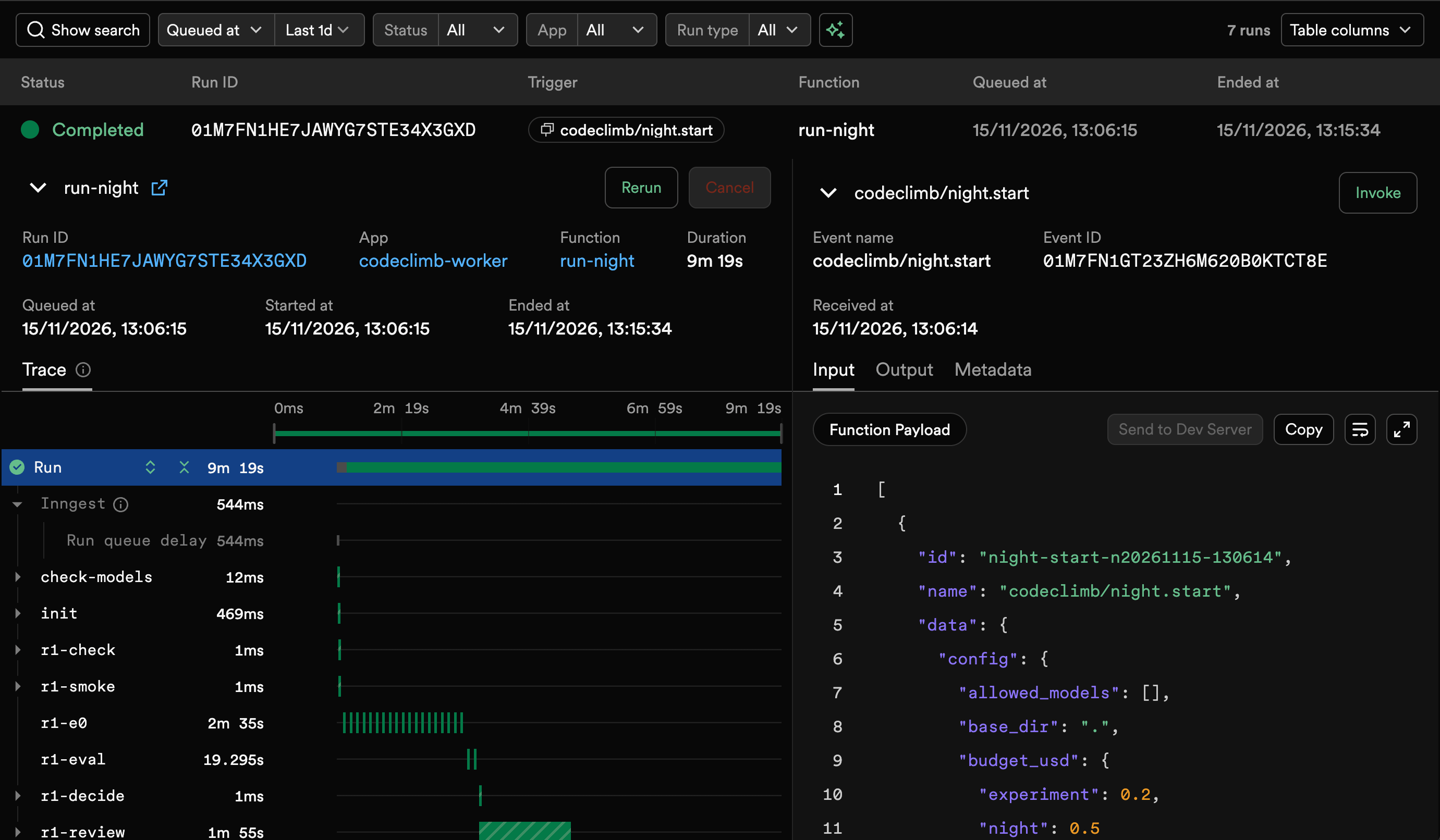
run-night trace, where every step, such as r1-e0 (the experiment) and r1-eval, is measured.There is a ton of flexibility in how you model your functions and steps. But with great power comes great responsibility. Event-based systems are beautiful, but if not implemented properly, they can quickly become a web extremely hard to understand. And honestly, I don’t expect coding agents to make the data flow between events a straight line easy to follow and debug.
When running locally, we used the Inngest dev server and ran a single Inngest worker, where the Pi coding agent runs directly in the worker and executes tools in a Docker container sandbox. The metering proxy and the Next.js dashboard run as separate local processes. Night runs and experiments connect through JSON files and local git repositories to the dashboard.
For deployment, as an internal tool, we tried to scale only the compute an experiment or evaluation needs. Most of it executes agent tools, so we moved it to Inngest remote sandboxes, where we can download the experiment data to the host when a sandbox finishes. Durability moved to Inngest Cloud, so checkpoints persist between runs. The biggest bottlenecks were the proxy, where we had to use a Cloudflare tunnel to connect the remote sandboxes to our centralized proxy, plus the workflow was limited to one concurrent run. Next steps are to deploy these to Vercel and move storage to GCS, since we only work with files, as shown in Image 7.
💻 Test out CodeClimb (on the main branch for Inngest) on Inngest Cloud for free, using this link for a 3-month free Pro trial (available until Nov 2027), which includes 1M executions, 5M events, 20 workers, and 100 remote sandboxes.
Now, let’s see how building CodeClimb in the LangChain ecosystem compares.
Durable long-running agents powered by LangChain
For context, the LangChain ecosystem consists of LangGraph, their open-source framework for building durable agents and workflows, plus LangSmith, their all-in-one deployment platform with monitoring, evals, hosting, and remote sandboxes.
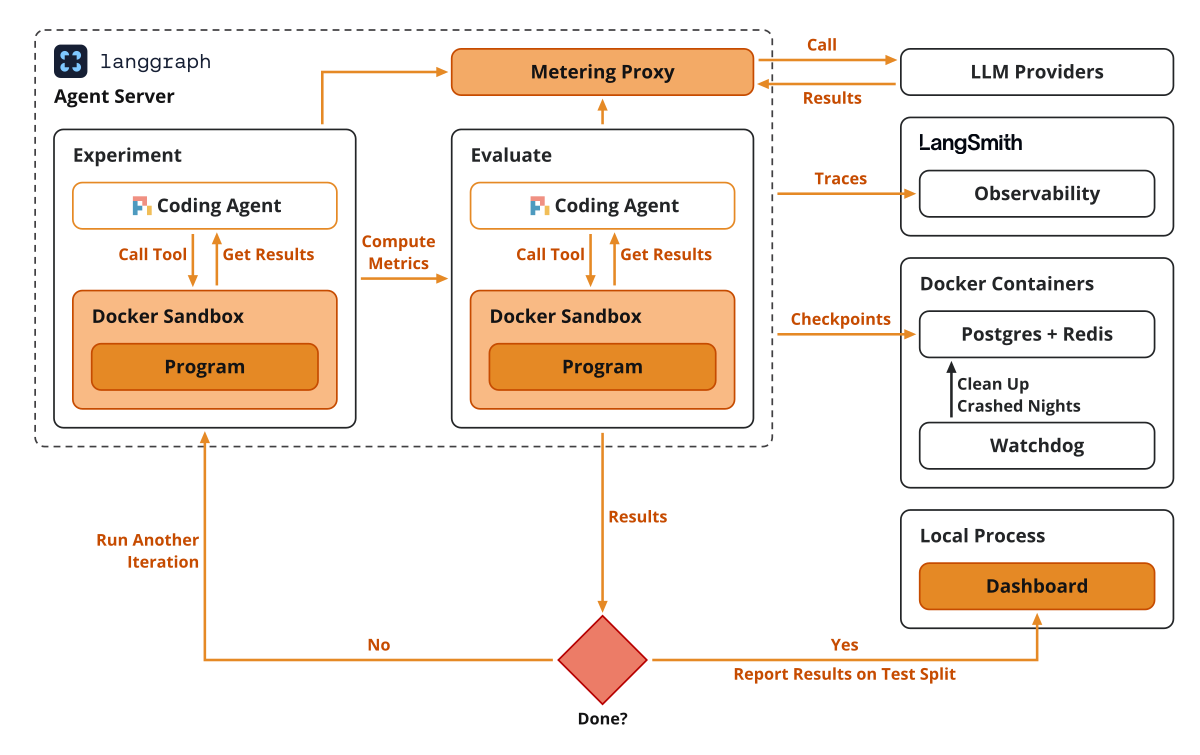
For durability, we used LangGraph’s TypeScript SDK, served via their Agent Server, their solution to deploy any LangGraph app out of the box on LangSmith. Instead of splitting the work between a worker that executes the code and a server that holds the state, everything runs on one node: the LangChain scheduler and all of CodeClimb’s code.
They provide a wrapper over Postgres that stores the threads, runs and checkpoints, and one over Redis that queues the jobs the Agent Server pulls and executes.
That’s the architecture LangChain forces on you. The biggest benefit is that you can deploy and scale your agent on LangSmith with minimal effort, and you get out-of-the-box observability to log all your agent traces, as in Image 8.
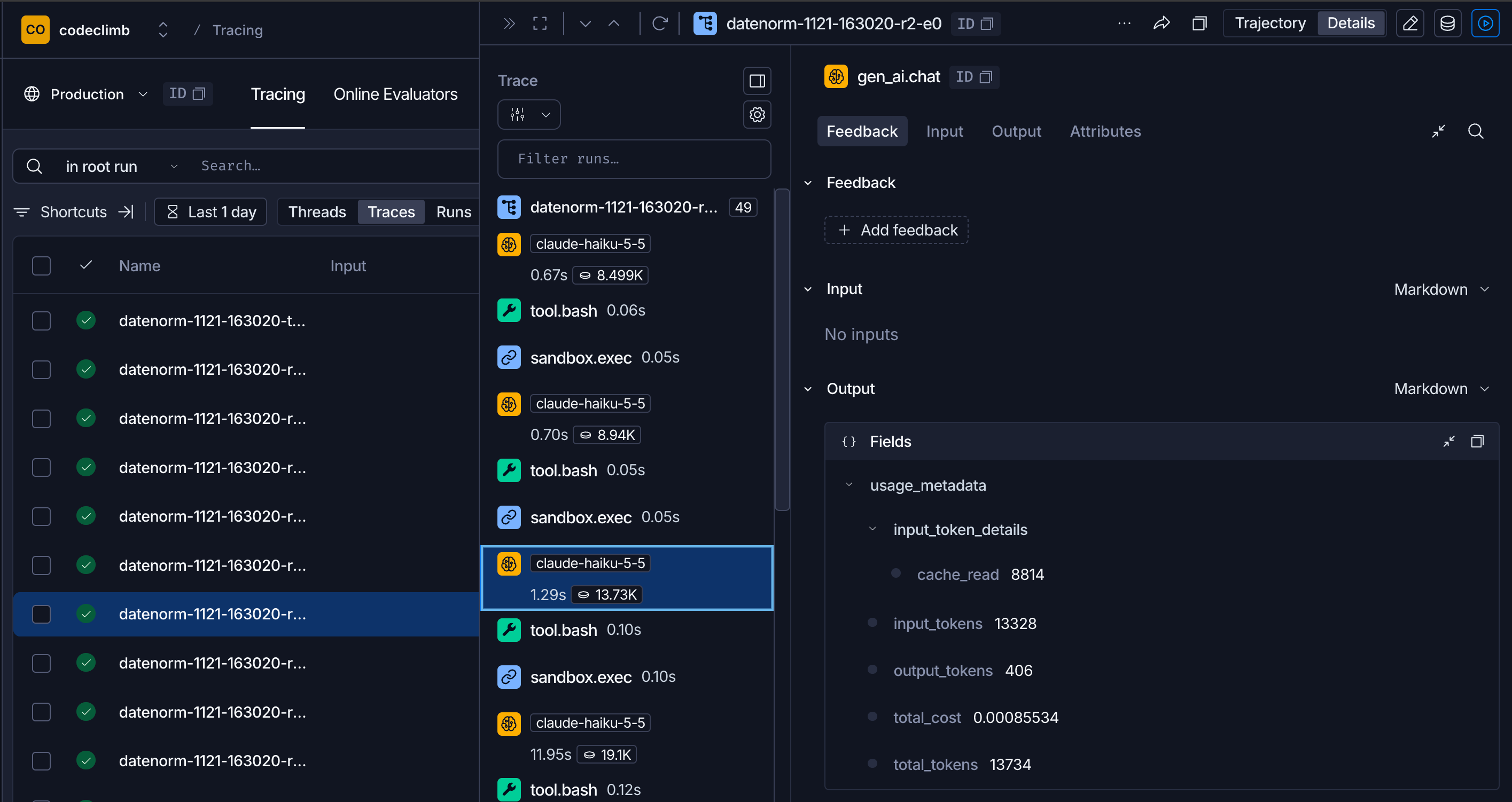
tool.bash and sandbox.exec calls it triggered.What’s still on you is where you deploy the proxy and dashboard, plus how you store the results from the experiments. In this scenario, to leverage the existing infrastructure, we can move the experiment results from JSON files to JSON objects within our Postgres cluster, reducing our need for S3-like storage. Image 9 shows how CodeClimb powered by LangChain runs locally.
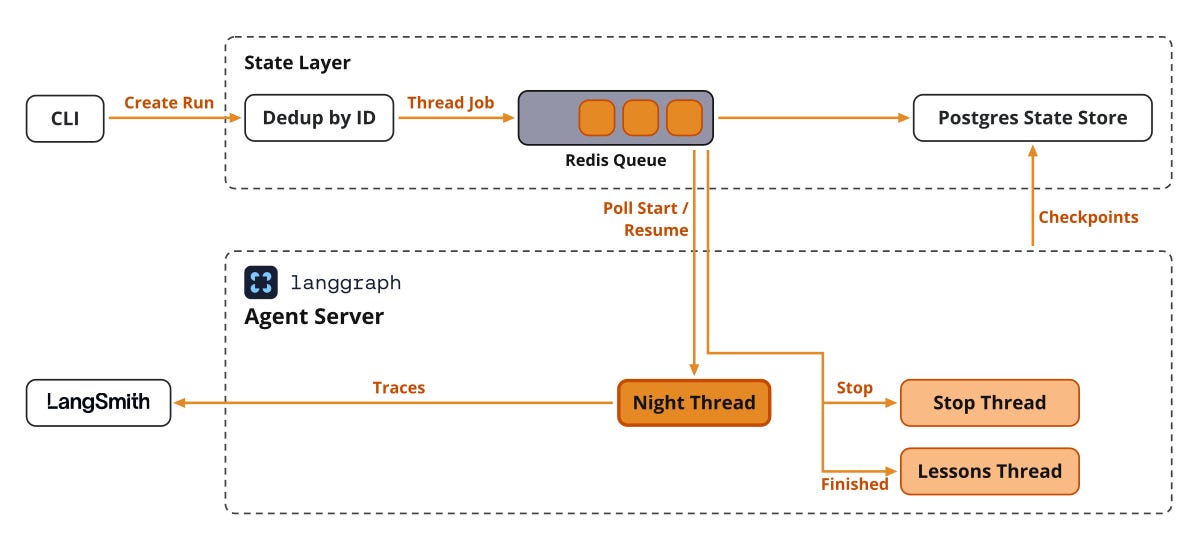
Instead of functions triggered by events, with LangGraph you define graphs that run as threads. As shown in Image 10, for CodeClimb, we have 3 graphs: night, stop and lessons.
We are not big fans of their Graph API, so we leveraged their Functional API, which is on par with what Inngest provides. We define an entrypoint with multiple tasks, where each task’s input and output are checkpointed, can be retried, resumed and has all the other durability goodies.
export const night = entrypoint("night", async (input) => {
  for (;;) {
    const code = await task({ name: "r2-e0/code", retry: { maxAttempts: 3 } }, runCoder)();
    // ...
    const metrics = await task({ name: "r2-e0/evaluate", retry: { maxAttempts: 3 } }, runEvaluation)();
    // ...
  }
});
As with Inngest or any durability platform, every side effect or non-deterministic step is a task(), checkpointed and replayed by name and call order, not by input. We kept Inngest’s granularity: 1 Pi coding session is 1 code task, and 1 evaluation is 1 evaluate task. Each task gets 3 retry attempts.
Instead of events, the Agent Server queues runs, where each run is called a thread. The CLI calls runs.create(nightThread, ...) with a thread ID based on the night ID derived from the run’s properties, so a duplicate start is dropped.
With the thread ID and the Postgres checkpoints, we can start, resume or stop any night run:
await client.runs.create(nightThread, "night", { input, durability: "sync" });
await client.runs.create(nightThread, "night", { command: { resume }, durability: "sync" });
await client.runs.create(stopThread, "stop", { input: { night_id } });
For human-in-the-loop, LangGraph provides the interrupt() functionality, which ends the run, while everything is checkpointed on that thread. This ensures all the resources are freed up. Then, when the human provides feedback, the thread is resumed with Command({ resume }), which replays the checkpoints up to the pause and carries on.
So here is how everything connects. The CLI queues a night run, and the Agent Server picks it off Redis. Each round, the code task runs Pi in a Docker sandbox, and the final experiment results are checkpointed to Postgres. Then the evaluation does the same. The night loops until a stop condition, then scores the test split and starts a lessons run to compile the decision memory.
Unfortunately, durability isn’t as robust as with Inngest. I guess this is what happens when you try to be everything. With durability: "sync", the most “real-time” option, the server batches its writes every 1s. So any step that isn’t saved between two batches is lost.
Task retries live inside the server process, so a crash wipes them out. After a restart, the runs sweeper reruns the whole run, up to 3 times. After that, the thread ends in an error state, while its sandboxes keep running. With Inngest, the server running outside the worker can detect failures based on the worker or night run state, emitting a cleanup event that is executed on the next valid worker. With LangChain’s Agent Server, we cannot do that, as there is no third party that can detect failures and add a cleanup job to the Redis queue. So we had to implement an additional watchdog to do that.
When running locally, we run the Agent Server, Redis and Postgres in different Docker containers, along with the watchdog, metering proxy, Docker sandboxes and Next.js dashboard. As before, results are JSON files and a local git repo on the host disk, as in Image 9.
Image 11 sketches how a LangSmith deployment could look.
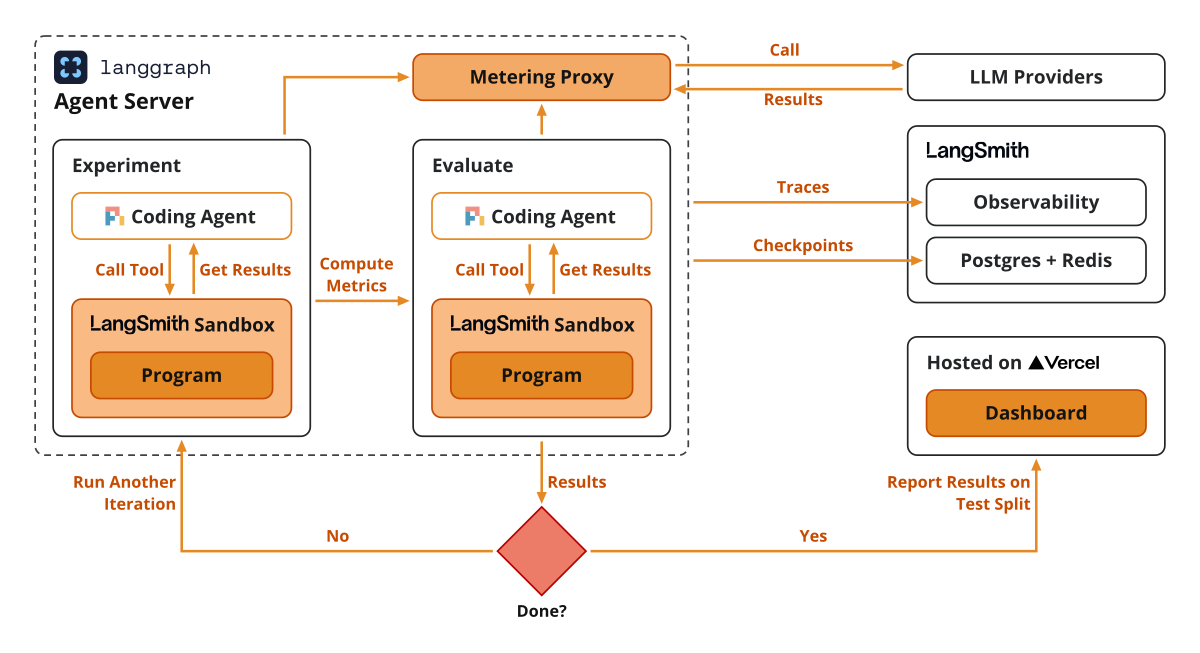
To scale compute, we could have taken a similar approach, swapping the Docker containers with LangSmith sandboxes. Fully deploying the whole agent is easier than with Inngest, since CodeClimb is already packaged with the Agent Server, the Postgres checkpointer and Redis queue, which are fully supported within the LangSmith ecosystem.
💻 Test out CodeClimb implemented in LangChain on the langchain branch.
But convenience costs, so let’s see what each stack costs.
So what about costs?
I priced 12-hour night runs at 10, 100 and 1,000 nights a month, from list prices (from 2026-11-21) from Inngest and LangChain plus LangChain’s usage calculator, model spend excluded. A fair comparison is Inngest plus Vercel, which hosts the worker, versus LangSmith, which hosts the Agent Server.

The small tier is highly skewed by fixed fees: $99 for Inngest Pro plus $20 for Vercel Pro, versus a $39 seat and a $62 serverless deployment on LangSmith. Past it, sandboxes drive the gap: ~$1.15 a night on Inngest versus ~$2.17 on LangSmith, whose smallest 2 vCPU sandbox has 4 GiB. At ~1000 runs, we need to swap the Agent Server from serverless to dedicated. Table 2 lists every decision.
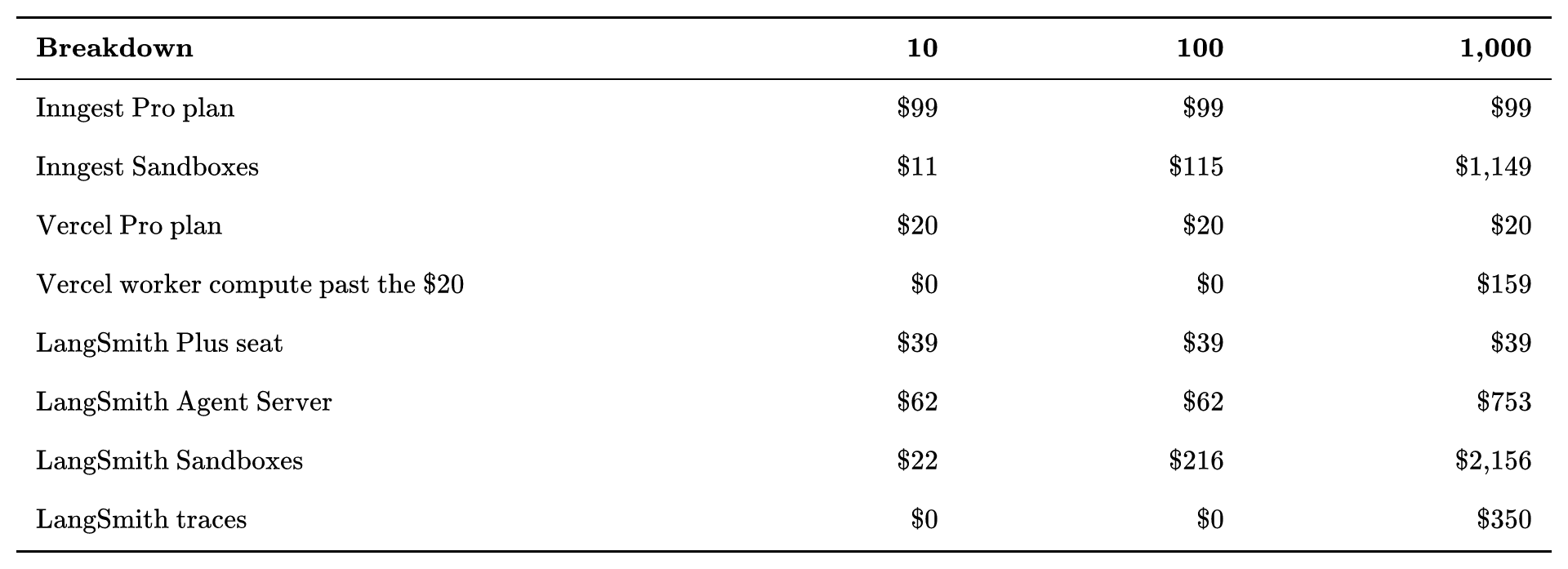
These are rough estimates. As I haven’t ran these setups to measure real numbers. Storage and network are left out. Past 1,000 nights a month, you’d most probably need LangChain’s Enterprise plan, which is negotiated, reason why I stopped at 1,000 runs.
The winner?
In my opinion, both Inngest and LangChain stacks are great choices, so the devil lies in the details. We will compare them on 6 dimensions: durability, developer experience (DevEx), observability, deployment, costs and SDKs.
On durability, Inngest handles syncing the checkpoints to the main server and cleaning up resources after crashes more robustly. With LangChain, we had to add the watchdog as a workaround. One point for Inngest. (1/0)
On DevEx, I personally see LangChain as somewhere in between code and no-code. If you fit their patterns, it’s a beautiful solution, but once you don’t, you start fighting against it. Meanwhile, with Inngest you have full freedom. It’s quite easy to port existing code to Inngest, while for LangChain you probably want to use it only when starting directly in it. Plus, the LangChain docs are quite clunky relative to what Inngest provides. I have to give another point to Inngest. (2/0)
On observability, Inngest doesn’t have any LLM/agent native elements such as LLM or tool calls, whereas LangSmith is a mature product around agent observability. Here, LangChain is a clear winner, as you would probably need a tool like LangSmith, Opik or LangFuse along with Inngest. (2/1)
On deploying the solution, LangSmith makes it a no-brainer to host and scale your solution, while Inngest requires bringing in other tools. So another point for LangChain. (2/2)
On costs, as LangChain’s prices spike with scale, Inngest is a clear winner. Which makes sense, as LangChain provides convenience and manages everything. (3/2)
On SDKs, we used TypeScript for both. Both also support Python. Go is supported in Inngest and LangSmith (no LangGraph), while Inngest, as an event-based system, supports cross-language workers. (4/2)
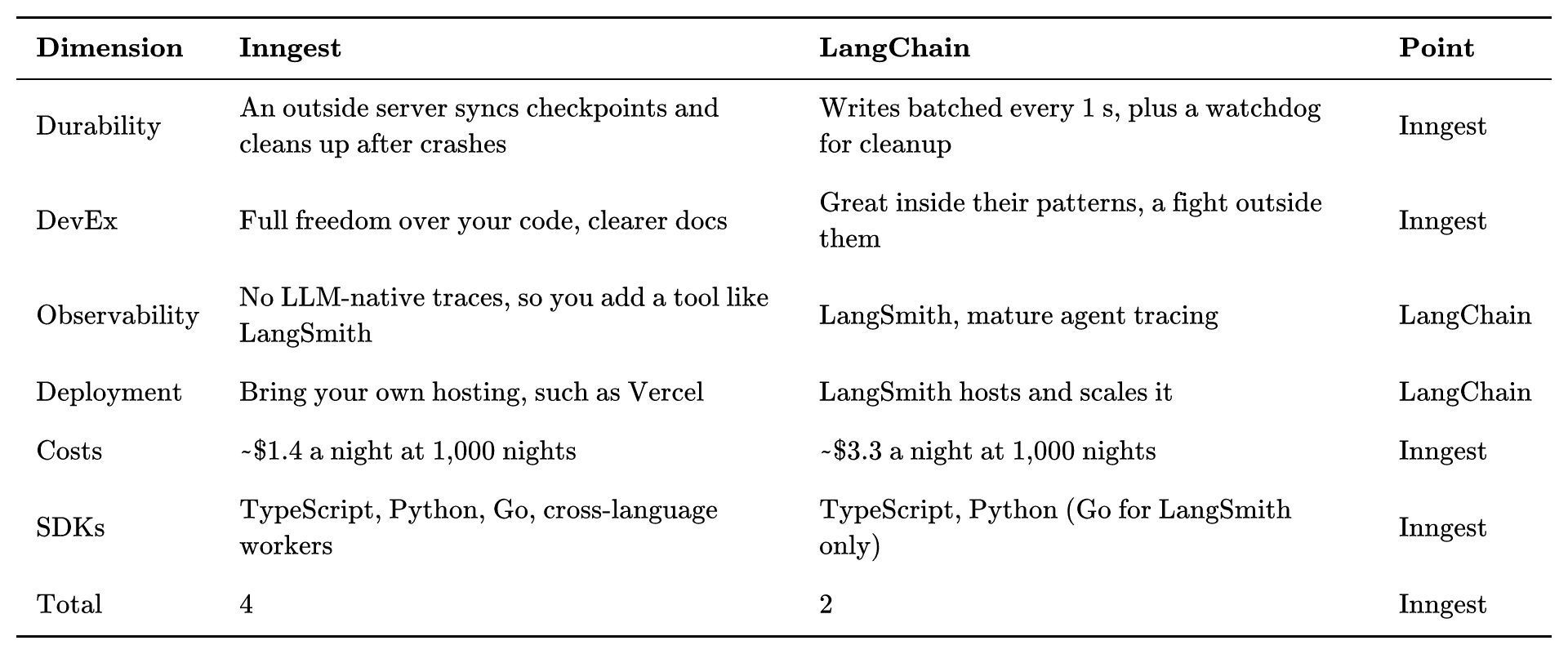
So which one should you pick? If you want to port an existing codebase to a durability platform, you have a cracked engineering team or you are building something super custom that needs high-level durability and precision, I would go with Inngest as the durable engine you plug into your own code.
If you are starting from scratch, you have a small engineering team and don’t want to bother with infrastructure or you follow standard workflow/agent patterns, I would still go with LangChain as the agent framework with durability built in, plus a hosted runtime. Even if it costs more, you can save a ton of money on engineering salaries or coding agent subscriptions.
💻 Try out CodeClimb on the main branch for Inngest and langchain for LangChain. For Inngest, use this link for a 3-month free Pro trial (until Nov 2027).
Now what about AgentEx? Instead of vague assumptions, I want to benchmark which platform works more smoothly with coding agents across different skills, MCP and software factory setups. That’s what we will cover in the next article in the series.
References
Whenever you’re ready, here is how I can help you
Go from agent user to agent builder. Master the foundations of AI agents and turn fragile demo code into reliable, production-ready systems with my course, Agent Engineering: Building Multi-Agent Systems (made with Towards AI).
35 lessons. Pure foundations from scratch. 4 mini-projects. 2 production systems. A certificate and direct access to me & industry experts in our Discord.
Built for software and data professionals transitioning into AI engineering. Rated 5/5 with 300+ students. The first 7 lessons are free:
Not ready to commit? Start with our free Agent AI Engineering Guide, a 6-day email course on the mistakes that silently break AI agents in production.
Thanks again to Inngest for sponsoring the series and keeping it free!
Build AI agents and workflows that survive crashes, retries, and long waits:
Images & videos
If not otherwise stated, all images and videos are created by the author.