


Paul: Today, the stage belongs to Lucian Lature, Solutions Architect and Technical Leader with 15+ years of experience spent building and scaling cloud platforms and Node.js products.
He’s skipping the textbook definitions today to focus on the architectural trade-offs and real-world logic behind his most recent builds.
Enough chitchat. Let’s get into it 👀 ↓
When Single-Agent Systems Fall Apart
You know the moment. You built a perfectly capable AI agent that writes code, answers questions, and searches through your docs. It works great. Then you ask it to review code for security issues and synthesize three different research papers. It returns something that’s half right and half wrong, delivered with full confidence.
I used to think this was a model problem. Better prompts, bigger context window, maybe switch to the latest Sonnet release. Wrong. The problem is architectural, and no amount of prompt engineering fixes it.
A single agent with 40+ tools, a 2,000-word prompt over five different domains, and retrieval tuned for one job at a time collapses. Context windows get bloated. Tool selection becomes a mess. Quality tanks.
This happened to me with Screech, a personal agent I built for my side projects. It started simply, basically a smarter search over my notes. Then I kept adding: code generation, documentation, code reviews, security audits, and research synthesis. The single-agent approach worked beautifully until it very suddenly didn’t.
The stack is not exotic. It’s VoltAgent for runtime and workflows, SurrealDB as the “one DB to store everything” experiment, and Claude as the default model tier.
And yes, the agent is named after Screech from the Saved by the Bell TV series. Also, my childhood nickname.
I didn’t invent this in a vacuum. Graphiti shaped how I think about knowledge that changes over time. VoltAgent gave me workflow primitives I didn’t have to build. Paul Iusztin’s AI Agents Foundations convinced me to stop forcing PDFs through OCR and treat them as images. Agentic Playbooks showed me that auditable agent decisions are a performance win, not only a governance check.
So, here’s the architecture, decisions, and stuff I’d do differently. For legal reasons, that’s “informational only,” not “you should do this.”
Before we continue, a quick word from the Decoding AI team. ↓
Go Deeper: Your Path to Agentic AI for Production
The Agentic AI Engineering course, built in partnership with Towards AI, walks you through building exactly this kind of multi-agent architecture across 34 lessons.
Across 34 lessons (articles, videos, and a lot of code), you’ll design, build, evaluate, and deploy production-grade AI agents end to end. By the final lesson, you’ll have built a multi-agent system and a capstone project where you apply everything you’ve learned on your own.
Three portfolio projects and a certificate to showcase in interviews. Plus a Discord community where you have direct access to other industry experts and me.
Rated 4.9/5 ⭐️ by 290+ early students — ”Every AI Engineer needs a course like this” and ”an excellent bridge from experimental LLM projects to real-world AI engineering.”
↓ Now, back to the article.
If You’re Not Building Agents
You can stop here and still get the gist. The problem: one AI agent that should do everything (search your notes, write code, review for security, summarize research) does all of it poorly. One large prompt and many tools. It confuses tasks, wastes tokens, and returns confident nonsense when goals conflict, e.g., security paranoia versus “ship it” code gen.
The solution: one conductor agent that handles simple work itself and a pool of specialists it calls when the task needs depth. The conductor stays cheap and fast for most requests. Specialists run only when needed. You need routing (who handles what), hybrid retrieval (not only vector search), and one store for documents, relationships, and chat (here, SurrealDB). The rest of this article is for people who want to see the wiring.
Multi-Agent: When It’s Worth the Complexity
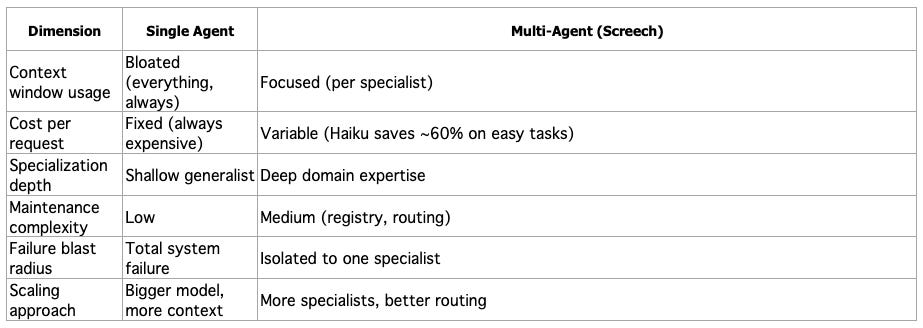
The maintenance overhead is real. So let me be clear about when this makes sense.
I’d only do it when there are 3+ domains that actively conflict (dev, research, security is a classic triangle), when I care about cost per request (not “cost later”, cost now), and when I need failures to be contained so that one specialist can be dumb without contaminating the whole system.
Stay single-agent when tasks are similar, the tool count is under about 15, you do not need different model tiers, and simplicity beats per-task quality.
Single-agent favors simplicity. Multi-agent favors quality per task and adds orchestration. Pick your poison.
The Three-Layer Architecture
I think of Screech as an orchestra. One conductor who knows the entire score but doesn’t play every instrument. Backed by specialists who are genuinely brilliant at their specific parts.
Layer 1: Orchestration. It does the boring-but-hard parts: understanding intent, pulling context, and deciding whether this is “handle it now” or “call a specialist”. Three meta-tools carry most of the orchestration weight: discover subagents, invoke one subagent, and fan out to multiple subagents. A task router (Claude Haiku) classifies complexity before any expensive model runs. The runtime, memory management, workflow engine (with suspend/resume), and MCP server integration come from VoltAgent. I didn’t build any of that infrastructure, I plugged in.
Layer 2: Specialists.128 subagents in 10 categories: core development, language specialists (TypeScript, Python, Rust, plus 19 more), testing & quality, meta-orchestration. More on why that number and why these categories in a bit.
Layer 3: Knowledge. Hybrid retrieval combining vector search + knowledge graph traversal + keyword matching, all backed by SurrealDB. Plus a temporal layer (Graphiti-style) so the system knows when it learned something, not only what.
Here’s the key decision: Screech is a full agent with its own tools and retrieval, not a dumb router. That is the decision that matters. It handles 60–70% of requests directly. Subagents only kick in when you need deep specialization. That keeps latency and cost sane for the common case.
If you’ve used Claude Code, this pattern will feel familiar, but there is a key difference: Claude Code is one agent plus injected context (CLAUDE.md, conventions, slash commands). When you give it a task, the same agent handles everything, and it just gets extra context injected from your skill files. It’s the “enhanced single-agent” end of the spectrum: one brain, augmented with domain knowledge. Screech pushes further along that spectrum. Instead of injecting domain knowledge into one agent’s prompt, each specialist is its own agent with a dedicated system prompt, model tier, and tool set. The orchestrator doesn’t just get “React knowledge” injected — it delegates to an react-specialist agent that was born and bred to think in components, hooks, and JSX. The difference matters when domains actively conflict: a security auditor’s “assume everything is dangerous” mindset would poison a code generator’s “keep it simple” prompt if they shared the same context. Separate agents, separate prompts, no cross-contamination. Think of it as: Claude Code = one chef who reads different recipe books depending on the dish. Screech = a head chef who delegates to a pastry specialist, a sushi chef, and a grill master: each with their own kitchen and knives.
The diagram below shows how these layers connect. Here’s the flow from top to bottom:
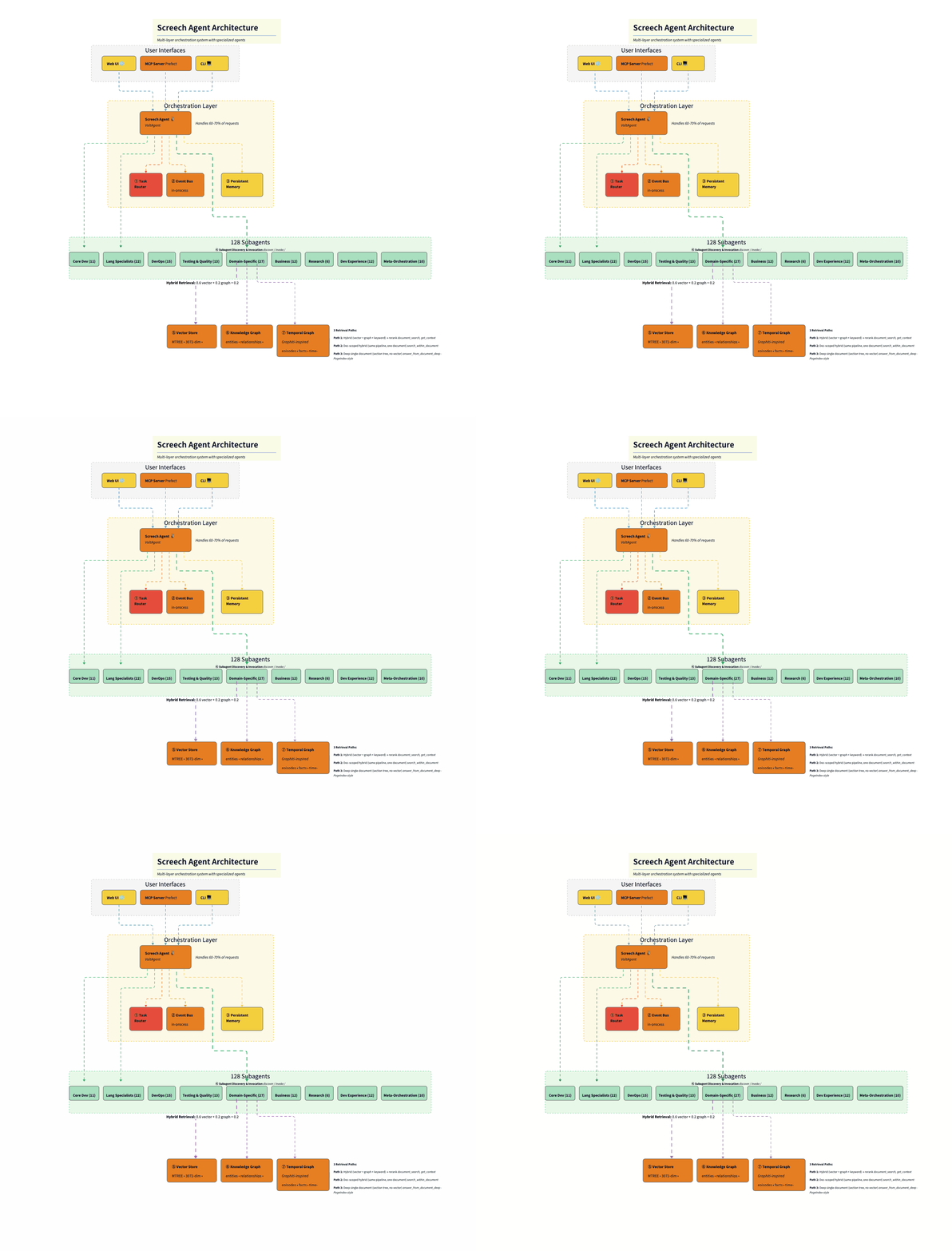
User Interfaces layer exposes three entry points: a web UI (React), an MCP server (for IDE integration like Cursor), and a CLI terminal. All hit the same orchestration layer.
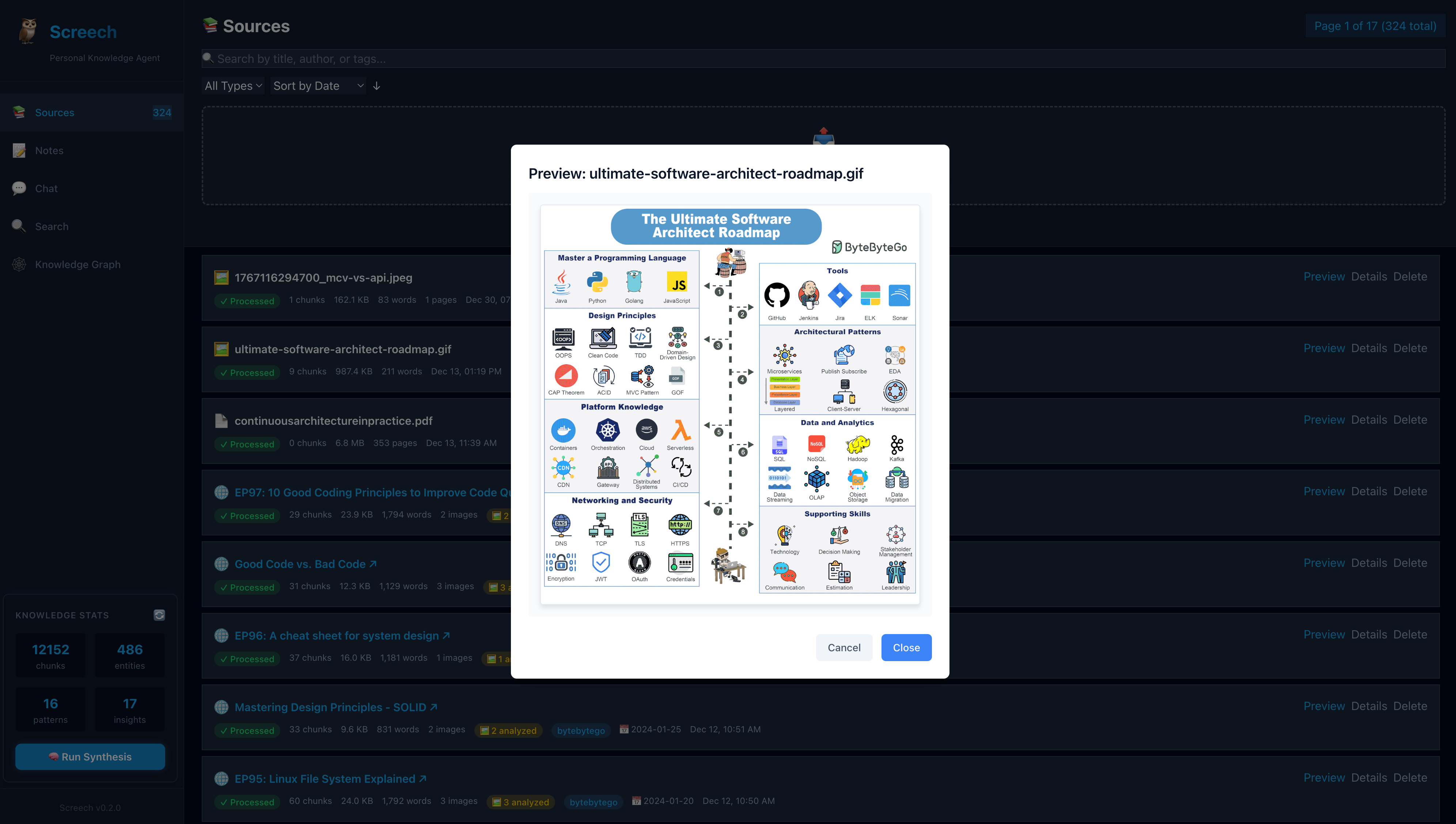
Screech Web UI is a React-based interface for the Screech personal knowledge agent. It connects to the Screech backend and provides five main views: Sources (ingest and manage documents, view chunk/entity/pattern/insight stats), Notes, Chat (conversation with the agent), Search (query over your knowledge), and Knowledge Graph (browse entities and relationships). It also shows connection status and supports running synthesis. Its main use is to browse, chat, search, and explore your knowledge graph in one place.
Orchestration Layer has as a master agent the Screech agent (Claude Sonnet 4), which sits at the center, handling 60–70% of requests directly. Three supporting components surround it: the Task Router (Haiku, $0.0025/classification), the Event Bus (in-process pub/sub), and Persistent Memory (conversation history, user context).
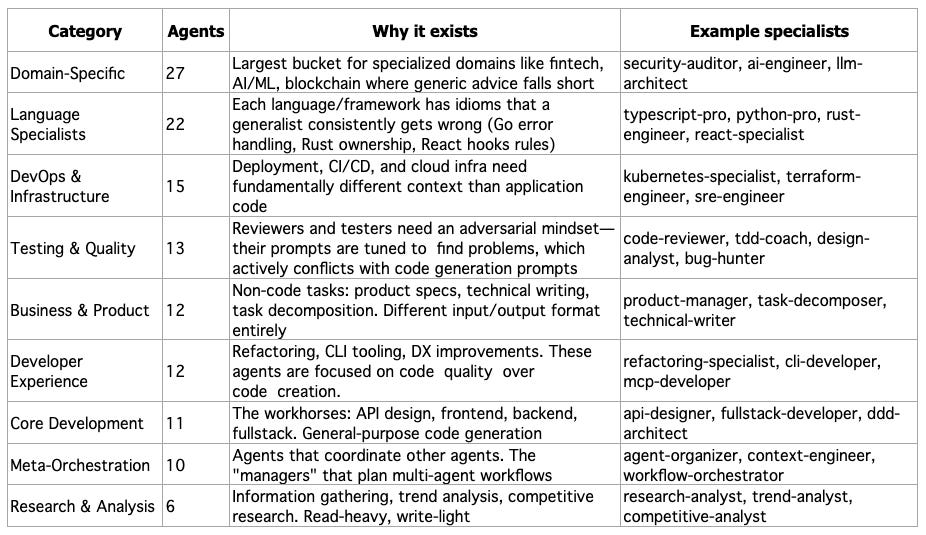
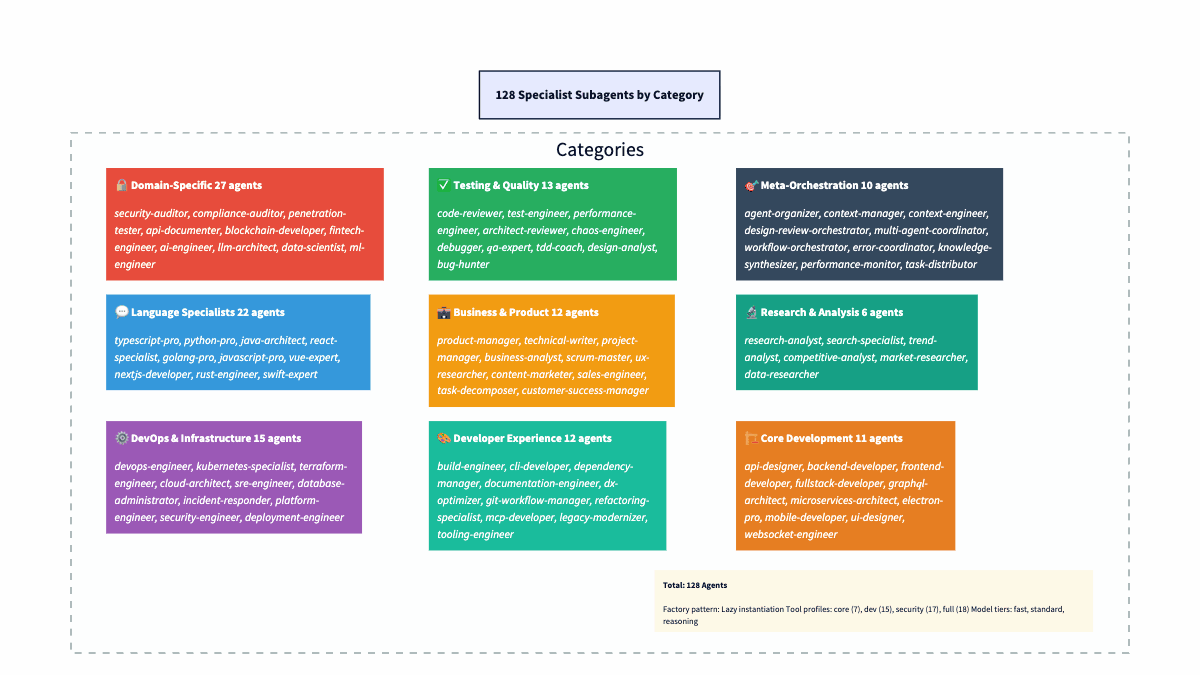
The 128 Subagents are arranged by category: Core Dev (11), Language Specialists (22), DevOps (15), Testing & Quality (13), Domain-Specific (27), Business (12), Research (6), Dev Experience (12), and Meta-Orchestration (10). The orchestrator delegates to these when deep specialization is needed.
Hybrid Retrieval sits between the agents and the database: 0.6 vector + 0.2 graph + 0.2 keyword, merging three signals before final relevance scoring.
SurrealDB acts as the persistence layer, split into three logical stores in one database: the Vector Store (MTREE index, 3072-dim embeddings, cosine similarity), the Knowledge Graph (entities, relationships, BFS traversal), and the Temporal Graph (Graphiti-inspired episodes, facts, time-range queries).
At a code level, Screech is just an Agent instance with four things wired in: a model, a hybrid retriever, a tool set, and persistent memory. This “agent factory” is the single place where the orchestration decisions become concrete.
// The Screech agent factory
const agent = new Agent({
  name: "Screech",
  purpose: "Unified personal agent for side projects, knowledge synthesis, " +
           "development, documentation, and orchestration of specialist subagents.",
  model: anthropic("claude-sonnet-4-20250514"),
  retriever,  // Hybrid RAG (vector + graph + keyword)
  tools: screechTools,  // Deduplicated from 3 domains
  memory,  // LibSQL persistent memory
});
11 Tables, One Database: The SurrealDB Model
One of the strongest arguments for SurrealDB: documents, embeddings, knowledge graph, temporal events, and conversation memory in 11 tables, one database. No Postgres + Neo4j + Redis dance.
Documents and Chunks
Ingest a document. Create a document record (metadata, content hash for dedup). Then split it into chunk records. Each chunk gets a 3072-dim embedding (OpenAI text-embedding-3-large). SurrealDB’s MTREE index does cosine similarity. MTREE is a tree index for high-dimensional vectors (same idea as pgvector’s HNSW/IVFFlat). It lets SurrealDB find the nearest embeddings without brute-force scanning every row. Chunks are multimodal. They store image_data (base64) and mime_type alongside text. This comes straight from Paul Iusztin’s insight: stop forcing PDFs through OCR. Treat them as images.
// Multimodal chunk structure
interface Chunk {
  document_id: string;  // Parent document link
  content: string;      // Text or image description
  embedding: number[];  // 3072-dim vector (MTREE indexed)
  mime_type?: string;   // "text/plain", "image/png", "application/pdf"
  image_data?: string;  // Base64 for vision-processed pages
  page_number?: number; // PDF page tracking
}
Entities and the Graph (Your Ontology)
Here’s where Screech diverges from typical RAG: I extract a structured knowledge graph. Claude identifies entities and relationships from each document. SurrealDB’s RELATION type makes this straightforward: entity table relates_to with TYPE RELATION IN entity OUT entity. No separate graph DB.
-- SurrealDB graph relationships (native support)
DEFINE TABLE relates_to SCHEMAFULL TYPE RELATION IN entity OUT entity;

RELATE entity:react->relates_to->entity:nextjs CONTENT {
  relation_type: "EXTENDS",
  confidence: 0.9,
  description: "Next.js extends React with SSR and routing"
};
I picked 11 entity types on purpose. This is the system’s ontology, the vocabulary it uses to classify everything it learns: concept, person, organization, tool, technology, pattern, best_practice, principle, process, document, topic. Each type has its own extraction prompt (e.g., person for roles and affiliations, technology for use cases, and ecosystem). Relationship types include IMPLEMENTS, USES, DEPENDS_ON, PART_OF, EXTENDS, SIMILAR_TO. The ontology is deliberately small; there is enough granularity for useful graph queries without turning into a taxonomy nightmare. Bigger ontologies mean more edge cases and more “is this a tool or a technology?” ambiguity. Eleven types cover 95%+ of what a personal knowledge agent encounters.
Episodes and Facts: Temporal Layer (It’s a Log)
This is the Graphiti-inspired layer that most RAG systems completely skip. Every ingestion creates an episode. Think of episodes as an append-only log of everything the system has ever learned. It is time-stamped and immutable. Episodes link to entities via source_episode_ids. Ingest a PDF, and you get a new episode. Process a paper, and you get a new episode. They do not get updated or overwritten. Old episodes don’t get deleted when new ones arrive; they stay in the timeline with their original timestamps. You can ask “what did I know about X six months ago?” and get a real and accurate answer.
Facts are triples (subject, predicate, object) with a source_episode_id. They capture the structured knowledge extracted alongside each episode. When two facts conflict, e.g., “Bun is experimental” (June) and “Bun is production-ready” (January), the agent can prefer the more recent one.
Why does this matter? Knowledge changes. Without temporal tracking, both facts coexist in your knowledge base with equal weight, and the agent might confidently cite the stale one. Graphiti calls this “bi-temporal awareness”. Tracking both when a fact was true in the world and when the system learned it.
Behind the scenes, temporal queries run entity search (match query terms), then episode retrieval in a time range (filter out chat episodes, keep knowledge episodes), then relevance filtering and linking back to entities. The result is a time-ordered context. The context field returned is prompt-ready: entity descriptions and relationship sentences in plain language.
// Time-aware queries
const recent = await queryTemporalGraph("recent learnings", {
  includeTemporal: true,
  timeRange: { start: oneMonthAgo, end: now },
});
// Returns: episodes + linked entities + relationships, time-ordered
Patterns and Insights: The “So What?” Chain
Beyond storage, Screech runs a synthesis pipeline. Detects patterns across your knowledge base. Generates actionable insights. The pattern table stores detected patterns (workflows, successes, failures, optimizations) with embeddings for searchability. The insight table stores generated insights, each linked back to source patterns with relevance scores.
Documents become chunks, which get embedded. Chunks become entities through extraction. Entities become patterns once the synthesis pipeline starts noticing recurring signals. Patterns become insights (actionable takeaways with provenance). Each stage feeds the next. Every layer is searchable. Vague question goes to vector over chunks. Relationships go to a graph over entities. “What should I do?” goes to insights.
Conversation Memory
user, thread, message tables handle conversation memory. Zep-style user summaries, conversation threading, and message history. Persistent context across sessions, but separate from the knowledge base.
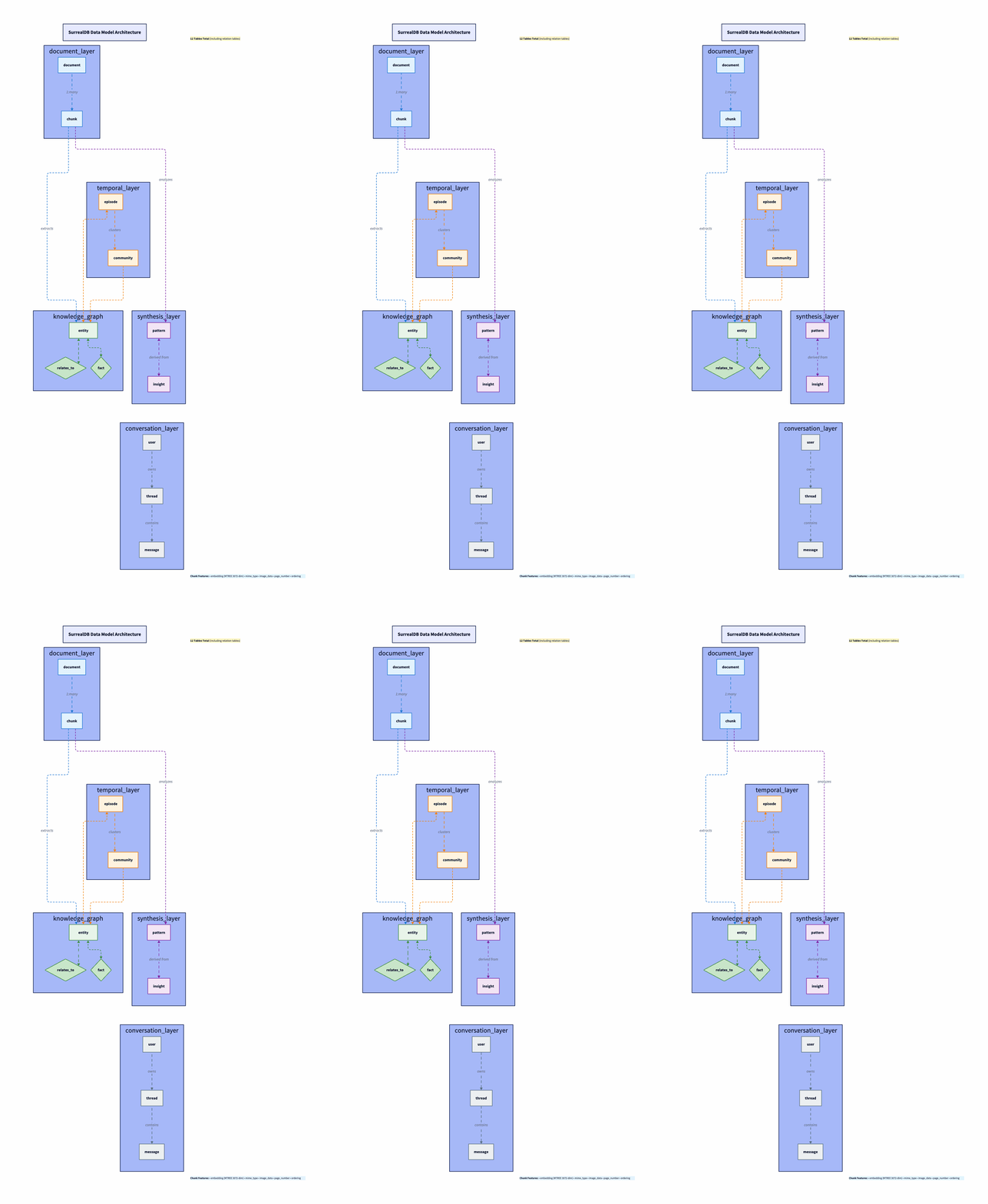
The diagram below shows how data flows through the system. Think of it as five layers stacked on top of each other, each feeding the next:
Document layer (top):
documentandchunk. Raw material comes in here. A PDF becomes adocumentrecord; its content gets split intochunkrecords, each with a 3072-dim embedding. This is the foundation everything else builds on.Temporal layer:
episodeandcommunity. Every ingestion event creates anepisodetimestamped to when the system learned it. Episodes link back to chunks (what was ingested) and forward to entities (what was extracted). This is the Graphiti-inspired time dimension—the system knows when it learned something, not just what.Knowledge graph layer:
entity,relates_to, andfact. Entities extracted from chunks (concepts, technologies, people) live here, connected by typedrelates_toedges. The diamond shape in the diagram represents the relationship table, which is a SurrealDBRELATIONtype that sits between entity nodes.facttriples (subject, predicate, object) capture the structured knowledge extracted alongside entities.Synthesis layer:
patternandinsight. Patterns detected across your knowledge base (recurring workflows, success/failure signals, optimization opportunities) and actionable insights generated from those patterns. Each links back to the entities and episodes that sourced it.Conversation layer (bottom):
user,thread,message. Conversation memory, separate from knowledge. Threads reference the user; messages reference threads. The agent can query conversation history independently of the knowledge base.
The arrows in the diagram show the key relationships: chunks link to their parent document. Episodes link to chunks and entities. Entities connect via relates_to. Patterns and insights link back to entities and episodes for provenance. Each layer is independently searchable via the hybrid retrieval pipeline.
When to Use This vs. Alternatives
Unified SurrealDB works when you want graph + vector + relational without three databases, your dataset is moderate (thousands to tens of thousands of docs), and you value dev velocity over ecosystem maturity.
For production SLAs, PostgreSQL plus pgvector is the safer bet. If your graph is only 2–3 hops (like Screech’s BFS), Postgres handles it with recursive CTEs or JOINs, even at millions of rows. Neo4j earns its place when you need deep traversals or heavy graph queries. Graphiti uses Neo4j for that. For my 2-hop, few-thousand-entity case, Postgres + pgvector could do it all. I chose SurrealDB to prototype faster with one schema and one connection. Right call for me. One schema file. One connection. One query language. I would not blindly recommend it for a team with compliance needs.
Subagent System: Factory, Registry, Profiles
Every subagent is a factory (memory?) => Agent. Keeps instantiation lazy (no subagent created until needed) and shared memory (agents in the same workflow see the same conversation history).
// Subagent factory pattern
export type SubagentFactory = (memory?: Memory) => Agent;

// Registry metadata for discovery
export interface SubagentDefinition {
  name: string;
  description: string;
  category: SubagentCategory;  // 10 categories
  tags: string[];
  modelTier?: ModelTier;       // fast | standard | reasoning
  toolProfile?: ToolProfile;   // core | dev | security | full
  capabilities?: SubagentCapabilities;
  factory: SubagentFactory;
}
Three decisions that actually matter:
Model tiers control cost. Not every agent needs Sonnet. Simple formatting → Haiku (~90% cheaper). Security audits → reasoning tier. Default is standard (Sonnet 4). Router can override.
const MODEL_MAP = {
  fast: anthropic("claude-3-5-haiku-20241022"),     // ~10x cheaper
  standard: anthropic("claude-sonnet-4-20250514"),   // Balanced
  reasoning: anthropic("claude-sonnet-4-20250514"),  // Same model, deeper prompts
};
Tool profiles prevent token waste. Research analyst doesn’t need git tools. Code reviewer doesn’t need security scanning tools. Four profiles: core (7 tools): Knowledge/RAG + file ops + workflow discovery, dev (15 tools): core + git + code analysis + testing, security (17 tools): dev + security scanning + dependency audit andfull (18 tools): everything (backwards-compatible default)
Each subagent can add domain tools on top of its profile.
Capability declarations. With 128 agents, “find agents tagged typescript” returns a dozen. The orchestrator needs to know what each agent is good at. Each subagent declares what it can do, expected input, output, and latency tier. Semantic matching sends “TypeScript conditional types” to the agent whose canDo includes “conditional types” and “type system design”, not any agent with TypeScript in the tag. Same language field, different canDo, e.g., typescript-pro vs. react-specialist.
capabilities: {
  canDo: ["type system design", "generics", "conditional types"],
  languages: ["typescript", "javascript"],
  inputSchema: "code snippet or type problem description",
  outputSchema: "typed solution with explanation",
  latencyTier: "medium",
}
Why 10 categories? Flat list worked until about 40 agents. Then discovery got noisy. Categories are a coarse filter: the orchestrator picks a category, then finds the right specialist within it. The split follows prompt conflicts: security paranoia vs. code-gen creativity, test-engineer adversarial vs. technical-writer explanatory. Separate categories, separate prompts.
At the same time, agents in the same category share a tool profile but differ in expertise. All language specialists get the dev tool profile (git, testing, code analysis). All testing-quality agents share dev tools, too, but their prompts are tuned for finding problems, not writing code. Security agents get security tools. Research agents only need core tools (knowledge/RAG). The table below summarizes counts and examples. The diagram repeats it visually.
How Voltagent Fits Into the Picture
VoltAgent is the runtime layer that makes the orchestration practical: it provides workflow primitives, tool execution, memory management, and suspend/resume so the orchestrator and subagents can run as a coordinated system.
The $0.0025 Routing Layer
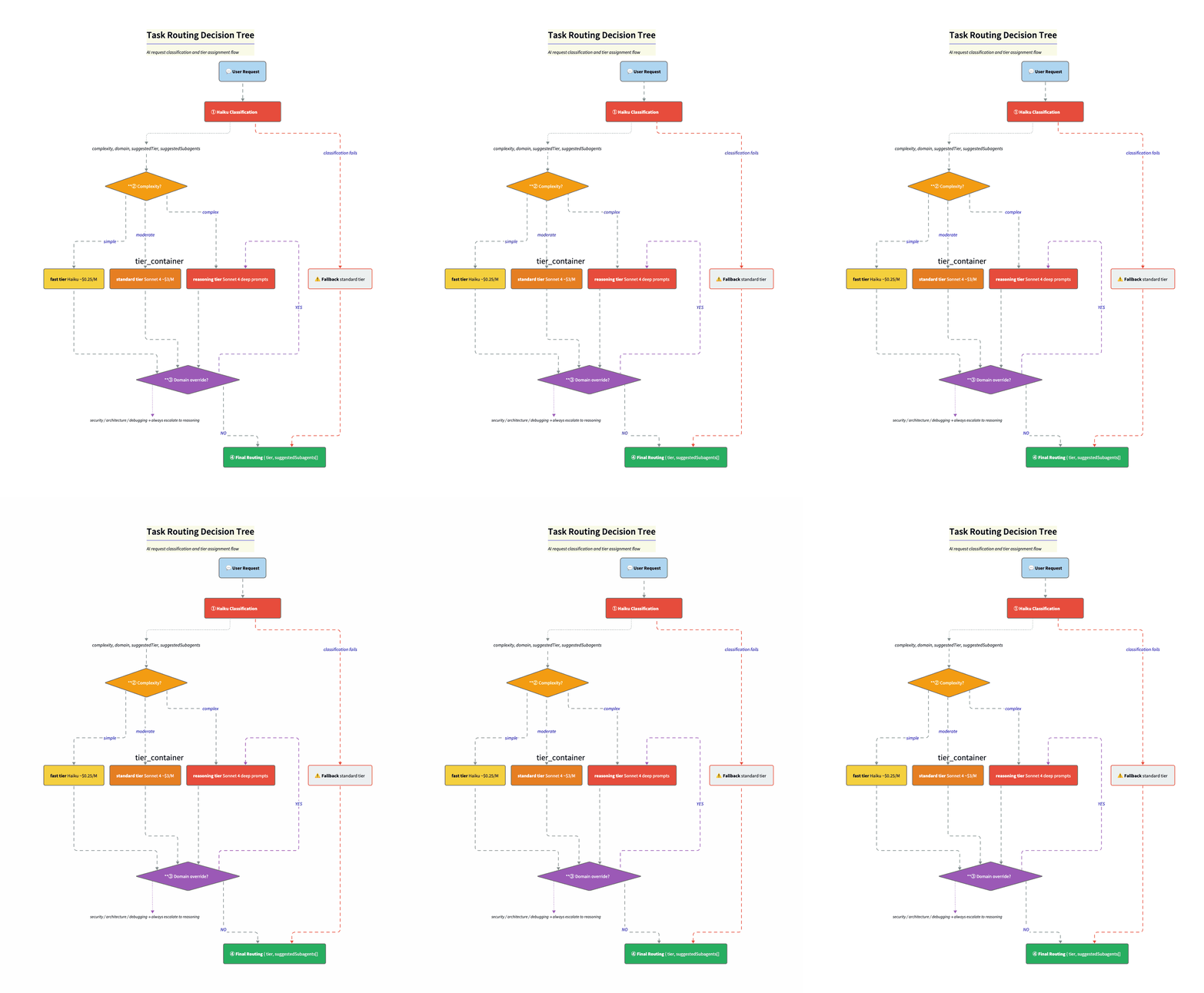
This is what makes the economics work. Before anything expensive runs, I do a tiny classification call (Haiku) to label the request. Complexity. Domain. Suggested tier. Up to three candidate specialists. The system prompt gives Haiku the full category list. Rules are explicit. “Security” or “vulnerability” always goes to reasoning. Simple question goes too fast. Code gen goes to at least standard.
const classificationSchema = z.object({
  complexity: z.enum(["simple", "moderate", "complex"]),
  domain: z.enum(["lookup", "formatting", "code-generation",
                  "code-review", "architecture", "security",
                  "debugging", "research", "orchestration", "other"]),
  reasoning: z.string(),
  suggestedTier: z.enum(["fast", "standard", "reasoning"]),
  suggestedSubagents: z.array(z.string()).max(3),
});
Step 2: Domain overrides. resolveRoutedTier() takes the complexity-based tier and domain overrides and picks the higher of the two. So a “simple” security question still goes to reasoning. Security that looks simple often is not. The override is a safety net for Haiku’s optimism.
const DOMAIN_TIER_OVERRIDES = {
  security: "reasoning",     // No shortcuts
  architecture: "reasoning", // No shortcuts
  debugging: "reasoning",    // No shortcuts
  "code-review": "standard", // At least standard
};
Step 3: Final routing. Resolved tier + suggested subagents + rationale → orchestrator picks model and specialists.
Fallback. If classification fails (network error, timeout), we default to { complexity: "moderate", tier: "standard" }. Fail to the middle. Not cheapest (might undershoot). Not the most expensive (waste on every failure). Safest with zero information.
Cost: ~$0.0025 per classification (~$0.25/M input tokens on Haiku). Route 1,000 tasks, spend $2.50. If even 30% land on Haiku instead of Sonnet, you save on the order $8-10 per 1,000 tasks. The router pays for itself quickly.
Hybrid Retrieval: Three Signals Beat One
I started with pure vector search. It worked until it didn’t. Three failure modes:
Structural queries fell flat. “What tools does the API designer use?” The answer is in the relationship structure. Vector search gave me chunks that mentioned the API designer, not the ones describing its tool config. I needed graph traversal.
Exact-match queries got paraphrased away. “What is the error for SQLITE_BUSY?” Embeddings map that into “database locking” neighborhood and miss the chunk with the actual error code. I needed a keyword.
Long-document questions needed reasoning, not similarity. “What are the conclusions?” The conclusion section often is not the most similar to the word “conclusions”. The intro restating the thesis can score higher. I needed the model to reason over document structure (e.g., a table of contents), not only similarity.
Instead of trying to make one approach handle everything, I split retrieval into three paths:
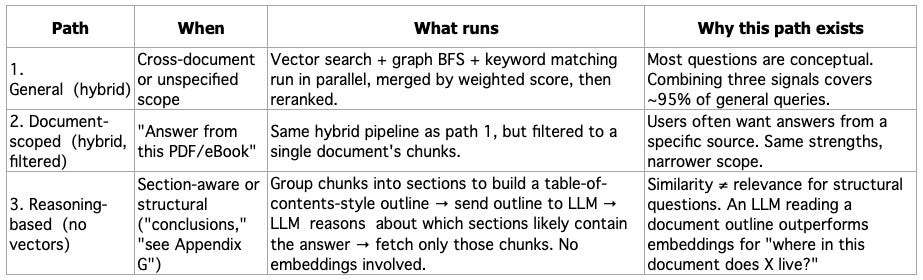
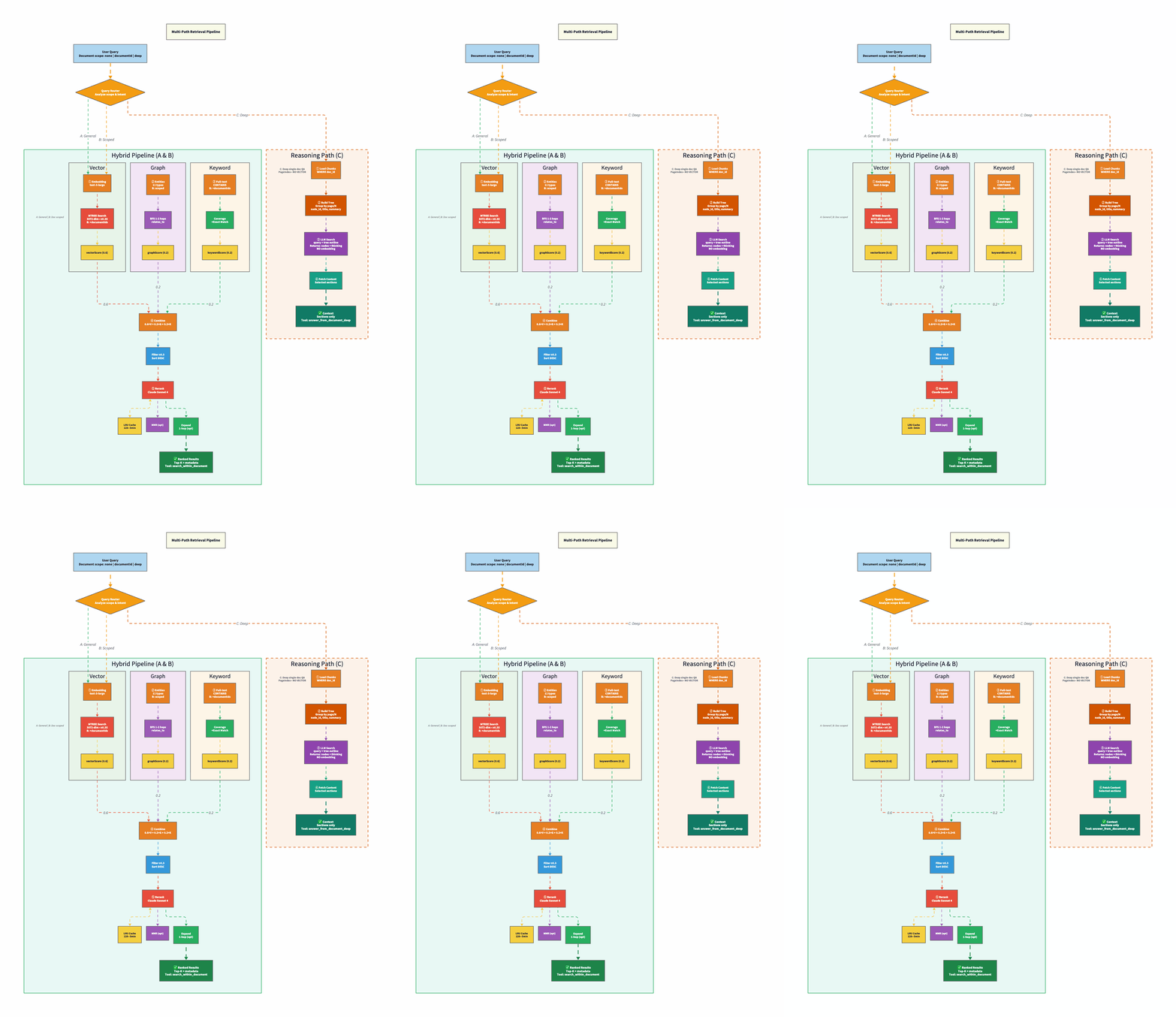
The agent picks which tool to call: document_search / get_context → hybrid (vector + graph + keyword, then rerank). search_within_document → same pipeline, one document. answer_from_document_deep → build a section tree from chunks, LLM picks sections, fetch those chunks only. No vectors on path 3.
Why Three Signals Beat One (Paths 1 & 2)
The hybrid pipeline runs three queries in parallel, then merges with configurable weights:
const DEFAULT_WEIGHTS = {
  vectorWeight: 0.6,   // Semantic similarity (primary)
  graphWeight: 0.2,    // Relationship traversal
  keywordWeight: 0.2,  // Exact matching
};
Why these weights? Vector search gets 0.6 because most knowledge base questions are conceptual, like “explain X,” “how does Y work?”; therefore, embeddings handle these well. OpenAI’s text-embedding-3-large (3072 dims) with SurrealDB’s native MTREE index, cosine similarity. The threshold is intentionally low (0.35), but you can tweak that value according to your use case. Similarity scores compress into a narrow range, so 0.35 is more selective than it sounds.
Graph search gets 0.2 because structural queries are the minority but high-value. It works in two stages. First, it finds entities that match the query by name or description, basically a simple text search over the entity table (concepts, technologies, people, organizations). Then it expands outward from those matches using breadth-first search (BFS): for each matched entity, it queries the relates_to edges in SurrealDB to discover neighbors, scoring them at 70% of the parent’s relevance. Configurable traversal depth (default: 2 hops) controls how far the expansion goes. It should be deep enough to find meaningful connections, but shallow enough to avoid pulling in the entire graph.
So: vector search finds a chunk mentioning “React”? Graph search starts at the “React” entity node, walks its edges, and pulls in “hooks”, “server components”, or “Next.js”, without needing those terms in the original query. Need the path between two concepts? A separate BFS finds the shortest connection: React → EXTENDS → JavaScript → USES → V8, each hop following typed relationships (IMPLEMENTS, USES, DEPENDS_ON, EXTENDS, SIMILAR_TO). This is the signal that vector search fundamentally cannot provide, because relationships are structural, not semantic.
Keyword search gets 0.2 because sometimes you just need to find the exact string. Ask a pure vector system “what version of React does project X use?” and it’ll confidently return chunks about React 17, React 18.2, and React 19, all because to an embedding model, they’re all basically “React with a number.” Helpful if you’re writing an essay. Useless if you need the actual version pinned in your package.json. Keyword search is the boring friend who actually reads the label. Full-text matching with term coverage scoring. No AI magic, just string comparison. And for error codes, version numbers, and config keys, that’s exactly what you want.
After merging, results go through reranking, and this is where the quality jump happens. The weighted merge gets you close, but reranking catches cases where a high-scoring vector result is semantically related but does not actually answer the question.
The reranker supports three methods, selectable per query:
Embedding reranking (fast, cheap): recalculates cosine similarity between the query embedding and each result’s embedding, then blends it 50/50 with the original merge score. This catches results that scored well on the graph or keyword but are semantically distant from the actual query. Fast because it’s just math. You don’t need an LLM call.
LLM reranking (slower, more accurate): sends the query + top 20 candidate passages to Claude Sonnet 4, which scores each on a 0–1 relevance scale. The LLM understands intent, and it knows that “how do I fix CORS errors?” is asking for a solution, not a definition. Sits behind an LRU cache (128 entries, 5-minute TTL) to avoid redundant calls for similar queries.
Hybrid reranking (two-pass): embedding reranking first to narrow the candidate set, then LLM reranking on the survivors. Best quality, highest latency.
On top of any reranking method, there’s an optional diversity-aware mode using MMR (Maximal Marginal Relevance). It iteratively selects results that maximize relevance while penalizing similarity to already-selected results, so it prevents returning five chunks from the same paragraph. Plus a source-type preference layer that weights chunks, entities, patterns, and insights differently depending on the query type.
Why Reasoning Beats Similarity for Long Documents (Path 3)
This is the insight that took me the longest to internalize. For a 300-page PDF, when someone asks “what are the conclusions?” the location of the answer is a function of document structure, not content similarity. A chunk from the introduction that restates the thesis will often score higher on cosine similarity to “conclusions” than the actual conclusion section. More embedding dimensions won’t fix this. Better chunking strategies help, but don’t solve it.
Path 3 skips vector search entirely. The pipeline has three steps:
Step 1: Build the section tree. Take the document’s chunks (already stored from ingestion) and group them into sections. If chunks have page numbers (PDFs), group by page. Otherwise, group into fixed-size windows (default: 4 chunks per section). Each section node gets an ID, a title (”Page 12” or “Section 5”), and a short summary (first ~220 characters of the first chunk). The result is a flat list of TreeNode objects, essentially a reconstructed table of contents.
interface TreeNode {
  node_id: string;        // "s0", "s1", "s2"...
  title: string;          // "Page 12" or "Section 5"
  summary: string;        // First ~220 chars of first chunk
  startChunkIndex: number;
  endChunkIndex: number;
  pageRange?: string;     // "pp. 12–14"
}
Step 2: LLM selects relevant sections. The tree outline (node IDs + titles + summaries) is sent to Claude in a single prompt. The key instruction: use reasoning, not keyword matching. The prompt explicitly tells the LLM to think structurally, e.g., “conclusions are usually in the final section”, “see Appendix G means look for an appendix section.” The LLM returns a JSON object with its reasoning and a list of selected node IDs.
// What the LLM sees (abbreviated)
// - s0: Page 1 — "Chapter 1: Introduction. This paper presents..."
// - s1: Page 2 — "Related work in retrieval-augmented generation..."
// - ...
// - s14: Page 28 — "7. Conclusions and Future Work. We have shown..."

// What the LLM returns
{
  "thinking": "Conclusions are in the final sections. s14 title mentions Conclusions.",
  "node_list": ["s14"]
}
Step 3: Fetch and return. Map the selected node IDs back to chunk index ranges, fetch those chunks, and concatenate their content. That’s your retrieval context. No embedding comparison anywhere in the pipeline.
The fallback is important: if the LLM returns invalid JSON or no valid node IDs, the system defaults to the first 2–3 sections. Better to return something than nothing, and introductory sections are a reasonable default for most questions.
The design is directly inspired by PageIndex‘s thesis: similarity ≠ relevance, and reasoning over document structure often beats embedding search for professional long-form content. It won’t help for vague conceptual questions; that’s what path 1 is for. But for “where in this document does X live?” or “what does chapter 7 say about Y?”, it’s dramatically better because the LLM can reason about document organization the way a human reader would: by scanning the table of contents first.
Document-scoped (path 2) simply narrows the same hybrid pipeline to one document via a documentIds filter. Same three signals, same reranker—just scoped.
The temporal knowledge graph is directly inspired by Graphiti, Zep’s framework for building real-time knowledge graphs. Their core insight: knowledge isn’t static. Tracking when facts were learned matters as much as the facts themselves. Perfect for a personal agent that continuously ingests new content.
Every ingested piece creates an “episode”; remember that it’s a timestamped event linking to extracted entities and fact triples (subject-predicate-object). So now you can use time-aware queries: “What technologies have I been reading about this month?” or “How has my understanding of RAG changed?”
Four Production Patterns That Actually Saved Me
These emerged from running this thing in the wild. I’d recommend all four to anyone building multi-agent systems.
1. LLM Resilience with Tiered Timeouts
Every LLM call goes through withLLMResilience():wrapper that adds per-attempt AbortController timeouts, exponential backoff with jitter, retry only for rate limits / 5xx/ network. Never retries 4xx errors (your fault, not theirs). Different timeouts per use case: classification 60s (if it takes that long, fail), synthesis 300s (different budget). I learned this the hard way. One stuck call should not hold everything up.
export const LLM_TIMEOUTS = {
  fast: { timeoutMs: 60_000, maxRetries: 3 },      // Classification, reranking
  standard: { timeoutMs: 120_000, maxRetries: 2 }, // Agent generation
  long: { timeoutMs: 300_000, maxRetries: 1 },     // Synthesis, deep analysis
};

// Usage
const result = await withLLMResilience(
  (signal) => anthropic.messages.create({ ... }, { signal }),
  { ...LLM_TIMEOUTS.fast, label: "task-classification" }
);
Key insight: different operations need different timeout budgets. Classification call taking 60 seconds? Failed. Synthesis operation taking 60 seconds? Just warming up.
2. Findings Cache for Review Chains
When you run multiple reviewers on the same code (code-reviewer → security-auditor → design-analyst), each reviewer produces findings that downstream reviewers need. Without sharing, every reviewer re-parses the same files, re-discovers the same structure, and wastes tokens on duplicate analysis.
The FindingsCache is a singleton in-memory cache keyed by chain ID. It stores two things: structural analysis (file structure, dependencies, symbols, complexity metrics) produced by the first reviewer, and accumulated findings from every reviewer in the chain—each typed with category, severity, source, and location.
// Each finding is typed and traceable
interface ReviewFinding {
  source: string;     // Which reviewer produced it
  category: "structural" | "quality" | "security" | "design" | "performance";
  severity: "info" | "low" | "medium" | "high" | "critical";
  summary: string;    // Human-readable
  data?: Record<string, unknown>;  // Structured data per reviewer type
  location?: string;  // File/line reference
}
The first reviewer in the chain caches the expensive structural work. The next ones get getChainContextForReviewer(): previous findings + structural cache as a prompt-ready string. Typed findings (source, category, severity, location). TTL 10 min, cap 50 chains. Cuts chain latency by about 40%. The expensive part is parsing and context building, not the LLM. Pattern credit: Agentic Playbooks. Traceable decisions are also a performance win.
// First one caches structure
findingsCache.setStructuralCache(chainId, {
  fileStructure: "src/api/users.ts - 245 lines, 3 exports",
  dependencies: ["express", "zod", "prisma"],
  symbols: ["createUser", "validateInput", "UserSchema"],
  metrics: { cyclomaticComplexity: 12, loc: 245 },
});

// Next get pre-built context
const context = findingsCache.getChainContextForReviewer(chainId, "security-auditor");
// Returns previous findings + cached structure, prompt-ready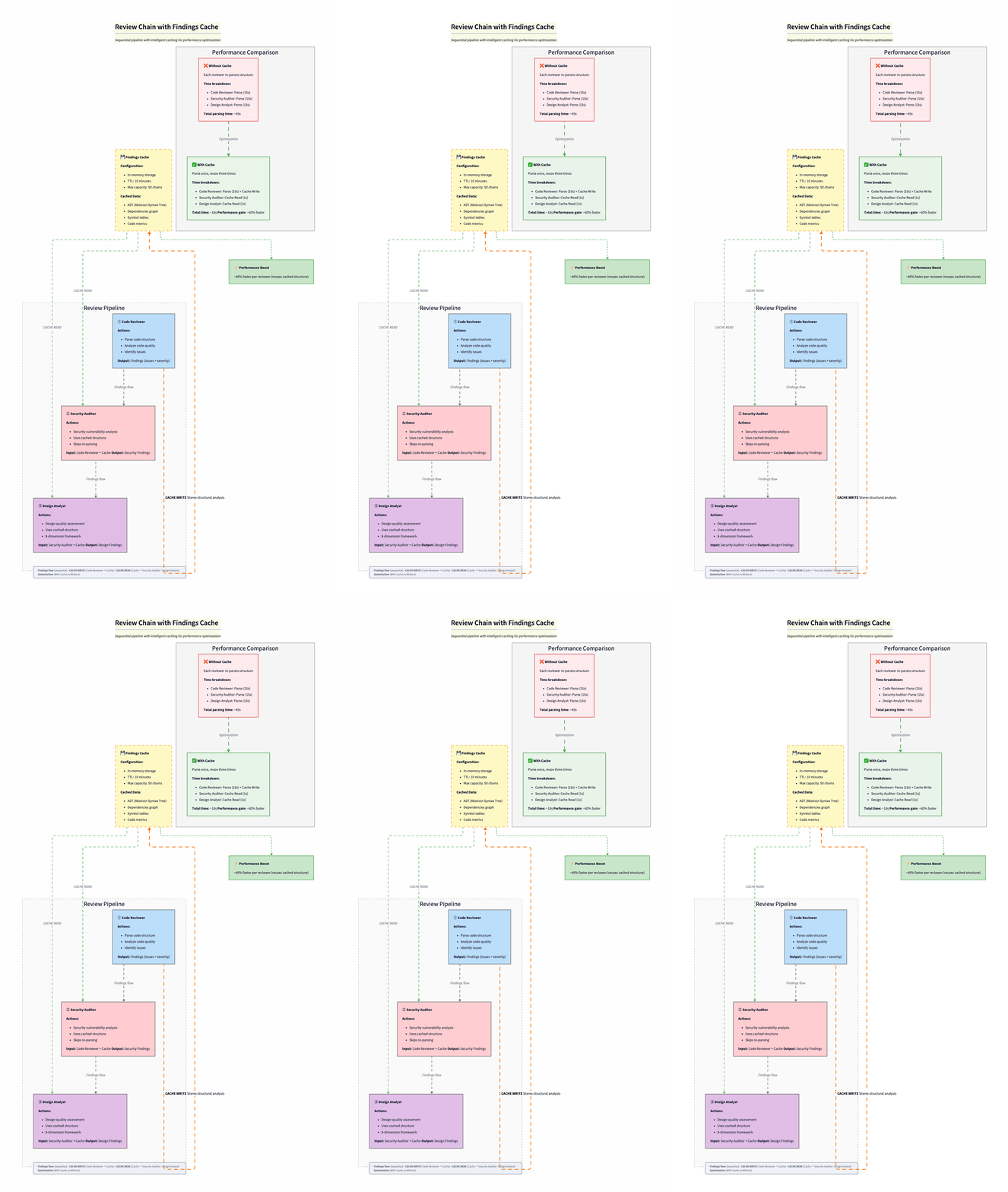
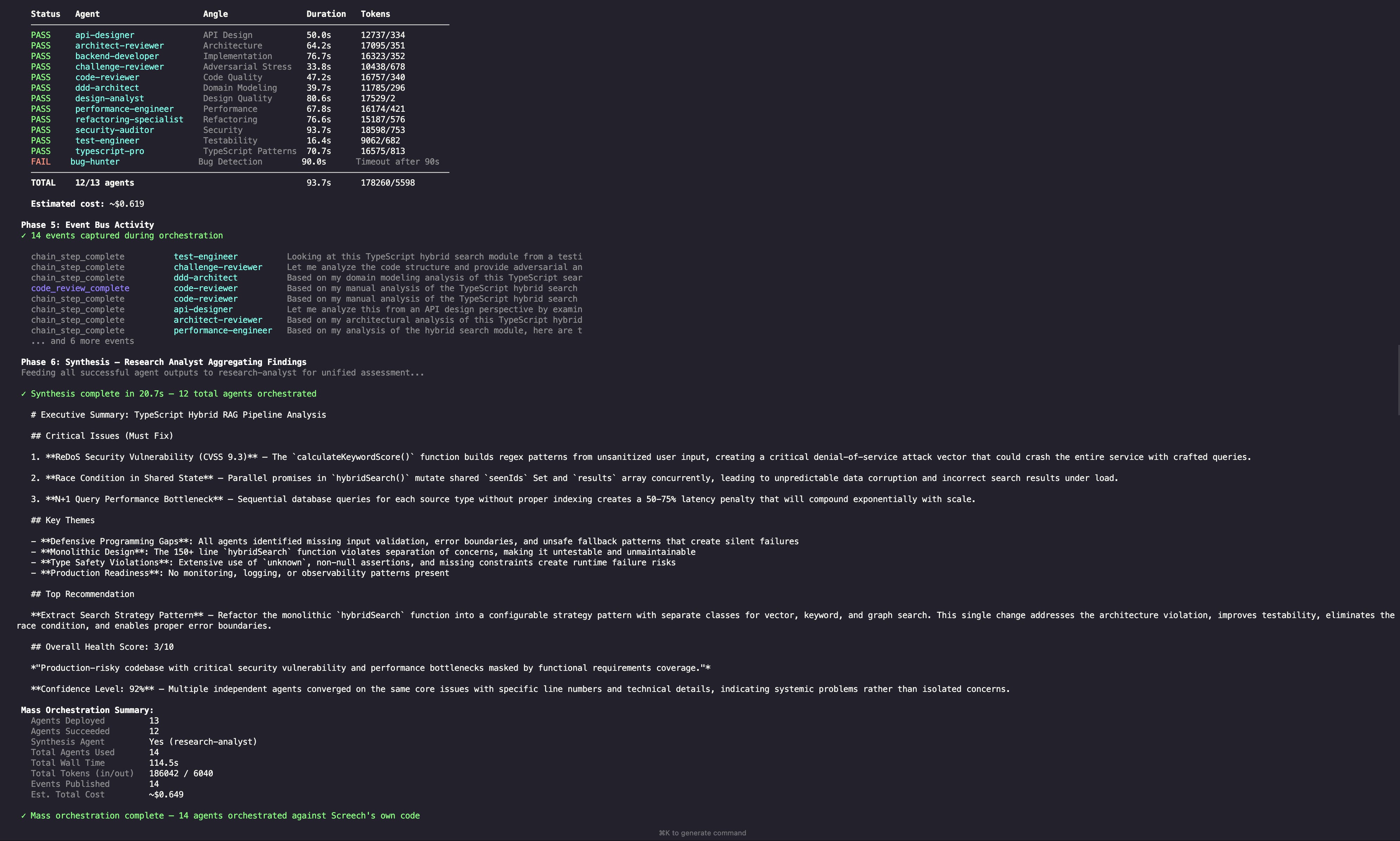
What the Workflow Looks Like in Practice
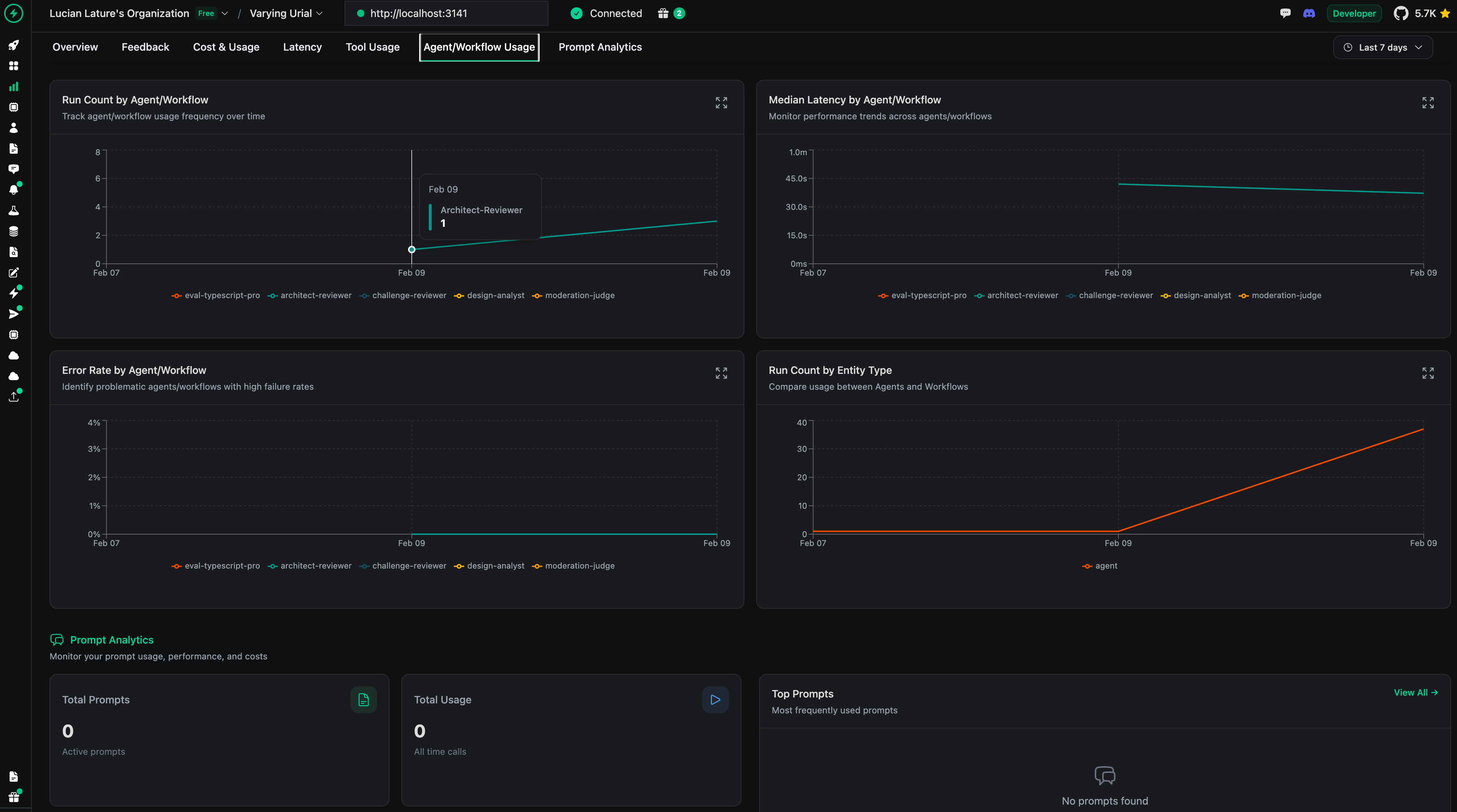
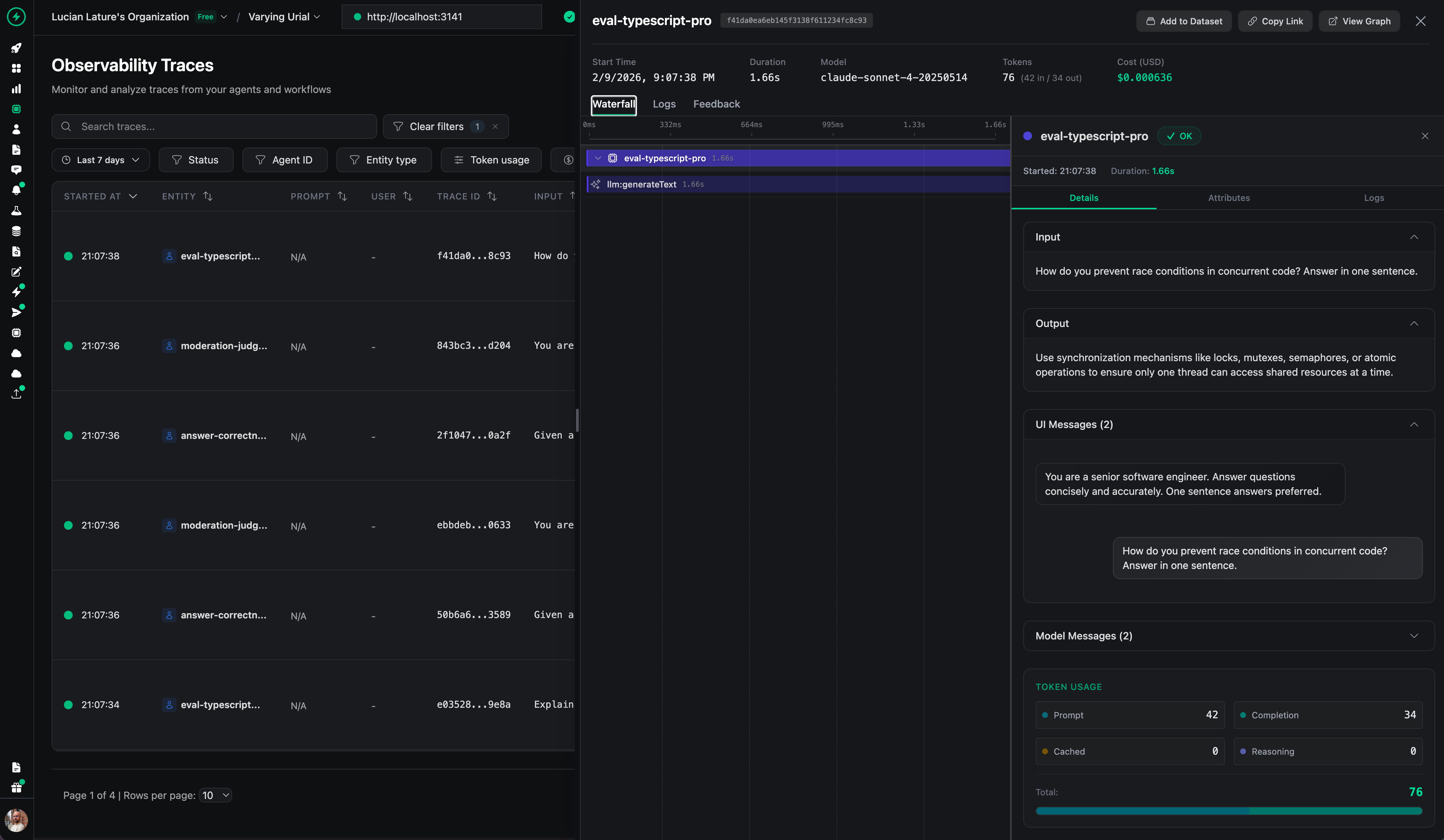
The screenshot below is a real run of a multi-step workflow, showing the chain of specialist calls and the event-style logging that makes the system debuggable.
3. In-Process Event Bus
Agents need to share findings without tight coupling. Solution: a singleton in-memory pub/sub: typed events, well-known topics (VULNERABILITY_FOUND, CODE_REVIEW_COMPLETE, etc.), source agent ID + correlation ID for tracing across a review chain, and a typed payload. Security auditor finds a vulnerability? Publishes to vulnerability_found. Code reviewer subscribes, incorporates the finding.
The implementation is a single AgentEventBus class with no external dependencies.
// Typed event structure
interface AgentEvent<T = unknown> {
  id: string;           // Auto-generated: evt_<timestamp>_<counter>
  topic: string;        // Well-known topic (e.g., "vulnerability_found")
  source: string;       // Publishing agent name
  data: T;              // Typed payload
  timestamp: string;    // ISO timestamp
  correlationId?: string; // Chain/session tracing
}
The key design choice: fire-and-forget delivery. When an agent publishes, subscribers are notified via Promise.allSettled(). Slow or failing subscribers never block the publisher. Handler errors are caught and logged, never thrown.
// Publisher (security-auditor)
await eventBus.publish("vulnerability_found", "security-auditor", {
  severity: "critical",
  type: "sql-injection",
  location: "src/api/users.ts:42",
});

// Subscriber (code-reviewer) registered at startup
eventBus.subscribe("vulnerability_found", async (event) => {
  // Incorporate into review findings
});
Late-joining subscribers can replay event history (last 50 per topic). Events auto-expire via TTL (5 minutes) with periodic cleanup every 100 events. This way, it keeps memory bounded without needing a background timer. Source filtering lets subscribers only receive events from specific agents.
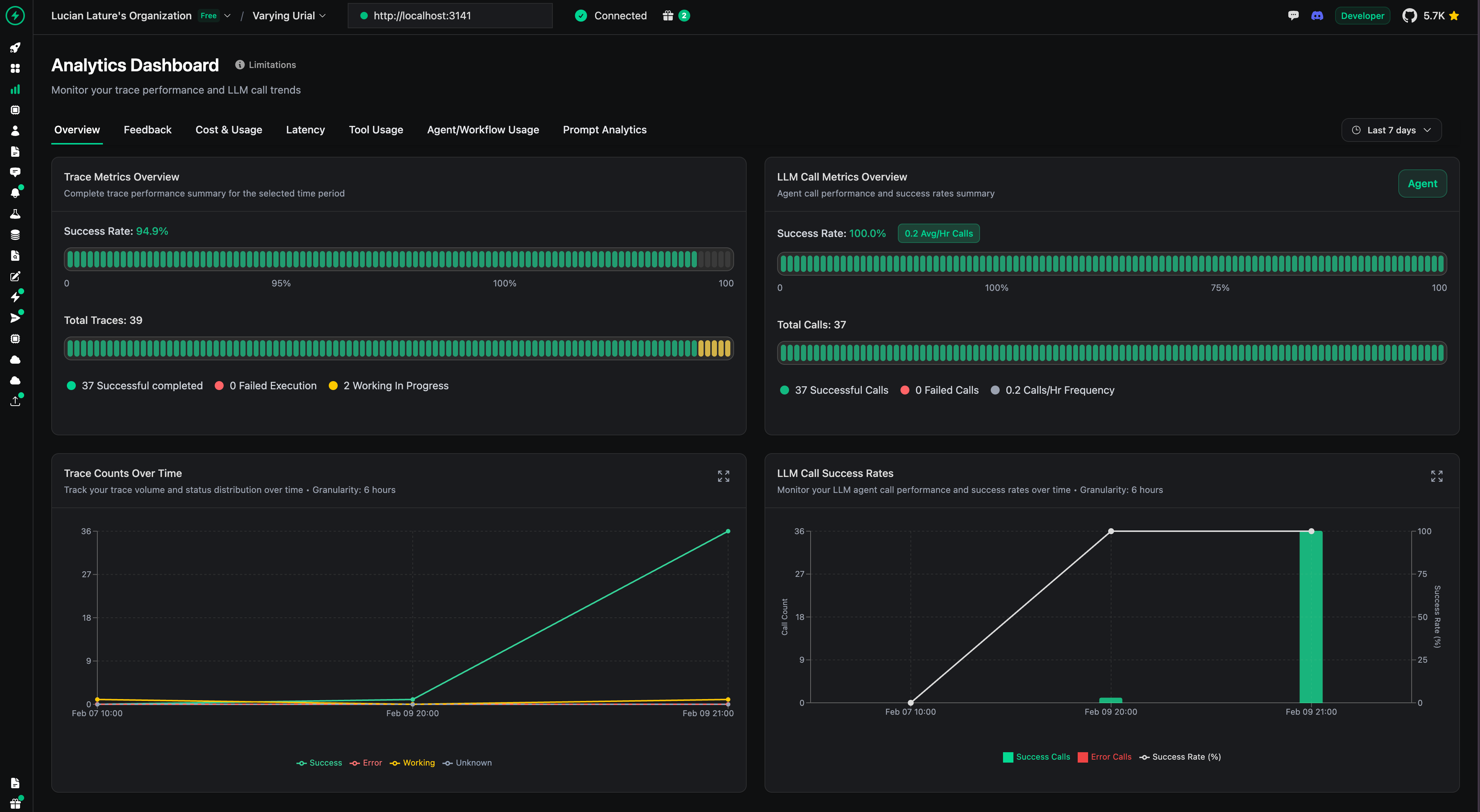
4. Live Evaluation with Sampling
Production traffic gets evaluated by moderation and relevancy scorers at configurable sampling rates. Moderation runs on 20% of requests (cheap). Relevance scoring on 10% (LLM judge, expensive). Both async, non-blocking. Never slow down user-facing response.
What I’d Change: Real Talk
The in-memory event bus doesn’t survive restarts. Fine for a personal side-project agent. Terrible for a production system serving a team. Durable workflow engines like Prefect, Temporal, or DBOS solve this really well with less infrastructure overhead than rolling your own durability with Redis Streams or NATS. Current design optimizes for simplicity, not resilience. I made that trade knowingly.
128 subagents is ridiculous. Pareto wins: ~20 agents do 80%+ of the work. The long tail exists because adding a subagent costs basically nothing (factory + registry entry). I should prune the ones that never get used. Future me will regret not doing that earlier.
SurrealDB as a unified store is elegant but young. Graph + vector + relational in one database? Architecturally clean. But doc gaps cost me time. For strict SLAs, I would use Postgres plus pgvector. For 2 to 3 hop graphs, Postgres is enough. Neo4j, when you need a deep graph. I chose SurrealDB to move fast with one DB. Wouldn’t push it on a team with compliance requirements.
Haiku routing adds ~500ms latency. Noticeable in interactive chat. Negligible in background workflows. For latency-critical paths, consider static routing rules (if the tool is security_scan always use reasoning tier) and only invoke the dynamic router for ambiguous tasks.
Workflow suspend/resume is powerful but adds state complexity. The 70+ workflows support human-in-the-loop via suspend/resume—workflow pauses, waits for human input, and continues. Great for approval flows (expense reports, code reviews). Terrible for state management. Every suspended workflow is a piece of state that can go stale. I’ve had workflows suspended for weeks because I forgot about them. Take that as you will.
The Elephant in the Room: Multi-Agent Is Hard for Everyone
Screech and others: Claude Code with Skills, custom orchestrators, the lot.
Overconfidence. One wrong assumption in step 2 of a 10-step workflow and you get a confidently wrong result. Isolated specialists with focused prompts help, but don’t remove it. I still see invented APIs and wrong architectural assumptions.
More agents do not mean better output. Coordination overhead, conflicting findings, more for the human to reconcile. Findings cache and event bus make communication explicit and traceable, but someone still has to review. Synthesis is an LLM summarizing other LLMs. The chain can be long.
Oversight tax. You spend more time reviewing and redirecting than writing. PR review times go up in high-adoption teams (e.g., plus 91%). Comprehension debt: the more you delegate, the less you understand your codebase. Review becomes rubber-stamping. Screech does not fix that.
Token bloat. Tool schemas, prompts, skills. You can blow past 50k tokens before the agent does useful work. I keep tool profiles tight (7–18 per agent). Complex runs still burn tokens.
Credentials. For a side project, it’s manageable. For production with real APIs and DBs, auth and secrets become a project. A lot of agent efforts reportedly fail to scale there. Not the AI. The plumbing. (My therapist has asked me not to elaborate.)
I’m building Screech knowing these limits. The design mitigates some of it. It does not remove it. Multi-agent amplifies both capability and failure modes. Build guardrails.
Standing on Shoulders
VoltAgent. TypeScript agent framework. Runtime, memory, workflows, MCP, observability. Saved me months.
Graphiti (Zep). Temporal knowledge graph. Episodes, bi-temporal awareness. “Knowledge changes” shaped my RAG thinking.
Decoding AI, AI Agents Foundations (Paul Iusztin). Treat docs as images, not OCR. ReAct, tools, memory.
Agentic Playbooks (Justin Narracott). Traceable, auditable decisions as a performance pattern. Findings cache and review chains owe a lot here.
PageIndex (Vectify AI). Reasoning over document structure instead of pure similarity. Path 3 (tree-search) is inspired by this.
Three Patterns Worth Stealing
You don’t need 128 subagents or a temporal knowledge graph. Here are the three ideas that transfer to any multi-agent system:
Route cheap before routing expensive. A $0.0025 classification call that routes 30% of tasks to a model, 90% cheaper? Pays for itself on the first batch. Even without subagents, using a small model to decide whether a task needs your large model is almost always worth it.
Not every agent needs every tool. Tool profiles cut token usage, improve tool selection accuracy, and make prompts focused. A research analyst with 7 tools outperforms the same analyst drowning in 18 tools they’ll never use.
Hybrid retrieval beats any single method. Vector search handles 70% of queries. Graph traversal and keyword matching cover the other 30% (structural queries, exact-match lookups, relationship questions that embeddings silently botch).
The multi-agent pattern isn’t inherently better. It’s a trade: quality per task versus orchestration complexity. Start with a single capable agent. When quality degrades across diverse tasks, reach for these patterns. The hard part isn’t the agents. It’s the routing, the retrieval, the resilience.
Screech runs on VoltAgent (agent framework), SurrealDB (multi-model database), and Anthropic Claude (LLM). Architectural inspiration from Graphiti, Agentic Playbooks, PageIndex, and the Decoding AI community. Built for personal side-project workloads. Adapt the patterns to your scale.
‘Till next time
What’s your opinion? Do you agree, disagree, or is there something I missed?
Enjoyed the article? The most sincere compliment is to share our work.
Whenever you’re ready, here is how I can help you
Go from agent user to agent builder. Master the foundations of AI agents and turn fragile demo code into reliable, production-ready systems with my course, Agent Engineering: Building Multi-Agent Systems (made with Towards AI).
35 lessons. Pure foundations from scratch. 4 mini-projects. 2 production systems. A certificate and direct access to me & industry experts in our Discord.
Built for software and data professionals transitioning into AI engineering. Rated 5/5 with 300+ students. The first 7 lessons are free:
Not ready to commit? Start with our free Agent AI Engineering Guide, a 6-day email course on the mistakes that silently break AI agents in production.
Images
If not otherwise stated, all images are created by the author.

Love this piece!
‘
You don’t need 128 subagents or a temporal knowledge graph.
‘
loved this section. nice read overall with solid advice instead of blind recommendation. i think a lot of people would benefit in reading this.