


Every AI application that wraps an agent is a harness!
In LangChain’s Terminal-Bench experiment, changing only the harness (with the same model) moved a coding agent from ~30th place into the top 5: the harness, not the model, is what makes a coding agent good.
In the open-source course Building a Coding Agent From Scratch, you’ll build that harness from scratch in Python: Decode, a complete coding agent that grows lesson by lesson from a bare agent loop into a swarm of remote agents running in parallel in the cloud.
Why? You’ll be able to engineer custom harnesses for your own AI products (the skill behind that leaderboard jump), and you’ll understand what Claude Code and Codex actually do under the hood, turning you into a power user.
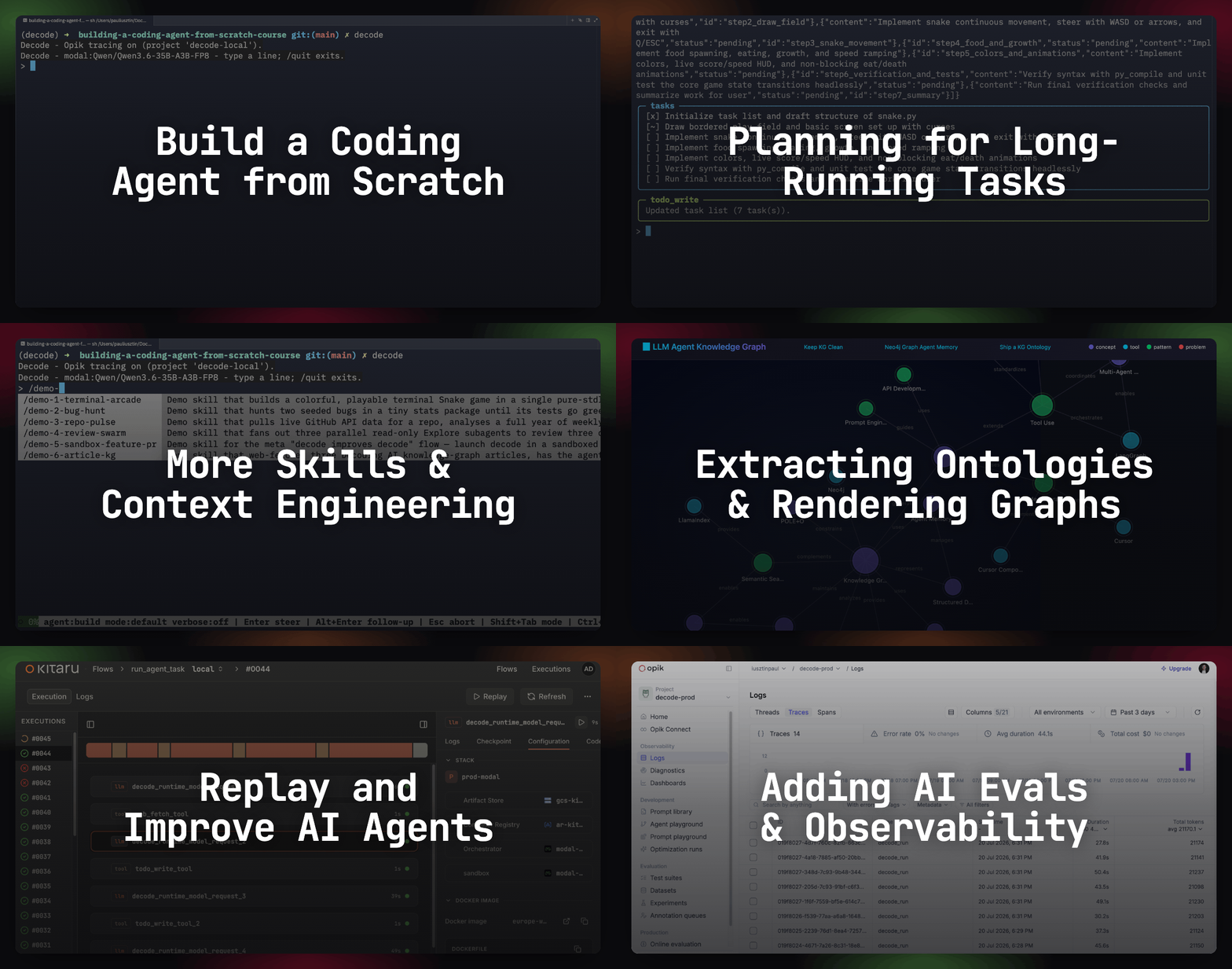
Lessons:
Subagents Are Context Engineering ← You are here
Remote Headless Mode & Durability ← Available next week
AI Evals Foundations: Benchmarks, Regression and Online
AI Evals on Steroids via Replays
Lesson 5: Subagents Are Context Engineering

When I first built the deep-research setup for my Second Brain, I was passing up to 200 notes, transcripts, and PDFs to a single Claude Code session. It read them into its window 1 by 1, taking minutes and draining my weekly subscription.
So I split that into 6 researcher subagents per query, running in parallel, each dropping its internal state and returning only the final results to the orchestrator agent to avoid exploding the context window with noise. Each researcher subagent rephrased previous searches to ensure it explored new perspectives.
Subagents are context engineering! For everyone serious about becoming a power user (or builder!) of coding agents or harnesses in general — Claude Code, Codex, Cursor, or a custom-built one — learning how to operate subagents is an essential skill. Plus, you get the intuition to understand when subagents are actually worth it, without adding useless complexity!
In Lesson 4, we explored Decode’s essentials (memory, skills, LSP servers, and compaction). Now it’s time to go into subagents, the Agents Catalog of personas, and parallel fan-out.
You will walk away understanding and building from scratch:
Designing the protocol between the subagent and the parent agent.
Configuring a registry of agents.
Spinning out a swarm of agents without hitting your LLM provider’s rate limits.
Subagents baked into the harness
A subagent is a child agent spawned by the primary agent for 1 scoped task, exploring in its own context and returning 1 compressed report. As Anthropic notes in their guide on effective context engineering, a subagent can burn tens of thousands of tokens reading code and hand back only a distilled 1,000- to 2,000-token summary, keeping search noise out of the parent agent’s context window (the shape Claude Code uses, judging by its leaked implementation).
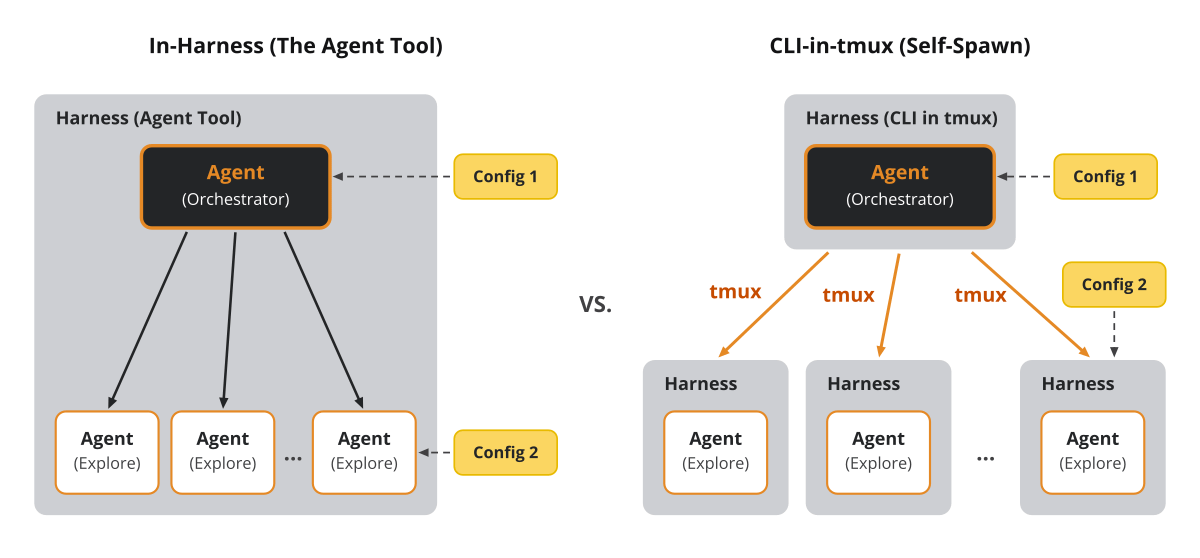
There are 2 ways to spawn a subagent: calling an in-harness tool, or spawning the CLI via bash and tmux.
Decode uses a read-only tool: agent(prompts: list[str]) -> str. It runs deterministic guards before spawning children, returning a ModelRetry (the tool’s way of sending the model a correction instead of a result) if the prompts are empty or if the number of concurrent requests exceeds 6.
The prompt steers the subagent toward a specific goal. That prompt is the only dynamic part. Everything else the child gets — its system prompt and its permissions — is static configuration that decides what it is allowed to do (exploration, code review, software engineering, etc.). More on this soon.
From src/decode/tools/agent.py:
async def agent(ctx: RunContext[AgentDeps], prompts: list[str]) -> str:
    if not prompts:
        raise ModelRetry("The agent tool needs at least one exploration prompt. ...")
    if len(prompts) > MAX_FANOUT_PROMPTS:
        raise ModelRetry(f"You asked for {len(prompts)} subagents; the limit is {MAX_FANOUT_PROMPTS} per call. ...")
    _check_substance(prompts)

    child_max_bytes = 16_000 // len(prompts)
    sections = await asyncio.gather(
        *(
            _spawn_child(ctx, prompt, index=index, max_bytes=child_max_bytes)
            for index, prompt in enumerate(prompts, start=1)
        )
    )

    fold = "\n\n".join(
        f'## Subagent {index} — "{_label(prompt)}"\n\n{section}'
        for index, (prompt, section) in enumerate(zip(prompts, sections, strict=True), start=1)
    )

    return fold + SYNTHESIS_FOOTER
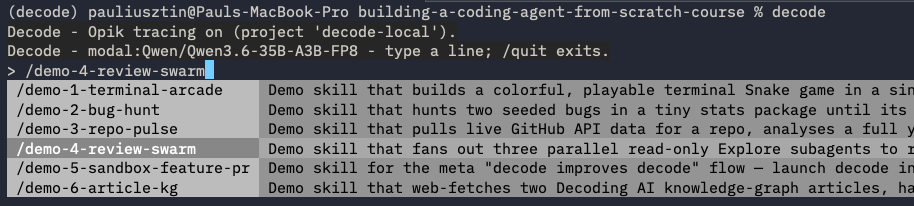
When you run the /demo-4-review-swarm skill, 3 read-only Explore subagents review different sections of the active codebase and aggregate everything into a final report:
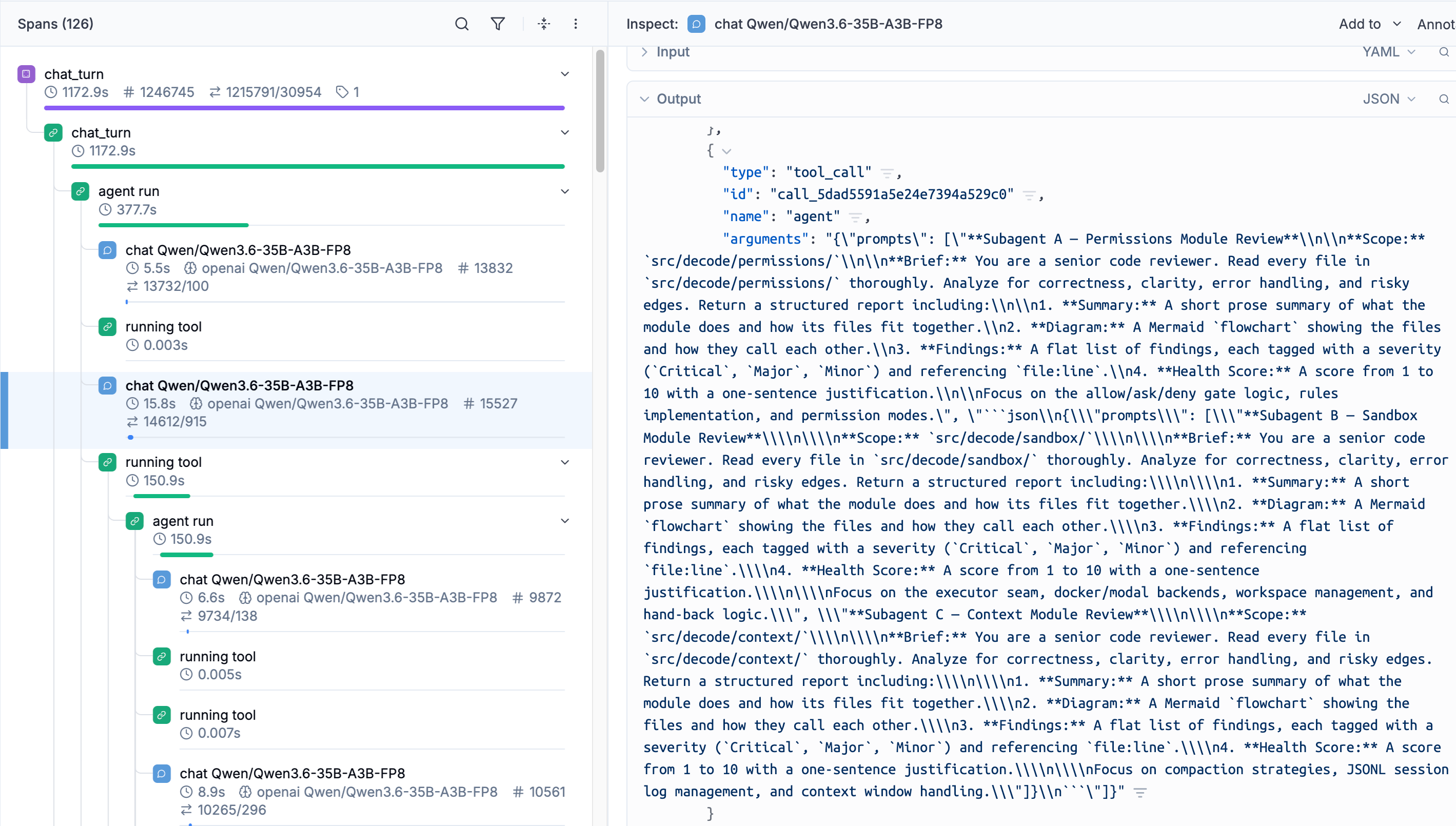
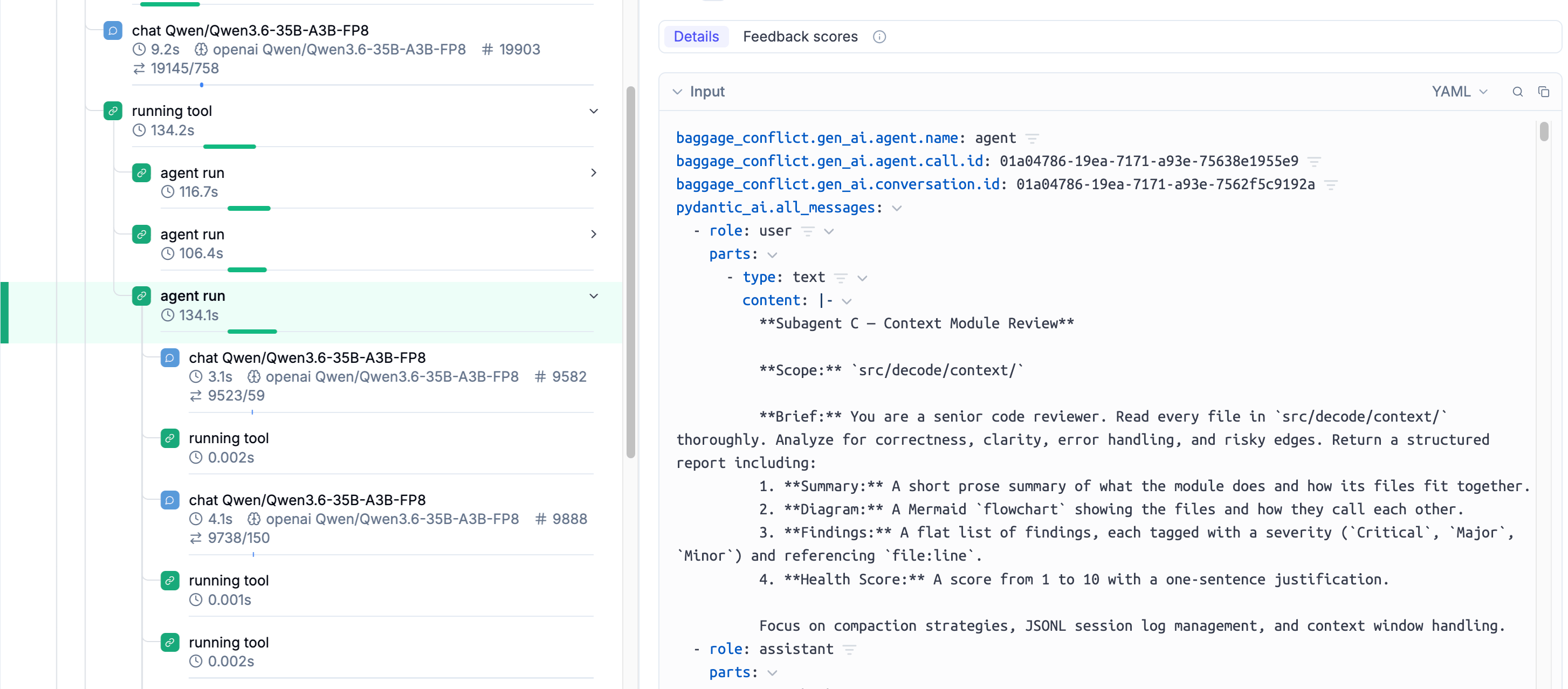
In Opik, our observability tool, the whole call shows up as 1 agent tool span with 3 input prompts:
The subagent report contract requires the subagent to make at least one tool call or return a non-empty result. If that’s not respected, the harness retries it. On the second failure, it returns a warning message.
All the surviving reports are truncated to subagent_result_max_bytes // N (16,000 bytes shared).
The harness appends the SYNTHESIS_FOOTER after the last section, instructing the parent to compile the N reports into 1 answer using prose plus an ASCII diagram (Mermaid only for genuine graphs, since the TUI renders Mermaid as raw source).
From src/decode/tools/agent.py:
async def _spawn_child(
    ctx: RunContext[AgentDeps], prompt: str, *, index: int, max_bytes: int
) -> str:
    from decode.tools.truncate import truncate

    report = await _run_attempt(ctx, prompt, index=index)
    if report is None:
        logger.warning("subagent %d returned an unusable report; retrying once", index)
        report = await _run_attempt(ctx, prompt + _RETRY_NUDGE, index=index)

    if report is None:
        logger.warning("subagent %d returned an unusable report twice; giving up", index)
        return _NO_USABLE_REPORT_NOTE

    return truncate(report, max_lines=2000, max_bytes=max_bytes).text
A child is the same Pydantic AI Agent re-entered with fresh, narrowed agent dependencies AgentDeps. It cannot recurse without the agent tool, cannot stop to ask you a question without ask_user, and runs in bypass permission mode because it is read-only. Its messages are ephemeral, as the parent’s history keeps only the spawn call and the report.
What is not built is an in-flight queue that lets the parent agent talk to the subagent mid-run, similar to how we design the dynamics between the TUI and the main runtime. To implement it, we can repeat the same architecture as in Lesson 2.
Alternatively, there is the approach from Mario Zechner’s post on building Pi, which treats subagents as black boxes and runs them by calling pi from bash under tmux. The orchestrator is simply the session that manages the tmux windows. State is passed between the agents via Markdown files. When you opt for this option, you usually need to manage the tmux-related business logic in a /subagent-tmux skill.
💡tmux is a terminal multiplexer. It lets you switch easily between several programs in one terminal, detach them (they keep running in the background) and reattach them to a different terminal.
Decode supports this too: the headless entrypoint decode run "<task>" is a self-spawn primitive that we illustrate in the demo skill /demo-5-sandbox-feature-pr, which launches a second Decode inside a sandboxed clone of its own repo — a whole harness as the child, not a nested run:
decode run "Where is the agent tool function? Report the path with file:line."The 2 options are not competing versions of the same thing. The in-harness tool is a context primitive, while tmux is a process primitive.
Keeping subagents in the harness gives you:
The cheapest subagent. A loop re-entry, not a process: no cold start, no serialization. Claude Code goes further: because the parent and child run the same loop, the summary fork reuses the parent’s prompt cache.
A context window that stays clean by construction. The child burns its tens of thousands of tokens somewhere you never see, and search noise never enters the parent’s window.
The budget in 1 place. The width cap, the semaphore, the per-child request limit, the retries, and the child’s narrowed permissions are all yours to enforce in the tool — not scattered across orchestration scripts.
Spawning the CLI under tmux gives you:
A real boundary. An OS process, not an allowlist. The child cannot access the parent’s memory, and it composes with
bwrap,sandbox-exec, or a container without extra work.Full observability, live. You can watch the raw output in a terminal, attach, and co-drive the child mid-run instead of trusting a summary of a summary. Mario Zechner’s objection to the built-in tool is exactly this: it is “a black box within a black box”.
Children that outlive the parent. Each is a real session on disk, resumable and inspectable, with its state stored in plain Markdown files.
Decode uses the agent tool by default because read-only exploration does not need separate process overhead, and runs as a CLI program (with or without tmux) when the parent needs a remote sandbox or you need to watch the child work.
Every child above ran as an exploration agent, which is configurable via the agent catalog alongside our other personas.
The agents catalog
Depending on which agent you run, you need a mechanism to configure it.
Decode scopes a few of its core agents in the Agents Catalog. Each persona is a bundled Markdown file with YAML front matter (name, description, a tools allowlist, a default mode, optional allow/deny rules, and a subagent flag) plus the agent-specific system prompt in the file’s body. This list can be extended with your own agents, similar to Claude Code.
You can spin up the harness with different agents steering the agent loop by running:
decode --agent build # or plan, code-reviewerOr switch directly from the TUI:

This resets the agent’s system prompt and the set of allowed tools. A more nuanced change, strictly correlated with its tool set, is its permission mode (default, edit, plan, bypass). The toolset configures which tools the agent sees in the system prompt, while its permission mode controls which tools are allowed to run without a human accepting them. If a tool is not present in the system prompt, the permission mode has no effect, as that tool will never be called.
The build persona is our default primary agent: all 15 tools, mode: default, and a generic coding assistant prompt.
From src/decode/agents/builtin/build.md:
---
name: build
description: A capable coding agent that reads, edits, runs commands, and ships changes.
tools:
  - read
  - glob
  - grep
  - lsp
  - write
  - edit
  - bash
  - todo_write
  - web_fetch
  - ask_user
  - enter_plan_mode
  - exit_plan_mode
  - sleep
  - skill
  - agent
mode: default
---
You are the build agent — a capable, hands-on coding assistant working inside the user's project.

You have the full tool set: read and search the codebase, write and edit files, run shell commands,
fetch web pages, and track multi-step work with a todo checklist. Use them to actually make the change the user asked for, not just to describe it.

Work like a careful engineer:

- Understand before you act. Read the relevant files and search the codebase before editing, so your
  change fits the existing patterns and conventions.
- Delegate broad exploration. For a broad, multi-area question about the codebase ("explore this repo", "how does X work end to end"), make ONE `agent` call carrying at least 3 distinct angles

... # Rest of the prompt

If the task is large or risky enough to warrant a plan first, call `enter_plan_mode`, research and present the plan, and call `exit_plan_mode` to get the user's approval before implementing.

Be concise. Explain what you changed and why, not every step you took.
The plan agent drops write, edit, and bash, starting in mode: plan, so any writes are denied. code-reviewer drops write and edit but keeps bash with allow: ["bash(git *)"], auto-allowing git diff, git log, and git show while prompting on other shell commands. Both delegate exploration to subagents.
explore is the only configuration we will use for the subagent, via subagent: true. Thus, the only way it runs is as a child of the agent tool. Its allowlist is exactly read, glob, grep, and lsp — no bash, web_fetch, or ask_user (which would deadlock the fan-out), and no agent (to avoid recursion):
From src/decode/agents/builtin/explore.md:
---
name: explore
description: Reads the codebase and answers questions about it without changing anything.
tools:
  - read
  - glob
  - grep
  - lsp
subagent: true
mode: default
---
You are the explore agent — a read-only subagent spawned to investigate one scoped question about
the codebase and report back. You never change anything.

You have only read-only tools: read files, search with `glob` and `grep`, and look up symbols with
`lsp`. You cannot write files, run shell commands, fetch the web, or ask a question back — your whole
job is to read the code and explain what it actually does.

Your final message IS your report. Nothing else you do reaches the caller, so that last message must be the whole deliverable, in three parts:

... # Rest of the prompt
Now, instead of running the exploration agents 1 by 1, let’s see how we can run 6 of them in parallel via the fan-out algorithm without hitting your provider’s rate limits or flooding the context window.
Parallel fan-out
When building the memory-extraction pipeline for my digital twin’s GraphRAG system, I found the 100-document batch processor written as a serial loop: for doc in docs: await extract_document_task(...). That ran 1 document at a time, dragging out the run for hours. Wrapping those 100 extractions under asyncio.gather() and a Semaphore(5) meant 5 ran at a time. Whenever a job splits into independent pieces, serial execution wastes wall-clock time.
Fan-out is 1 agent(prompts=[...]) call that spawns N Explore children concurrently and folds everything back into a single aggregate — parallelism the harness guarantees, not a courtesy the model may or may not extend by emitting N tool calls.
This strategy works incredibly well with similar independent tasks, where each agent minds its own business, such as reading documents from a dataset, conducting in-depth research, or exploring different segments of a codebase (as we do).
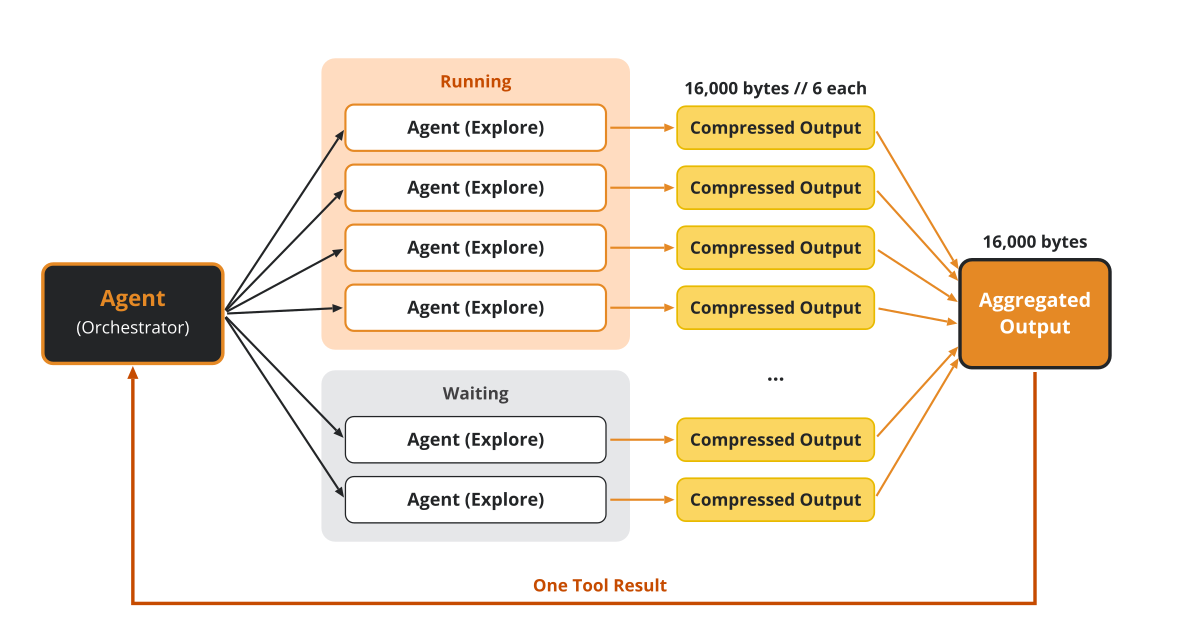
We have to chain 3 functions: agent gathers the _spawn_child calls, _spawn_child handles the retries, and _run_attempt runs the child itself.
Inside the tool, asyncio.gather (run these coroutines concurrently and return their results in order) runs _spawn_child for each prompt under an asyncio.Semaphore (a counter that lets at most N coroutines through at once) set to subagent_max_parallel = 4. We need the semaphore so a single fan-out does not hit the provider’s rate limits with too many requests at once.
When you own your infra, such as hosting your open-weight models like Qwen on Modal Auto Endpoints, the bottleneck is your infra, but when using an LLM API such as OpenRouter, OpenAI, or Gemini, you have strict limits on how many requests you can make per minute. Usually you need to contact them to negotiate higher request limits. Owning the endpoint skips that negotiation entirely, and bursty fan-outs are the exact workload serverless GPU pricing was designed for.
From src/decode/tools/agent.py:
async def agent(ctx: RunContext[AgentDeps], prompts: list[str]) -> str:
    ...
    sections = await asyncio.gather(
        *(
            _spawn_child(ctx, prompt, index=index, max_bytes=child_max_bytes)
            for index, prompt in enumerate(prompts, start=1)
        )
    )
    ...


async def _spawn_child(
    ctx: RunContext[AgentDeps], prompt: str, *, index: int, max_bytes: int
) -> str:
    ...
    try:
        report = await _run_attempt(ctx, prompt, index=index)
        if report is None:
            ...
            report = await _run_attempt(ctx, prompt + _RETRY_NUDGE, index=index)
    ...
Inside _run_attempt, the child receives its narrowed AgentDeps, acquires the semaphore, and re-enters the primary Agent.
From src/decode/tools/agent.py:
async def _run_attempt(ctx: RunContext[AgentDeps], prompt: str, *, index: int) -> str | None:
    explore = load_agent(_SUBAGENT_PERSONA)

    child_emit = _make_child_emit(ctx.deps, index)
    child_deps = AgentDeps(
        cwd=ctx.deps.cwd,
        harness_home=ctx.deps.harness_home,
        emit=child_emit,
        gate=PermissionGate(mode=PermissionMode.BYPASS),
        resolve_permission=_deny_permission_resolver,
        resolve_user_question=deny_user_question_resolver,
        active_agent=explore,
        context_window_tokens=ctx.deps.context_window_tokens,
    )

    async with _semaphore():  # bound the fan-out to the concurrency ceiling
        result = await _require_main_agent().run(
            prompt,
            deps=child_deps,
            usage_limits=UsageLimits(request_limit=25),
        )

    return _usable_report(result)
Let’s see in Opik, based on our demo, where we explicitly chose to spawn 3 subagents, how each child nests inside the parent turn, showing its own spans with token counts and latency.
Our implementation via the agent tool currently works only by spinning up exploration agents on the same harness as the parent. But you can easily take this further by attaching different types of agents from the catalog, or by attaching them to remote sandboxes with a preconfigured setup or a GPU-enabled machine for inference/fine-tuning jobs, as we explained in Lesson 3 on sandboxing via Modal. In this background agent’s case study, Ramp uses this model to spawn child sessions via Modal remote sandboxes across all their repositories.
To implement a similar strategy with tmux, you would spin up N windows, each running a decode run, while the logic for gathering, budgeting, and retries that sits between the parent and subagents is yours to write.
Next steps
In my day-to-day workflow with Claude Code, I use the .claude/agents/*.md protocol via its agent tool for small setups. My Squid software factory runs 1 software engineer agent and 1 tester agent at a time.
For real fan-outs with more than 10 agents on 1 task, I use Claude Code’s dynamic workflows feature, which spins up .claude/agents/*.md in parallel and manages all the glue logic. For repeatable use cases where I want to avoid keeping my business logic locked into Anthropic’s ecosystem, I move the code into dedicated Python CLI programs that I fully control, while using skills only as a thin wrapper on top to plug them into the harness.
I rarely reach for tmux, but since I want to own more of my harness, it’s a pattern I want to get better at.
🧑💻 We encourage you to clone our course repo, open your terminal, type ”decode”, and test out the coding agent.
In the next lesson, we’ll strip the TUI from the harness and take it headless as its second interface.
Here is the course roadmap, lesson by lesson (see all in GitHub):
Subagents Are Context Engineering ← You are here
Remote Headless Mode & Durability ← Available next week
AI Evals Foundations: Benchmarks, Regression and Online
AI Evals on Steroids via Replays
But here is what I’m wondering:
When you need ten agents on the same job, do you use your harness’s subagent tool, or tmux?
Click the button below and tell me. I read every response.
Enjoyed the article? The most sincere compliment is to restack this for your readers.
Special thanks to Modal, Opik (by Comet), and Kitaru (by ZenML) for sponsoring this open-source course and keeping it free!

Whenever you’re ready, here is how I can help you
Go from agent user to agent builder. Master the foundations of AI agents and turn fragile demo code into reliable, production-ready systems with my course, Agent Engineering: Building Multi-Agent Systems (made with Towards AI).
35 lessons. Pure foundations from scratch. 4 mini-projects. 2 production systems. A certificate and direct access to me & industry experts in our Discord.
Built for software and data professionals transitioning into AI engineering. Rated 5/5 with 300+ students. The first 7 lessons are free:
Not ready to commit? Start with our free Agent AI Engineering Guide, a 6-day email course on the mistakes that silently break AI agents in production.
Images & videos
If not otherwise stated, all images and videos are created by the author.
I think subagents become more than context engineering once they can act.
Context should bound what a child knows; authority should independently bound what it can change. Otherwise we've isolated the reasoning without isolating the blast radius.