


Welcome to the AI Evals Foundations series: A 7-part journey from shipping AI apps to systematically improving them. Made by busy people. For busy people.
🧐 Everyone says you need AI evals. Few explain how to actually build them and answer questions such as…
How do we avoid creating evals that waste our time and resources? How do we build datasets and design evaluators that matter? How do we adapt them for RAG? ...and most importantly, how do we stop “vibe checking” and leverage evals to actually track and optimize our app?
This 7-article series breaks it all down from first principles:
Integrating AI Evals Into Your AI App ← You are here
By the end, you’ll know how to integrate AI evals that actually track and improve the performance of your AI product. No vibe checking required!
Let’s get started.
Integrating AI Evals Into Your AI App
Understanding where AI Evals and Observability fit into the broader scheme of things can be daunting. It certainly was for me. At first, it was confusing because you can use AI evals in so many places within your application. Also, everyone seemed to have a different definition.
But it does not have to be that complicated. With this article, we want to finally connect the dots on where AI Evals fit in your AI app holistically.
But first, let’s understand WHY AI Evals are so essential.
A few months ago, I had to completely rewrite Brown, a writer agent I built as one of the capstone projects for my Agentic AI Engineering course. The first version worked but was slow and expensive. So, I redesigned the architecture from scratch.
Immediately, I hit a wall. How do I know this new version is at least as good as the old one? I had spent months fine-tuning the original and could not afford to lose that progress silently.
That is when AI evals saved me. I wrote evaluators that scored the agent on dimensions tied to our actual business requirements. With those evals, every code change generated a clear signal indicating whether I was on track. Without them, the rewrite would have been a coin flip.
You likely shipped the first version of your app. You got this far by “vibe checking” if the app works fine. Up to this point, everything is fine.
However, once you start adding new features, you realize old features break. Once you start having real users, they interact with the app in unexpected ways. If you have only 10 users, vibe checking works.
But as this scales, you get overwhelmed. You try to improve current features, and it is incredibly hard to tell if your changes have any effect. Manually managing all of this is a living hell.
💡 The solution is a structured way of measuring how well your app performs. This is known as AI Evals.
In this article, we will cover:
A holistic view of the AI Evals lifecycle.
How to use evals for optimization during development.
How to use evals for regression testing in CI pipelines.
How to monitor production quality using sampling.
Common misconceptions regarding guardrails and benchmarks.
The recommended tech stack for implementing this system.
Before digging into the article, a quick word from our sponsor, Opik. ↓
Opik: Open-Source Observability for Your Multimodal AI Agents (Sponsored)
This AI Evals & Observability series is brought to you by Opik, the LLMOps open-source platform used by Uber, Netflix, Etsy, and more.
We’re proud to partner with a tool we actually use daily across our open-source courses and real-world AI products. Why? Because it makes evaluating multimodal AI apps as easy as evaluating text ones.

AI apps are no longer just text-in, text-out. They process images, generate videos, parse PDFs, and more. Monitoring and evaluating all of that used to be painful. With Opik, it’s not. Here is why we love it:
Trace everything — Opik renders images, videos and PDFs directly inside your traces. No more guessing what your model actually saw or generated. We use this daily, and it changed how we debug multimodal pipelines.
Zero-friction multimodal evals — Add image URLs or upload files directly in the UI, then run LLM-as-a-Judge evaluations on them. Opik auto-detects vision-capable models (GPT-4o, Claude 3+, Gemini) and warns you if the model doesn’t support vision.
Video generation? Traced automatically — Wrap your OpenAI client in one line, and Opik tracks the full Sora workflow: creation, polling, download, and logs the generated video as an attachment. Full visibility, minimal setup. Guide here.
Opik is fully open-source and works with custom code or most AI frameworks. You can also use the managed version for free (with 25K spans/month on their generous free tier). Learn more about evaluating multimodal traces:
↓ Now, let’s move back to the article.
The Holistic View of AI Evals
At their heart, AI Evals are systematic data analytics on your LLM application. You look at the data flowing through your app, create metrics for what matters, and use those metrics to measure what is happening. This allows you to iterate, experiment, and improve with confidence rather than guess [1], [2].
Without evals, every prompt change is a coin flip. With them, you have a concrete feedback signal to iterate against [3].
In this article, we will focus on the where, when, why, and what. In future articles from the series, we will focus on the how. There are three core scenarios where AI Evals play a central role:
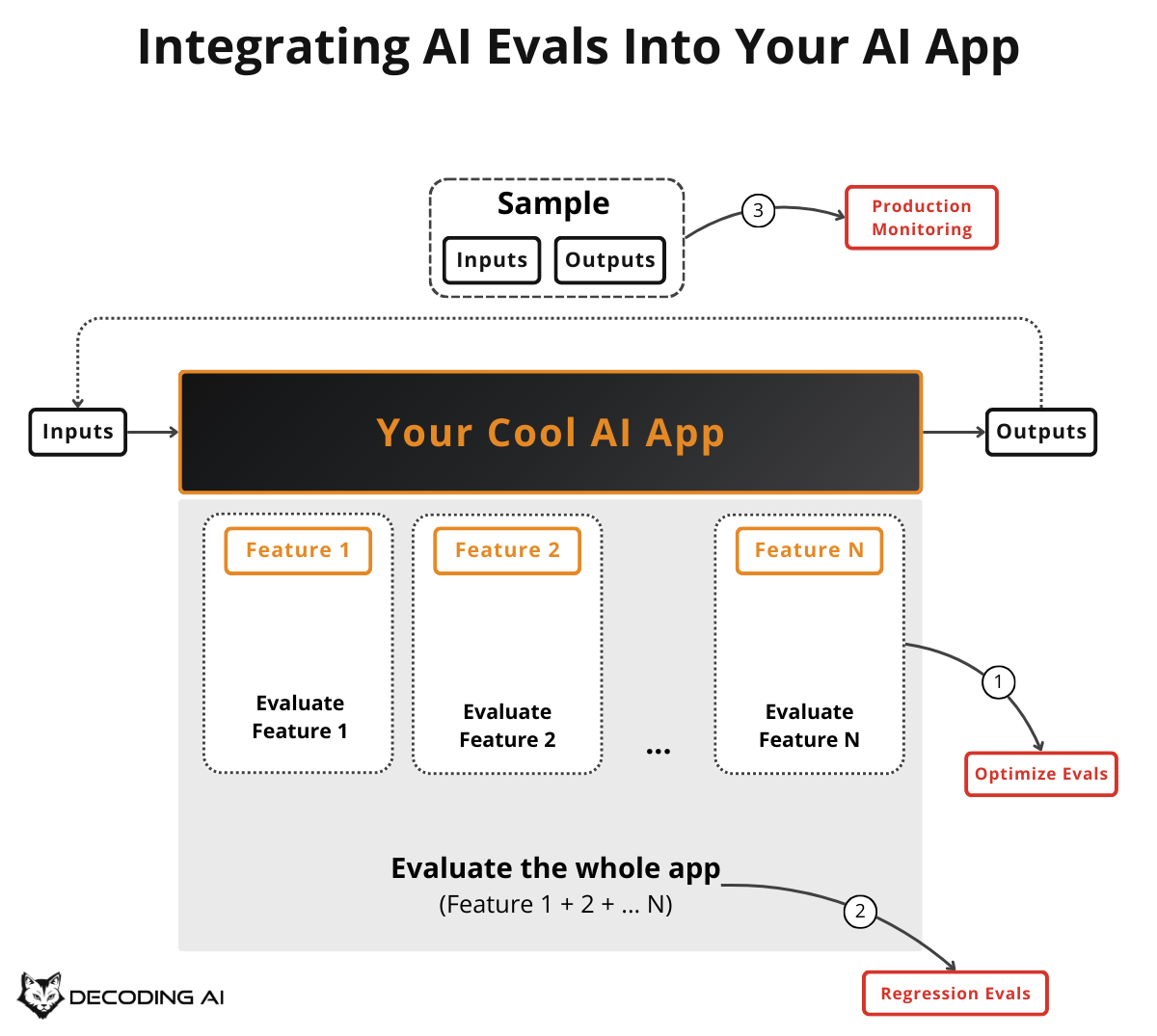
Optimization: During development, we use evals to measure and optimize current or new features.
Regression: During development, when changing the code, we use evals to ensure our changes do not break previous features. This is conceptually similar to classic software tests.
Production Monitoring: In production, we use evals to detect potential performance issues caused by unexpected user behavior or drift.
Beyond these three, two complementary signals round out the picture. We touch on them briefly later, but they are not the focus of this article:
User Feedback: These are direct signals from users that bypass all our predefined datasets and evaluation strategies. They are the most valuable signal you can get.
A/B Testing: This ensures new code changes perform as expected, tested on real user behavior rather than predefined datasets.
This is illustrated in Image 1, which maps these concepts to the development lifecycle.
Now that we have the big picture, let’s dig deeper into each of the three core scenarios, starting with optimization.
Using Evals for Optimization
The first major use case for AI Evals is optimizing your application on a specific feature during development.
To keep costs under control and run tests multiple times during development, we run the AI evals only on a subset of the dataset that targets the feature we want to optimize. This is usually triggered manually by the developer while testing new code.
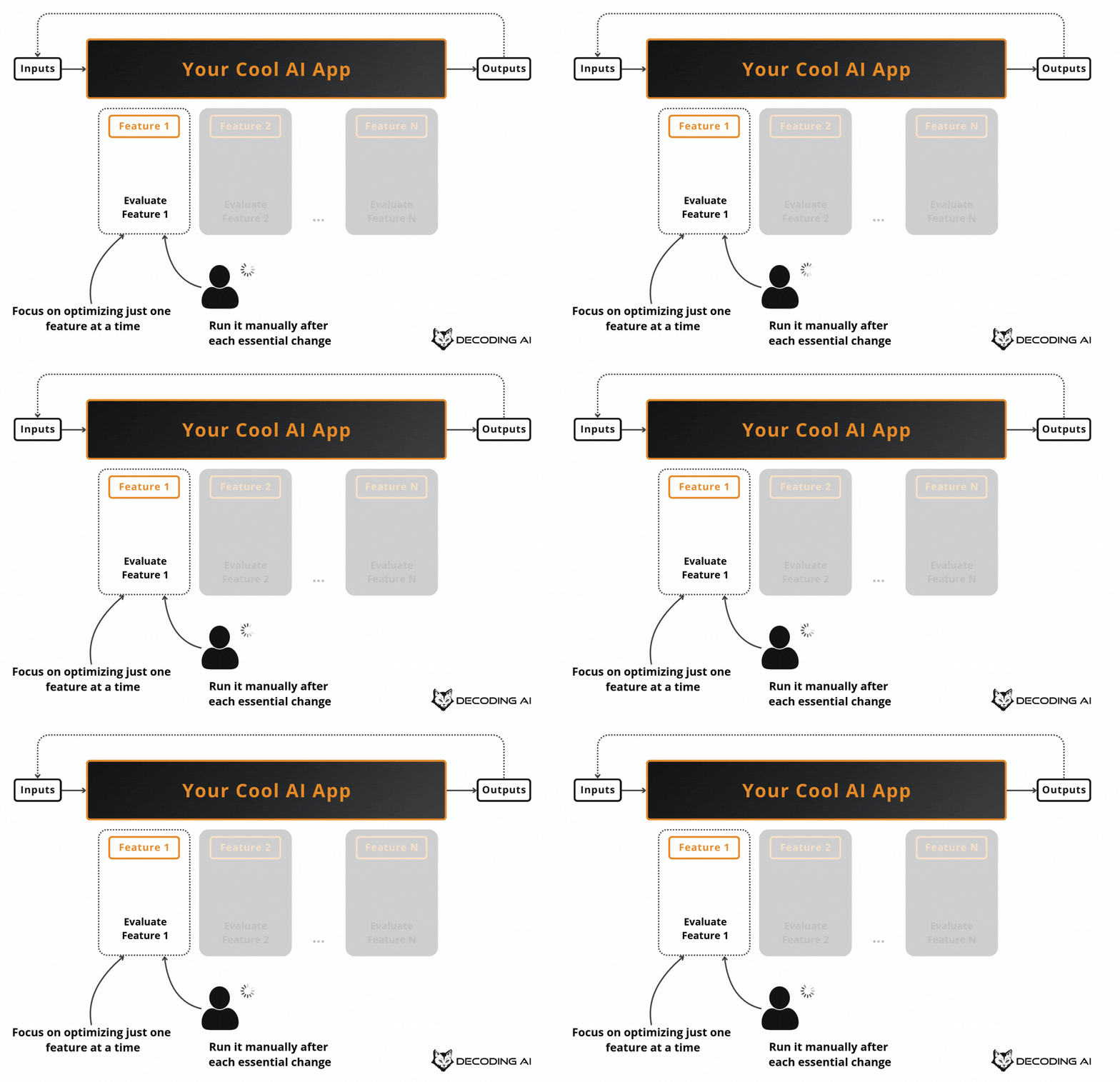
This makes development guided by concrete numbers that can be measured against a baseline, rather than just vibe-checking.
Suppose you have a customer support bot and you want to improve how it handles refund requests. You do not run your evals on the entire dataset, which may also cover shipping questions, account issues, and technical support. Instead, you filter your evals dataset down to just the refund-related examples and iterate on that subset.
You tweak the prompt, run the evals, check if your “refund accuracy” metric improved compared to the baseline, tweak again, and repeat. This keeps each cycle fast and cheap, so you can iterate multiple times in a single session [4].
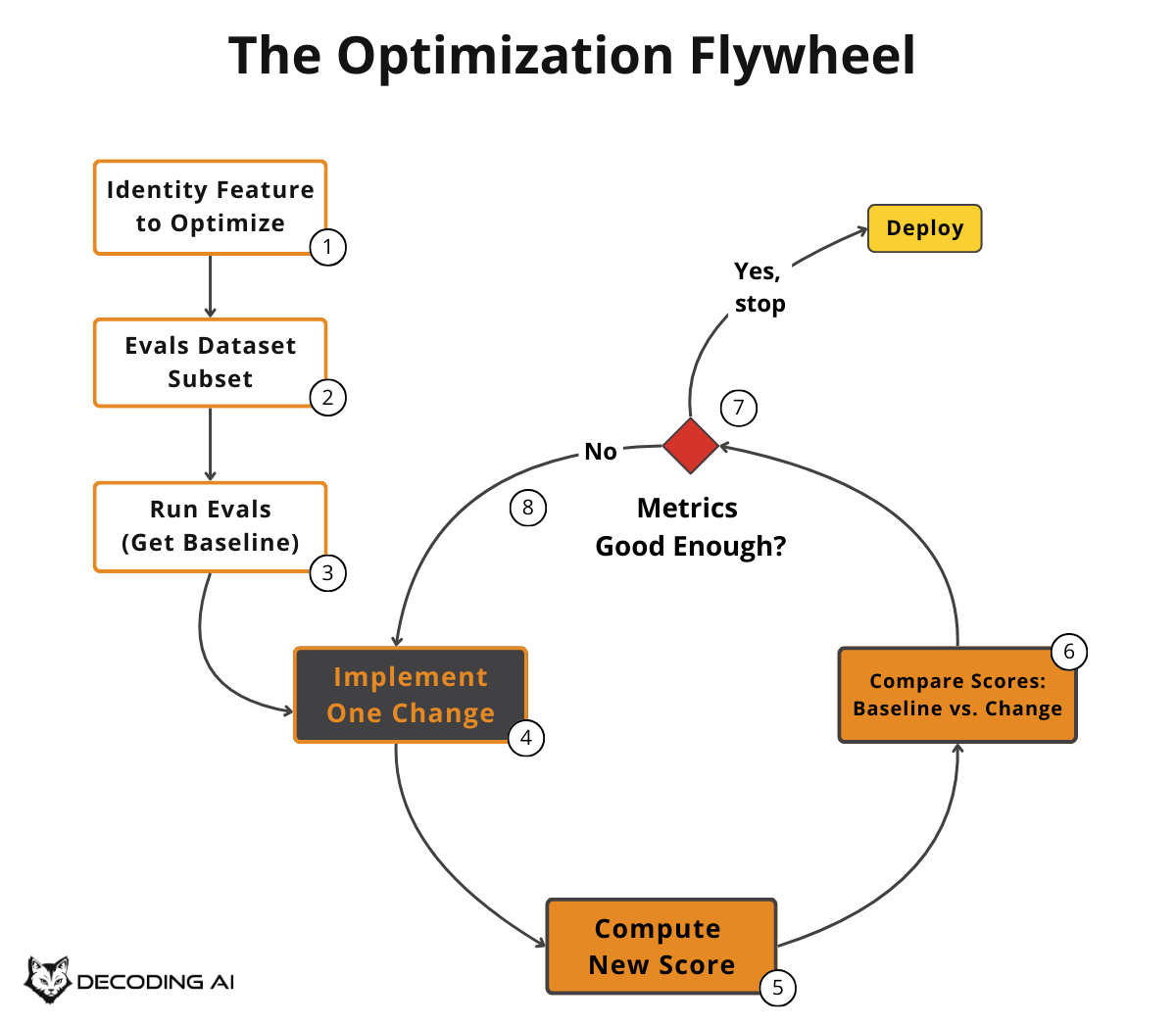
But what happens when your optimization work accidentally breaks something that was already working? That is where regression testing comes in.
Using Evals for Regression
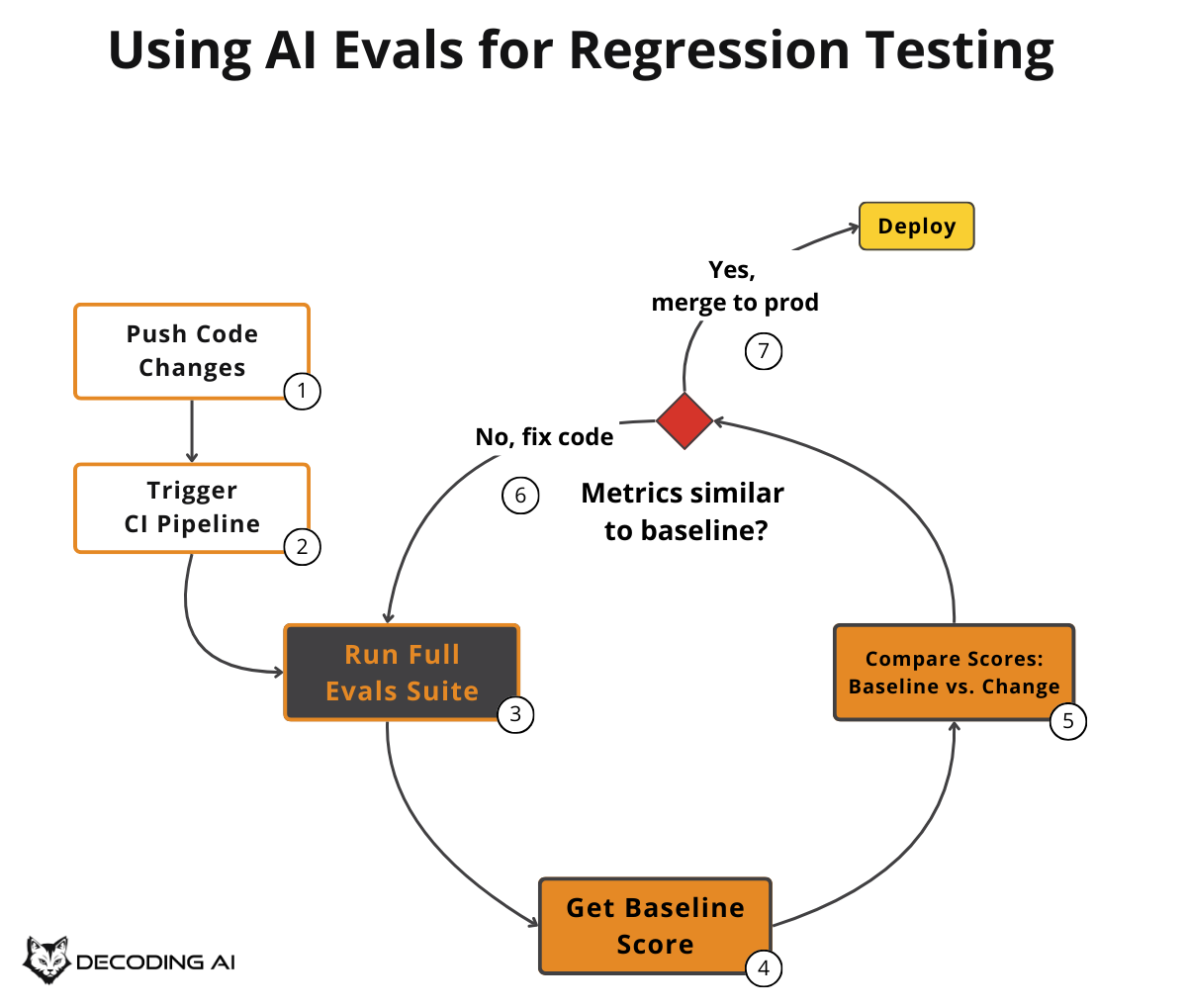
Regression testing is used to catch potential errors introduced by your new changes before they reach production. Unlike optimization, which focuses on a subset, regression testing runs on the whole evaluation dataset.
This typically happens within the CI pipeline. Because running AI Evals on the entire dataset is costly (some evaluators rely on LLM calls to grade outputs), we try to avoid running them on every single commit, as we do with standard software tests. A common approach is to run this suite when you think you are “done” with your feature, right before merging the feature branch, to ensure you are not introducing new bugs.
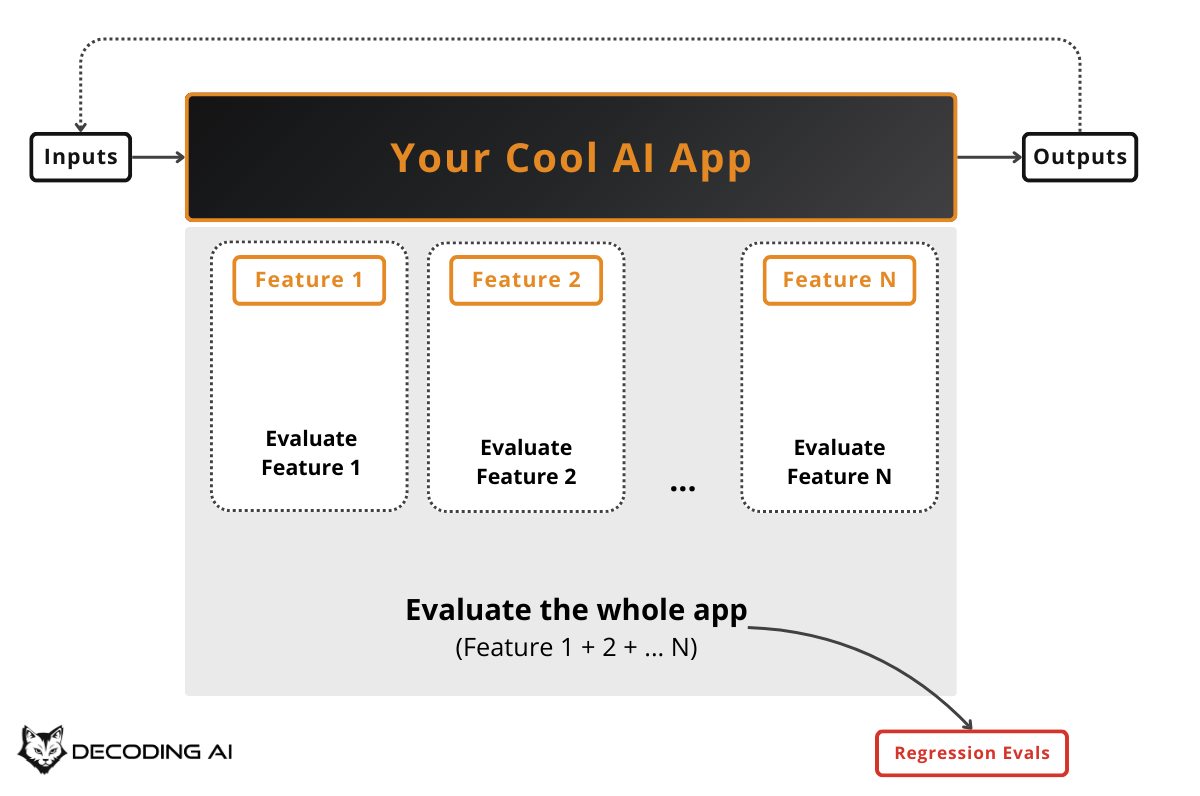
Continuing the customer support bot example: after you optimized refund handling during the optimization phase, you now want to merge your changes. Before merging, your CI pipeline runs the full eval suite. This includes refunds, shipping questions, account issues, and escalation scenarios.
This catches regressions. Maybe your prompt change for refunds accidentally made the bot worse at routing shipping complaints to the right team. If any metric drops below the baseline threshold, the pipeline fails and blocks the merge until you fix it. This is similar to how Anthropic’s Claude Code team and Bolt’s AI team run separate eval suites for quality benchmarking and regression testing on each change [1].
Optimization and regression testing happen during development, but what about after you deploy? Let’s look at how AI Evals work in production.
Using Evals for Production Monitoring
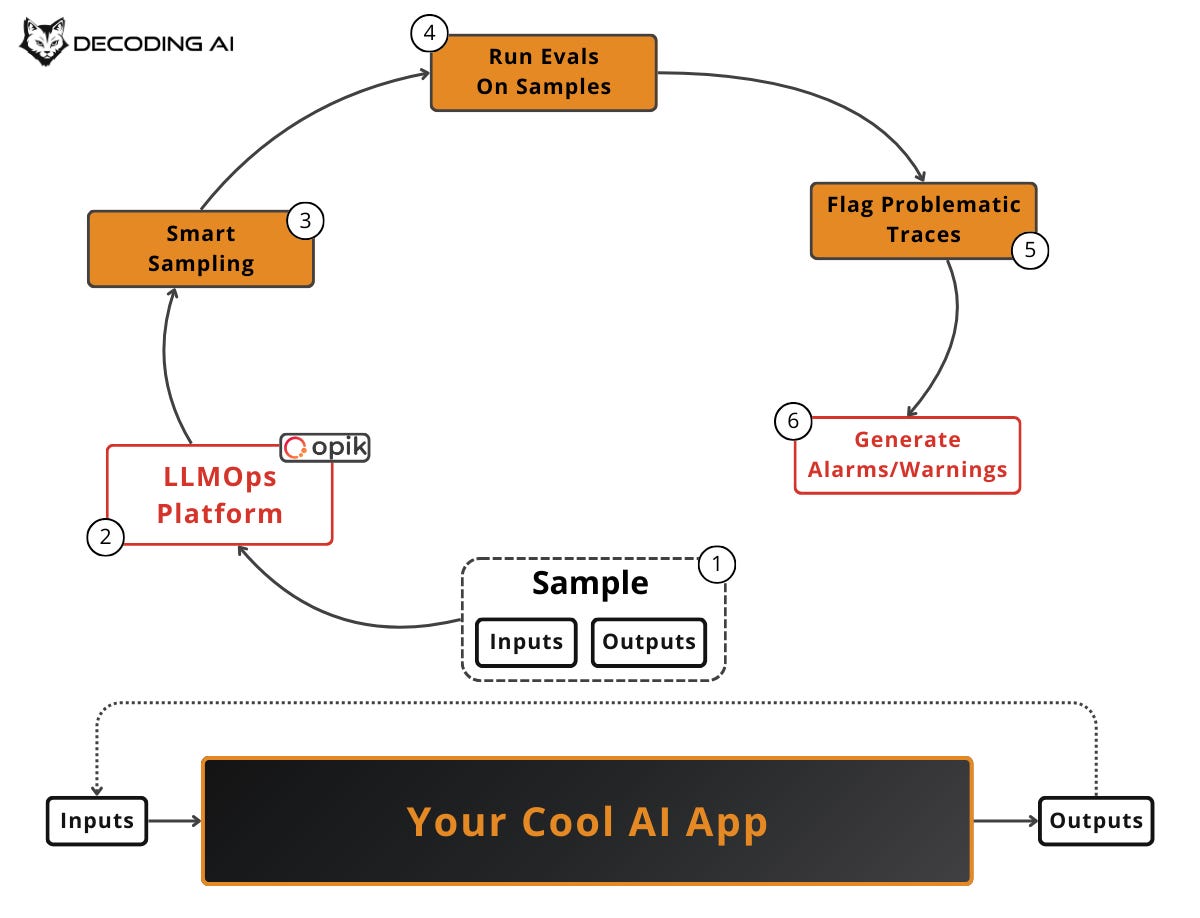
Production monitoring is similar to regression testing, but instead of running it offline on your AI Evals dataset, we aim to catch issues in the production environment using live traces tracked by your LLMOps platform. The final scope is to identify potential pitfalls in our system and generate alarms or warnings.
To keep costs under control, we apply smart live sampling techniques within your LLMOps platform (e.g., Opik). You rarely want to evaluate 100% of production traffic with an LLM judge. Instead, you use:
Random sampling: Evaluate a fixed percentage of all traces (e.g., 5-10%) to get an unbiased baseline of overall quality.
Stratified sampling: Divide traces into meaningful subgroups (by feature, user segment, query type) and sample from each proportionally, ensuring no critical category is overlooked.
Signal-based sampling: Prioritize traces that show suspicious signals. These include long exchanges, repeated questions, user frustration indicators (thumbs-down, drop-offs from your user feedback pipe), low confidence scores, or anomalous latency/cost spikes. These are the highest-value traces to review.
You should run these as soon as practical. This can be near real-time or on a batch schedule (e.g., nightly), depending on risk tolerance and cost.
Suppose your customer support bot is live with thousands of conversations per day. Even with a 95% success rate, that still amounts to dozens of failures daily. That is far too many to review manually. Your LLMOps platform samples a percentage of live traces and automatically runs evaluators on them. For instance, you might check if the bot hallucinated a return policy that does not exist or if it escalated appropriately when the user was frustrated.
These evaluators flag problematic traces and feed dashboards that track failure rates over time. When you see a spike, you catch it within hours instead of waiting for user complaints to pile up. Perhaps a new product launch causes questions the bot wasn’t trained on [5].
Beyond evaluators, you have two complementary signals. User Feedback (thumbs-up/down, comments) is the most valuable quality signal because it reflects real satisfaction, not proxy metrics. A/B Testing validates that improvements measured offline actually hold up under real user behavior by routing traffic to different variants.
Now that we understand where and when to run AI Evals, let’s clear up some common misconceptions that trip up most teams.
Looking at Common Misconceptions
There are three major areas where terminology gets confusing: guardrails, benchmarks, and software tests.
Guardrails vs. Evaluators
Guardrails run on the inputs and outputs of the LLM or other components of your AI app. These should be very fast to avoid adding extra latency. Their role is to flag inputs/outputs as valid or not, or mask sensitive data. Evaluators, on the other hand, are used to compute metrics on your AI app components.
While you can use evaluators as guardrails if they detect adherence to business outcomes, this is the exception, not the rule. Evaluators are usually designed for accuracy rather than low latency.
For example, a guardrail in your customer support bot checks every user message in real time. If the user pastes a credit card number, the guardrail masks it instantly. On the output side, another guardrail blocks any response that promises a refund above a certain threshold. These must run in milliseconds.
An evaluator runs after the fact (or offline on sampled traces). It measures whether the bot’s refund responses are actually accurate, helpful, and aligned with company policy. The evaluator can take seconds or even minutes per trace because it is not in the user’s critical path.
App Evaluators vs. LLM Evaluators
App Evaluators measure your whole app as a unit (LLM calls + everything around them). They focus on ensuring the performance of your business use case.
LLM Evaluators measure only the performance of the LLM itself, rarely considering your business use case. Popular benchmarks like the LLM arena evaluate only the LLM in isolation. That is why benchmarks are deceiving and should never be your only criterion when picking an LLM. They are often a marketing strategy for foundational model companies.
Examples like Chatbot Arena (LMSYS) or MMLU tell you which LLM is “generally smarter.” But they say nothing about whether that LLM will handle your specific refund policy correctly, escalate frustrated users at the right moment, or respect your company’s tone of voice. You need app-level evaluators grounded in your business use case, not generic benchmark scores [4].
Evaluator vs. Classic Software Tests
When running evaluators as regression tests, they are conceptually similar to classic software tests. Their purpose is to ensure everything still works after you change the code. However, the implementation is vastly different.
Classic software tests are deterministic. For a given state of the database and a given input, you almost always get the same output. It is also much cheaper and easier to run because the code itself is cheap to run, and the outputs are structured and easy to validate.
AI Evaluators must assess the quality of LLM calls operating in a non-deterministic environment, often with unstructured data. Instead of writing unit and integration test cases, AI evals cases are operated as eval datasets, reflecting the AI-centric approach.
With a clear mental model of what AI Evals are and aren’t, let’s look at the tools you need to put this into practice.
So What Is the Tech Stack?
To run AI Evals effectively, you need two core tool families: an annotation tool and an LLMOps platform.
First, should you build a custom annotation tool or use an off-the-shelf tool? Since your data is always custom, we recommend building the annotation tool from scratch. With current AI coding tools such as Claude Code, Cursor, or Lovable, doing this is extremely easy. You want to make annotation effortless, adding zero resistance to how your data is displayed. As your data is custom, no pre-defined tool can do that perfectly for you. Most LLMOps platforms will have a feature around this, but a custom lightweight tool often wins on speed and usability.
Second, you need an LLMOps platform. Our favorite vendor is Opik. It is what we recommend and use in all our products. It is open source, constantly updated with new features, works out of the box with popular LLM APIs and AI Frameworks, and offers a generous freemium plan.
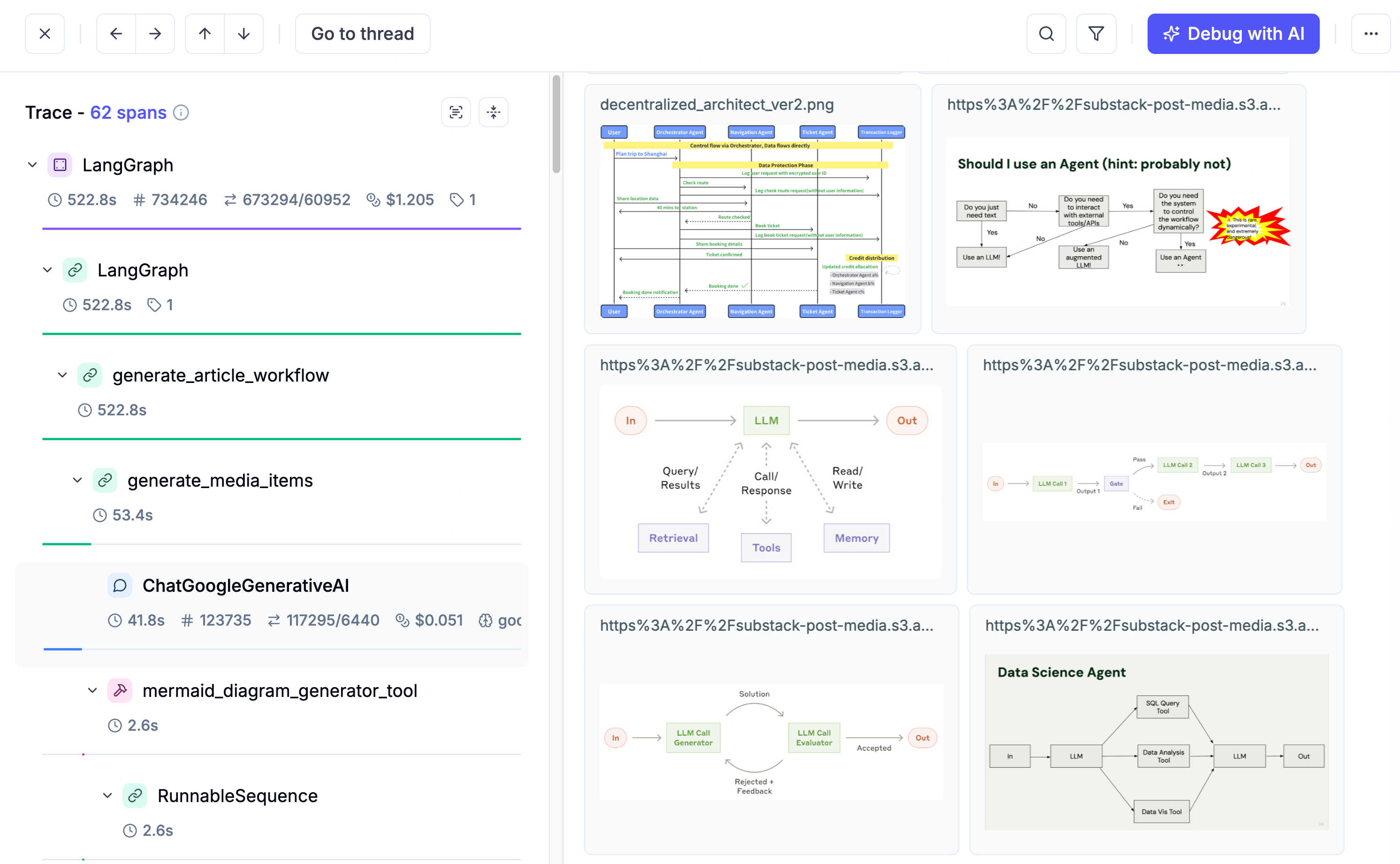
Other strong options include LangSmith, which is best for the LangChain ecosystem, and LangFuse, another solid open-source alternative. We have also heard good things about Braintrust and Arize.
The reality is that most of the time, you should pick the best tool for your current setup. We use Opik, but most of these tools have overlapping features. Choose the one that best fits your ecosystem and connections.
Next Steps
AI Evals are not optional. They are a structured, repeatable way to ensure your AI app actually works, both during development and in production.
Now that we understand the where, when, why, and what of AI Evals, the next article will focus on the how. Specifically, we will dive into how to gradually build an evals dataset.
Also, remember that this article is part of a 7-piece series on AI Evals & Observability. Here is what’s ahead:
Integrating AI Evals Into Your AI App ← You just finished this one
See you next Tuesday.
What’s your opinion? Do you agree, disagree, or is there something I missed?
Enjoyed the article? The most sincere compliment is to share our work.
Whenever you’re ready, here is how I can help you
Go from agent user to agent builder. Master the foundations of AI agents and turn fragile demo code into reliable, production-ready systems with my course, Agent Engineering: Building Multi-Agent Systems (made with Towards AI).
35 lessons. Pure foundations from scratch. 4 mini-projects. 2 production systems. A certificate and direct access to me & industry experts in our Discord.
Built for software and data professionals transitioning into AI engineering. Rated 5/5 with 300+ students. The first 7 lessons are free:
Not ready to commit? Start with our free Agent AI Engineering Guide, a 6-day email course on the mistakes that silently break AI agents in production.
Thanks again to Opik for sponsoring the series and keeping it free!

If you want to monitor, evaluate and optimize your AI workflows and agents:
References
Anthropic. (n.d.). Demystifying evals for AI agents. Anthropic. https://www.anthropic.com/engineering/demystifying-evals-for-ai-agents
Husain, H. (n.d.). LLM Evals: Everything You Need to Know (Evals FAQ). Hamel’s Blog. https://hamel.dev/blog/posts/evals-faq/
Lenny’s Podcast. (n.d.). Why AI evals are the hottest new skill for product builders | Hamel Husain & Shreya Shankar. YouTube. link
Reganti, A. N., & Badam, K. (2025, January 28). Evals Are NOT All You Need. O’Reilly. https://www.oreilly.com/radar/evals-are-not-all-you-need/
Habib, R. (2024, March 14). Why Your AI Product Needs Evals with Hamel Husain. Humanloop Blog. https://humanloop.com/blog/why-your-product-needs-evals
Images
If not otherwise stated, all images are created by the author.
“AI Evaluators must assess the quality of LLM calls operating in a non-deterministic environment, often with unstructured data. Instead of writing unit and integration test cases, AI evals cases are operated as eval datasets, reflecting the AI-centric approach.”
glad you hammered that point. i see too many approach still assuming deterministic style controls or scald and wondering why they fail. great post!
"check if your “refund accuracy” metric improved compared to the baseline, tweak again, and repeat" -- how to check this? this post covered when to do evals, not how to do evals. do you have a post on that too?