


Sorry for clickbaiting you. This is not a roadmap. It’s actually a free course containing 9 lessons covering the end-to-end fundamentals of building AI agents.
This is not a hype based course. It’s not based on any framework or tool. On the contrary, we focused only on key concepts and designs to help you develop a strong intuition about what it takes to architect a robust AI solution powered by agents or workflows.
Our job with this course is to teach you “how to fish”. Thus, we built most of our examples from scratch.
After you wrap up the lessons, you can open up the docs of any AI framework and your favorite AI coding tool and start building something that works. Why? Because you will know how to ask the right questions and connect the right dots.
Without more yada, yada, here are the 9 lessons of the course:
(Scroll down to find more about each lesson individually.)
Everything is completely free, without any hidden costs, thanks to our sponsor, Opik ↓
Opik: Open-Source LLMOps Platform (Sponsored)
This AI Agents Foundations series is brought to you by Opik, the LLMOps open-source platform used by Uber, Etsy, Netflix, and more.
But most importantly, we are incredibly grateful to be supported by a tool that we personally love and keep returning to for all our open-source courses and real-world AI products. Why? Because it makes escaping the PoC purgatory possible!

Here is how Opik helps us ship AI workflows and agents to production:
We see everything - Visualize complete traces of LLM calls, including costs and latency breakdowns at each reasoning step.
Easily optimize our system - Measure our performance using custom LLM judges, run experiments, compare results and pick the best configuration.
Catch issues quickly - Plug in the LLM Judge metrics into production traces and receive on-demand alarms.
Stop manual prompt engineering - Their prompt versioning and optimization features allow us to track and improve our system automatically. The future of AutoAI.
Opik is fully open-source and works with custom code or most AI frameworks. You can also use the managed version for free (w/ 25K spans/month on their generous free tier).
↓ Now, let’s quickly walk you through what you will find in each lesson. ↓
Lesson 1: Workflows vs. Agents: The Autonomy Slider
You might think you are building agents, but you are not. Or you are building agents, and you shouldn’t.
As one of the most important design decisions for your AI app, the first step is to understand the difference between workflows and agents clearly.
This design decision translates to the autonomy slider: the trade-off between control and reliability, or autonomy and fragility.
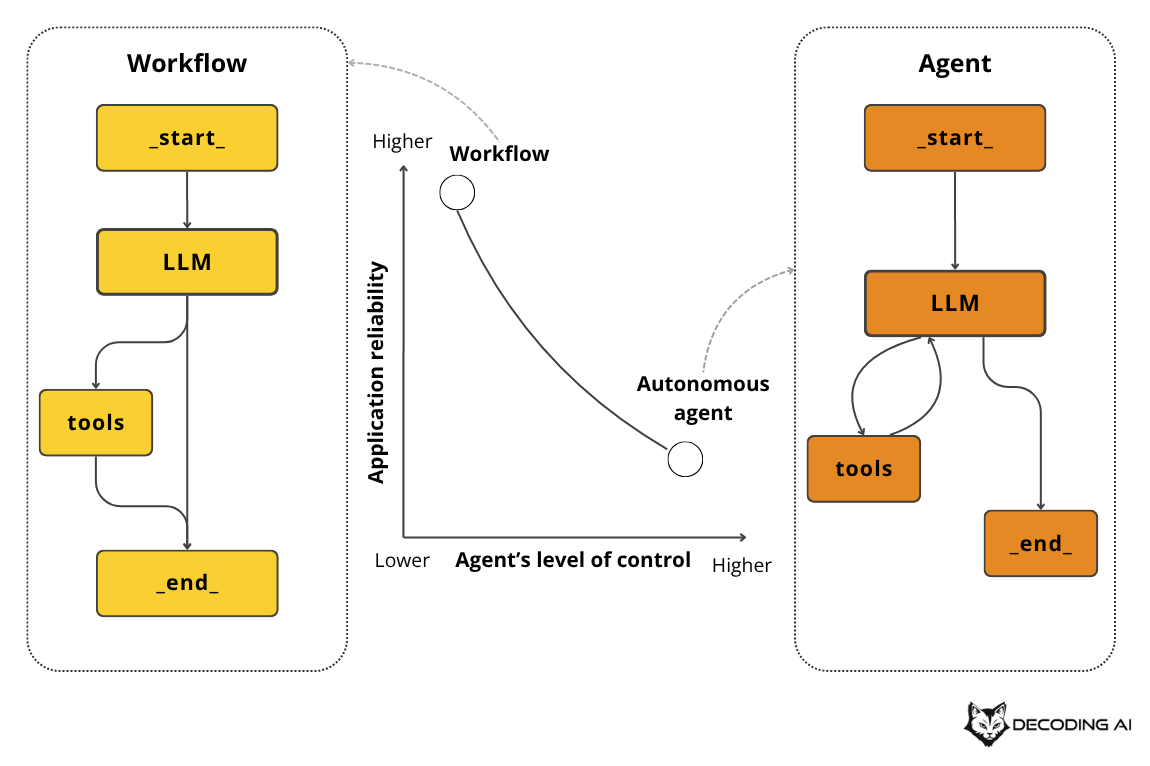
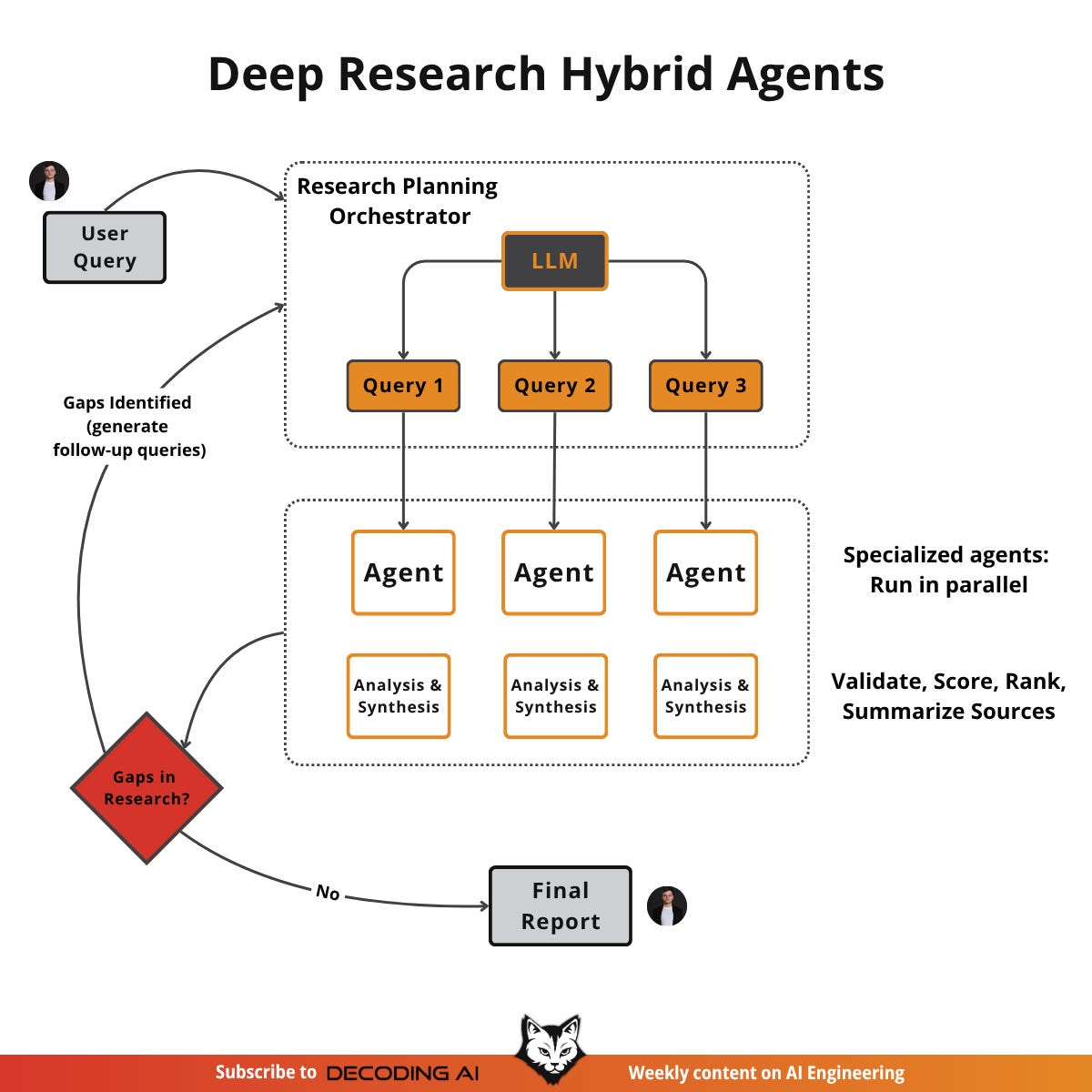
Thus, in this lesson, we will first examine the key differences among workflows, agents, and hybrid systems. Next, we will look at some popular workflows, agents and hybrid use cases to build the intuition required to design your own AI systems, such as:
Document summarization workflow
Coding agents
Vertical AI agents
Deep research agents
Lesson 2: Context Engineering
Prompt engineering alone is insufficient when building workflows or agents.
For simple chatbots in 2022, it was enough. In 2023, we adopted RAG and began feeding domain-specific knowledge into models. We now have tool-using, memory-enabled agents that must build relationships and maintain state over time. Prompt engineering is no longer sufficient to keep the context window clean and the LLM performant.
Why? As AI applications grow more complex, simply adding more information to the prompt can lead to serious issues. The most common problem is known as context decay or context rot. Models get confused by long, messy contexts, leading to hallucinations and misguided answers. Typically, a model’s accuracy declines significantly once the context exceeds 32,000 tokens, well before the advertised 1-million-token limit.
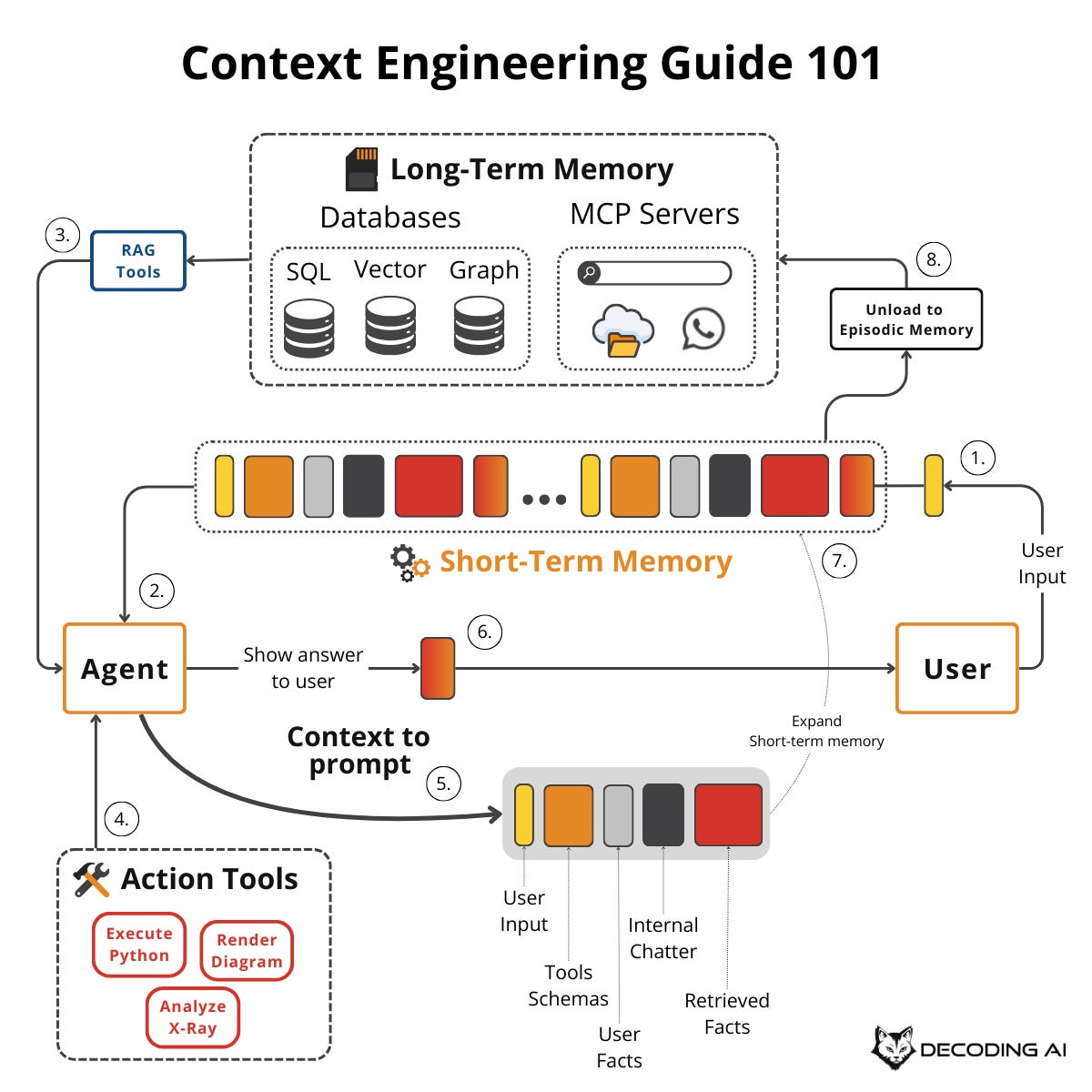
This is where the second lesson on context engineering comes in. It’s a shift in mindset from crafting individual prompts to architecting an AI’s entire information ecosystem. We dynamically gather and filter information from memory, databases, and tools to provide the LLM with only what’s essential for the task at hand. This makes our systems more accurate, faster, and cost-effective.
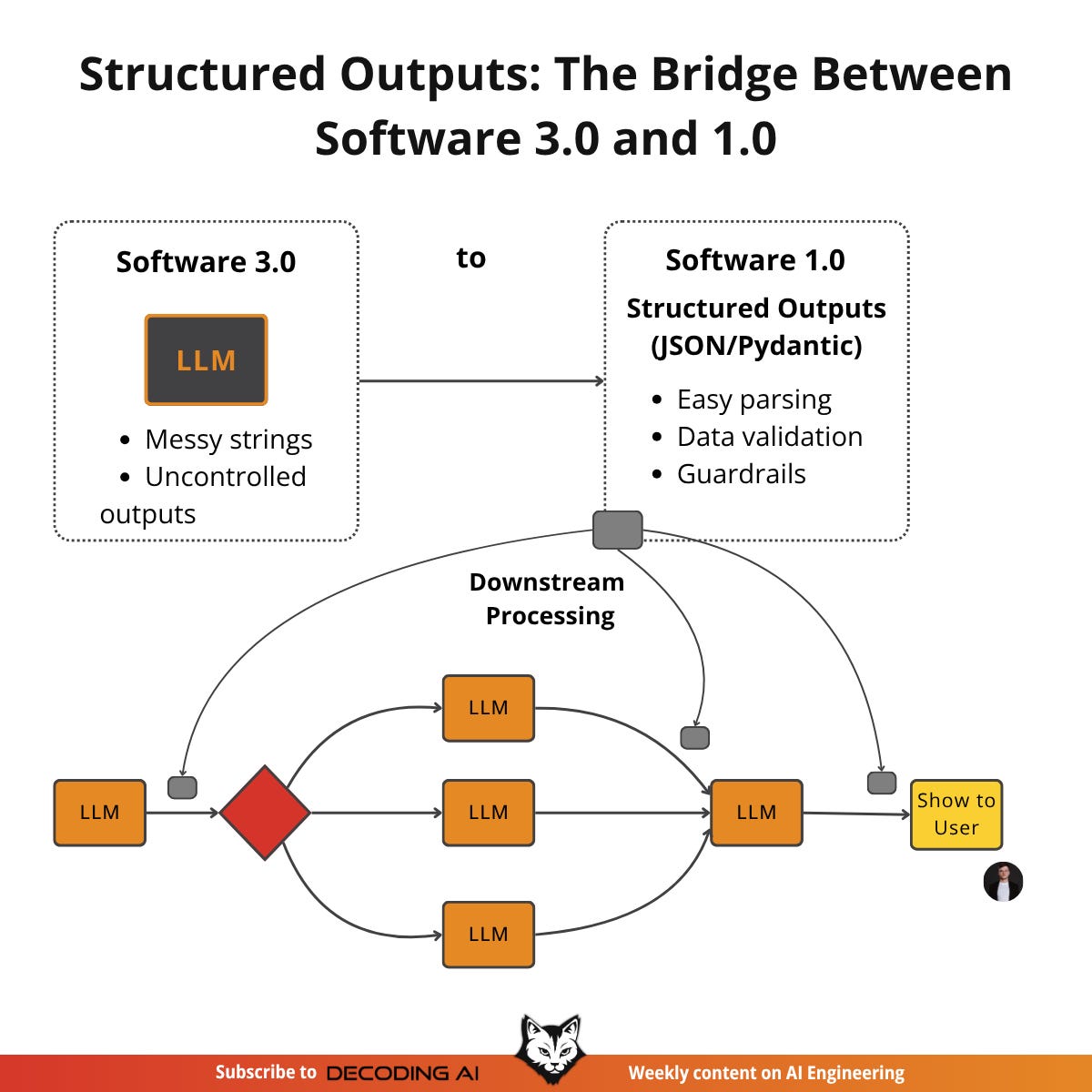
Lesson 3: Structured Outputs
In a recent project, our production AI system failed just before an important demo. Why? No, it wasn’t the demo curse. It was because we were not using structured outputs consistently across our LLM workflows.
Our staging environment had been working well with simple regex parsing of LLM responses, but when we deployed to production, everything failed. Our regex patterns failed to match slightly different response formats, data types were inconsistent, and downstream processes couldn’t handle the unpredictable data.
The problem was clear: we had been relying on fragile string parsing, hoping the LLM would always respond in the exact same format. But in production, especially with AI systems, users will always enter inputs you never expect.
Thus, in this lesson, we will address a fundamental challenge: obtaining reliable information from an LLM.
To understand precisely what happens, we will first write everything from scratch and then move to using popular LLM APIs such as Gemini’s GenAI SDK:
From scratch using JSON
From scratch using Pydantic (We love Pydantic!)
Using the Gemini SDK and Pydantic
Lesson 4: The 5 Workflow Patterns
When building Brown, my writer assistant capstone project for my paid AI Agents course, I faced a critical challenge. The first iteration worked. It could generate articles. But it was slow, expensive, and the user experience was poor. More importantly, when I tried to rewrite it from scratch for better performance, I realized something crucial: the system was trying to do too much in a single, massive LLM call.
A single, large LLM call for a complex task is often problematic. It makes pinpointing errors difficult, lacks modularity, and increases the likelihood of “lost in the middle” issues, where the model ignores information in long contexts. You might think that when a single prompt fails, you should jump straight to AI Agents. But that is a trap.
Jumping to agents is often overkill for deterministic tasks. Most workflows have predictable steps. Agents add unnecessary complexity with their autonomous decision-making when you just need reliable execution. They introduce too many moving parts to debug, leading to unpredictable costs and reliability issues.
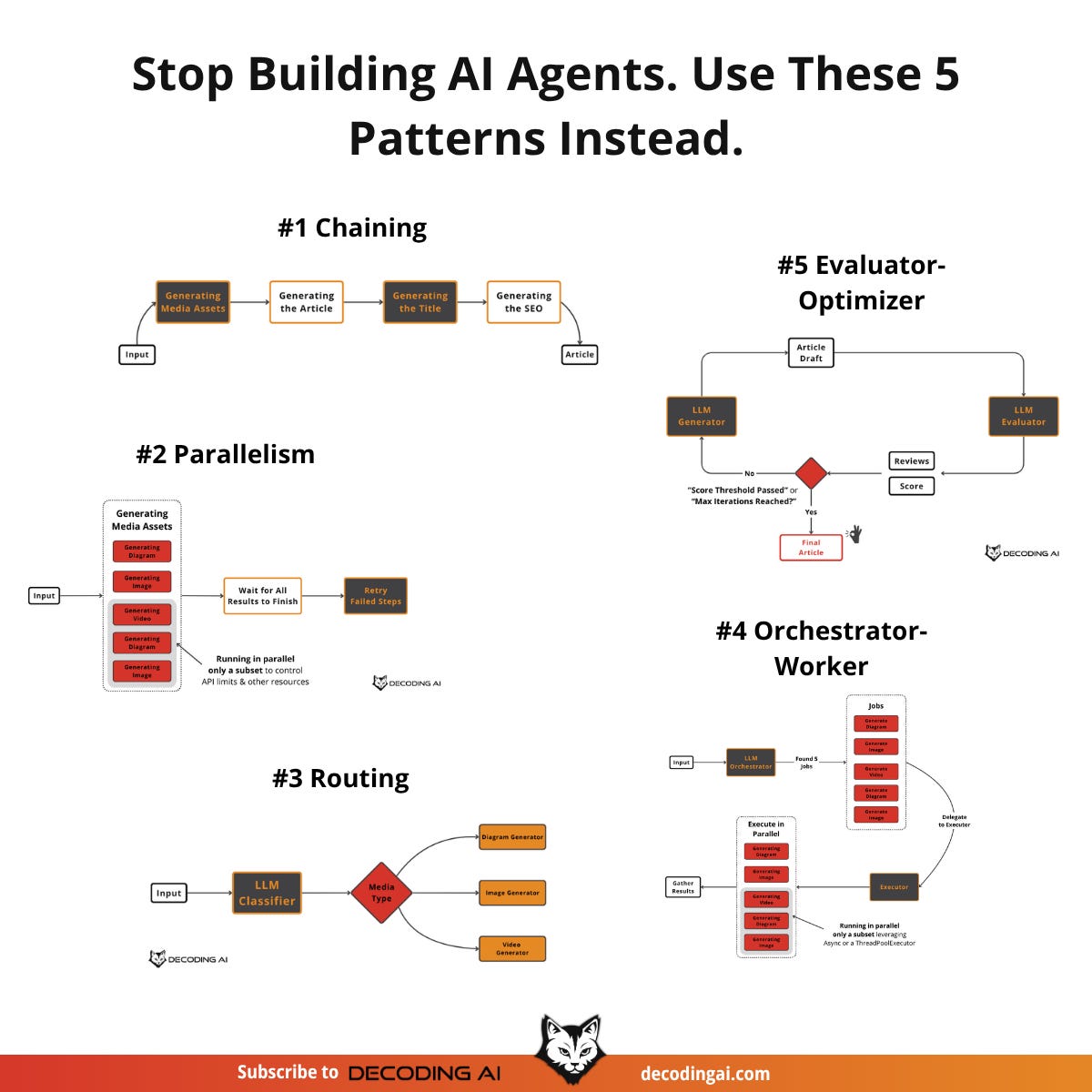
The smarter approach is to start with simpler, more controllable patterns. Before considering agents, you should try to solve your problem using these five core workflow patterns, which we will teach in the 4th lesson:
Prompt Chaining
Parallelization
Routing
Orchestrator-Worker
Evaluator-Optimizer
Lesson 5: Tool Calling From Scratch
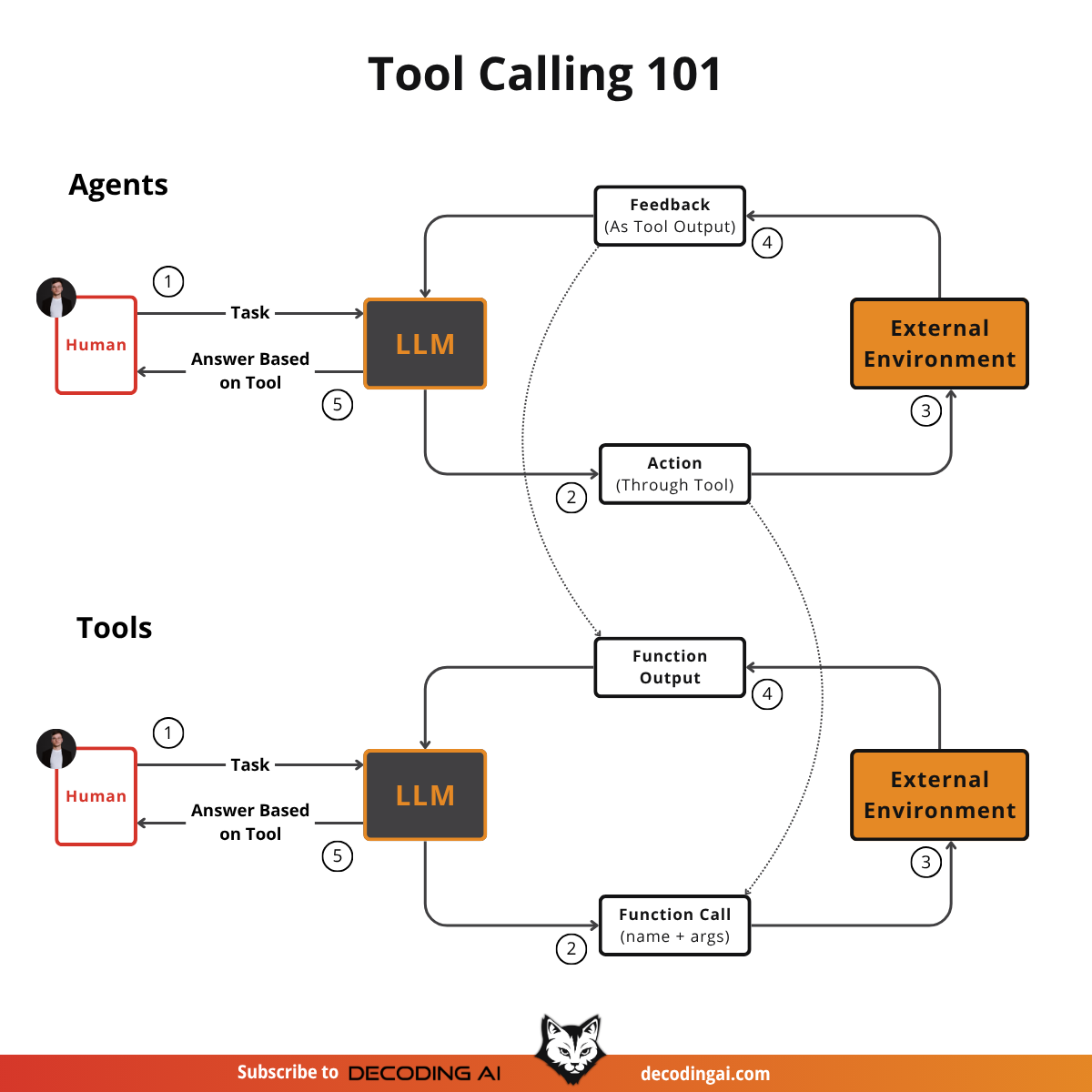
Often, we use frameworks like LangGraph or AgentSDK to implement tools, hook up to smart MCP servers and ultimately use APIs like Gemini or OpenAI to call them.
But how do tools actually work under the hood? That’s a fundamental question to answer to optimize how agents use tools exactly as we want. To understand how to properly define tools, how many tools to give to your agent to avoid tool confusion and what types of tools are even worth using. To answer these questions, the best approach is to build tool calling from scratch, which we will do in the 5th lesson.
Lesson 6: Planning: ReAct & Plan-and-Execute
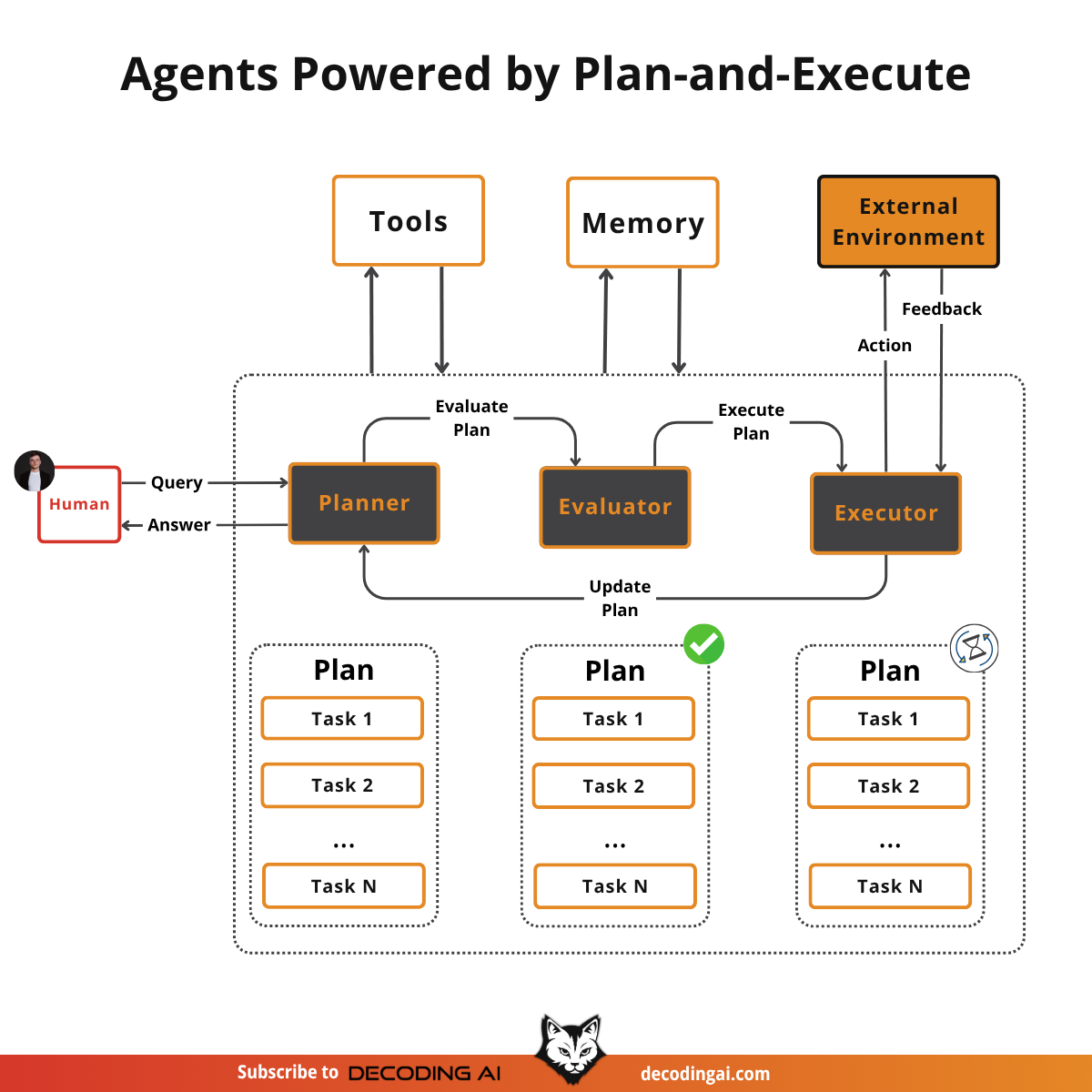
I have often seen people running tools in a loop and calling that an agent, but that is only half the story. That approach fails when multiple tools are used in complex scenarios. Why? Because it lacks planning, which is the key factor that enables the transition from a simple workflow to a true agent.
But how does planning actually work? How does it connect to tools and loops? These questions confused me when I first started building agents. That is why, in previous articles, we gradually built all the necessary blocks to fully grasp how everything connects into the well-known “AI Agent” construct.
In this lesson, we will learn to separate planning from execution. We will then present the two core planning methods: ReAct and Plan-and-Execute.
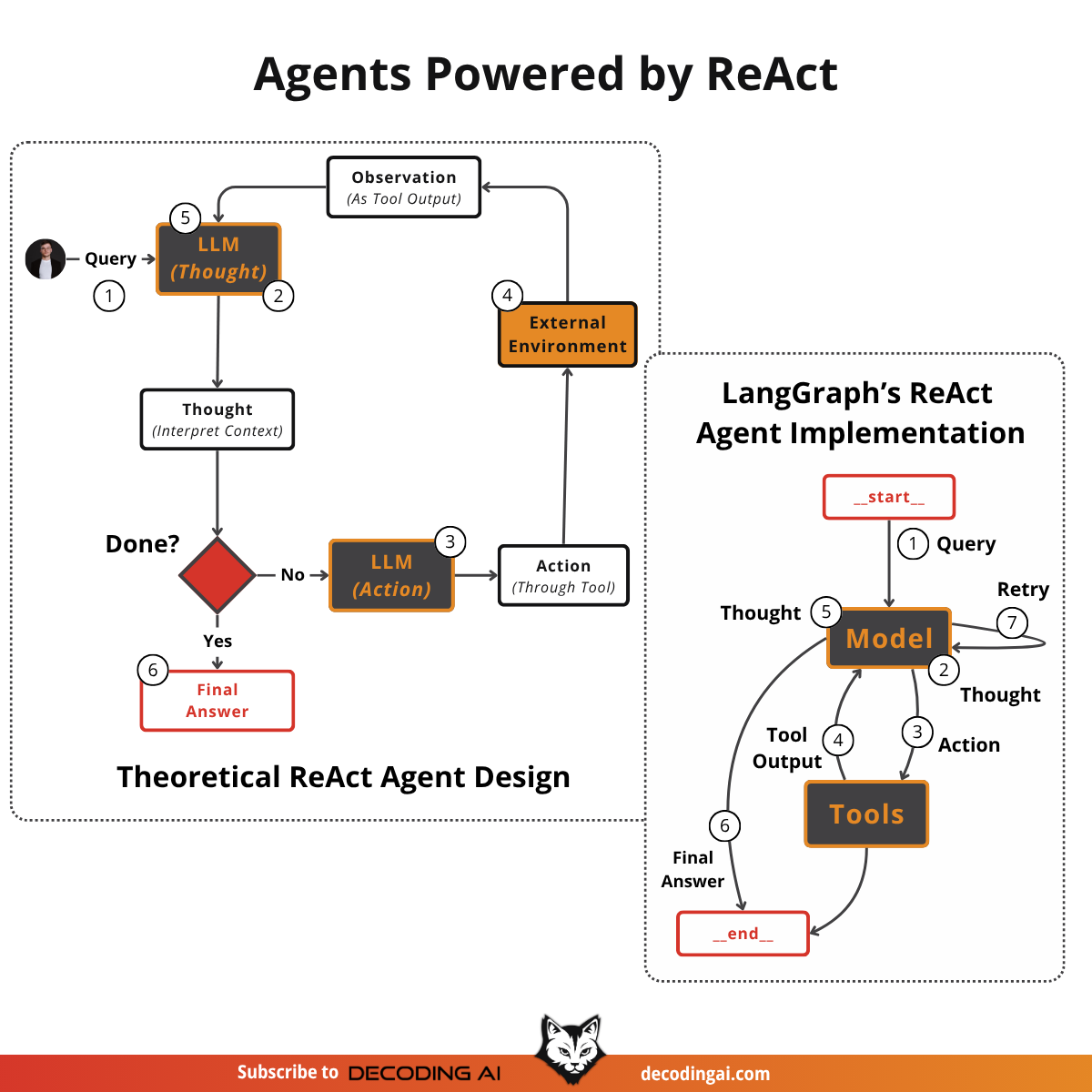
Lesson 7: ReAct Agents From Scratch
When I began building Brown, my writing agent, I chose to implement the ReAct pattern using LangGraph's graph SDK with nodes and edges, believing it would simplify development. However, I quickly encountered frustrating challenges: straightforward logic and basic loops that should have taken minutes instead required hours. Forcing my Python code to fit their graph paradigm felt unnatural and added unnecessary complexity, providing little real value.
Ultimately, I decided to abandon LangGraph and build my own solution from scratch, giving me full control and allowing me to customize it as needed.
To learn how to implement it from scratch, I read LangGraph’s ReAct agent source code, which I will explain step by step in this lesson.
Thus, in this lesson, we will walk you through their core implementation to teach you how to write your own custom React/Plan-and-Execute agents or at least build a strong intuition on how they work under the hood.
Lesson 8: AI Agent’s Memory
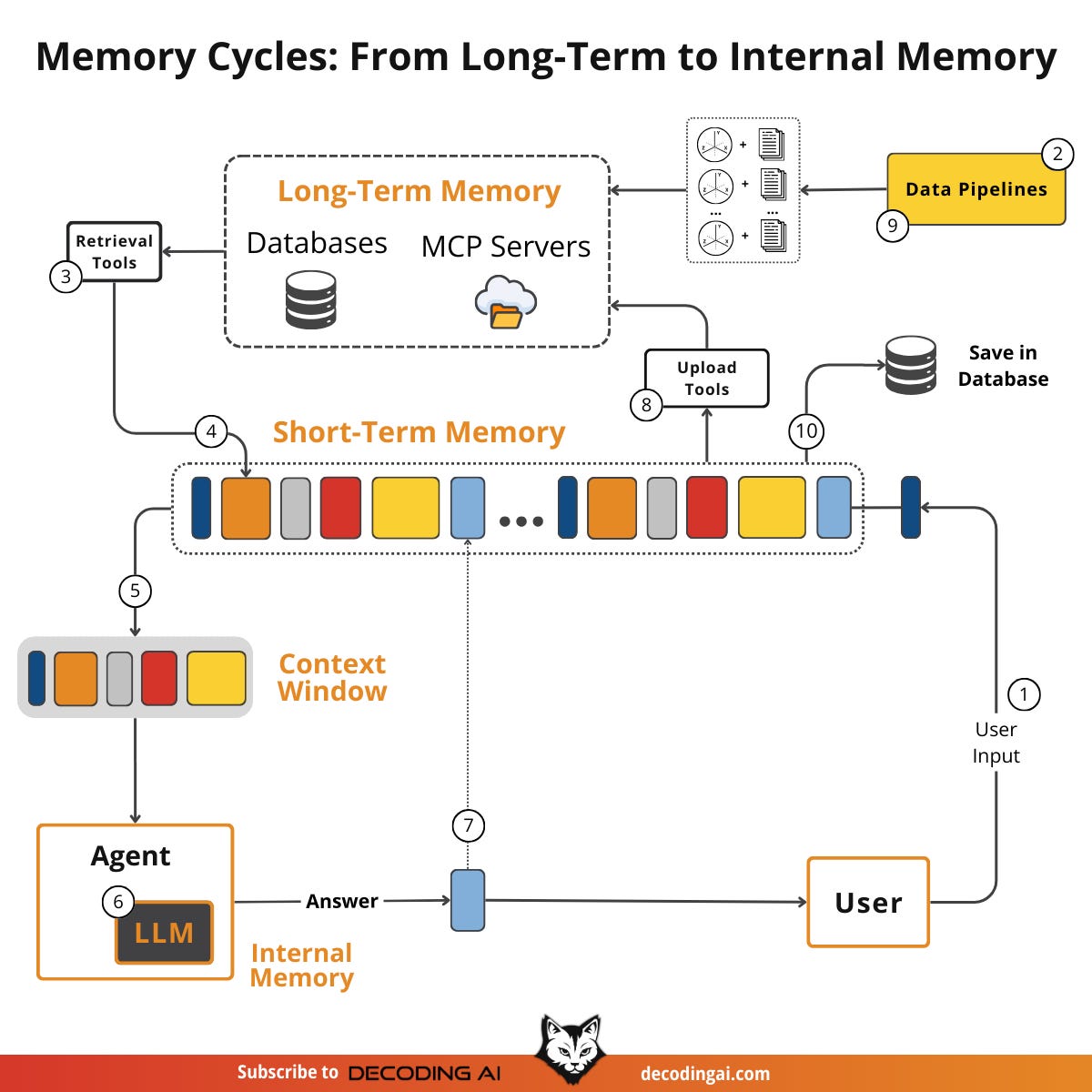
Memory is solving one of the fundamental limitations of LLMs: their knowledge is vast but frozen in time. To address this, we use the context window as a form of “working memory” to simulate continuous learning.
However, keeping an entire conversation thread plus additional information in the context window is often unrealistic. Rising per-turn costs and the “lost in the middle” problem, in which models struggle to use information buried in the center of a long conversation, limit this approach. While context windows are increasing, relying solely on them introduces noise and overhead.
(Yes, memory is closely linked to context engineering.)
Memory tools act as the solution. They provide agents with continuity, adaptability, and the ability to “learn” without retraining by creating a “dance” between working and long-term memory. The agents will offload information they don’t need to long-term memory while retrieving key facts for the latest user queries.
Thus, in this article, we will explore:
The four fundamental types of memory for AI agents.
A detailed look at long-term memory: Semantic, Episodic, and Procedural.
The trade-offs between storing memories as strings, entities, or knowledge graphs.
The complete memory cycle, from ingestion to inference.
Lesson 9: Multimodal Agents
When I first started building AI agents, I hit a frustrating wall. I was comfortable manipulating text, but the moment I had to integrate multimodal data, such as images, audio, and especially documents like PDFs, my elegant architectures turned into messy hacks. I spent weeks building complex pipelines that tried to force everything into text.
The breakthrough came when I realized I was solving the wrong problem. I didn’t need to convert images or documents to text.
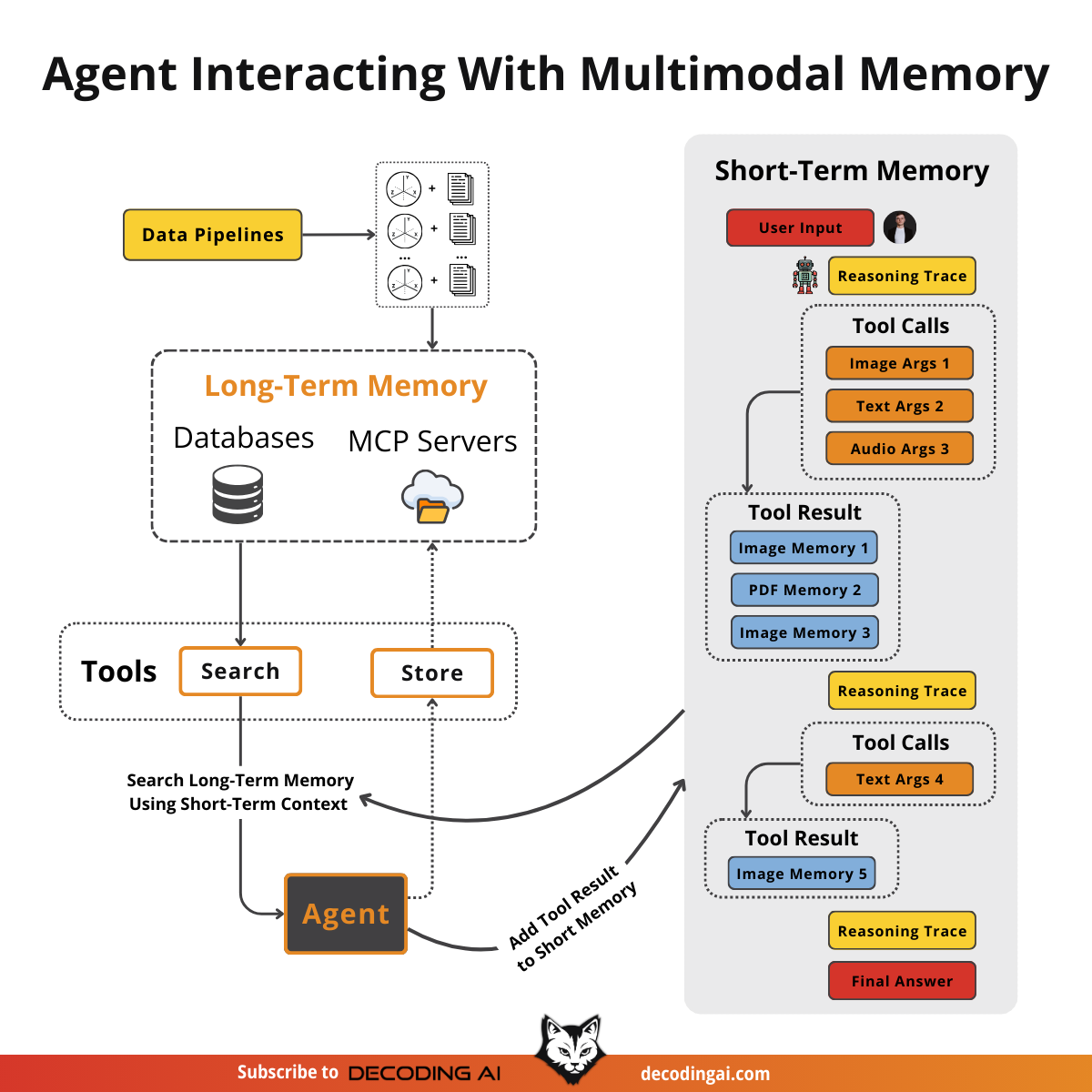
The old approach of normalizing everything to text is lossy. When you translate a complex diagram or a chart into text, you lose the spatial relationships, the colors, and the context. You lose the information that matters most. By processing data in its native format, we preserve this rich visual information, resulting in systems that are faster, cheaper, and significantly more performant.
Thus, in this lesson, we will cover how to directly manipulate multimodal data when building your AI agents without first converting it to text.
How to Take the Course?
As the course is 100% free, with no hidden costs or registration required, taking it is a no-brainer.
Each lesson is a free article hosted on the Decoding AI Magazine.
Just open each lesson in the order provided by us, and you are good to go:
Each lesson will guide you through the required steps.
Enjoy!
Now What?
After completing these lessons, if you want the information to stick, you have to practice by building a cool project!
I am sorry to say there is no other way to make learning worthwhile.
If you build anything after doing this course, please share it with me. If you are excited about it, I will be too and share it on my socials with my 100k+ audience.
How can you share it? Write me an email at p.b.iusztin@gmail.com or DM on my Substack.
See you next Tuesday.
What’s your take on today’s topic? Do you agree, disagree, or is there something I missed?
If you enjoyed this article, the ultimate compliment is to share our work.
Whenever you’re ready, here is how I can help you
Go from agent user to agent builder. Master the foundations of AI agents and turn fragile demo code into reliable, production-ready systems with my course, Agent Engineering: Building Multi-Agent Systems (made with Towards AI).
35 lessons. Pure foundations from scratch. 4 mini-projects. 2 production systems. A certificate and direct access to me & industry experts in our Discord.
Built for software and data professionals transitioning into AI engineering. Rated 5/5 with 300+ students. The first 7 lessons are free:
Not ready to commit? Start with our free Agent AI Engineering Guide, a 6-day email course on the mistakes that silently break AI agents in production.
Thanks again to Opik for sponsoring the series and keeping it free!

If you want to monitor, evaluate and optimize your AI workflows and agents:
Images
If not otherwise stated, all images are created by the author.
This series is absolutely brilliant, and addresses actual production level considerations. I think I'm going to be re-reading this several times! Thank you Paul. By the way, I fed the 9 links to ChatGpt/NotebookLM and the (relative) newcomer GLM 4.7 and asked them to create slides derived from this course. ChatGPT was meh, NotebookLM did a good job as expected but GLM 4.7 really blew me away! Happy to share them (or the Prompt I used) with you/ other readers if you like (didn't paste as I wasn't sure about copyright issues etc.). Happy Holidays!
This is a masterclass in building intuition before frameworks. Learning agents from scratch, step by step, ensures you understand the “why” behind every design choice, exactly what most tutorials skip.